AS Level 9618 · Paper 1 · 1.1
Data Representation
How numbers and characters are stored in binary, and how to work with them. Read the notes, try the past-paper questions, then check the mark scheme.
Past papers from June 2021 to June 202632 questions · 179 marks
In this subtopic
- Binary prefixes (kibi, mebi) and decimal prefixes (kilo, mega)
- Binary, denary, hexadecimal and BCD, and converting between them
- Two's complement, and binary addition and subtraction, including overflow
- Where BCD and hexadecimal are used
- Character sets: ASCII, extended ASCII and Unicode
1.1 · 1 of 28Book page Contents
Number bases and place values
A number base is the number of different digits that a number system uses to represent numbers.
The same digits can mean different values in different bases. For example, 100 in binary (base 2), 100 in denary (base 10) and 100 in hexadecimal (base 16) are three different numbers. To show which base is meant, we often write the base as a small number after it, for example 100₂, 100₁₀ and 100₁₆.
In the denary number system (base-10) we use ten digits, 0 to 9. Each digit in a number has a place value, or weight, that is a power of 10. For example, the number 8211 can be broken down like this:
| Place value | 103 | 102 | 101 | 100 |
|---|---|---|---|---|
| Digit | 8 | 2 | 1 | 1 |
The value of this number is (8 × 10³) + (2 × 10²) + (1 × 101) + (1 × 100) = 8,000 + 200 + 10 + 1 = 8,211.
Used later in
1.1 · 2 of 28Book page Contents
Binary numbers
Computers use electronic circuits that work as switches, which can be either on or off. Every type of information in a computer (numbers, text, images, sound, program instructions) is stored and processed using these two states. So computers use a number system with only two digits: 0 for the off state of a switch and 1 for the on state. This is the binary number system, from the Latin word "bini", meaning "two by two" or "pair".
Binary (base-2) follows the same rules as denary, but each digit has a place value that is a power of 2. For example, the binary number 11010110 is represented as:
| Place value | 27 | 26 | 25 | 24 | 23 | 22 | 21 | 20 |
|---|---|---|---|---|---|---|---|---|
| Digit | 1 | 1 | 0 | 1 | 0 | 1 | 1 | 0 |
Its value in denary is (1 × 27) + (1 × 26) + (0 × 25) + (1 × 24) + (0 × 23) + (1 × 22) + (1 × 21) + (0 × 20) = 128 + 64 + 16 + 4 + 2 = 214.
In binary, the leftmost digit is called the most significant bit (MSB), and the rightmost digit is called the least significant bit (LSB).
Used later in
1.1 · 3 of 28Book pages Contents
Hexadecimal numbers
The hexadecimal number system (base-16, or hex) uses 16 digits. Denary only has ten symbols (0 to 9), so hexadecimal uses six more, the letters A to F, for the other six digits. The sixteen digits stand for the denary values 0 to 15, and each hex digit is equal to four binary digits:
| Denary | Hexadecimal | Binary |
|---|---|---|
| 0 | 0 | 0000 |
| 1 | 1 | 0001 |
| 2 | 2 | 0010 |
| 3 | 3 | 0011 |
| 4 | 4 | 0100 |
| 5 | 5 | 0101 |
| 6 | 6 | 0110 |
| 7 | 7 | 0111 |
| 8 | 8 | 1000 |
| 9 | 9 | 1001 |
| 10 | A | 1010 |
| 11 | B | 1011 |
| 12 | C | 1100 |
| 13 | D | 1101 |
| 14 | E | 1110 |
| 15 | F | 1111 |
In hexadecimal each digit has a place value that is a power of 16. For example, the hexadecimal number 7A19 is:
| Place value | 163 | 162 | 161 | 160 |
|---|---|---|---|---|
| Digit | 7 | A | 1 | 9 |
Its value in denary is (7 × 163) + (10 × 162) + (1 × 161) + (9 × 160) = 28672 + 2560 + 16 + 9 = 31257.
Why hexadecimal is used as a shorthand for binary. Long strings of binary digits are hard for people to read and understand, so programmers often write binary in hexadecimal instead. For example, the colours on a web page are 24-bit codes: 8 bits for a shade of red, 8 for green and 8 for blue. In hexadecimal the same colour needs only 6 digits: orange is FFA500 instead of 111111111010010100000000 in binary.
Practical applications of hexadecimal
- HTML colour codes on web pages, for example #FFA500 for orange.
- MAC addresses of network devices, for example 00-1C-B3-4F-25-FE.
- Memory addresses, and memory dumps used when debugging a program.
- Error codes shown by a computer.
- Machine code and assembly language listings.
Why hexadecimal is used
- It is shorter than binary, so it is easier for people to read, remember and write down.
- There are fewer digits to copy, so fewer mistakes are made.
- It is easy to convert to and from binary, because each hex digit is exactly four bits.
1.1 · 4 of 28Book page Contents
Units of data storage and binary prefixes
A binary digit (or bit) is the basic unit of data storage, with a value of 0 or 1. A group of eight bits is called a byte, and a group of four bits is called a nibble.
Storage used to be measured with the decimal prefixes kilo (1,000), mega (1,000,000) and so on, which are powers of 10. Since 1998 there has been a move to special binary prefixes, defined by the International Electrotechnical Commission (IEC), which are powers of 2 and so represent binary values exactly. For example, a kibibyte is 1,024 bytes, whereas a kilobyte is 1,000 bytes.
Look carefully at which letters are capitals:
| Name | Symbol | Power of 10 | Value |
|---|---|---|---|
| kilobyte | kB | 103 | 1,000 bytes |
| megabyte | MB | 106 | 1,000,000 bytes |
| gigabyte | GB | 109 | 1,000,000,000 bytes |
| terabyte | TB | 1012 | 1,000,000,000,000 bytes |
| Name | Symbol | Power of 2 | Value |
|---|---|---|---|
| kibibyte | KiB | 210 | 10241 = 1,024 bytes |
| mebibyte | MiB | 220 | 10242 = 1,048,576 bytes |
| gibibyte | GiB | 230 | 10243 = 1,073,741,824 bytes |
| tebibyte | TiB | 240 | 10244 = 1,099,511,627,776 bytes |
Binary prefixes compared with decimal prefixes
- Binary prefixes (kibi, mebi, gibi, tebi) are based on powers of 2; decimal prefixes (kilo, mega, giga, tera) are based on powers of 10.
- Each binary prefix is 1,024 times the one before it; each decimal prefix is 1,000 times the one before it.
- A kibibyte is 1,024 bytes but a kilobyte is 1,000 bytes; a tebibyte is 240 bytes but a terabyte is 1012 bytes.
- So a binary unit is always a little larger than the decimal unit with the same position, for example 1 MiB is larger than 1 MB.
Practise this: past-paper questions
- November 2021 · Paper 11 · Q1(a)Draw one line from each binary value to its equivalent (same) value on the right. Binary value: 8 bits 8000 bits 1000 kilobytes 1024 mebibytes…
- June 2022 · Paper 11 · Q1(a)State the difference between a tebibyte and a terabyte
- June 2023 · Paper 11 · Q3(d)(i)State the difference between a kibibyte and a kilobyte
- November 2023 · Paper 12 · Q3(a)State one difference between a kibibyte and a megabyte
Show 4 more
- June 2024 · Paper 12 · Q7(a)Tick (✓) one box only to identify the largest file size. 3300 kibibytes 0.3 megabytes 3 mebibytes 3300 kilobytes
- June 2024 · Paper 13 · Q1(a)Complete the following description. A kibibyte has a prefix. Three kibibytes is the same as bytes. A megabyte has a prefix. Two terabytes is the…
- November 2024 · Paper 11 · Q1(a)State one difference between a tebibyte and a gigabyte
- June 2026 · Paper 11 · Q1(d)Identify two differences between binary prefixes and decimal prefixes. 1 2
Used later in
1.1 · 5 of 28Book page Contents
How many values can n bits hold
Here is how many different values a small number of bits can represent:
- One bit can represent 21 = 2 different binary patterns: 0 and 1.
- Two bits can represent 22 = 4 different patterns: 00, 01, 10 and 11.
- Three bits can represent 23 = 8 different patterns: 000, 001, 010, 011, 100, 101, 110 and 111.
With every extra bit, the number of different patterns of 0s and 1s doubles. So n bits can represent 2n different binary patterns.
| Number of bits (n) | Number of different patterns (2n) |
|---|---|
| 1 | 2 |
| 2 | 4 |
| 3 | 8 |
| 4 | 16 |
| 5 | 32 |
| 6 | 64 |
| 7 | 128 |
| 8 | 256 |
For example, 16 bits can represent 216 = 65,536 different values.
Practise this: past-paper questions
1.1 · 6 of 28Book page Contents
Converting binary to denary
Each digit of a binary number has a place value that is a power of 2. The place values for an 8-bit number are:
| Power of 2 | 27 | 26 | 25 | 24 | 23 | 22 | 21 | 20 |
|---|---|---|---|---|---|---|---|---|
| Place value | 128 | 64 | 32 | 16 | 8 | 4 | 2 | 1 |
To convert a binary number into denary, add up the place values of only the digits that are 1.
Worked example
Convert the binary number 11000110 into denary.
- Step 1Write the number under the place values.
128 64 32 16 8 4 2 1 1 1 0 0 0 1 1 0 - Step 2Add the place values where there is a 1: 128 + 64 + 4 + 2 = 198.
Practise this: past-paper questions
- November 2021 · Paper 12 · Q4(a)The binary value in the register represents an unsigned binary integer. Convert the unsigned binary integer into denary
- November 2022 · Paper 11 · Q1(a)(i)Convert the unsigned binary integer into denary. 00100111 Answer
- November 2022 · Paper 12 · Q2(a)(iii)Convert the unsigned binary integer into Binary Coded Decimal (BCD). Show your working. 10010101 Working Answer
- November 2022 · Paper 13 · Q9(a)(ii)Convert the unsigned binary value into denary. 10010011
Show 6 more
- November 2023 · Paper 12 · Q3(b)(iii)Convert the unsigned binary integer into denary. 000111010110
- June 2025 · Paper 11 · Q3(b)(ii)The Unicode character '❮' has the binary value: 0010 0111 0110 1110 Convert the binary value for the character '❮' into denary
- June 2025 · Paper 13 · Q1(c)(ii)Some of the school’s computers use the extended ASCII character set. The table gives some characters from the extended ASCII character set, their…
- November 2025 · Paper 12 · Q6(b)The following table shows some words and corresponding denary values. Word | Denary value Computing | 55 Science | 56 Computers | 57 are | 58…
- June 2026 · Paper 11 · Q1(a)(i)Complete the table by calculating the missing values. character | denary | binary | hexadecimal ҉ | | 0001 1110 1001 | 1E9 @ | 64 | | 40 Ώ | 911 |…
- June 2026 · Paper 12 · Q5(a)Complete the table by calculating the missing values. denary | unsigned binary | hexadecimal | Binary Coded Decimal (BCD) 160 | 10100000 | A0 |…
1.1 · 7 of 28Book pages Contents
Converting denary to binary
There are two methods for converting a denary number to binary.
Method 1: division by 2
- Divide the denary number by 2 using division with remainder, and write down the result and the remainder.
- Keep dividing the result by 2 until you get a result of 0.
- Write the remainders in reverse order (from the last one to the first) to get the binary number.
Note Division with remainder (also called Euclidean division) gives a whole-number result (the quotient) and a remainder. For example, 7 ÷ 2 gives a result of 3 and a remainder of 1, instead of 3.5. In Python, the floor division operator // gives the whole-number result and the modulo operator % gives the remainder.
Worked example
Convert the denary number 135 into binary using method 1.
- Step 1Divide by 2 again and again, writing down each remainder.
135 ÷ 2 = 67 remainder 1 67 ÷ 2 = 33 remainder 1 33 ÷ 2 = 16 remainder 1 16 ÷ 2 = 8 remainder 0 8 ÷ 2 = 4 remainder 0 4 ÷ 2 = 2 remainder 0 2 ÷ 2 = 1 remainder 0 1 ÷ 2 = 0 remainder 1 - Step 2Read the remainders from the bottom up: 135 = 10000111.
Method 2: place values table
- Draw a table with the place values of each digit.
- Find the largest place value that fits into the denary number.
- Set the digit under that place value to 1.
- Subtract the place value from the denary number.
- Repeat steps 2 to 4 with what is left, until you reach 0.
- Set all the other digits to 0.
- Read the binary number from left to right.
Worked example
Convert the denary number 135 into binary using method 2.
- Step 1The largest place value that fits into 135 is 128, so set the 128 digit to 1. 135 – 128 = 7.
- Step 2The largest place value that fits into 7 is 4, so set the 4 digit to 1. 7 – 4 = 3.
- Step 3The largest place value that fits into 3 is 2, so set the 2 digit to 1. 3 – 2 = 1.
- Step 4The largest place value that fits into 1 is 1, so set the 1 digit to 1. 1 – 1 = 0, so stop.
- Step 5Set all the other digits to 0 and read the number.
128  64  32  16   8   4   2   1
  1   0   0   0   0   1   1   1

135 = 10000111
Practise this: past-paper questions
- June 2025 · Paper 12 · Q2(a)Convert the denary integer 558 into 12-bit binary and hexadecimal. Binary Hexadecimal
- June 2025 · Paper 13 · Q1(c)(ii)Some of the school’s computers use the extended ASCII character set. The table gives some characters from the extended ASCII character set, their…
- June 2026 · Paper 11 · Q1(a)(i)Complete the table by calculating the missing values. character | denary | binary | hexadecimal ҉ | | 0001 1110 1001 | 1E9 @ | 64 | | 40 Ώ | 911 |…
- June 2026 · Paper 12 · Q5(a)Complete the table by calculating the missing values. denary | unsigned binary | hexadecimal | Binary Coded Decimal (BCD) 160 | 10100000 | A0 |…
1.1 · 8 of 28Book pages Contents
Converting binary to hexadecimal
Builds on
Every four binary digits match one hexadecimal digit, so there is a quick way to convert between them. To convert a binary number to hexadecimal:
- Working from the right (the LSB), split the binary number into nibbles (groups of four bits). If the last group on the left is short, add 0s at its front.
- Work out the denary value of each nibble, using the place values 8, 4, 2 and 1.
- Change each denary value into its hexadecimal digit.
- Read the hexadecimal number from left to right.
Note To remember the hex digits, learn that 10 is A and 15 is F, and count between them. Or use the table in the hexadecimal section.
Worked example
Convert the binary number 10100111 to hexadecimal.
- Step 1Split the number into two nibbles.
8 4 2 1 8 4 2 1 1 0 1 0 0 1 1 1 - Step 2Work out the denary value of each nibble: 8 + 2 = 10 and 4 + 2 + 1 = 7.
- Step 3Change each value into its hex digit: 10 is A and 7 is 7.
- Step 4Read the hex number from left to right: 10100111 = A7.
Practise this: past-paper questions
- November 2021 · Paper 12 · Q4(c)The binary value in the register represents a hexadecimal number. Convert the binary number into hexadecimal
- June 2022 · Paper 12 · Q3(c)Convert the following positive binary integer into hexadecimal. 01111110
- November 2022 · Paper 12 · Q2(a)(ii)Convert the unsigned binary integer into hexadecimal. 10010110 Answer
- November 2022 · Paper 13 · Q9(a)(i)Convert the unsigned binary value into hexadecimal. 10010011
Show 6 more
- June 2023 · Paper 11 · Q3(d)(iii)Convert the positive binary integer 11110010 into hexadecimal
- November 2024 · Paper 11 · Q1(b)(i)Convert the unsigned binary integer into hexadecimal. 110001100111
- November 2025 · Paper 11 · Q1(a)(i)Convert the binary number into hexadecimal. 101100111010
- November 2025 · Paper 13 · Q2(d)Convert the following positive binary integer into hexadecimal. 1110001100111011
- June 2026 · Paper 11 · Q1(a)(i)Complete the table by calculating the missing values. character | denary | binary | hexadecimal ҉ | | 0001 1110 1001 | 1E9 @ | 64 | | 40 Ώ | 911 |…
- June 2026 · Paper 12 · Q5(a)Complete the table by calculating the missing values. denary | unsigned binary | hexadecimal | Binary Coded Decimal (BCD) 160 | 10100000 | A0 |…
1.1 · 9 of 28Book pages Contents
Converting hexadecimal to binary
Builds on
To convert a hexadecimal number into binary:
- Take each hex digit on its own and find its denary value.
- Convert each denary value into a four-digit binary number, using the place values 8, 4, 2 and 1. Each value must use exactly four digits, so add leading zeros where needed.
- Read the binary number from left to right.
Worked example
Convert the hexadecimal number B03 into binary.
- Step 1Find the denary value of each hex digit: B = 11, 0 = 0 and 3 = 3.
- Step 2Write each one as a 4-bit binary number, with leading zeros.
8 4 2 1 8 4 2 1 8 4 2 1 1 0 1 1 0 0 0 0 0 0 1 1 - Step 3Read the binary number from left to right: B03 = 101100000011.
1.1 · 10 of 28Book pages Contents
Converting denary to hexadecimal
There are two methods for converting a denary number to hexadecimal.
Method 1: via binary. Convert the denary number into binary, then convert the binary into hexadecimal.
Worked example
Convert the denary number 103 into hexadecimal using method 1.
- Step 1Convert 103 into binary: 64 + 32 + 4 + 2 + 1 = 103.
128 64 32 16 8 4 2 1 0 1 1 0 0 1 1 1 - Step 2
- Step 3So 103 in denary is 67 in hexadecimal.
Method 2: division by 16. This works like division by 2 for binary:
- Divide the denary number by 16 and write down the result and the remainder.
- Keep dividing the result by 16 until you get a result of 0.
- Change each remainder into its hexadecimal digit.
- Write the remainders in reverse order (from the last one to the first).
Worked example
Convert the denary number 125 into hexadecimal using method 2.
- Step 1Divide by 16 until the result is 0, writing down each remainder.
125 ÷ 16 = 7 remainder 13 7 ÷ 16 = 0 remainder 7 - Step 2Change the remainders into hex digits: 13 = D and 7 = 7.
- Step 3Read the remainders from the last to the first: 125 in denary is 7D in hexadecimal.
Practise this: past-paper questions
- June 2021 · Paper 12 · Q6(c)(i)Write the hexadecimal value for the Unicode character ‘1’
- June 2022 · Paper 11 · Q1(c)Convert the denary number 251 into hexadecimal. Show your working. Working Answer
- June 2022 · Paper 13 · Q1(b)A computer can represent numerical data in different forms. Complete the table by writing the answer to each statement. | Statement | Answer | |…
- June 2024 · Paper 13 · Q1(b)Convert the denary number 241 to hexadecimal
Show 4 more
- June 2025 · Paper 12 · Q2(a)Convert the denary integer 558 into 12-bit binary and hexadecimal. Binary Hexadecimal
- June 2025 · Paper 13 · Q1(c)(ii)Some of the school’s computers use the extended ASCII character set. The table gives some characters from the extended ASCII character set, their…
- November 2025 · Paper 12 · Q7(c)(ii)Write the hexadecimal value for the ASCII character ‘h’
- June 2026 · Paper 13 · Q6(a)Draw one or more lines to match each denary number with its equivalent unsigned binary, hexadecimal or Binary Coded Decimal (BCD) value(s). Denary…
1.1 · 11 of 28Book pages Contents
Converting hexadecimal to denary
There are two methods for converting a hexadecimal number to denary.
Method 1: via binary. Convert the hexadecimal number into binary, then convert the binary into denary.
Worked example
Convert the hexadecimal number B7 into denary using method 1.
- Step 1B = 11, which is 1011 in binary, and 7 = 0111. So B7 = 10110111.
- Step 2Convert 10110111 into denary.
128 64 32 16 8 4 2 1 1 0 1 1 0 1 1 1 - Step 3Add the place values where there is a 1: 128 + 32 + 16 + 4 + 2 + 1 = 183. So B7 = 183.
Method 2: place values table.
- Separate the hex digits and find the denary value of each one.
- Multiply each value by its hexadecimal place value (1, 16, 256, 4096 and so on).
- Add the results together.
Worked example
Convert the hexadecimal number F8 into denary using method 2.
- Step 1Separate the digits: F = 15 and 8 = 8.
- Step 2Multiply by the place values: 15 × 161 = 15 × 16 = 240, and 8 × 160 = 8 × 1 = 8.
- Step 3Add the results: F8 = 240 + 8 = 248.
Practise this: past-paper questions
- June 2021 · Paper 11 · Q1(c)(i)Convert the hexadecimal code FC into denary
- November 2021 · Paper 11 · Q1(c)Convert the hexadecimal value F0 into denary
- June 2022 · Paper 13 · Q1(b)A computer can represent numerical data in different forms. Complete the table by writing the answer to each statement. | Statement | Answer | |…
- June 2023 · Paper 12 · Q4(c)Convert the hexadecimal number A04 into denary. Show your working
Show 4 more
- June 2024 · Paper 12 · Q7(c)Convert the hexadecimal number C0F into denary. Show your working
- November 2024 · Paper 13 · Q8(a)Convert the hexadecimal number 1FAB into denary
- June 2025 · Paper 11 · Q3(b)(iii)The Unicode character '⅀' has the hexadecimal value 2140 Convert the hexadecimal code for the character '⅀' into denary
- June 2026 · Paper 12 · Q5(a)Complete the table by calculating the missing values. denary | unsigned binary | hexadecimal | Binary Coded Decimal (BCD) 160 | 10100000 | A0 |…
1.1 · 12 of 28Book page Contents
Signed and unsigned binary numbers
An unsigned binary number can only be positive (or zero). Every bit, including the most significant bit, is part of the size of the number; no bit says whether the number is positive or negative.
A signed binary number can be positive or negative. In a signed binary number, the first bit (the most significant bit, on the left) is 1 if the number is negative and 0 if it is positive. For example, 10010111 is negative and 01011011 is positive. There are several ways to represent negative numbers; the most common is two’s complement, which is explained below.
1.1 · 13 of 28Book pages Contents
Smallest and largest unsigned values
Three steps give the smallest value, the largest value and the number of different values that n bits can hold as an unsigned binary integer:
- The smallest value is 0.
- The largest value is 2n – 1, where n is the number of bits.
- The number of different values is 2n.
For example, with 2 bits the smallest value is 00 = 0, and the largest value is 11 = 22 – 1 = 4 – 1 = 3. The values go from 0 to 3, which is 22 = 4 different values.
Worked example
Give the smallest value, largest value and number of different values that can be stored with 4 bits.
- Step 1The smallest value is 0.
- Step 2The largest value is 2n – 1 = 24 – 1 = 16 – 1 = 15.
- Step 3The number of values is 2n = 24 = 16.
Worked example
Give the smallest value, largest value and number of different values that can be stored with 8 bits.
- Step 1The smallest value is 0.
- Step 2The largest value is 28 – 1 = 256 – 1 = 255.
- Step 3The number of values is 28 = 256.
Worked example
Give the smallest value, largest value and number of different values that can be stored with 1 bit.
- Step 1The smallest value is 0.
- Step 2The largest value is 21 – 1 = 2 – 1 = 1.
- Step 3The number of values is 21 = 2.
Practise this: past-paper questions
- June 2022 · Paper 13 · Q1(b)A computer can represent numerical data in different forms. Complete the table by writing the answer to each statement. | Statement | Answer | |…
- June 2023 · Paper 13 · Q7(a)Draw one line from each description to its matching denary value. Description | Denary value The smallest integer that can be represented in 8-bit…
1.1 · 14 of 28Book pages Contents
Binary addition
Binary addition uses four rules:
- Rule 1: 0 + 0 = 0
- Rule 2: 0 + 1 = 1, and 1 + 0 = 1
- Rule 3: 1 + 1 = 0 carry 1 (because 1 + 1 = 10 in binary)
- Rule 4: 1 + 1 + 1 = 1 carry 1 (because 1 + 1 + 1 = 11 in binary)
You may be given two or more binary numbers to add. Write them one above the other, lined up on the right. Then work through the columns one at a time, starting from the right (with 8 bits, the 8th bit from the left first, then the 7th). Write each carry in the column to its left, and count it when you apply the rules to that column.
Worked example
Add the binary numbers 01111011 and 01101000.
- Step 1Write the numbers one above the other, lined up on the right.
- Step 2Rightmost column: 1 + 0. Rule 2, so the answer is 1.
- Step 3Next column: 1 + 0. Rule 2 again, so the answer is 1.
- Step 4Next column: 0 + 0. Rule 1, so the answer is 0.
- Step 5Next column: 1 + 1. Rule 3, so the answer is 0 carry 1. Write the carry under the column to the left.
- Step 6Next column, including the carry: 1 + 0 + 1. There are two 1s, so this is Rule 3: 0 carry 1.
- Step 7Next column, including the carry: 1 + 1 + 1. There are three 1s, so this is Rule 4: 1 carry 1.
- Step 8Next column, including the carry: 1 + 1 + 1. Rule 4 again: 1 carry 1.
- Step 9Last column, including the carry: 0 + 0 + 1. There is one 1, so this is Rule 2: the answer is 1.
0 1 1 1 1 0 1 1 (123) + 0 1 1 0 1 0 0 0 (104) 1 1 1 1 carries --------------- 1 1 1 0 0 0 1 1 (227) - Step 10Check your answer by converting to denary: 123 + 104 = 227, and 11100011 = 128 + 64 + 32 + 2 + 1 = 227.
Practise this: past-paper questions
- June 2021 · Paper 11 · Q1(c)(ii)The amount of green in binary is 00100011. This has the denary number 15 added to it to create a second colour. Add the denary number 15 to the…
- November 2021 · Paper 11 · Q1(b)(i)Perform the following binary addition. Show your working. 10101010 + 00110111
- November 2021 · Paper 12 · Q4(e)(i)Add the contents of Register 1 and Register 2. Show your working
- June 2022 · Paper 11 · Q1(d)Add the following unsigned binary integers. 01010000 +00111110
Show 7 more
- November 2022 · Paper 12 · Q2(b)Perform the following binary addition. 1 0 0 0 1 1 0 0 + 0 1 0 0 0 1 1 0
- June 2023 · Paper 11 · Q3(d)(v)Add the following two binary integers using binary addition. Show your working. 10110000 +00011011
- June 2024 · Paper 11 · Q7Complete the binary addition. Show your working. 10011110 01100001 +00011001
- June 2025 · Paper 13 · Q7(b)Complete the following binary addition. Show your working. Include any overflow bit(s). 1 1 1 1 0 1 0 1 + 1 0 1 1 0 0 0 1
- November 2025 · Paper 11 · Q1(b)(i)The following binary addition is performed using 8-bit registers. Complete the calculation using binary addition. 10110011 + 01111000
- November 2025 · Paper 12 · Q7(a)The following binary addition is performed using 8-bit registers. Complete the calculation using binary addition. 10000111 + 00111001
- June 2026 · Paper 13 · Q6(b)Complete the binary addition. Show all of your working. 1 1 0 1 0 1 0 0 1 1 1 1 + 1 1 1 1 1 1 0 0 1 1 1 1
1.1 · 15 of 28Book page Contents
Overflow
Worked example
Add the binary numbers 10110111 and 11000111.
- Step 1Rightmost column: two 1s, so Rule 3: 0 carry 1.
- Step 2Second column: three 1s (including the carry), so Rule 4: 1 carry 1.
- Step 3Continue until the end.
1 0 1 1 0 1 1 1 (183) + 1 1 0 0 0 1 1 1 (199) 1 1 1 1 carries --------------- 1 0 1 1 1 1 1 1 0 (382) - Step 4There is a carry left over from the leftmost column, so the answer needs 9 bits: 101111110.
This extra carry is called overflow. It means that the result of adding the two 8-bit numbers is too large to fit in 8 bits: it needs 9. The largest unsigned 8-bit value is 255, and 183 + 199 = 382. If only 8 bits are kept, the stored answer is 01111110 = 126, which is wrong. In the exam, show the overflow bit clearly, to make it clear you know what has happened. You may also be asked what it is and why it happened.
Overflow
- Overflow happens when the result of a calculation is too large to be stored in the number of bits available (the register size). With signed numbers, a result that is too far below zero also overflows.
- In unsigned binary addition, it shows as a carry out of the most significant bit.
- The extra bit is lost, so the stored result is wrong.
Overflow can also happen with signed numbers. For two’s complement numbers it is shown by the sign of the result: this is explained with the range of two’s complement numbers below.
Practise this: past-paper questions
- November 2021 · Paper 11 · Q1(b)(ii)State how an overflow can occur when adding two binary integers
- June 2024 · Paper 11 · Q7Complete the binary addition. Show your working. 10011110 01100001 +00011001
- June 2024 · Paper 13 · Q1(c)State what is meant by an overflow in binary addition
- November 2024 · Paper 11 · Q1(d)State one reason why binary addition and subtraction can result in overflow
Show 4 more
- June 2025 · Paper 13 · Q7(b)Complete the following binary addition. Show your working. Include any overflow bit(s). 1 1 1 1 0 1 0 1 + 1 0 1 1 0 0 0 1
- November 2025 · Paper 11 · Q1(b)(i)The following binary addition is performed using 8-bit registers. Complete the calculation using binary addition. 10110011 + 01111000
- November 2025 · Paper 11 · Q1(b)(ii)Name and describe the error that can occur when binary addition is performed
- June 2026 · Paper 13 · Q6(b)Complete the binary addition. Show all of your working. 1 1 0 1 0 1 0 0 1 1 1 1 + 1 1 1 1 1 1 0 0 1 1 1 1
Used later in
1.1 · 16 of 28Book pages Contents
Signed integers and two’s complement
Builds on
Whole numbers such as 7, 12 and 3988 are called integers. Unsigned integers are always positive (or zero), while signed integers can be positive or negative. In denary, a negative integer is shown with a minus sign in front, for example –19. In binary there are several ways to represent signed integers; the most common is two’s complement.
Positive numbers. If the denary number is positive, convert it to binary as normal. But its first bit (the MSB) must be 0, to show that it is positive. For example, 23 in binary is 10111. This starts with a 1, which would mean a negative number, so add a 0 at the front: 010111.
Negative numbers. There are several ways to do this; we will use one. Convert the number without its minus sign into binary as normal (with a 0 at the front), then flip every bit (each 1 becomes 0 and each 0 becomes 1), then add binary 1.
Worked example
Convert the denary number –35 into two’s complement.
- Step 1Write +35 in binary, with a 0 at the left to show it is positive: 0100011.
- Step 2The number is negative, so flip every bit: 1011100.
- Step 3Add 1.
1 0 1 1 1 0 0 + 0 0 0 0 0 0 1 ------------- 1 0 1 1 1 0 1 - Step 4The answer is 1011101. Check: –64 + 16 + 8 + 4 + 1 = –35.
Worked example
Convert the denary number –149 into two’s complement.
- Step 1Write +149 in binary, with a 0 at the left: 010010101.
- Step 2The number is negative, so flip every bit: 101101010.
- Step 3Add 1.
1 0 1 1 0 1 0 1 0 + 0 0 0 0 0 0 0 0 1 ----------------- 1 0 1 1 0 1 0 1 1 - Step 4The answer is 101101011. Check: –256 + 64 + 32 + 8 + 2 + 1 = –149.
Worked example
Convert the denary number 200 into two’s complement.
- Step 1Write +200 in binary, with a 0 at the left: 011001000.
- Step 2The number is not negative, so just check there is a 0 at the front. There is.
- Step 3The answer is 011001000.
Note In the exam you are usually told how many bits to use, for example 8 or 12. Write the positive number with that many bits (adding 0s at the front) before you flip. For example, in 8 bits +100 is 01100100, flipped it is 10011011, and adding 1 gives –100 = 10011100.
Practise this: past-paper questions
- June 2022 · Paper 11 · Q1(b)Convert the signed denary value -100 into an 8-bit two’s complement binary integer. Working Answer
- June 2022 · Paper 13 · Q1(b)A computer can represent numerical data in different forms. Complete the table by writing the answer to each statement. | Statement | Answer | |…
- November 2023 · Paper 12 · Q3(b)(i)Convert the denary value into a 12-bit two's complement binary integer. -196
- November 2025 · Paper 13 · Q2(b)Convert the denary number -108 into a 12-bit two’s complement binary number
Used later in
1.1 · 17 of 28Contents
One’s complement
Builds on
One’s complement is another way to represent signed binary integers. A negative number is made by writing the positive number in binary (with a 0 at the front) and then flipping every bit. This is only the first two steps of the two’s complement method: two’s complement is one’s complement plus 1.
Worked example
Give the 8-bit one’s complement representation of the denary number –120.
- Step 1Write +120 in 8-bit binary: 01111000.
- Step 2Flip every bit: 10000111. This is –120 in one’s complement.
- Step 3For comparison, adding 1 gives 10001000, which is –120 in two’s complement.
As in two’s complement, the first bit is 1 for a negative number. A disadvantage of one’s complement is that it has two patterns for zero: 00000000 (+0) and 11111111 (–0). So 8-bit one’s complement can only hold –127 to +127.
Practise this: past-paper questions
1.1 · 18 of 28Book pages Contents
Converting two’s complement to denary
Builds on
To convert a two’s complement number to denary, first check whether it is positive or negative by looking at the first (leftmost) bit. If it is 1, the number is negative. If it is 0, the number is positive.
If the number is positive, convert it like an ordinary binary number. For example, 01101011 = 64 + 32 + 8 + 2 + 1 = 107.
If it is negative, you need to undo the flipping. The easiest way: working from right to left, copy all the bits up to and including the first 1, then flip all the bits to the left of that 1. Convert the result to denary and put a minus sign in front.
Worked example
Convert the two’s complement number 1010 into denary.
- Step 1The first bit is 1, so the number is negative.
- Step 2From right to left, copy the bits up to and including the first 1, and flip the rest.
Before 1 0 1 0 After 0 1 1 0 - Step 3Treat it as a positive binary number and convert it: 0110 = 6.
- Step 4Write the answer with a minus sign: –6.
Worked example
Convert the two’s complement number 110110 into denary.
- Step 1The first bit is 1, so the number is negative.
- Step 2From right to left, copy the bits up to and including the first 1, and flip the rest.
Before 1 1 0 1 1 0 After 0 0 1 0 1 0 - Step 3Convert it as a positive binary number: 001010 = 10.
- Step 4Write the answer with a minus sign: –10.
Worked example
Convert the two’s complement number 010110 into denary.
- Step 1The first bit is 0, so the number is positive.
- Step 2Convert it as a positive binary number: 010110 = 16 + 4 + 2 = 22.
Another method: a negative place value. In two’s complement the leftmost bit has a negative place value. In 8 bits the place values are –128, 64, 32, 16, 8, 4, 2 and 1 (in 12 bits the first is –2048, and in n bits it is –2n–1). Add up the place values of the bits that are 1, as for any binary number.
Worked example
Convert the 8-bit two’s complement integer 10011111 into denary.
- Step 1Write the number under the place values. The leftmost place value is negative.
-128 64 32 16 8 4 2 1 1 0 0 1 1 1 1 1 - Step 2Add the place values where there is a 1: –128 + 16 + 8 + 4 + 2 + 1 = –97.
Practise this: past-paper questions
- November 2021 · Paper 12 · Q4(b)The binary value in the register represents a two’s complement binary integer. Convert the two’s complement binary integer into denary
- November 2022 · Paper 11 · Q1(a)(iii)Convert the 8-bit two’s complement binary integer into denary. 11100111 Answer
- November 2022 · Paper 12 · Q2(a)(i)Convert the two’s complement binary integer into denary. 10010110 Answer
- November 2024 · Paper 11 · Q1(b)(ii)Convert the two’s complement binary number into denary. 100110010111
Show 5 more
- November 2024 · Paper 13 · Q8(b)Explain how to convert the two’s complement integer 10011111 into denary. Give the denary value after conversion
- June 2025 · Paper 12 · Q2(b)(i)Convert the two’s complement binary integer 11100010 into denary
- November 2025 · Paper 11 · Q1(a)(iii)Convert the 12-bit two’s complement binary integer into denary. Show your working. 111110111100
- June 2026 · Paper 11 · Q1(b)The computer also uses two's complement. Convert the 8-bit two's complement binary integer 01101011 into denary
- June 2026 · Paper 13 · Q6(c)Convert the two's complement integer 011010110001 into denary
1.1 · 19 of 28Book page Contents
Range of two’s complement numbers
Builds on
Two’s complement numbers cover a different range from unsigned binary numbers with the same number of bits. Unsigned 8 bits can store 0 to 255, while two’s complement 8 bits can store –128 to +127. The number of different values is the same (256), but half of them are now negative.
With n bits in two’s complement:
- the largest (most positive) value is 2n–1 – 1, a 0 followed by all 1s, for example 01111111 = +127;
- the smallest (most negative) value is –2n–1, a 1 followed by all 0s, for example 10000000 = –128.
For example, with 6 bits the largest value is 26–1 – 1 = 25 – 1 = 32 – 1 = 31, and the smallest is –25 = –32. So the range is –32 to +31.
Worked example
What is the range of numbers that can be stored in two’s complement with 5 bits?
- Step 1The largest value is 2n–1 – 1 = 25–1 – 1 = 24 – 1 = 16 – 1 = 15 (01111).
- Step 2The smallest value is –24 = –16 (10000).
- Step 3The range is –16 to +15.
Overflow in two’s complement. If a result is outside this range, it cannot be stored correctly. When two positive numbers are added, overflow shows as a result that starts with 1, so it looks negative. When two negative numbers are added, it shows as a result that starts with 0. For example, if 01111011 (+123) and 01101000 (+104) are added as two’s complement numbers, the 8-bit result 11100011 reads as –29, because the true answer, 227, is larger than +127. Adding a positive and a negative number can never overflow.
Practise this: past-paper questions
- June 2023 · Paper 11 · Q3(d)(iv)Give the smallest and largest two’s complement binary number that can be represented using 8 bits
- June 2023 · Paper 13 · Q7(a)Draw one line from each description to its matching denary value. Description | Denary value The smallest integer that can be represented in 8-bit…
- June 2025 · Paper 12 · Q2(b)(ii)Write the smallest and the largest two’s complement binary integers that can be represented in 8 bits. Smallest Largest
- June 2026 · Paper 13 · Q6(d)Tick (✓) one box to identify the smallest integer that can be represented by a 16-bit two's complement integer. 0000000000000000 1111111111111111…
1.1 · 20 of 28Book pages Contents
Binary subtraction with two’s complement
Builds on
Two’s complement can be used for binary subtraction. Subtracting a number is the same as adding its negative: for example, 12 – 3 is the same as 12 + (–3). So turn the second number into a negative using two’s complement, and then add the two numbers together.
Worked example
Perform the binary subtraction 12 – 3.
- Step 1Turn it into an addition: 12 + (–3).
- Step 2Turn the first number into binary, with a 0 at the front so it is positive: 12 = 01100.
- Step 3Turn the second number into two’s complement: +3 = 0011, so –3 = 1101.
- Step 4Write the two numbers ready to add. Make them the same length by adding 0s at the front of the positive number, or 1s at the front of the negative number: –3 = 11101. Then add.
0 1 1 0 0 (+12) + 1 1 1 0 1 (–3) 1 1 1 carries --------- 1 0 1 0 0 1 Drop the carry: 01001 (+9) - Step 5There is a carry out of the leftmost bit. When a positive and a negative number are added, this carry is ignored, and it is not an overflow. The answer is 01001 = 9.
Worked example
Perform the binary subtraction 53 – 15.
- Step 1Turn it into an addition: 53 + (–15).
- Step 2Turn the first number into binary: 53 = 0110101.
- Step 3Turn the second number into two’s complement: +15 = 01111, so –15 = 10001.
- Step 4Make them the same length (–15 = 1110001) and add.
0 1 1 0 1 0 1 (+53) + 1 1 1 0 0 0 1 (–15) 1 1 1 1 carries ------------- 1 0 1 0 0 1 1 0 Drop the carry: 0100110 (+38) - Step 5The answer is 0100110 = 32 + 4 + 2 = 38.
Note Exam questions usually say how many bits to use, for example "perform the subtraction 12 – 127 in 8-bit binary". Write both numbers with that many bits before you start.
Practise this: past-paper questions
- June 2021 · Paper 11 · Q1(c)(iii)Hexadecimal 23 in two’s complement representation is 00100011. The denary number 10 needs to be subtracted from this value. Subtract the denary…
- November 2021 · Paper 12 · Q4(e)(ii)Subtract the contents of Register 2 from the contents of Register 1. Show your working
- June 2022 · Paper 12 · Q3(e)Convert the denary numbers 127 and 12 to 8-bit binary and then perform the subtraction 12 - 127 in binary. Show your working. 127 in binary 12 in…
- November 2022 · Paper 11 · Q1(b)Perform the following binary subtraction. Show your working. 1 0 1 1 0 0 1 1 - 0 1 1 1 0 1 0 1
Show 4 more
- June 2024 · Paper 12 · Q7(b)Subtract the denary number 10 from the denary number 100 using binary subtraction. Show your working
- November 2024 · Paper 11 · Q1(c)Subtract the denary number 23 from the two’s complement binary number 01001010 Perform this calculation using binary subtraction. Show your working
- June 2025 · Paper 13 · Q7(c)Subtract the binary number 00011110 from the binary number 01100100 using binary subtraction. Show your working
- June 2026 · Paper 11 · Q1(c)Show how the denary number 30 is subtracted from the binary number 01101011 using binary subtraction. Show your working
1.1 · 21 of 28Book page Contents
Binary coded decimal (BCD)
Binary coded decimal (BCD) is a way of storing numbers in which each denary digit is stored separately, as its own 4-bit binary code (a nibble). It is useful when single denary digits have to be stored or sent. In the simple scheme used here, the digits 0 to 9 are coded as the binary values 0000 to 1001. The codes 1010 to 1111 have no meaning.
A denary number with more than one digit needs a group of four bits for each digit. There are two ways to store it: one BCD code in each byte, leaving four bits unused, or packed BCD, where two 4-bit codes are stored in one byte. For example, the denary digits 8503 can be stored in either of these ways:

Worked example
Convert the denary number 964 into BCD.
- Step 1Take each denary digit on its own: 9, 6 and 4.
- Step 2Write each digit as a 4-bit binary code: 9 = 1001, 6 = 0110, 4 = 0100.
- Step 3Join the codes together: 964 = 1001 0110 0100.
Worked example
Convert the BCD value 100001100101 into denary.
- Step 1Split it into nibbles from the left: 1000 0110 0101.
- Step 2Convert each nibble into one denary digit: 1000 = 8, 0110 = 6, 0101 = 5.
- Step 3Write the digits together: 865.
Note A value cannot be BCD if any of its nibbles is 1010 or more, because that is more than 9. For example, 11001101 cannot be BCD: 1100 is 12 and 1101 is 13, which are not single denary digits.
Practise this: past-paper questions
- November 2021 · Paper 12 · Q4(d)State why the value in the register cannot be interpreted as a Binary Coded Decimal (BCD)
- June 2022 · Paper 13 · Q1(b)A computer can represent numerical data in different forms. Complete the table by writing the answer to each statement. | Statement | Answer | |…
- November 2022 · Paper 11 · Q1(a)(ii)Convert the Binary Coded Decimal (BCD) into denary. 00100111 Answer
- November 2022 · Paper 12 · Q2(a)(iii)Convert the unsigned binary integer into Binary Coded Decimal (BCD). Show your working. 10010101 Working Answer
Show 7 more
- June 2023 · Paper 11 · Q3(d)(ii)Convert the denary number 964 into Binary Coded Decimal (BCD)
- November 2023 · Paper 12 · Q3(b)(ii)Convert the Binary Coded Decimal (BCD) into denary. 100001100101
- November 2024 · Paper 11 · Q1(b)(iii)Convert the Binary Coded Decimal (BCD) into denary. 010101110011
- November 2025 · Paper 11 · Q1(a)(ii)Convert the denary number into Binary Coded Decimal (BCD). 108
- November 2025 · Paper 12 · Q7(c)(i)Write the Binary Coded Decimal (BCD) value for the ASCII character ‘h’
- June 2026 · Paper 12 · Q5(a)Complete the table by calculating the missing values. denary | unsigned binary | hexadecimal | Binary Coded Decimal (BCD) 160 | 10100000 | A0 |…
- June 2026 · Paper 13 · Q6(a)Draw one or more lines to match each denary number with its equivalent unsigned binary, hexadecimal or Binary Coded Decimal (BCD) value(s). Denary…
1.1 · 22 of 28Book page Contents
Applications of BCD
There are several applications where BCD is used. The obvious one is where denary digits have to be displayed, for example on the screen of a calculator or a digital clock: each digit can be sent straight to its own part of the display.
A more surprising application is storing amounts of money. A value such as $300.25 is a fixed-point decimal number (ignoring the dollar sign). You might expect it to be stored as a real number, but real numbers in binary (floating-point) cannot store most decimal fractions exactly. One solution is to store each denary digit as a BCD code, so the value is stored exactly.
Why BCD is used
- Each denary digit has its own code, so it is easy to convert to denary to show on a display, such as a calculator, digital clock or electronic meter.
- Currency values are stored exactly, with no rounding errors, because each digit is stored on its own.
Practise this: past-paper questions
- November 2022 · Paper 13 · Q9(b)State two benefits of using Binary Coded Decimal (BCD) to represent values
- November 2023 · Paper 12 · Q3(c)Identify one practical application of BCD and justify why BCD is used in this application. Application ... Justification
- June 2025 · Paper 12 · Q2(c)Give one application where Binary Coded Decimal (BCD) is used and justify its use
Used later in
1.1 · 23 of 28Book pages Contents
Adding BCD values
Builds on
Here is how a computer might add currency values stored in BCD. Assume a two-byte packed BCD representation: the first byte holds two denary digits for the whole-number part, and the second byte holds two digits for the fraction part.
Take the values $0.26 and $0.85. The result should be 1 dollar and 11 cents, with a carry from the first decimal place to the whole-number part. But simple binary addition of the BCD codes gives 0010 0110 + 1000 0101 = 1010 1011. The two fraction nibbles now hold the values 10 and 11, but a BCD nibble must be a single digit (0 to 9). This error has also lost the carry to the whole-number part.
The processor has to recognise that an impossible value has been produced and correct it. The solution is to add 0110 (6) to a nibble whenever this problem is found.
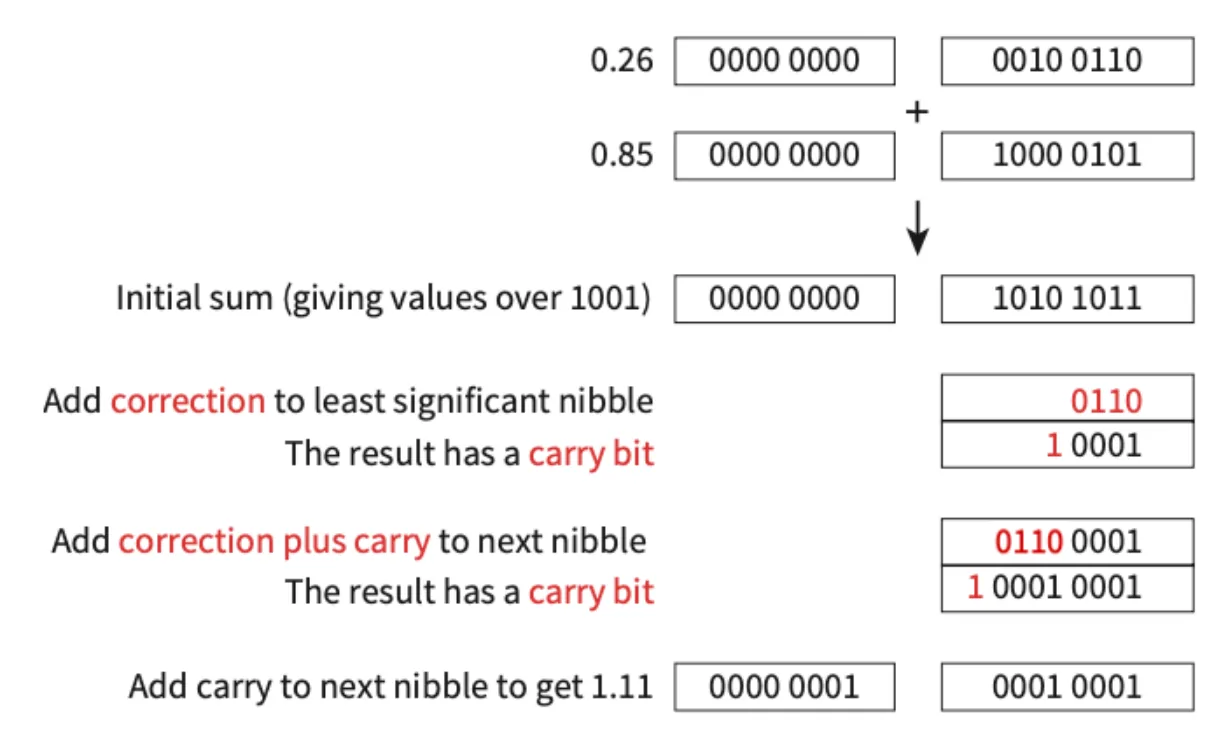
- Starting with the least significant nibble, adding 0110 (6) to 0101 (5) gives 1011, which is recognised as wrong.
- The correction value 0110 is added, giving 10001.
- The 0001 is stored and the leading 1 is carried to the next nibble.
- In the first decimal place, adding 0010 (2) to 1000 (8) and then the carry bit 1 gives 1011, which is also recognised as wrong.
- The correction 0110 is added, giving 10001.
- The 0001 is stored and the leading 1 is carried to the next nibble, the whole-number part.
- The two whole-number nibbles were both 0000, so the whole-number part is just the carry: 0000 0001. The result is 0000 0001 . 0001 0001, which is 1 dollar and 11 cents.
1.1 · 24 of 28Book page Contents
Character sets
To represent text, each character needs its own unique bit pattern. A bit pattern is a combination of 1s and 0s used to represent data inside a computer. The bit pattern used for each character is its numeric character code.
A character can be any of these:
- letters (upper case and lower case letters have different codes)
- punctuation and symbols, such as ? / | \ £ $
- digits (0 to 9)
- non-printing commands, such as Enter, Delete or F1
For computers to exchange text, they must agree which character code stands for which character. A standard collection of characters and the bit patterns used to represent them is called a character set.
What a character set is
- A list of all the characters a computer can recognise and represent.
- Each character has its own unique binary code (character code).
- Examples are ASCII, extended ASCII and Unicode.
Practise this: past-paper questions
- June 2022 · Paper 13 · Q1(a)(i)Describe what is meant by a character set
- June 2022 · Paper 13 · Q1(a)(ii)Identify two character sets and state one difference between them. Character set 1 Character set 2 Difference
- June 2024 · Paper 13 · Q1(d)(i)Complete the table by identifying the number of bits each of the character sets allocates to each character. | Character set | Number of bits | |…
- November 2024 · Paper 13 · Q6(a)A character set is used to represent characters in a computer. Identify and describe one character set
1.1 · 25 of 28Book page Contents
ASCII
Builds on
ASCII stands for American Standard Code for Information Interchange. It was defined in 1963 and became one of the most common character sets. It uses 7 bits for each character, so it can represent at most 27 = 128 characters.
Today each ASCII character is stored in 8 bits (1 byte). The original codes are unchanged, but each one has a 0 in front, so there are still only 128 bit patterns in the set. The eighth bit was sometimes used as a parity bit to check for errors when data was sent.
When text is stored using ASCII, each character is given a denary character code, which is stored in the computer in binary. The codes follow patterns:
| Character | Character code in denary | Character code in binary |
|---|---|---|
| a | 97 | 0110 0001 |
| b | 98 | 0110 0010 |
| c | 99 | 0110 0011 |
a is 97, b is 98 and c is 99: letters of the alphabet have consecutive codes. So if you know the code of one character, you can work out the codes of the characters before and after it.
How text is represented using ASCII
- Each character in the text, such as each letter of the word "HOUSE", has its own unique character code.
- The computer stores the binary value of each character’s code, one after another, in the order of the text.
- The codes for upper case and lower case letters are different.
Note You do not need to learn any character codes by heart; exam questions give you the codes they use.
Practise this: past-paper questions
- June 2021 · Paper 12 · Q6(a)State the number of characters that can be represented by the ASCII character set and the extended ASCII character set. ASCII Extended ASCII
- June 2021 · Paper 12 · Q6(b)Explain how a word such as ‘HOUSE’ is represented by the ASCII character set
- June 2024 · Paper 13 · Q1(d)(i)Complete the table by identifying the number of bits each of the character sets allocates to each character. | Character set | Number of bits | |…
- June 2024 · Paper 13 · Q1(d)(ii)Explain how the word ‘Clock’ is represented by a character set
1.1 · 26 of 28Book page Contents
Extended ASCII
Builds on
Extended ASCII is an extension of the ASCII standard that uses 8 bits for each character. This raises the number of possible characters to 28 = 256. The first 128 codes are the same as standard ASCII; the extra 128 hold characters such as accented letters (for example ü) and symbols.
Practise this: past-paper questions
- June 2021 · Paper 12 · Q6(a)State the number of characters that can be represented by the ASCII character set and the extended ASCII character set. ASCII Extended ASCII
- June 2024 · Paper 13 · Q1(d)(i)Complete the table by identifying the number of bits each of the character sets allocates to each character. | Character set | Number of bits | |…
- June 2025 · Paper 13 · Q1(c)(ii)Some of the school’s computers use the extended ASCII character set. The table gives some characters from the extended ASCII character set, their…
Used later in
1.1 · 27 of 28Book pages Contents
Unicode
The problem with ASCII is that it can only represent a small number of characters (128 for standard ASCII). This may be enough for the English alphabet, but not for all the languages and scripts in the world, with all their numbers and symbols. For example, ASCII cannot possibly store the hundreds of thousands of characters in these scripts in just 8 bits:
- Chinese characters 汉字
- Japanese characters 漢字
- Cyrillic Кириллица
- Gujarati ગુજરાતી
- Urdu اردو
- Greek ελληνικά
The spread of the World Wide Web also made a single international code more important, as the range of platforms and programs grew and developers around the world used a much wider range of characters.
The character set most used instead is Unicode. Each Unicode character can be stored using one of three encoding standards, which differ in the smallest number of bits they use:
| Name | Description |
|---|---|
| UTF‑8 | The most common Unicode format. Characters can use as few as 8 bits, which keeps it compatible with ASCII. It is variable-width: a character can expand to 16, 24 or 32 bits when it is from a larger set of characters. |
| UTF‑16 | Like UTF-8, it is variable-width: a character uses 16 bits and can expand to 32 bits. |
| UTF‑32 | Every character uses exactly 32 bits. This is fixed-width encoding. |
With over a million possible characters, Unicode can store every character from every alphabet, and many special symbols such as mathematical operators, shapes, arrows, emojis and ideograms. The first 128 codes in Unicode and ASCII represent the same characters.
ASCII compared with Unicode
- Similarity: both give each character a unique binary code, and the first 128 codes are the same in both.
- ASCII uses 7 bits (8 bits in extended ASCII) per character; Unicode uses up to 32 bits per character (from 8 to 32 bits, depending on the encoding and the character).
- ASCII has 128 characters (256 in extended ASCII); Unicode has over a million possible characters.
- ASCII covers only English characters; Unicode covers the characters of every language, and symbols such as emojis.
- Unicode text takes more storage space than ASCII text.
Practise this: past-paper questions
- June 2021 · Paper 12 · Q6(c)(i)Write the hexadecimal value for the Unicode character ‘1’
- June 2021 · Paper 12 · Q6(c)(ii)Write the denary value for the Unicode character ‘5’
- June 2022 · Paper 13 · Q1(a)(ii)Identify two character sets and state one difference between them. Character set 1 Character set 2 Difference
- November 2022 · Paper 11 · Q1(c)Give one similarity and two differences between the ASCII and Unicode character sets. Similarity Difference 1 Difference 2
Show 9 more
- June 2024 · Paper 13 · Q1(d)(i)Complete the table by identifying the number of bits each of the character sets allocates to each character. | Character set | Number of bits | |…
- June 2025 · Paper 11 · Q3(b)(i)Give two advantages of using the Unicode character set instead of using the ASCII character set
- June 2025 · Paper 11 · Q3(b)(ii)The Unicode character '❮' has the binary value: 0010 0111 0110 1110 Convert the binary value for the character '❮' into denary
- June 2025 · Paper 11 · Q3(b)(iii)The Unicode character '⅀' has the hexadecimal value 2140 Convert the hexadecimal code for the character '⅀' into denary
- June 2025 · Paper 13 · Q1(c)(i)The computer uses the Unicode character set. Give two characteristics of the Unicode character set
- November 2025 · Paper 12 · Q7(b)A computer uses the Unicode character set. State the number of bits used to store one character from the Unicode character set
- November 2025 · Paper 13 · Q1(c)Give two differences between the ASCII and UNICODE character sets
- June 2026 · Paper 11 · Q1(a)(i)Complete the table by calculating the missing values. character | denary | binary | hexadecimal ҉ | | 0001 1110 1001 | 1E9 @ | 64 | | 40 Ώ | 911 |…
- June 2026 · Paper 11 · Q1(a)(ii)Identify one other character set and explain how it is different from UNICODE. character set differences
1.1 · 28 of 28Book page Contents
Character codes for digits
A number can be stored as a set of characters. For example, the number 35 can be stored as the characters "3" and "5". When a digit (0 to 9) is processed as a character, the computer uses the bit pattern of its character code, not the binary value of the digit.
For example, the number 35 in 8-bit binary is 00100011. But the characters "35" are stored as 00110011 00110101, because in 8-bit ASCII the character code for "3" is 51 = 00110011 and the code for "5" is 53 = 00110101.
So you must be able to tell the difference between the binary value of a denary number and the (different) bit pattern for that number stored as a set of characters.
1.1
Concepts in 1.1
Every idea explained in 1.1, and where else in the notes it is used.
Zain Merchant's notes, page by page, as printed in his book. The Notes tab has the same notes as text, with links.
Past-paper questions and mark schemes © Cambridge University Press & Assessment. Compiled for revision by Zain Merchant.
- June 2021 · Paper 11 · Q1Notes:Converting hexadecimal to denaryBinary additionBinary subtraction with two’s complement
- June 2021 · Paper 12 · Q6Notes:Converting denary to hexadecimalASCIIExtended ASCIIUnicodeCharacter codes for digits
- November 2021 · Paper 11 · Q1Notes:Units of data storage and binary prefixesConverting hexadecimal to denaryBinary additionOverflow
- November 2021 · Paper 12 · Q4Notes:Converting binary to denaryConverting binary to hexadecimalBinary additionConverting two’s complement to denaryBinary subtraction with two’s complementBinary coded decimal (BCD)
- June 2022 · Paper 11 · Q1Notes:Units of data storage and binary prefixesConverting denary to hexadecimalBinary additionSigned integers and two’s complement
- June 2022 · Paper 12 · Q3Notes:Converting binary to hexadecimalBinary subtraction with two’s complement
- June 2022 · Paper 13 · Q1Notes:Converting denary to hexadecimalConverting hexadecimal to denarySmallest and largest unsigned valuesSigned integers and two’s complementBinary coded decimal (BCD)Character setsUnicode
- November 2022 · Paper 11 · Q1Notes:Converting binary to denaryConverting two’s complement to denaryBinary subtraction with two’s complementBinary coded decimal (BCD)Unicode
- November 2022 · Paper 12 · Q2Notes:Converting binary to denaryConverting binary to hexadecimalBinary additionConverting two’s complement to denaryBinary coded decimal (BCD)
- November 2022 · Paper 13 · Q9Notes:Converting binary to denaryConverting binary to hexadecimalApplications of BCD
- June 2023 · Paper 11 · Q3Notes:Units of data storage and binary prefixesConverting binary to hexadecimalBinary additionRange of two’s complement numbersBinary coded decimal (BCD)
- June 2023 · Paper 12 · Q4Notes:How many values can n bits holdConverting hexadecimal to denaryOne’s complement
- June 2023 · Paper 13 · Q7Notes:Smallest and largest unsigned valuesRange of two’s complement numbers
- November 2023 · Paper 12 · Q3Notes:Units of data storage and binary prefixesConverting binary to denarySigned integers and two’s complementBinary coded decimal (BCD)Applications of BCD
- June 2024 · Paper 11 · Q7Notes:Binary additionOverflow
- June 2024 · Paper 12 · Q7Notes:Units of data storage and binary prefixesConverting hexadecimal to denaryBinary subtraction with two’s complement
- June 2024 · Paper 13 · Q1Notes:Units of data storage and binary prefixesConverting denary to hexadecimalOverflowCharacter setsASCIIExtended ASCIIUnicode
- November 2024 · Paper 11 · Q1Notes:Units of data storage and binary prefixesConverting binary to hexadecimalOverflowConverting two’s complement to denaryBinary subtraction with two’s complementBinary coded decimal (BCD)
- November 2024 · Paper 13 · Q6Notes:Character sets
- November 2024 · Paper 13 · Q8Notes:Converting hexadecimal to denaryConverting two’s complement to denary
- June 2025 · Paper 11 · Q3Notes:Converting binary to denaryConverting hexadecimal to denaryUnicode
- June 2025 · Paper 12 · Q2Notes:Converting denary to binaryConverting denary to hexadecimalConverting two’s complement to denaryRange of two’s complement numbersApplications of BCD
- June 2025 · Paper 13 · Q1Notes:Converting binary to denaryConverting denary to binaryConverting denary to hexadecimalExtended ASCIIUnicode
- June 2025 · Paper 13 · Q7Notes:Binary additionOverflowBinary subtraction with two’s complement
- November 2025 · Paper 11 · Q1Notes:Converting binary to hexadecimalBinary additionOverflowConverting two’s complement to denaryBinary coded decimal (BCD)
- November 2025 · Paper 12 · Q6Notes:Converting binary to denary
- November 2025 · Paper 12 · Q7Notes:Converting denary to hexadecimalBinary additionBinary coded decimal (BCD)Unicode
- November 2025 · Paper 13 · Q1Notes:ASCIIUnicode
- November 2025 · Paper 13 · Q2Notes:Converting binary to hexadecimalSigned integers and two’s complement
- June 2026 · Paper 11 · Q1Notes:Units of data storage and binary prefixesConverting binary to denaryConverting denary to binaryConverting binary to hexadecimalConverting two’s complement to denaryBinary subtraction with two’s complementUnicode
- June 2026 · Paper 12 · Q5Notes:Converting binary to denaryConverting denary to binaryConverting binary to hexadecimalConverting hexadecimal to denaryBinary coded decimal (BCD)
- June 2026 · Paper 13 · Q6Notes:Converting denary to binaryConverting denary to hexadecimalBinary additionOverflowConverting two’s complement to denaryRange of two’s complement numbersBinary coded decimal (BCD)
Past-paper questions and mark schemes © Cambridge University Press & Assessment. Compiled for revision by Zain Merchant.
Try the questions first.
Write your answers, then check them against the mark scheme. Your choice is remembered on this device.