AS Level 9618 · Paper 1 · 1.3
Compression
Why files are compressed, and how lossy and lossless methods work. Read the notes, try the past-paper questions, then check the mark scheme.
Past papers from June 2021 to June 202620 questions · 65 marks
In this subtopic
- Why compression is needed, with examples
- Lossy and lossless compression, and choosing one for a task
- How text, bitmap, vector and sound files can be compressed, including run-length encoding
1.3 · 1 of 9Book pages Contents
What compression is
Compression makes files smaller. A compression algorithm is a sequence of steps that is followed to reduce the size of a file. Every digital file is just a long series of binary digits, and a compression algorithm reduces the number of bits, so the compressed file has fewer bits (often far fewer).
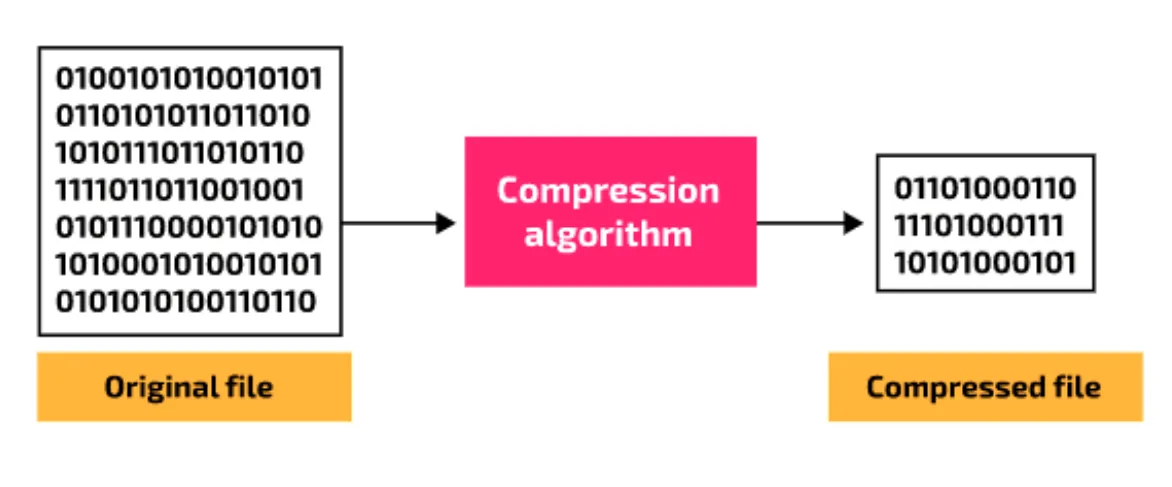
A compressed file can be saved and moved around in this form, but it has to be decompressed before it can be used in a meaningful way (for example viewed or listened to).
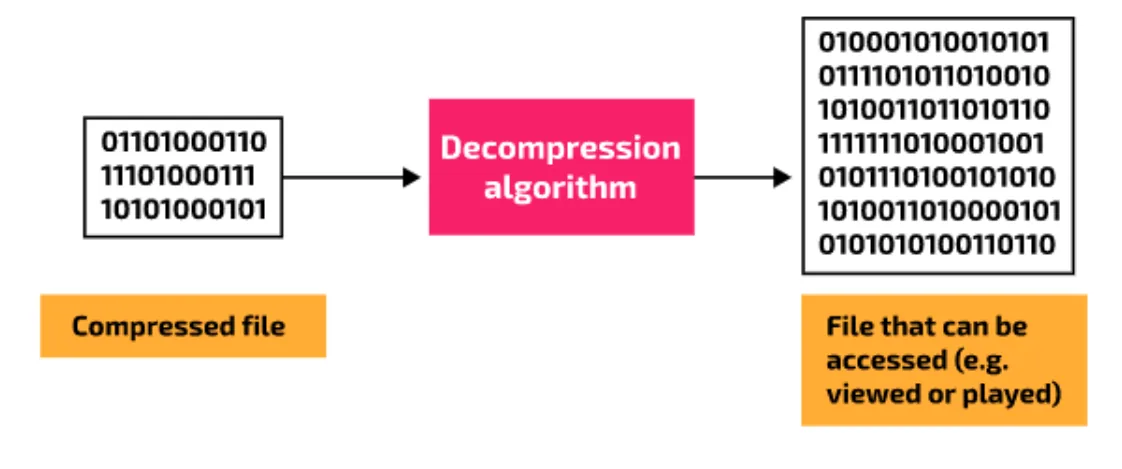
The decompressed file above is not labelled "original file". Whether it is exactly the same as the original depends on whether the compression was lossy or lossless.
Compression may change the data inside a file, but it does not change the basic properties of the file. For example, a compressed bitmap image still has the same resolution as before, and a 10-minute piece of music still lasts 10 minutes.
Compressing and decompressing usually happen automatically. Most users do not choose to compress a file: they just save it in a format that happens to be compressed. For example, a phone camera usually saves photos in JPEG format, which is compressed, so the phone applies the compression algorithm to every photo automatically. When you open the photo, the software uses the file format to decompress the data and show it as an image.
1.3 · 2 of 9Book pages Contents
Why files are compressed
Builds on
Some files are very large. Local storage is often cheap and plentiful, so sometimes file size does not matter. But large files are a problem when they must be stored on a device with limited capacity (such as a memory card) or sent over a cable or wireless link. A smaller file means more files fit in the same storage, and files are quicker to transfer, upload and download.
The need to compress images. Image files can be very large. A typical mid-range camera is rated at 24 megapixels, which means it uses about 24 000 000 pixels for each image. A photo typically uses 12 bits for each colour channel, red (R), green (G) and blue (B), so 36 bits per pixel.
Worked example
Calculate the size of an uncompressed photo from a 24-megapixel camera that uses 36 bits per pixel.
- Step 1Number of pixels: 24 megapixels × 1 000 000 (pixels in a megapixel) = 24 000 000 pixels.
- Step 2Bits per pixel: 12 (R) + 12 (G) + 12 (B) = 36 bits.
- Step 3Total bits: 24 000 000 × 36 = 864 000 000 bits.
- Step 4Bytes: 864 000 000 / 8 = 108 000 000 bytes.
- Step 5Megabytes: 108 000 000 / 1 000 000 = 108 MB.
Storage space is often limited: for example, the number of photos a camera can hold depends on the size of its memory card. Photos may also need to be uploaded to cloud storage, a web server or a social media account, which can take a long time. To cut the storage and transfer time, photos are usually stored in JPEG format, which is highly compressed: JPEG reduces a file to around 10% of its uncompressed size.
The need to compress sound files. Sound files can also be very large. The most popular sound format for everyday users is MP3, which is compressed. Most listeners do not notice any difference in quality after compression, and they benefit from the smaller files when streaming or downloading. Music professionals usually work with uncompressed data to keep the highest sound quality: WAV is an uncompressed sound format.
Why files are compressed
- The file takes up less storage space, so more files can be stored (on a device, a web server or an email account).
- The file is quicker to send, upload or download.
- Less bandwidth is used, so other transmissions are not slowed down, and less of a data allowance is used.
- Streamed video and sound play more smoothly, with less buffering.
- Email systems often have a maximum size for attachments.
Practise this: past-paper questions
- November 2021 · Paper 11 · Q7(b)(i)Explain the reasons why Bobby compresses the sound file
- June 2023 · Paper 11 · Q1(c)(i)Explain the reasons why compressing the photographs will benefit the customers
- November 2023 · Paper 11 · Q1(c)Explain why a bitmap image is often compressed before it is attached to an email
- November 2023 · Paper 13 · Q5(b)(i)Explain the reasons for compressing the files
Show 3 more
- June 2024 · Paper 12 · Q2(d)(iii)The bitmap video is not compressed before transmission to the VR headset. Give two reasons why the video does not need to be compressed
- June 2024 · Paper 13 · Q2(b)(i)Give three benefits of this photograph being compressed using lossy compression instead of lossless compression
- November 2024 · Paper 11 · Q4(b)(i)Explain the benefits to the teacher of the attachment being a compressed file
1.3 · 3 of 9Book pages Contents
Lossy compression
Builds on
Lossy compression always loses data: some data is permanently removed from the file. When the file is decompressed, the removed data is recreated from the data that remains, but it is never an exact copy of the original. It is an approximation. For example, a lossy algorithm could compress the number 3.1415926, and decompressing it would give back only 3.14.
It may seem strange that the data is not exactly the same after compression. But for many types of file, an approximation of the original data is good enough. Lossy compression is often used for image and sound files, because some data can be lost without a noticeable effect on quality: the human eye and ear cannot usually detect the small changes the algorithm makes. It also makes files much smaller than lossless compression can.
| Lossy format | Uses |
|---|---|
| MP3 | Sound files, typically for downloading music from the internet |
| JPEG | Photographs |
| MPEG-1 | Video files; suitable for small, low-resolution video |
| MPEG-2 | Video files; suitable for full-screen, high-resolution video |
The risks of lossy compression. Lossy compression is destructive: the original data is lost for ever. Compressing a file with a lossy method again and again can lose so much data that the file becomes unrecognisable.
Practise this: past-paper questions
- November 2023 · Paper 12 · Q6(a)A real-time video of a music concert needs to be streamed to subscribers. Tick (✓) one box to identify the most appropriate type of compression…
- June 2024 · Paper 13 · Q2(b)(i)Give three benefits of this photograph being compressed using lossy compression instead of lossless compression
- November 2024 · Paper 13 · Q6(b)(iii)A bitmap image can be compressed using lossy compression. Explain the reasons why lossy compression is often suitable for a bitmap image
1.3 · 4 of 9Book pages Contents
Lossless compression, and choosing a method
Lossless compression loses no data. When the file is decompressed, its contents are identical to the original file before it was compressed. For example, a lossless algorithm could compress the text AABBBA into a shorter string of bits, and decompressing those bits gives back exactly AABBBA.
Files that are unsuitable for lossy compression. Some data must not go through lossy compression. A file of words or numbers must be exactly the same when it is decompressed: it cannot be approximated. Imagine trying to rebuild a word when you are given only every other letter. From the letters "fos", the word could be "floss", "frogs", "fools" or many other words. Data like this needs lossless compression.
Lossless compression is the right choice wherever data cannot be approximated, such as documents of text and numbers, where every character must be kept. For example, if you email an assignment to your teacher, it must be exactly the same as the original when it is opened to be marked.
Most users do not choose a compression method. Compression is applied automatically when a file is saved, and the data is recreated when the file is opened. You rely on the software to store the data in the most suitable form.
| Lossless format | Uses |
|---|---|
| PNG | Images that must keep the highest level of quality |
| GIF | Images and short animations |
Choosing lossy or lossless compression
- Use lossless for text, numbers and program files: no data can be lost, or the file would be corrupted or not make sense.
- Use lossless when the user needs full quality, for example a professional editing photos or music, or when the connection is fast enough to send the bigger file.
- Use lossy for photos, sound and video when a small loss of quality will not be noticed and a much smaller file matters, for example for web pages, email attachments or streaming.
- For a live stream, such as a concert, lossy compression needs less bandwidth, so there is less buffering and the video plays smoothly.
Practise this: past-paper questions
- June 2022 · Paper 13 · Q1(a)(iv)Explain why lossy compression should not be used on a text file
- November 2022 · Paper 12 · Q8(c)(ii)RLE is an example of lossless compression. Explain why lossless compression is more appropriate than lossy compression for a text file
- November 2023 · Paper 12 · Q6(a)A real-time video of a music concert needs to be streamed to subscribers. Tick (✓) one box to identify the most appropriate type of compression…
1.3 · 5 of 9Book pages Contents
Run-length encoding
Builds on
There are many compression techniques, and the best one depends on the kind of data. Each technique is either lossy or lossless.
Run-length encoding (RLE) is a lossless compression technique. It finds runs of the same value repeated one after another, and replaces each run with one copy of the value and a number that says how many times it is repeated.
This bitmap image is 28 pixels by 28 pixels. Each pixel is stored as a binary colour code. A black and white image would need just one bit per pixel (0 for black, 1 for white), but this image uses five colours, so more codes are needed. To give five colours their own codes, 3 bits are needed (23 = 8), so the colour depth is 3 bits.
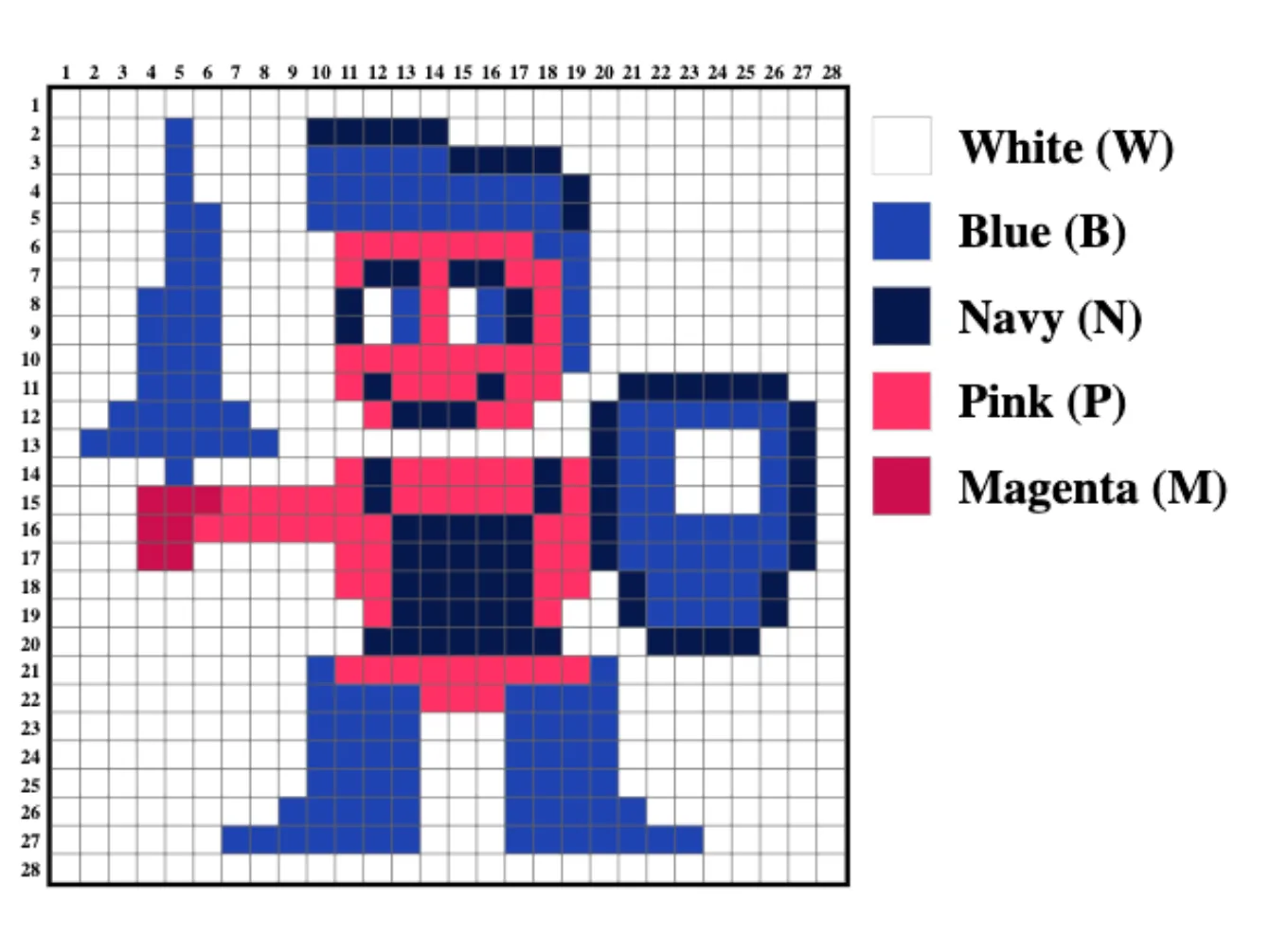
| Code | Colour |
|---|---|
| 000 | White |
| 001 | Pink |
| 010 | Blue |
| 011 | Magenta |
| 100 | Navy |
| 101 | not used |
| 110 | not used |
| 111 | not used |
Worked example
Row 6 of the image has, from the left, 4 white pixels, 2 blue, 4 white, 7 pink, 2 blue and 9 white. Compress it with run-length encoding, using 5 bits for each count.
- Step 1Without compression, the 28 pixels need 28 × 3 = 84 bits:
000 000 000 000 010 010 000 000 000 000 001 001 001 001 001 001 001 010 010 000 000 000 000 000 000 000 000 000 - Step 2With RLE, store each run as a pair: the colour code, then the number of pixels in the run. White (000) is followed by 4 in binary (00100), then blue (010) is followed by 2 (00010), and so on.
- Step 3The compressed row is (spaces added to make it easier to read):
000 00100 010 00010 000 00100 001 00111 010 00010 000 01001 - Step 4There are 6 pairs of 3 + 5 = 8 bits, so the compressed row needs 6 × 8 = 48 bits instead of 84.
RLE is lossless: the exact original data can be recreated from the compressed data by reversing the process.
Points to note about RLE
- Runs are not usually processed row by row: one long run can carry on across several rows.
- The number of bits used for each count must be enough to hold the longest run.
- RLE does not only work on images, but it suits images well, especially images with few colours, which often have large blocks of the same colour.
- In a photograph, long runs of exactly the same colour are rare, unlike in cartoons, line art and logos. Because every value is stored with a count, RLE can make some images bigger instead of smaller. This is why photographs are often compressed with lossy methods.
Worked example: when RLE does not help
Show how RLE could make an image file bigger.
- Step 1Three pixels in a row are red, green and blue: there are no runs.
- Step 2RLE stores each colour with a count of 1: red 1, green 1, blue 1.
- Step 3The counts are extra data, so the compressed data is bigger than the original.
Practise this: past-paper questions
- June 2021 · Paper 11 · Q1(b)The image is compressed using lossless compression. Identify one method of lossless compression that can be used to compress the image and…
- June 2022 · Paper 12 · Q1(d)The first row of pixels in the image from part (b) is shown: B B B B B B B B B B Explain how this row of pixels can be compressed using lossless…
- June 2022 · Paper 13 · Q1(a)(iii)Describe how lossless compression can be used to reduce the file size of a text file
- November 2022 · Paper 11 · Q7(c)An Operating System may include a utility program to compress text files. Describe one appropriate method of compressing a text file
Show 8 more
- November 2022 · Paper 12 · Q8(c)(i)The table shows the compressed and uncompressed values for parts of the image file. Each colour of the pixel in the image is represented by a…
- June 2023 · Paper 11 · Q1(c)(ii)An image can be compressed using run-length encoding (RLE). Explain the reasons why RLE may not reduce the file size of a bitmap image. Give one…
- June 2024 · Paper 13 · Q2(b)(ii)Explain how run-length encoding (RLE) will compress the photograph
- November 2024 · Paper 11 · Q4(b)(ii)Describe one lossless method of compressing a text file
- November 2024 · Paper 12 · Q7(a)(iii)Identify one lossless method of compressing an image
- November 2025 · Paper 11 · Q7(d)(iii)Explain how a bitmap image is compressed using run-length encoding (RLE)
- June 2026 · Paper 12 · Q1(d)(ii)Explain how the image shown can be compressed using lossless compression
- June 2026 · Paper 13 · Q3(c)(i)Explain the different ways that lossless compression can be used to compress the images and the sound file. image file sound file
1.3 · 6 of 9Book pages Contents
Compressing text files
Builds on
Text files must be compressed with a lossless method, because every character must be exactly the same when the file is decompressed.
Run-length encoding of text. Groups of the same character repeated one after another are replaced by one copy of the character and the number of times it is repeated.
Worked example
Compress the text AAAABBBBBBCD using run-length encoding, storing each count and each character in one byte.
- Step 1Find the runs: four A, six B, one C, one D.
- Step 2Store each run as a count and a character: 4A 6B 1C 1D.
- Step 3The original needs 12 bytes; the compressed text needs 4 pairs × 2 bytes = 8 bytes.
Dictionary-based methods. Words and groups of characters that appear many times are stored once in a dictionary, and every time they appear in the text they are replaced by a short reference to their place in the dictionary.
Huffman encoding is a lossless compression technique most often used for text documents. It works especially well when characters appear many times in the file.
Without compression, every character in a text file uses the same number of bits. With 8 bits per character, each character takes 1 byte, so a text of 180 characters needs 180 bytes, or 180 × 8 = 1440 bits.
Huffman encoding reduces the number of bits by giving characters bit patterns of different lengths. Characters that appear most often get short bit patterns, and characters that appear less often get longer ones.
Practise this: past-paper questions
- June 2022 · Paper 13 · Q1(a)(iii)Describe how lossless compression can be used to reduce the file size of a text file
- November 2022 · Paper 11 · Q7(c)An Operating System may include a utility program to compress text files. Describe one appropriate method of compressing a text file
- November 2024 · Paper 11 · Q4(b)(ii)Describe one lossless method of compressing a text file
1.3 · 7 of 9Book page Contents
Compressing bitmap images
Builds on
A digital photo is stored as a bitmap, with a colour code for each pixel. JPEG compression is a lossy technique that uses the fact that real-life images are not made of a grid of separate pixels, but of smooth changes in colour.
A photo has millions of pixels, and the difference in colour between one pixel and the next can be too small to see. JPEG takes advantage of this by storing fewer colour codes. The algorithm throws away colour information that the human eye cannot detect, and finds patterns in the colours that remain. Blocks of similar colours are stored as a single colour, worked out from a sample of the pixels in the block. This reduces the amount of data stored, so the file is smaller. On standard settings, one colour is stored for every block of nine pixels, which reduces the file size by around 90%.
JPEG compression is lossy, so some data is lost for ever. When the image is opened, the missing pixels are recreated from the colours that remain, using the colours on either side of each missing pixel. This can cause compression artefacts: visible faults that are most noticeable where there is a sharp change of colour.
Compression ratio. JPEG compression typically has a compression ratio of 10:1, with little noticeable loss of quality. So an image of 36 MB would be reduced to 3.6 MB. With JPEG, the amount of compression can be adjusted, so the user can choose between a smaller file and a better-quality image.
Ways to compress a photo or other image
- Lossless: run-length encoding stores each run of pixels of the same colour as the colour code and the number of pixels in the run.
- Lossy: reduce the image resolution, so there are fewer pixels to store.
- Lossy: reduce the colour depth, so each pixel is stored with fewer bits.
- Lossy: reduce the number of colours (the colour palette), so fewer bits are needed for each colour.
- Lossy: JPEG stores one colour for each block of similar pixels and removes detail the eye cannot see.
Practise this: past-paper questions
- November 2021 · Paper 12 · Q5(b)(ii)Riya needs to email the photograph. She compresses the photograph before sending it using an email. Describe two lossy methods that Riya can use…
- November 2024 · Paper 13 · Q6(b)(iii)A bitmap image can be compressed using lossy compression. Explain the reasons why lossy compression is often suitable for a bitmap image
Used later in
1.3 · 8 of 9Contents
Compressing vector graphics
Builds on
A vector graphic is stored as a drawing list: a list of drawing objects and their properties, usually saved as text (for example in SVG). So it can be compressed with lossless methods used for text, for example by replacing sequences that are repeated many times, such as the same property values, with short codes.
A vector file is already small, because it stores instructions for drawing each shape, not the colour of every pixel. It has little repeated data, so it does not usually compress as much as a bitmap image does.
1.3 · 9 of 9Book pages Contents
Compressing sound files
Builds on
Sampling already loses some data, because the sound between two samples is never captured. Compression can then make the file smaller still.
MP3 is a common lossy compression technique for sound files. It works on the fact that the human ear cannot hear some sounds, and hears some sounds much better than others. For example, a quiet sound can be hidden by a louder sound at the same time, so the quiet sound can be removed completely. Sounds outside the range of human hearing can be removed too. When the file is played, the MP3 player recreates the missing sound using what is known about how sounds change in the real world.
MP3 compresses about as much as JPEG: compressed files are typically 10% of the original size, so a 15 MB file becomes about 1.5 MB. The sound will not be exactly the same as the original, but most people will not notice, because sound quality also depends on the equipment and the room the music is played in.
Compressing sound by removing data
- Remove sounds the human ear cannot hear, or quiet sounds hidden by louder ones (as MP3 does).
- Reduce the sampling rate: fewer samples are stored each second. The original sound cannot be recreated, so this is lossy.
- Reduce the sampling resolution: each sample is stored with fewer bits.
Compressing sound with no data lost
- Run-length encoding: where the same sample value is repeated one after another, store the value and the number of times it repeats.
- Store the change in amplitude from one sample to the next instead of each amplitude: each change needs fewer bits than a whole new amplitude.
- Reduce the range of amplitude values to only the range actually used in the recording, so fewer bits are needed for each sample without changing the sound.
Practise this: past-paper questions
- November 2021 · Paper 11 · Q7(b)(ii)Bobby uses lossless compression. Describe how lossless compression can compress the sound file
- November 2024 · Paper 13 · Q6(c)(ii)Describe one method of compressing a sound file using lossy compression
- November 2025 · Paper 12 · Q6(a)A sound file is compressed by reducing the sampling rate. State whether this is lossless or lossy compression. Justify your choice. Type of…
- June 2026 · Paper 13 · Q3(c)(i)Explain the different ways that lossless compression can be used to compress the images and the sound file. image file sound file
1.3
Concepts in 1.3
Every idea explained in 1.3, and where else in the notes it is used.
| Concept | In one line | Also used in |
|---|---|---|
| compression algorithm | A sequence of steps followed to reduce the number of bits in a file. | 1.3 Run-length encoding |
| compression artefacts | Visible faults in a decompressed image, mostly where the colour changes sharply. | only here |
| compression ratio | The original size compared with the compressed size, for example 10:1. | only here |
| decompression | Turning a compressed file back into a form that can be used, such as viewed or played. | 1.3 Lossy compression, 1.3 Lossless compression, and choosing a method, 1.3 Compressing text files |
| dictionary-based compression | Lossless compression that stores repeated words once and replaces each one with a short reference. | only here |
| Huffman encoding | Lossless compression giving frequent characters short bit patterns and rare ones longer patterns. | only here |
| JPEG compression | A lossy method for photos that stores one colour for blocks of similar pixels. | 1.2 Bitmap file formats and how bitmaps are made, 1.3 What compression is, 1.3 Why files are compressed, 1.3 Lossy compression, 1.3 Compressing sound files |
| lossless compression | Compression that loses no data, so the original file is recreated exactly. | 1.3 What compression is, 1.3 Lossy compression, 1.3 Run-length encoding, 1.3 Compressing text files, 1.3 Compressing bitmap images, 1.3 Compressing vector graphics |
| lossy compression | Compression that permanently removes some data, so the original cannot be recreated exactly. | 1.3 What compression is, 1.3 Lossless compression, and choosing a method, 1.3 Run-length encoding, 1.3 Compressing bitmap images, 1.3 Compressing sound files |
| MP3 | A lossy sound format that removes sounds the human ear cannot hear. | 1.3 Why files are compressed, 1.3 Lossy compression |
| run-length encoding | Lossless compression that stores each run of repeated values as one value and a count. | 1.3 Compressing text files, 1.3 Compressing bitmap images, 1.3 Compressing sound files |
Zain Merchant's notes, page by page, as printed in his book. The Notes tab has the same notes as text, with links.
Past-paper questions and mark schemes © Cambridge University Press & Assessment. Compiled for revision by Zain Merchant.
- June 2021 · Paper 11 · Q1Notes:Run-length encoding
- November 2021 · Paper 11 · Q7Notes:Why files are compressedCompressing sound files
- November 2021 · Paper 12 · Q5Notes:Compressing bitmap images
- June 2022 · Paper 12 · Q1Notes:Run-length encoding
- June 2022 · Paper 13 · Q1Notes:Lossless compression, and choosing a methodRun-length encodingCompressing text files
- November 2022 · Paper 11 · Q7Notes:Run-length encodingCompressing text files
- November 2022 · Paper 12 · Q8Notes:Lossless compression, and choosing a methodRun-length encoding
- June 2023 · Paper 11 · Q1Notes:Why files are compressedRun-length encoding
- November 2023 · Paper 11 · Q1Notes:Why files are compressed
- November 2023 · Paper 12 · Q6Notes:Lossy compressionLossless compression, and choosing a method
- November 2023 · Paper 13 · Q5Notes:Why files are compressed
- June 2024 · Paper 12 · Q2Notes:Why files are compressed
- June 2024 · Paper 13 · Q2Notes:Why files are compressedLossy compressionRun-length encoding
- November 2024 · Paper 11 · Q4Notes:Why files are compressedRun-length encodingCompressing text files
- November 2024 · Paper 12 · Q7Notes:Run-length encoding
- November 2024 · Paper 13 · Q6Notes:Lossy compressionCompressing bitmap imagesCompressing sound files
- November 2025 · Paper 11 · Q7Notes:Run-length encoding
- November 2025 · Paper 12 · Q6Notes:Compressing sound files
- June 2026 · Paper 12 · Q1Notes:Run-length encoding
- June 2026 · Paper 13 · Q3Notes:Run-length encodingCompressing sound files
Past-paper questions and mark schemes © Cambridge University Press & Assessment. Compiled for revision by Zain Merchant.
Try the questions first.
Write your answers, then check them against the mark scheme. Your choice is remembered on this device.