A Level 9618 · Paper 3 · 15.1
Processors, Parallel Processing and Virtual Machines
How processors are designed and combined, and how one computer can run another inside it. Read the notes, try the past-paper questions, then check the mark scheme.
Past papers from June 2022 to June 202616 questions · 83 marks
In this subtopic
- RISC and CISC processors, and how each handles interrupts
- Pipelining and registers in RISC processors
- The four basic architectures: SISD, SIMD, MISD and MIMD
- Massively parallel computers
- Virtual machines: what they are used for, their benefits and limits
15.1 · 1 of 17Book page Contents
Types of processor
There are two main types of processor:
- RISC (reduced instruction set computer) processors are used in modern smartphones and tablets, and now in some laptops. This type of processor can carry out simple instructions quickly. Several instructions are needed to carry out basic tasks, such as adding together two numbers.
- CISC (complex instruction set computer) processors are used in desktop and laptop computers. This type of processor can process more complex instructions. For example, a single instruction can load two values, calculate their sum and store the result back in memory.
Many high-end computer systems have graphics cards that contain a GPU (graphics processing unit). GPUs are designed for parallel processing, which can improve the performance of applications that make heavy use of video or graphics.
15.1 · 2 of 17Book page Contents
RISC processors
RISC processors are designed to process simple instructions quickly. They need less circuitry, so they are cheaper to design and produce, give off less heat and use less power than CISC processors. This makes RISC processors suitable for tablets, smartphones and embedded systems, where there is no need to carry out complex instructions.
Practise this: past-paper questions
15.1 · 3 of 17Book page Contents
CISC processors
Builds on
CISC processors can process more complex instructions than RISC processors. More circuitry is needed to carry out complex tasks.
Compared with a RISC processor, a CISC processor:
- is more expensive to design and produce
- gives off more heat
- uses more power
- processes complex instructions faster
- is physically larger
Practise this: past-paper questions
15.1 · 4 of 17Book page Contents
RISC and CISC instruction set architectures
RISC and CISC are types of processor with different instruction set architectures (ISAs).
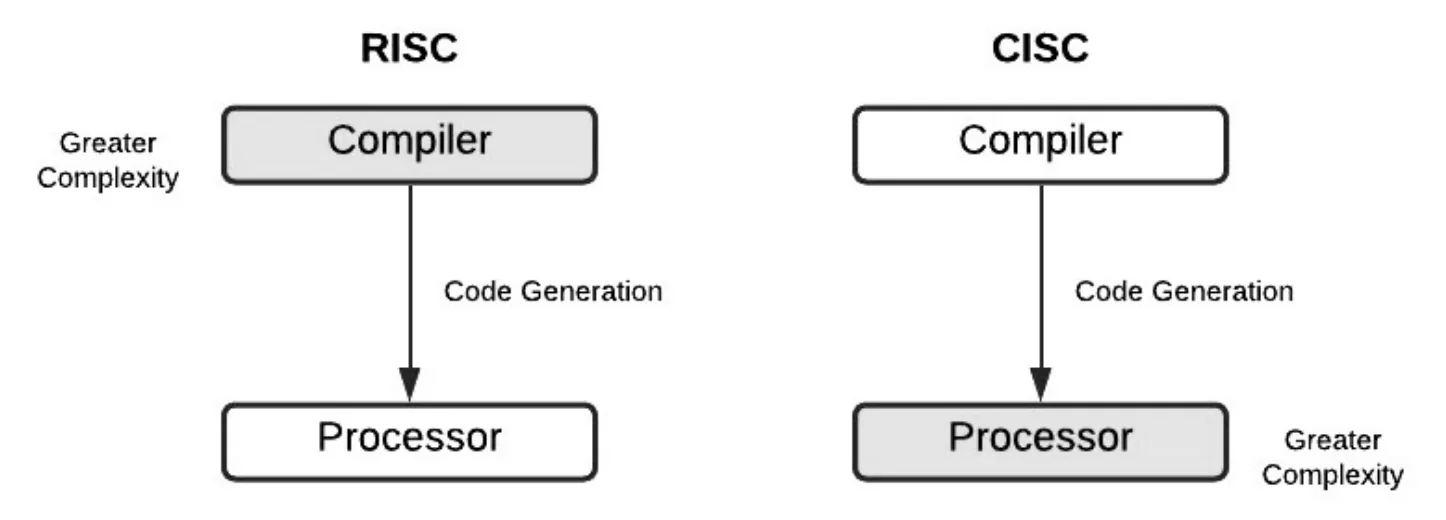
The main feature of RISC is that its instruction set is made of simple commands that are designed to take the same time to execute: one instruction is carried out per system clock cycle. This means that several instructions are needed to carry out a basic task, such as adding together two numbers. Because of this, low-level programs for RISC processors are longer and take up more memory. However, the simpler instruction design makes pipelining easier to implement, which in turn increases the performance of RISC processors. RISC processors also need less circuitry, so they are cheaper to design and produce, give off less heat and use less power than CISC processors.
The hardware of a CISC processor is designed to execute complex instructions: it carries out several low-level operations as part of a single instruction. For example, one instruction can load two values, calculate their sum and store the result back in memory. Because the instructions are more specialised, low-level programs for CISC processors take up less space in main memory and are easier to translate into machine code. However, pipelining is much more difficult on a CISC processor, because its instructions vary in length and take different amounts of time to execute.
Practise this: past-paper questions
15.1 · 5 of 17Book page Contents
RISC compared with CISC
Builds on
| RISC | CISC |
|---|---|
| Few instructions | More instructions |
| Simpler instructions | More complex instructions |
| Small number of instruction formats | Many instruction formats |
| Single-cycle instructions whenever possible | Multi-cycle instructions |
| Fixed-length instructions | Variable-length instructions |
| Only load and store instructions address memory | Many types of instruction address memory |
| Fewer addressing modes | More addressing modes |
| Multiple register sets | Fewer registers |
| Hard-wired control unit | Microprogrammed control unit |
| Pipelining easier | Pipelining more difficult |
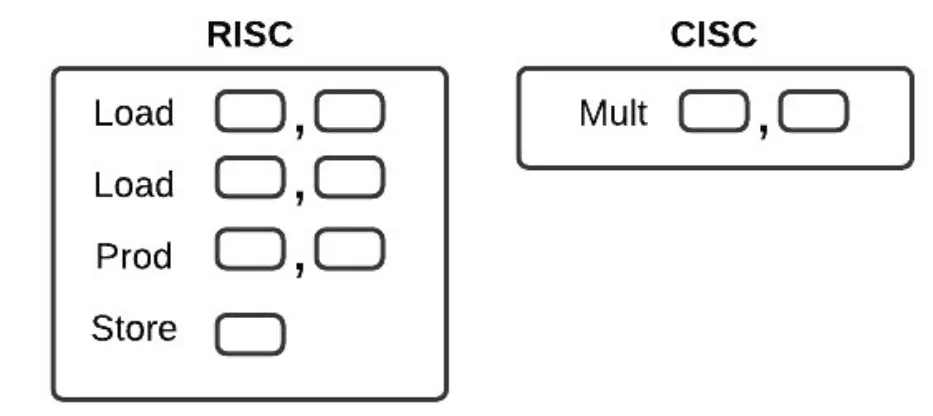
The diagram below shows the same job done on each type of processor. RISC needs four simple instructions (Load, Load, Prod, Store); CISC does it with a single instruction (Mult).
Practise this: past-paper questions
- June 2022 · Paper 31 · Q4(b)Identify two differences between RISC and CISC processors
- November 2022 · Paper 31 · Q10(a)Tick (✓) one box in each row to show if the statement applies to RISC or CISC processors. | Statement | RISC | CISC | | uses a smaller instruction…
- June 2024 · Paper 31 · Q11(a)State two features of RISC processors
- November 2024 · Paper 31 · Q2Reduced Instruction Set Computers (RISC) is a type of processor. Identify four features of a RISC processor
Used later in
15.1 · 6 of 17Book page Contents
Interrupt handling in RISC and CISC
Builds on
Interrupts are used on a RISC processor in just the same way as on a CISC processor. The same definition of an interrupt holds: a signal sent from a hardware device to the processor to show that the device needs attention.
Using interrupts means the processor does not have to keep checking whether a hardware device needs its attention. That strategy, called polling, was used before interrupts.
The system uses vectored interrupts. Every device is given a device number that matches the bits sent to an interrupt register, so from the number the processor knows the source of the interrupt.
Once the interrupt is received, the contents of all the registers must be saved and the right interrupt service routine (ISR) code is executed.
Practise this: past-paper questions
Used later in
15.1 · 7 of 17Book pages Contents
Pipelining
One of the major developments that came from RISC architecture is pipelining. It is one of the less complex ways of improving computer performance. Pipelining allows several instructions to be processed at the same time, without having to wait for the previous instructions to be completed.
To see how this works, split the execution of an instruction into its five stages:
- instruction fetch cycle (IF)
- instruction decode cycle (ID)
- operand fetch cycle (OF)
- instruction execution cycle (IE)
- write back result process (WB)
Take a program with six instructions: A, B, C, D, E and F. The table shows which instruction is at each processor stage in each clock cycle when pipelining is used, with every stage taking one clock cycle to complete. This needs a processor with several registers, to store each of the stages.
| Stage | 1 | 2 | 3 | 4 | 5 | 6 | 7 | 8 | 9 | 10 |
|---|---|---|---|---|---|---|---|---|---|---|
| IF | A | B | C | D | E | F | ||||
| ID | A | B | C | D | E | F | ||||
| OF | A | B | C | D | E | F | ||||
| IE | A | B | C | D | E | F | ||||
| WB | A | B | C | D | E | F |
Note The column headings 1 to 10 are the clock cycles.
The execution of each instruction is split into stages. During clock cycle 1, the first stage of instruction A is carried out. During clock cycle 2, the second stage of instruction A and the first stage of instruction B are carried out. During clock cycle 3, the third stage of A, the second stage of B and the first stage of C are carried out. This continues until all the instructions have been processed.
When instruction A completes, in clock cycle 5, instruction E is at the first stage and instructions B to D are at the stages in between; F starts in clock cycle 6. Several instructions are processed at the same time, and there is no need to wait for one instruction to go through all five stages before the next one can start.
In this example the six instructions need 10 clock cycles to complete. Without pipelining they would need 30 clock cycles (6 × 5), because each of the six instructions needs five stages to complete.
Practise this: past-paper questions
- November 2022 · Paper 31 · Q10(b)Describe the process of pipelining during the fetch-execute cycle in RISC processors
- June 2023 · Paper 32 · Q8(a)Describe the use of pipelining in Reduced Instruction Set Computers (RISC)
- June 2023 · Paper 32 · Q8(b)The processing of instructions is divided into five stages: • instruction fetch (IF) • instruction decode (ID) • operand fetch (OF) • instruction…
15.1 · 8 of 17Book page Contents
Interrupts and pipelining
Builds on
When the processor detects an interrupt (at the end of the fetch-execute cycle), the current program is temporarily stopped (depending on interrupt priorities) and the status of each register is stored. After the interrupt has been serviced, the processor can be restored to the status it had before the interrupt was received.
With pipelining, interrupt handling has an added complexity: when the interrupt is received, there could be several instructions still in the pipeline. The usual way to deal with this is to discard all the instructions in the pipeline except the last one, the instruction in the write back (WB) stage.
The interrupt handler routine is then applied to this remaining instruction and, once the interrupt has been serviced, the processor restarts with the next instruction in the sequence.
Another way, although much less common, is to store the contents of all five stages in registers. This saves all the current data, so the processor can be restored to its previous status once the interrupt has been serviced.
15.1 · 9 of 17Book page Contents
SISD: single instruction, single data
There are four basic computer architectures: SISD, SIMD, MISD and MIMD.
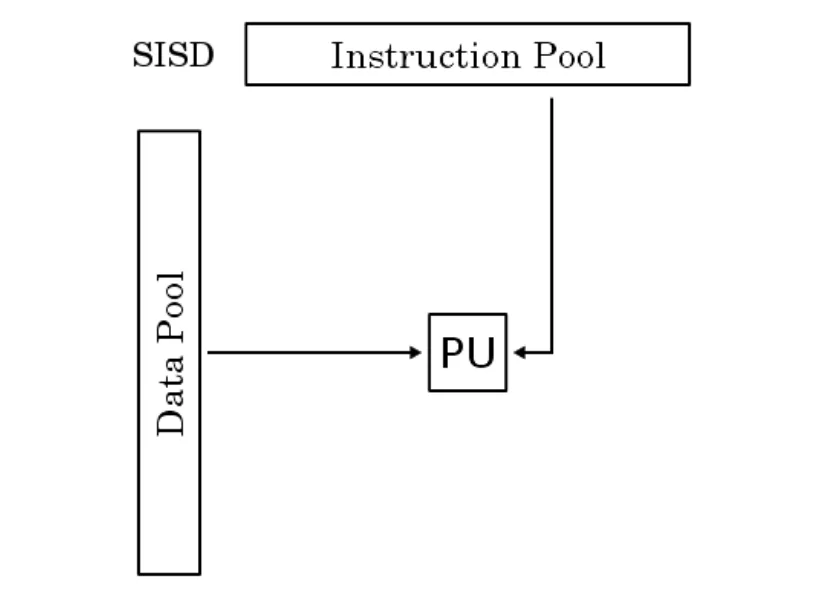
Single Instruction Single Data (SISD) is the original Von Neumann architecture, which does not use any kind of parallelism. The sequential processor takes data from a single address in memory and performs a single instruction on the data. All single-processor systems are SISD.
- Common usage: older computers; microcontrollers.
- Advantages: low power needs, as there is only a single core; a simpler architecture than the others, so it is cheaper and easier to manufacture.
- Disadvantage: the speed of the system is limited because it has only a single core.
Practise this: past-paper questions
15.1 · 10 of 17Book page Contents
SIMD: single instruction, multiple data
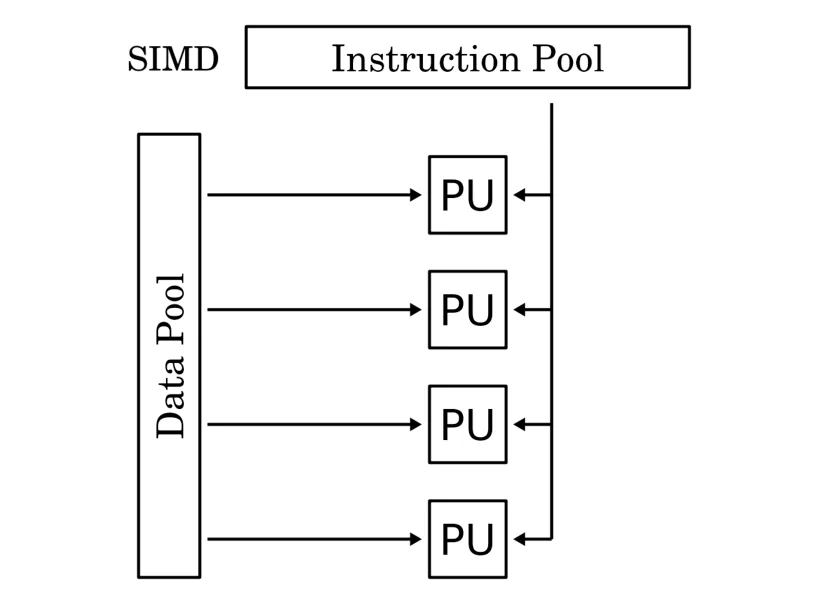
In Single Instruction Multiple Data (SIMD), a single instruction is carried out on several different data streams. The instructions can be performed one after another, taking advantage of pipelining, or in parallel using several processors. Modern GPUs, which contain vector processors and array processors, are usually SIMD systems.
- Common usage: graphics processing units performing vector and array operations; scientific processing.
- Advantage: very efficient when the same instruction has to be performed on large amounts of data.
Practise this: past-paper questions
- June 2022 · Paper 32 · Q5There are four basic categories of computer architecture. Single Instruction Single Data (SISD) is one architecture. Identify the three other…
- November 2023 · Paper 32 · Q10Describe the features of the SIMD and MISD computer architectures. SIMD MISD
- June 2026 · Paper 33 · Q4(b)State one difference and one similarity between the SIMD and MISD computer architectures
15.1 · 11 of 17Book page Contents
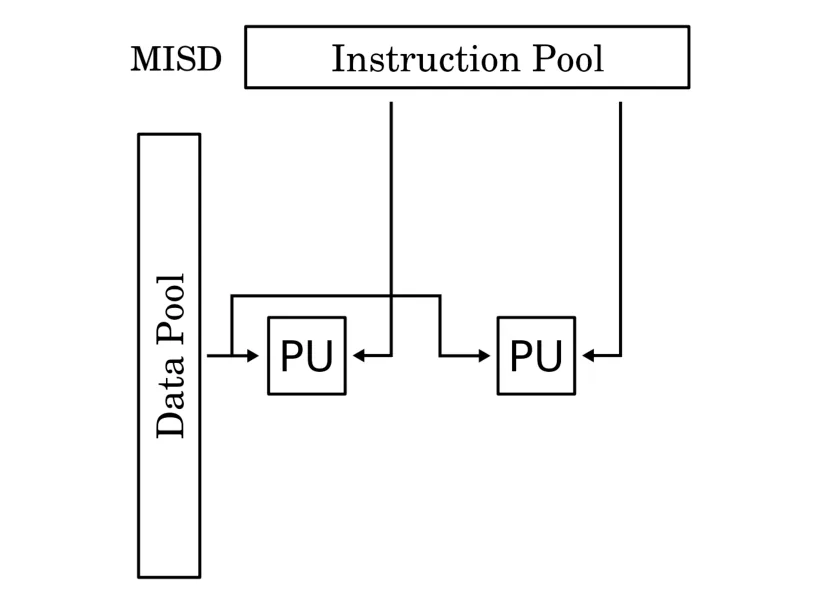
MISD: multiple instruction, single data
In Multiple Instruction Single Data (MISD), several instructions are performed on a single data stream. It is an uncommon type, mostly used for fault tolerance: different systems perform operations on the data and all the results must agree. It is used in flight control systems, where fault detection is critical.
- Common usage: not used commercially; some special-purpose systems, such as space flight control.
- Advantage: excellent where fault tolerance is critical.
Practise this: past-paper questions
- June 2022 · Paper 32 · Q5There are four basic categories of computer architecture. Single Instruction Single Data (SISD) is one architecture. Identify the three other…
- November 2023 · Paper 32 · Q10Describe the features of the SIMD and MISD computer architectures. SIMD MISD
- June 2026 · Paper 33 · Q4(b)State one difference and one similarity between the SIMD and MISD computer architectures
15.1 · 12 of 17Book page Contents
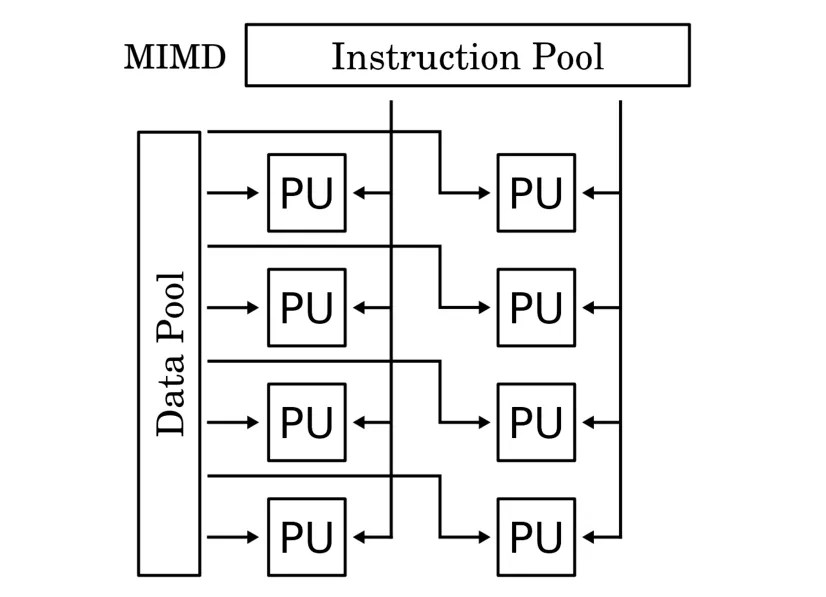
MIMD: multiple instruction, multiple data
In Multiple Instruction Multiple Data (MIMD), several independent processors perform operations on different pieces of data, either separately or as part of a shared memory space.
- Common usage: most modern desktop, laptop and mobile processors are MIMD processors.
- Advantage: great when you need to perform a variety of tasks that need a lot of processing and data, such as video editing and game rendering.
Practise this: past-paper questions
Used later in
15.1 · 13 of 17Book page Contents
Massively parallel computers
The MIMD architecture can be used in multicomputer systems known as massively parallel computers. Large organisations use these systems for calculations that involve highly complex mathematical processing. They are the latest type of supercomputer.
The major difference in architecture is that, instead of a bus structure supporting several processors, there is a network infrastructure supporting several computer units. The programs running on the different computers can communicate by passing messages over the network.
Another type of multicomputer system is cluster computing using PCs, sometimes called a server farm.
Whatever the technology used, these systems have an extremely large number of individual processors working in parallel.
Exam answer
- A large number of processors working together, at the same time, on the same program, communicating through a messaging interface.
15.1 · 14 of 17Book page Contents
What a virtual machine is
Because of advances in hardware, processing power has reached a point where systems can run as software processes inside other software that is already running, without a big loss of performance.
A host system can run software that lets other software behave as if it were running on a hardware system: this is called a virtual machine (VM). A VM can be set up to copy any combination of hardware, so the software running on it works as if it were using certain devices, even if those devices do not exist.
Practise this: past-paper questions
- November 2022 · Paper 32 · Q5Describe what is meant by a virtual machine. Include in your answer two benefits and two drawbacks of using a virtual machine. Description Benefit…
- June 2024 · Paper 32 · Q9(b)Explain the roles of the host operating system and the guest operating system as used in a computer system running a virtual machine
- June 2026 · Paper 32 · Q5Explain what is meant by the term virtual machine
15.1 · 15 of 17Book page Contents
Uses of a virtual machine
Virtual machines can fill many roles, including:
- Running other operating systems: a VM can be created so that one operating system can be installed inside another operating system. This might be a legacy OS, or an OS that would not normally be able to run on the host hardware. The VM can emulate different hardware setups, so the software runs as if it were on a different hardware platform.
- Supporting incompatible software: some older software will not run on newer systems. A VM can emulate an older system, on which the user can run the older software.
- Creating a test system: VMs are closed and controlled environments. The "hardware" of a VM exists only as a self-contained software process that is isolated from the real host system. This makes it possible to run software that could be damaging, such as malware, or early versions of software that need to be analysed.
- Running multiple servers: servers on a network have to fill several roles, such as giving access to file stores or storing email accounts for users. Several servers can run as VMs on one physical machine, which keeps the services separate without needing several pieces of hardware.
Note When a question asks for the benefits of a virtual machine, use these uses as your benefits.
Practise this: past-paper questions
- June 2022 · Paper 31 · Q6A virtual machine is used to emulate a new computer system. Describe two benefits and one limitation of using a virtual machine for this purpose.…
- November 2022 · Paper 32 · Q5Describe what is meant by a virtual machine. Include in your answer two benefits and two drawbacks of using a virtual machine. Description Benefit…
- June 2024 · Paper 32 · Q9(a)Outline two benefits and two limitations of a virtual machine. Benefit 1 Benefit 2 Limitation 1 Limitation 2
- June 2024 · Paper 32 · Q9(b)Explain the roles of the host operating system and the guest operating system as used in a computer system running a virtual machine
Used later in
15.1 · 16 of 17Book page Contents
Executing intermediate code
Instead of compiling program code into machine code that can only run on similar platforms, some languages use a virtual machine as a go-between for the system and the source code. Before it runs, the original program is translated into intermediate code, which is then passed to a virtual machine. The VM runs this code and works out how to control the host computer so that it carries out the right instructions.
Using a VM as a go-between for the system and the source code means the same code can be used on any platform that can run the VM. Java works in this way: the high-level code is compiled to Java bytecode, and then the Java virtual machine executes the code on whatever hardware platform it is running on.
15.1 · 17 of 17Book page Contents
Limitations of virtual machines
Limitations of a virtual machine
- A virtual machine may not be able to emulate new hardware, because that hardware may have been developed after the virtual machine was.
- Using a virtual machine means extra code is executed, so it might not be as efficient. Resources such as memory and processor time are shared, so processing time increases and performance gets worse.
- A virtual machine increases the maintenance overheads, because both the host system and the virtual machine must be maintained.
Practise this: past-paper questions
- June 2022 · Paper 31 · Q6A virtual machine is used to emulate a new computer system. Describe two benefits and one limitation of using a virtual machine for this purpose.…
- November 2022 · Paper 32 · Q5Describe what is meant by a virtual machine. Include in your answer two benefits and two drawbacks of using a virtual machine. Description Benefit…
- June 2024 · Paper 32 · Q9(a)Outline two benefits and two limitations of a virtual machine. Benefit 1 Benefit 2 Limitation 1 Limitation 2
- June 2026 · Paper 31 · Q5A virtual machine may be used to emulate computer hardware using software. Outline two benefits and two limitations of using a virtual machine
15.1
Concepts in 15.1
Every idea explained in 15.1, and where else in the notes it is used.
| Concept | In one line | Also used in |
|---|---|---|
| CISC | A processor with many complex, variable-length instructions that each do several low-level operations. | 15.1 Types of processor, 15.1 RISC processors, 15.1 RISC and CISC instruction set architectures, 15.1 RISC compared with CISC, 15.1 Interrupt handling in RISC and CISC |
| cluster computing | A multicomputer system built from many networked PCs, sometimes called a server farm. | only here |
| GPU (graphics processing unit) | A processor on a graphics card designed for parallel processing of video and graphics. | 15.1 SIMD: single instruction, multiple data |
| instruction set architecture | The design of a processor’s instruction set, such as RISC or CISC. | 15.1 RISC compared with CISC |
| intermediate code | Code a program is translated into so a virtual machine can run it on any platform. | only here |
| interrupt handling | Saving the registers and running the interrupt service routine when an interrupt arrives. | 15.1 Interrupts and pipelining |
| Java bytecode | The intermediate code Java is compiled into, run by the Java virtual machine. | only here |
| massively parallel computer | A very large number of processors working together on one program, communicating by messages. | only here |
| MIMD | Several independent processors carry out different instructions on different data. | 15.1 SISD: single instruction, single data, 15.1 Massively parallel computers |
| MISD | Several instructions are carried out on one data stream; used for fault tolerance. | 15.1 SISD: single instruction, single data |
| pipelining | Splitting instructions into stages so several instructions are processed at once, each at a different stage. | 15.1 RISC and CISC instruction set architectures, 15.1 RISC compared with CISC, 15.1 Interrupts and pipelining, 15.1 SIMD: single instruction, multiple data |
| polling | The processor regularly checking whether a hardware device needs attention, used before interrupts. | only here |
| RISC | A processor with a small set of simple, fixed-length instructions, each taking one clock cycle. | 15.1 Types of processor, 15.1 CISC processors, 15.1 RISC and CISC instruction set architectures, 15.1 RISC compared with CISC, 15.1 Interrupt handling in RISC and CISC, 15.1 Pipelining |
| SIMD | One instruction is carried out on several data streams at once, as in GPUs. | 15.1 Types of processor, 15.1 SISD: single instruction, single data |
| SISD | One processor carries out a single instruction on a single data stream, with no parallelism. | only here |
| vectored interrupts | Each device has a number sent to an interrupt register, so the processor knows the source. | only here |
| virtual machine | Software on a host system that behaves like a separate hardware system. | 15.1 Uses of a virtual machine, 15.1 Executing intermediate code, 15.1 Limitations of virtual machines |
Zain Merchant's notes, page by page, as printed in his book. The Notes tab has the same notes as text, with links.
Past-paper questions and mark schemes © Cambridge University Press & Assessment. Compiled for revision by Zain Merchant.
- June 2022 · Paper 31 · Q4Notes:RISC processorsCISC processorsRISC and CISC instruction set architecturesRISC compared with CISC
- June 2022 · Paper 31 · Q6Notes:Uses of a virtual machineLimitations of virtual machines
- June 2022 · Paper 32 · Q5Notes:SISD: single instruction, single dataSIMD: single instruction, multiple dataMISD: multiple instruction, single dataMIMD: multiple instruction, multiple data
- November 2022 · Paper 31 · Q10Notes:RISC compared with CISCPipelining
- November 2022 · Paper 32 · Q5Notes:What a virtual machine isUses of a virtual machineLimitations of virtual machines
- June 2023 · Paper 31 · Q8Notes:Massively parallel computers
- June 2023 · Paper 32 · Q8Notes:Pipelining
- November 2023 · Paper 31 · Q5Notes:SISD: single instruction, single dataMIMD: multiple instruction, multiple data
- November 2023 · Paper 32 · Q10Notes:SIMD: single instruction, multiple dataMISD: multiple instruction, single data
- June 2024 · Paper 31 · Q11Notes:RISC processorsRISC compared with CISCInterrupt handling in RISC and CISCInterrupts and pipelining
- June 2024 · Paper 32 · Q9Notes:What a virtual machine isUses of a virtual machineLimitations of virtual machines
- November 2024 · Paper 31 · Q2Notes:RISC processorsRISC compared with CISC
- November 2024 · Paper 32 · Q8Notes:CISC processorsRISC compared with CISC
- June 2026 · Paper 31 · Q5Notes:Uses of a virtual machineLimitations of virtual machines
- June 2026 · Paper 32 · Q5Notes:What a virtual machine is
- June 2026 · Paper 33 · Q4Notes:SIMD: single instruction, multiple dataMISD: multiple instruction, single dataMassively parallel computers
Past-paper questions and mark schemes © Cambridge University Press & Assessment. Compiled for revision by Zain Merchant.
Try the questions first.
Write your answers, then check them against the mark scheme. Your choice is remembered on this device.