AS Level 9618 · Paper 1 · 5.2
Language Translators
How programs are translated, and the tools in an IDE. Read the notes, try the past-paper questions, then check the mark scheme.
Past papers from June 2021 to June 202619 questions · 100 marks
In this subtopic
- Assemblers, compilers and interpreters, and when each is used
- Benefits and drawbacks of compilers and interpreters
- Partial compiling and interpreting, such as Java
- Features of a typical Integrated Development Environment (IDE)
5.2 · 1 of 12Book page Contents
Why translators are needed
Builds on
A processor can only execute machine code. Programs are written as source code, in a language people can read, so all source code programs must be translated into machine code before they can be executed. Assemblers, compilers and interpreters are all types of program translator, but they translate programs in different ways.
High-level languages, such as Visual Basic, C++ and Python, are used to write programs that do not depend on the computer architecture they will run on. To go from high-level source code to executable machine code, the source code must be translated. There are two main ways to do this: compilation or interpretation.
Whether source code is compiled or interpreted depends on the particular implementation of a programming language. Some implementations provide compilers, some provide interpreters, and some provide both.
Low-level language code, that is, assembly language programs, also needs to be translated. The translators used for assembly language programs are called assemblers.
| Translator | Translates | How |
|---|---|---|
| Assembler | Assembly language | Each assembly instruction becomes one machine code instruction. |
| Compiler | High-level language | Translates the whole program at once into an executable file. |
| Interpreter | High-level language | Translates and executes the program one line at a time. |
Practise this: past-paper questions
Used later in
5.2 · 2 of 12Book pages Contents
Compilers
A compiler translates source code into a form that can be executed, but the compiler does not execute the code. It produces executable code that cannot be read by a person or easily reverse-engineered (turned back into source code). Most commercial software is sold as compiled code so that the source code is protected. This helps commercial developers who make money from their code.
The compiler takes the source code and puts it through a series of processes to produce executable code:
Note These stages of compilation are taught at A Level, in 16.2 Translation software.
Any compilation errors are reported at the end of the compilation process. This is a disadvantage for large programs, because errors may be linked to each other. If errors are found, the program has to be corrected and compiled again, and this is repeated until the program is free of errors.
Once the program has compiled successfully, the executable file does not need to be translated again (unless the source code is changed). This makes it run faster, because no more translation is needed, which is a particular advantage for programs where performance is critical, such as fast-moving games.
Another advantage of a compiler is that the user does not need a translator (an interpreter) installed on their computer, because they never need to translate the program themselves. However, a Visual Basic program compiled to run on an Intel processor, for example, would need to be recompiled to run on an Apple processor.
For a compiler, these steps apply:
- The compiler program and the source code file are made available, but no data is needed.
- The compiler program begins execution.
- The first line of the source code is read.
- The line is analysed.
- If an error is found, this is recorded.
- If no error is found, the line of source code is converted to an intermediate code.
- The next line of source code is read and steps 4 to 7 are repeated.
- When the whole of the source code has been dealt with, one of two things happens. If no error has been found in the whole source code, the complete intermediate code is converted into object code. If any errors have been found, a list of them is output and no object code is produced.
The program can only be executed once compilation has shown no errors. This can happen straight away under the control of the compiler, if data for the program is available. Otherwise the object code is stored, and the program is executed later with no involvement of the compiler.
Practise this: past-paper questions
- November 2021 · Paper 11 · Q4(d)Francis’s team use language translators. Complete the descriptions of language translators by writing the missing words. are usually used when a…
- June 2022 · Paper 12 · Q6(a)Describe the operation of a compiler
- June 2025 · Paper 13 · Q3(a)Complete the description of compilers and interpreters by writing the missing words. A compiler checks all the code before attempting to translate…
Used later in
5.2 · 3 of 12Book pages Contents
Interpreters
Builds on
An interpreter translates and executes each line of source code, one line at a time. Each program line, when it is run, is first syntax-checked. If a syntax error is found, such as a missing bracket, the program stops and the error is reported. After the syntax check, the interpreter converts the line into its machine code equivalent and executes it. If a run-time error happens, the program crashes.
This line-by-line approach lets the developer test the program and quickly find and fix each error as it happens, without translating the whole program every time. So interpreters are very useful while a program is being developed.
Interpreted source code runs more slowly than compiled code, because it must be translated all over again every time the program is run. Also, the user must have the interpreter installed to run the program. However, interpreted code helps if the programmer does not know which platform will run the code. For example, JavaScript code is interpreted: the translation is done by the browser on the user’s computer.
For an interpreter, these steps apply:
- The interpreter program, the source code file and the data to be used by the source code program are all made available.
- The interpreter program begins execution.
- The first line of the source code is read.
- The line is analysed.
- If an error is found, it is reported and the interpreter program stops execution.
- If no error is found, the line of source code is converted to an intermediate code.
- The interpreter program uses this intermediate code to execute the required action.
- The next line of source code is read and steps 4 to 8 are repeated.
Compiler and interpreter in one line each
- A compiler translates the whole program, reports all errors at the end, and produces an executable file that runs without the compiler.
- An interpreter translates and runs one line at a time, stops at the first error, and is needed every time the program runs.
Practise this: past-paper questions
- November 2021 · Paper 11 · Q4(d)Francis’s team use language translators. Complete the descriptions of language translators by writing the missing words. are usually used when a…
- June 2022 · Paper 12 · Q6(b)Describe the operation of an interpreter
- June 2025 · Paper 13 · Q3(a)Complete the description of compilers and interpreters by writing the missing words. A compiler checks all the code before attempting to translate…
5.2 · 4 of 12Book pages Contents
Benefits and drawbacks of compilers and interpreters
Builds on
Whether a compiler or an interpreter is used depends on the programming language. For example, PHP programs (used to create dynamic web pages) are interpreted. When choosing between a language that can be compiled and one that can be interpreted, the programmer should weigh up the benefits and drawbacks of each.
Compilers: benefits
- The code can be well optimised by the compiler.
- Compiled programs can be given out as machine code, so the source code is hidden and can be kept secret for commercial reasons.
- No translation is needed when the program runs, because it was done when the source code was compiled.
Compilers: drawbacks
- You have to wait until the whole program has been compiled before you see any errors, which can take some time for a large program.
- If you want to change anything in the program, you have to recompile the whole program.
- The executable code produced only runs on one type of processor.
Interpreters: benefits
- Errors are reported as soon as they are found, so you do not have to wait for the whole program to be translated.
- Errors are shown line by line as the interpreter reaches them.
- Debugging is quicker and easier, because errors are reported in the console, which shows what the error is and where it is in the code.
Interpreters: drawbacks
- The program needs an interpreter to run.
- Translating the code line by line while it runs is slower than running compiled machine code.
- The interpreter takes up space in memory.
Practise this: past-paper questions
- November 2022 · Paper 12 · Q1(b)(i)State two drawbacks of using a compiler compared to an interpreter during program development. 1 2
- November 2023 · Paper 11 · Q6(a)Describe the advantages of using the interpreter compared to the compiler to translate the program
- June 2024 · Paper 11 · Q3(a)The developer uses an interpreter while writing the program code because it is easier for debugging. Explain one reason why it is easier to debug…
- November 2025 · Paper 13 · Q8(a)State two disadvantages of using a compiler compared to an interpreter during program development
5.2 · 5 of 12Book pages Contents
Choosing a compiler or an interpreter
Builds on
These tables give the reasons to choose each translator, comparing the two side by side.
Why a compiler should be used rather than an interpreter:
| Compiler | Interpreter | |
|---|---|---|
| Translator the user needs | The end user only needs the executable code, so they do not need to buy a compiler to translate the program before using it. | The end user needs a translator (an interpreter or a compiler) to translate the source code before it can be used. |
| Control of the source code | The developer keeps the source code, so the end user cannot change or extend it, and the developer can charge for upgrades and alterations. | The developer gives up control of the source code, so it is harder to charge for upgrades and alterations. Because end users can see the source code, they could use the developer’s intellectual property. |
| Speed when running | Compiled programs take less time to execute, because translation has already been done and the machine code may have been optimised by the compiler. | An interpreted program can take longer to execute than the same program compiled, because each line of the source code is translated before it is executed, every time the program is run. |
| Errors left in the program | Compiled programs have no syntax or semantic errors. | Interpreted programs may still contain syntax or semantic errors if any part of the program has not been fully tested; these errors will need to be debugged. |
| Running on another computer | The source program can be translated on one type of computer and then executed on another type, as long as the compiler produced the object code for that computer’s processor. | Interpreted programs cannot be interpreted on one type of computer and run on another type of computer. |
Why an interpreter should be used rather than a compiler:
| Compiler | Interpreter | |
|---|---|---|
| Finding errors | A compiler finds all the errors in a program. One error can make the compiler report other, dependent errors later in the program that will not be errors once the first one is corrected. So the number of errors reported may be more than the real number. | It is easier to develop and debug a program with an interpreter, because errors can be corrected on each line and the program restarted from that place, so the programmer can easily learn from each error. |
| Crashes while testing | Untested programs with errors may cause the computer to crash. | Untested programs should not be able to cause the computer to crash. |
| Seeing partial results | The developer has to write special routines to see partial results during development, which makes it harder to judge the quality of particular sections of code. | Partial results can be seen during development, so the developer can make informed decisions about a section of code, for example whether to keep it, change it, or scrap it and start again. |
| Changes by the end user | End users do not have the source code or the run-time libraries, so they cannot make changes and rely on the developer for updates and alterations. | If an interpreted program is bought, end users have all the source code and the run-time libraries, so they can change the program as needed without buying anything more. |
Interpreter while writing, compiler when finished
- While the program is being written, use an interpreter: incomplete code can be tested, it stops at the first error, and errors can be corrected in real time with the effect seen immediately.
- When the program is complete, use a compiler: it produces an executable file that can be tested and run many times without translating again, users do not need a translator, and the source code is not given away.
Practise this: past-paper questions
- June 2021 · Paper 12 · Q7(b)(i)The IDE allows Jennifer to use both an interpreter and a compiler while creating her computer program. Describe the ways in which Jennifer can use…
- June 2023 · Paper 12 · Q7(b)The development team needs to use a translator whilst writing the program for the client. Identify whether an interpreter or a compiler would be…
- June 2023 · Paper 13 · Q5(a)(i)Explain the reasons why the programmer uses an interpreter while writing the program code
- June 2023 · Paper 13 · Q5(a)(ii)Explain the reasons why the programmer uses a compiler when the program has been written
Show 4 more
- June 2024 · Paper 11 · Q3(a)The developer uses an interpreter while writing the program code because it is easier for debugging. Explain one reason why it is easier to debug…
- June 2024 · Paper 11 · Q3(b)The program is ready to be sold to customers. The developer uses a compiler because it creates an executable file. Explain the reasons why the…
- June 2024 · Paper 12 · Q8(a)The programmer decides to use the compiler when testing the final program. Describe the benefits of using the compiler during testing
- November 2025 · Paper 12 · Q10(a)Explain how the programmer can first use an interpreter and then a compiler to develop the computer program. Interpreter: Compiler
Used later in
5.2 · 6 of 12Book pages Contents
Partly compiled, partly interpreted: Java
Some high-level languages are partially compiled and partially interpreted. Most interpreted languages now use bytecode as an intermediate stage to speed up translation. The source code is compiled to produce bytecode (a low-level code), which is then interpreted (translated and executed) by a virtual machine.
Java works like this in console mode. A Java program is first compiled into Java bytecode. The bytecode is not the machine code of any real processor. When the program is run, the Java Virtual Machine on the user’s computer interprets the bytecode for that computer’s processor.
Why some languages are partially compiled and partially interpreted
- The same compiled bytecode can be used on different platforms, because it is interpreted for each processor when it runs.
- It is more efficient to run: the source code does not need recompiling for each platform, and running the bytecode is faster than interpreting the source code line by line.
- The machine code can be optimised for the processor, because it is generated when the program runs.
Practise this: past-paper questions
- November 2022 · Paper 12 · Q1(b)(ii)Explain why high-level language programs might be partially compiled and partially interpreted
- November 2023 · Paper 11 · Q6(b)State one reason why some high-level languages are partially compiled and partially interpreted
- June 2026 · Paper 12 · Q7(b)(ii)The high-level language the student is using can be partially compiled and partially interpreted. Explain the reasons why some high-level…
5.2 · 7 of 12Book page Contents
Assemblers
Builds on
An assembler translates assembly code programs into executable code. Because assembly code is specific to a type of processor, assemblers are specific too.
There is a one-to-one relationship between assembly code and machine code: each assembly instruction becomes one machine code instruction. So, compared with compiling high-level source code, assembling is a fairly simple translation. Any comments in an assembly code program are removed by the assembler, and symbolic references such as labels are replaced with actual addresses.
Practise this: past-paper questions
Used later in
5.2 · 8 of 12Book page Contents
Integrated development environment (IDE)
An integrated development environment (IDE) is used by programmers to help them write and develop programs. There are many different IDEs: some support just one programming language, others can be used for several. NetBeans, PyCharm, Visual Studio and SharpDevelop are all IDEs in use today.
IDEs usually have:
- a source code editor
- a compiler, an interpreter, or both
- a run-time environment with a debugger
- an auto-documenter.
| Purpose | IDE features |
|---|---|
| Coding | Context-sensitive prompts, text completion |
| Initial error detection | Dynamic syntax checks |
| Presentation | Prettyprint, expand and collapse code blocks |
| Debugging | Single stepping, breakpoints, report window showing variables and expressions |
Used later in
5.2 · 9 of 12Book pages Contents
Source code editor
Builds on
A source code editor lets a program be written and edited without using a separate text editor. An integrated source code editor speeds up development, because editing can be done without switching to a different piece of software every time the program needs correcting or adding to.
- Prettyprint: most source code editors colour code the words in the program and lay the program out in a meaningful way, such as indenting code blocks. This is called prettyprinting.
- Context-sensitive prompts: as the code is typed, the editor suggests ways to complete it, with text completion for variable names and reserved words.
- Dynamic syntax checks: the editor checks the syntax as the code is typed.
The figures show these features in the PyCharm source code editor.
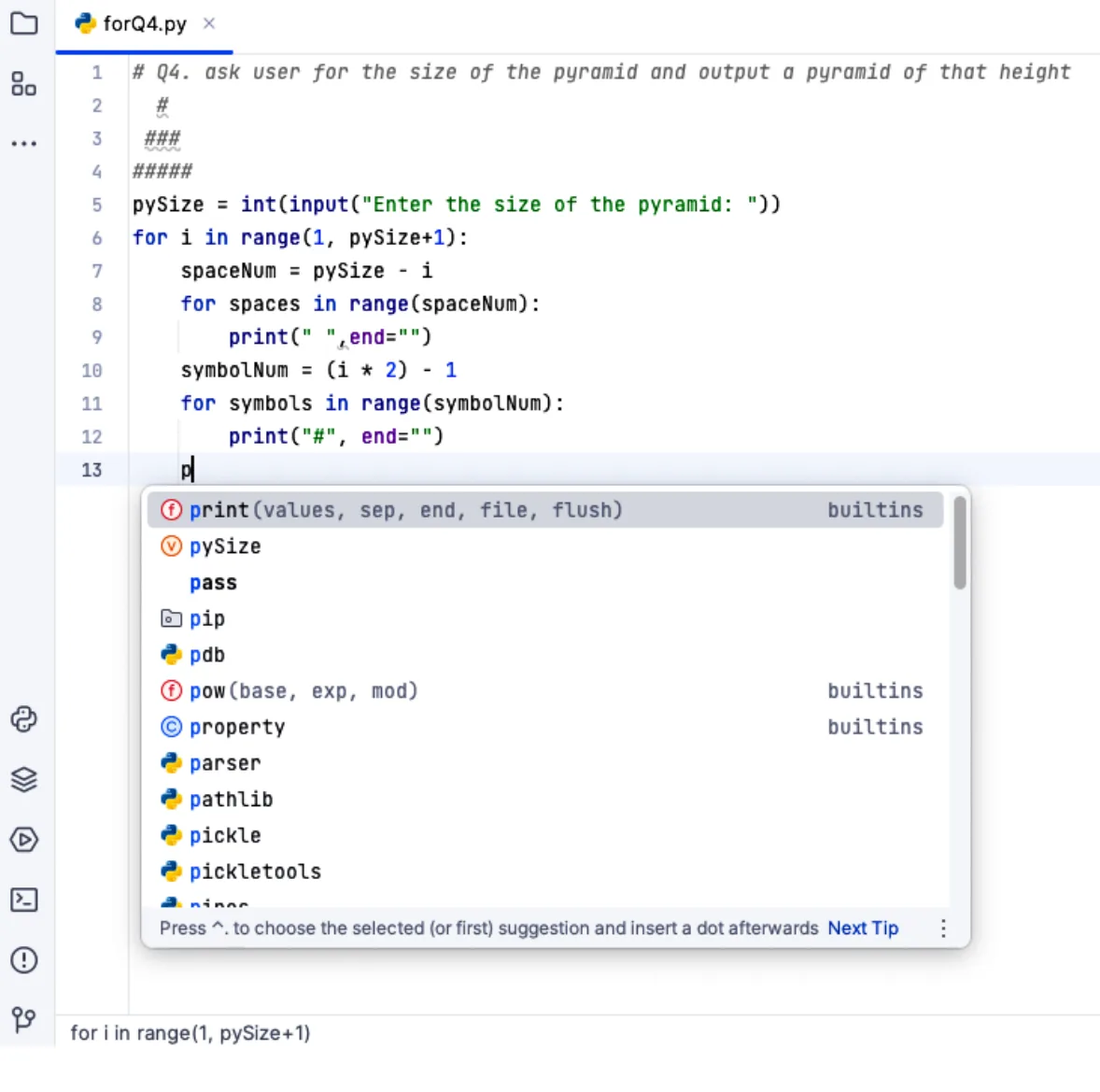
Dynamic syntax checking finds possible syntax errors while the program code is being typed into the source code editor, and alerts the programmer straight away, before the program is translated and run. So many errors can be found and corrected while the program is being written and edited, before it is run. Logic errors can only be found when the program is run.

Expand and collapse code blocks: in larger programs with more than one code block, some code blocks can be collapsed to a single line in the editor, so the programmer sees only the blocks being worked on. A collapsed block can be expanded again to show all its code.
Practise this: past-paper questions
- November 2021 · Paper 11 · Q4(b)(ii)A typical IDE provides debugging tools to support the testing of a program. Identify three other tools or features found in a typical IDE to…
- June 2022 · Paper 11 · Q5(a)Draw one line from each IDE feature to its correct description. IDE feature: Context-sensitive prompt Dynamic syntax check Breakpoint Single…
- June 2022 · Paper 12 · Q6(c)Explain how a programmer can make use of a typical Integrated Development Environment (IDE) when writing and testing a program. Writing Testing
- June 2023 · Paper 12 · Q7(c)The development team uses an Integrated Development Environment (IDE). Complete the table by describing the typical features found in an IDE. |…
Show 5 more
- November 2023 · Paper 11 · Q6(c)(i)Identify two features that support the visual presentation of the code in a typical Integrated Development Environment (IDE)
- November 2023 · Paper 13 · Q5(a)Describe the following features of a typical IDE. Context-sensitive prompts Single stepping
- June 2024 · Paper 12 · Q8(b)IDEs have many features other than built-in translators. Complete the table by identifying one other common IDE feature that can be used for each…
- November 2024 · Paper 11 · Q4(d)(i)One presentation feature found in a typical IDE is prettyprint. Identify and describe one other presentation feature found in a typical IDE.…
- November 2025 · Paper 11 · Q5(c)Identify two presentation features found in a typical Integrated Development Environment (IDE)
5.2 · 10 of 12Book page Contents
Compilers and interpreters in an IDE
Builds on
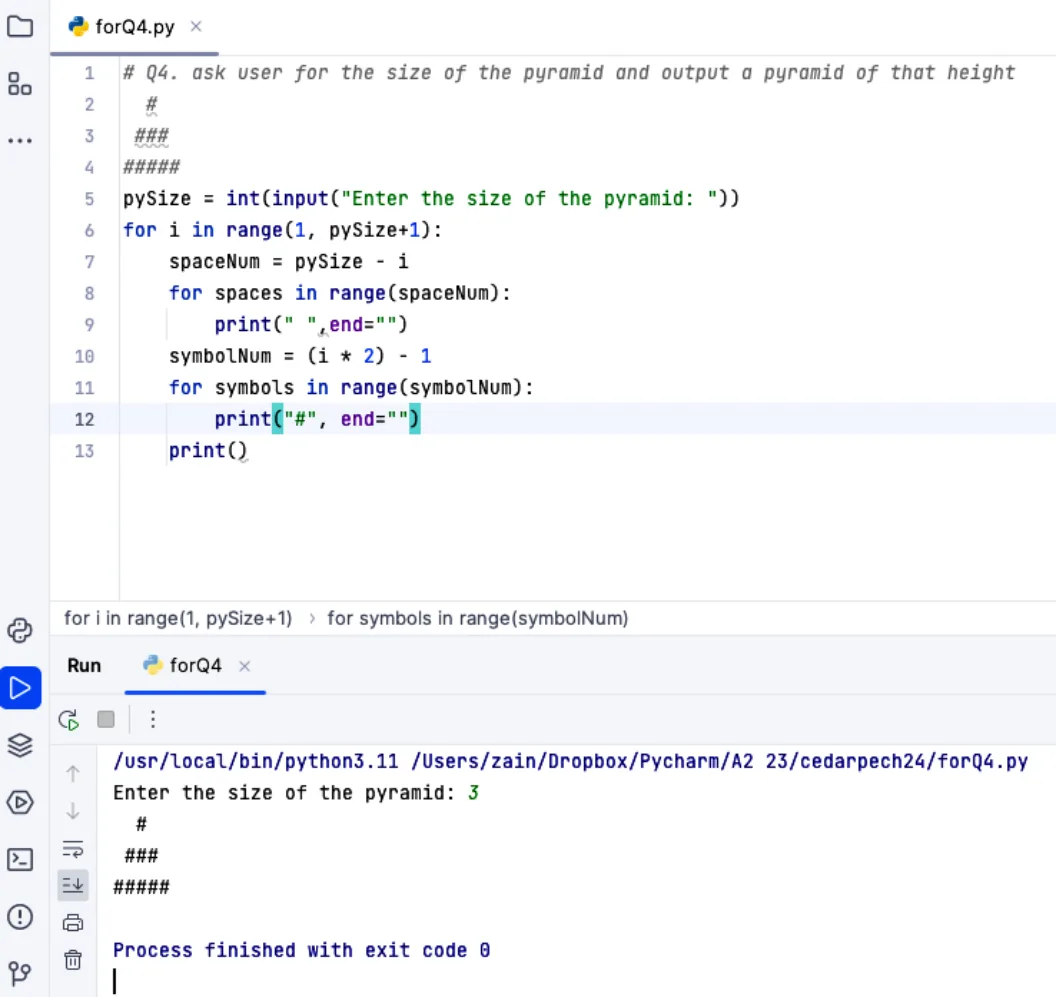
Most IDEs provide a compiler, an interpreter or both, to run the program. The interpreter is often used while developing the program, and the compiler to produce the final version of the object code.
With PyCharm there can be more than one interpreter, for different versions of the Python language. The program results are shown in the run-time environment provided.
Practise this: past-paper questions
- June 2021 · Paper 12 · Q7(b)(i)The IDE allows Jennifer to use both an interpreter and a compiler while creating her computer program. Describe the ways in which Jennifer can use…
- November 2025 · Paper 12 · Q10(a)Explain how the programmer can first use an interpreter and then a compiler to develop the computer program. Interpreter: Compiler
5.2 · 11 of 12Book page Contents
Run-time environment with a debugger
Builds on
A debugger is a program that runs the program being developed and helps with debugging (finding and correcting errors). It lets the programmer:
- single step through the program, running it one line at a time (single stepping), so the effect of each line can be seen
- set a breakpoint, which stops the program running at a chosen line of the source code.
A report window then shows the contents of the variables, and the values of expressions, at that point in the program. This lets the programmer look for logic errors and check that the program works as intended.
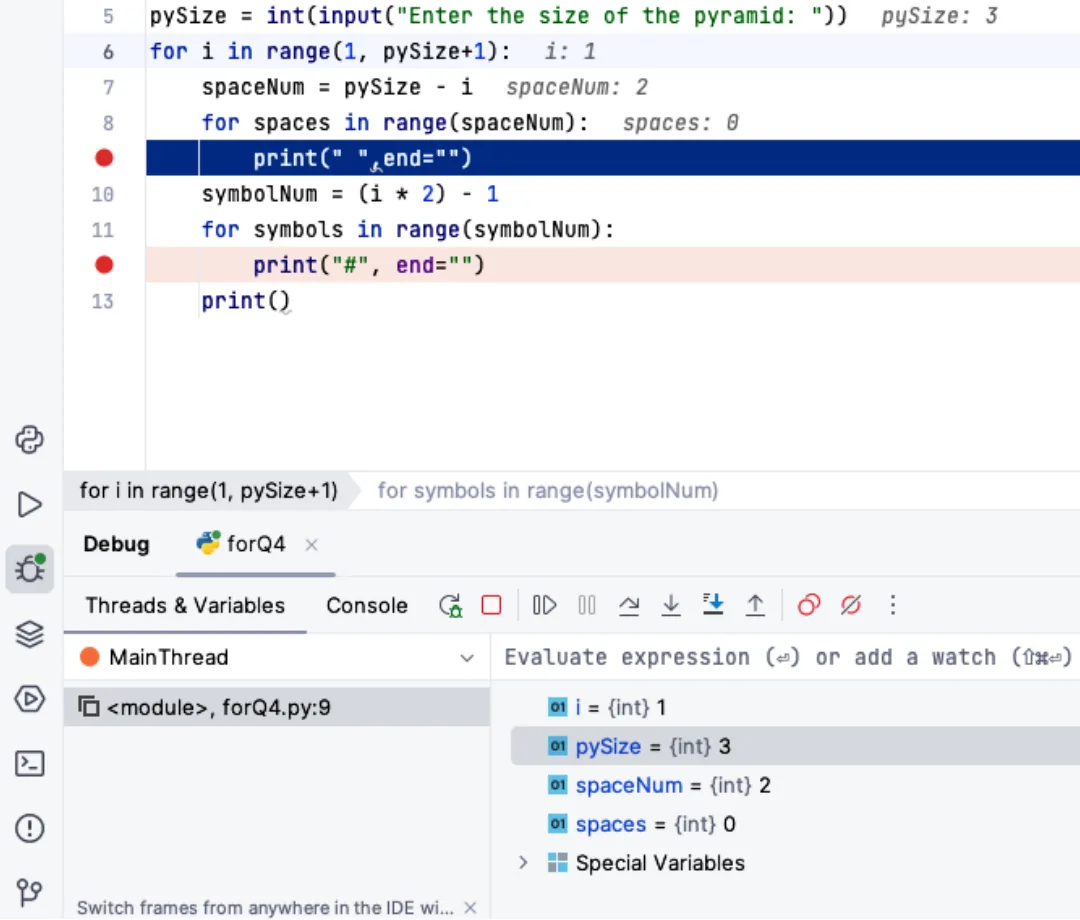
Each variable used is shown in the report window together with its data type and its contents at that point in the program. Answers to calculations and other expressions can also be shown.
Debugging features of an IDE
- Single stepping: runs the program one line at a time, so the effect of each line can be checked.
- Breakpoint: stops the program at a set line, so the values at that point can be checked.
- Report window (variable watch window): shows the values of variables and expressions and how they change as the program runs.
Practise this: past-paper questions
- June 2021 · Paper 12 · Q7(b)(ii)Identify two debugging tools that a typical IDE can provide
- June 2022 · Paper 11 · Q5(a)Draw one line from each IDE feature to its correct description. IDE feature: Context-sensitive prompt Dynamic syntax check Breakpoint Single…
- June 2022 · Paper 12 · Q6(c)Explain how a programmer can make use of a typical Integrated Development Environment (IDE) when writing and testing a program. Writing Testing
- June 2023 · Paper 12 · Q7(c)The development team uses an Integrated Development Environment (IDE). Complete the table by describing the typical features found in an IDE. |…
Show 6 more
- November 2023 · Paper 11 · Q6(c)(ii)Identify two features that support the debugging of the code in a typical IDE
- November 2023 · Paper 13 · Q5(a)Describe the following features of a typical IDE. Context-sensitive prompts Single stepping
- June 2024 · Paper 12 · Q8(b)IDEs have many features other than built-in translators. Complete the table by identifying one other common IDE feature that can be used for each…
- November 2024 · Paper 11 · Q4(d)(ii)One debugging feature found in a typical IDE is single stepping. Identify and describe one other debugging feature found in a typical IDE. Feature…
- November 2024 · Paper 12 · Q4(a)Describe how the programmers can use the debugging features of a typical IDE during the development of the program
- June 2026 · Paper 12 · Q7(b)(i)Explain how the student can use debugging tools in the IDE
5.2 · 12 of 12Book page Contents
Auto-documenter
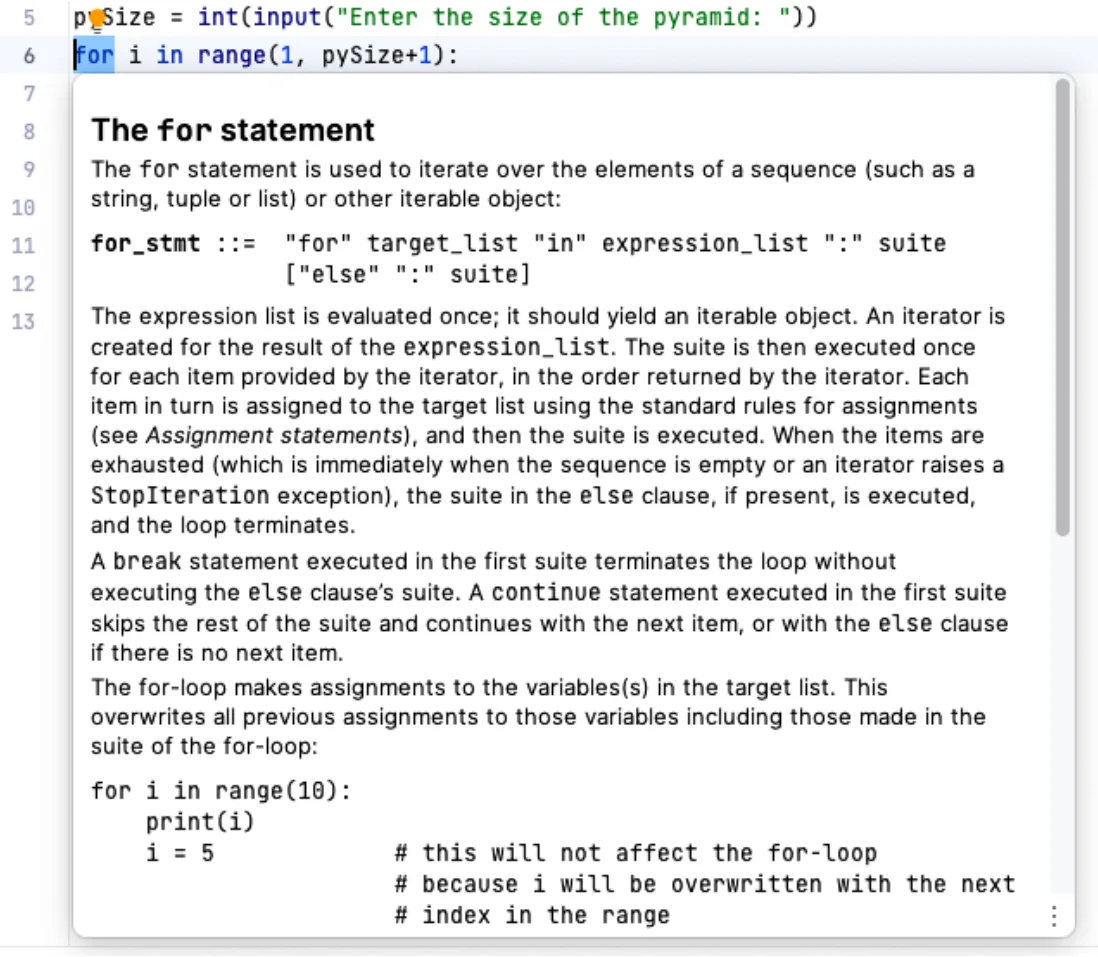
Most IDEs provide an auto-documenter, which explains the function and purpose of programming code.
5.2
Concepts in 5.2
Every idea explained in 5.2, and where else in the notes it is used.
Zain Merchant's notes, page by page, as printed in his book. The Notes tab has the same notes as text, with links.
Past-paper questions and mark schemes © Cambridge University Press & Assessment. Compiled for revision by Zain Merchant.
- June 2021 · Paper 12 · Q7Notes:Choosing a compiler or an interpreterCompilers and interpreters in an IDERun-time environment with a debugger
- November 2021 · Paper 11 · Q4Notes:Why translators are neededCompilersInterpretersAssemblersSource code editor
- June 2022 · Paper 11 · Q5Notes:Source code editorRun-time environment with a debugger
- June 2022 · Paper 12 · Q6Notes:CompilersInterpretersSource code editorRun-time environment with a debugger
- November 2022 · Paper 12 · Q1Notes:Benefits and drawbacks of compilers and interpretersPartly compiled, partly interpreted: Java
- June 2023 · Paper 12 · Q7Notes:Choosing a compiler or an interpreterSource code editorRun-time environment with a debugger
- June 2023 · Paper 13 · Q5Notes:Choosing a compiler or an interpreter
- November 2023 · Paper 11 · Q6Notes:Benefits and drawbacks of compilers and interpretersPartly compiled, partly interpreted: JavaSource code editorRun-time environment with a debugger
- November 2023 · Paper 13 · Q5Notes:Source code editorRun-time environment with a debugger
- June 2024 · Paper 11 · Q3Notes:Benefits and drawbacks of compilers and interpretersChoosing a compiler or an interpreter
- June 2024 · Paper 12 · Q8Notes:Choosing a compiler or an interpreterSource code editorRun-time environment with a debugger
- November 2024 · Paper 11 · Q4Notes:Source code editorRun-time environment with a debugger
- November 2024 · Paper 12 · Q4Notes:Run-time environment with a debugger
- June 2025 · Paper 13 · Q3Notes:CompilersInterpreters
- November 2025 · Paper 11 · Q5Notes:Source code editor
- November 2025 · Paper 12 · Q10Notes:Choosing a compiler or an interpreterCompilers and interpreters in an IDE
- November 2025 · Paper 13 · Q8Notes:Benefits and drawbacks of compilers and interpreters
- June 2026 · Paper 11 · Q2Notes:Why translators are neededBenefits and drawbacks of compilers and interpretersAssemblers
- June 2026 · Paper 12 · Q7Notes:Partly compiled, partly interpreted: JavaRun-time environment with a debugger
Past-paper questions and mark schemes © Cambridge University Press & Assessment. Compiled for revision by Zain Merchant.
Try the questions first.
Write your answers, then check them against the mark scheme. Your choice is remembered on this device.