AS Level 9618 · Paper 1 · 8.2
Database Management Systems (DBMS)
What a DBMS provides, and the tools inside it. Read the notes, try the past-paper questions, then check the mark scheme.
Past papers from June 2021 to June 202615 questions · 59 marks
In this subtopic
- Features of a DBMS that solve the problems of files
- The data dictionary, data modelling, logical schema, security and backup
- Software tools in a DBMS: developer interface and query processor
8.2 · 1 of 9Book pages Contents
What a DBMS is
Builds on
A database management system (DBMS) is the software that creates a database, manages it and controls access to it. Users and programs never reach the stored data directly: everything goes through the DBMS.
Databases come in many sizes, from a simple system made for one person to the central database of a large organisation. Some of the facilities a DBMS provides are only needed in a large organisation, where they are controlled by a database administrator.
In a file-based approach, each program keeps its own files, so the same data is stored many times, copies get out of step, and every program depends on how its files are laid out. A DBMS deals with these problems:
How a DBMS deals with the problems of a file-based approach
- Data management: the data is stored once, in linked tables, and shared by every program, so there is less repeated data, and a change made in one place is seen everywhere, so the data stays consistent. The DBMS keeps a data dictionary that describes all of the data.
- Data modelling: the structure of the data is designed as a whole, as a logical schema, instead of separately for each program.
- Program-data independence: programs ask the DBMS for data, so the way the data is stored can change without the programs being rewritten.
- Data integrity: the DBMS checks data as it is entered and keeps related tables in step.
- Data security: the DBMS controls who can see and change each part of the data (access rights), and provides backup procedures.
A DBMS also gives developers and users software tools: a developer interface for building the database and its forms and reports, and a query processor for finding data.
Practise this: past-paper questions
- June 2022 · Paper 12 · Q5(e)A Database Management System (DBMS) is used to create and manipulate the database. Complete the descriptions of the features and tools found in a…
- June 2023 · Paper 12 · Q2(a)The table contains names and descriptions of DBMS features and tools. Complete the table by writing down the missing names and descriptions. |…
- June 2024 · Paper 11 · Q6(b)The company is using a Database Management System (DBMS) to set up the database. Describe what is meant by the following DBMS features: Data…
Used later in
8.2 · 2 of 9Book pages Contents
The three-level model
A database is not just a collection of data: it is built according to the rules of a theoretical model. This idea was proposed by ANSI (the American National Standards Institute) in the 1970s, in its three-level model. The three levels are the external level, the conceptual level and the internal level.
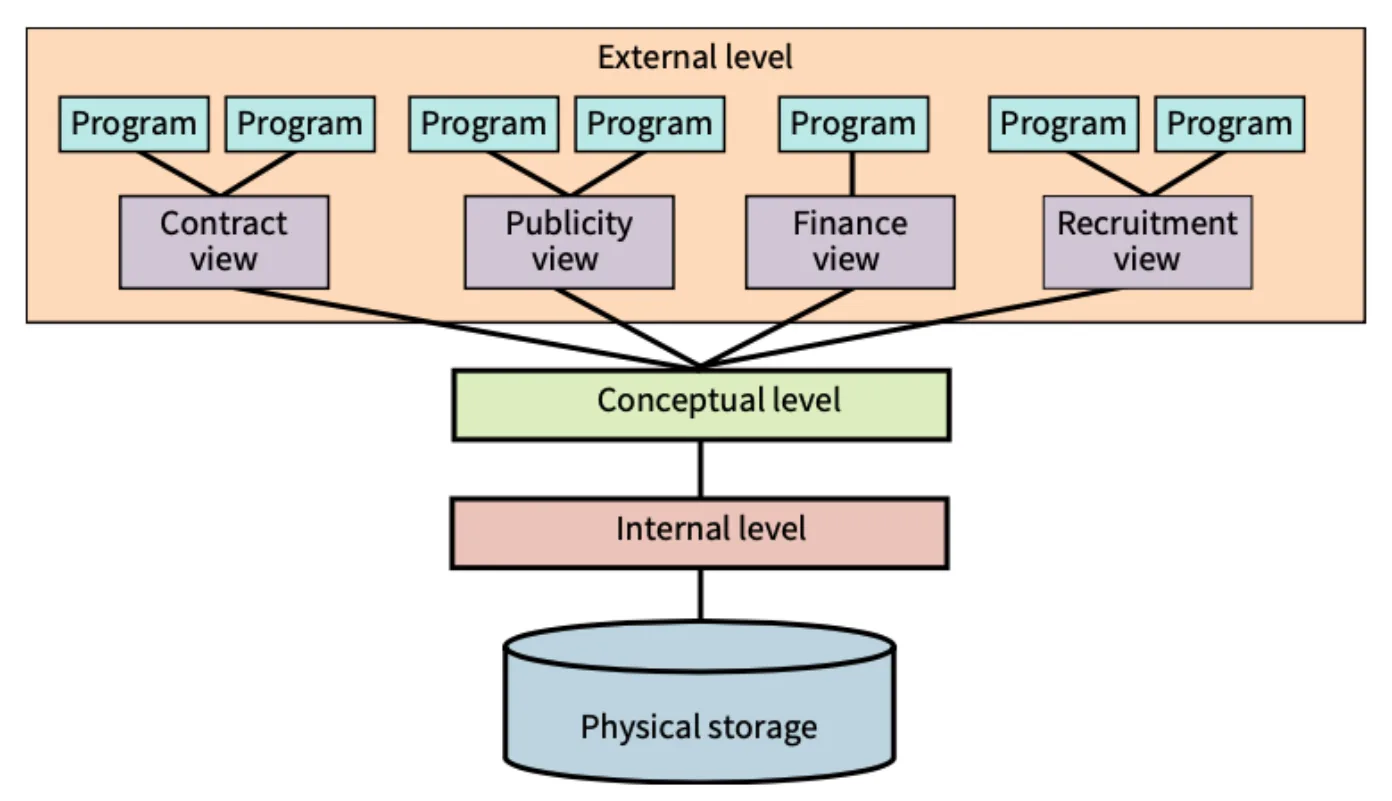
- The internal level is the lowest level. Its internal schema describes how the data is physically stored, here on disk. This level is controlled by the database management system (DBMS) software. Only the programmers who wrote the DBMS know the storage structure, and the DBMS copes with any change of storage medium.
- The conceptual level holds a single, overall view of the whole database. It is controlled by the database administrator (DBA), who has access to the DBMS. Its conceptual schema describes how the data is organised as a user or programmer sees it. It is also called the logical schema.
- The external level holds the individual user views and programmer views. Each view has an external schema that describes which parts of the database it can reach. One view can be used by several programs.
Views are an important security tool for the DBA. Each user, or group of users, can be given access rights that control what they are allowed to do through their view. For example, a user may be allowed to read data but not to change it, or may only be able to reach a few of the tables in the database.
8.2 · 3 of 9Book page Contents
Data modelling and the logical schema
Builds on
Data modelling means planning what data a database will store and how the items of data are related, before the database is built. The model is usually drawn as an entity-relationship (E-R) diagram, which shows the tables (entities) and the relationships between them.
The result of data modelling is the logical schema: the overall design of the database, showing its tables, their fields and the relationships between the tables. It is the conceptual schema of the three-level model. The logical schema describes the data and its structure, but not how the data is stored on disk, so it does not depend on any particular DBMS. It is then used to design the physical structure (the internal schema).
Logical schema: exam points
- An overview of the structure of the database: its tables, fields and relationships.
- It models the problem or situation, using methods such as an E-R diagram.
- It is independent of any particular DBMS (it is a model of a database that is not specific to one DBMS).
- It is used to design the physical structure of the database.
- It is the DBMS feature that describes the relationship between the data and its structure.
Practise this: past-paper questions
- June 2022 · Paper 12 · Q5(e)A Database Management System (DBMS) is used to create and manipulate the database. Complete the descriptions of the features and tools found in a…
- November 2022 · Paper 12 · Q5(d)(ii)Describe what is meant by a logical schema
- November 2022 · Paper 13 · Q2(b)A Database Management System (DBMS) has several features. Identify the feature that describes the relationship between data and its structure
- June 2023 · Paper 12 · Q2(a)The table contains names and descriptions of DBMS features and tools. Complete the table by writing down the missing names and descriptions. |…
Show 2 more
- June 2024 · Paper 11 · Q6(b)The company is using a Database Management System (DBMS) to set up the database. Describe what is meant by the following DBMS features: Data…
- June 2026 · Paper 12 · Q3(c)Complete the description of database key terms by writing the missing words. The stores data about the data in the database. The table names,…
8.2 · 4 of 9Book page Contents
The data dictionary
Builds on
An important feature of a DBMS is the data dictionary. It is part of the database, but it is hidden from everyone except the DBA. It holds metadata: data about the data. This includes the definitions of all the tables, fields and so on, and also details of how the physical storage is organised.
Keeping the data dictionary up to date is part of the data management that a DBMS provides.
Items stored in a data dictionary
- table names
- field (attribute) names
- the data type of each field
- validation rules
- primary keys and foreign keys
- relationships between the tables
- views
Exam definition
- The data dictionary stores metadata: data about the data (or about the structure) of the database, such as the field names and data types.
Practise this: past-paper questions
- June 2021 · Paper 11 · Q7(c)A database has a data dictionary. Give three items that are stored in a data dictionary
- November 2021 · Paper 12 · Q6(b)The shop manager uses a Database Management System (DBMS). Describe the purpose and contents of the data dictionary in the DBMS
- June 2022 · Paper 12 · Q5(e)A Database Management System (DBMS) is used to create and manipulate the database. Complete the descriptions of the features and tools found in a…
- November 2022 · Paper 12 · Q5(d)(i)Describe, using an example, what is meant by a data dictionary
Show 5 more
- June 2023 · Paper 11 · Q2(a)(i)State what is meant by a data dictionary and give one example of an item typically found in a data dictionary
- June 2023 · Paper 12 · Q2(a)The table contains names and descriptions of DBMS features and tools. Complete the table by writing down the missing names and descriptions. |…
- June 2024 · Paper 11 · Q6(b)The company is using a Database Management System (DBMS) to set up the database. Describe what is meant by the following DBMS features: Data…
- June 2025 · Paper 13 · Q6(d)(i)One feature provided by a DBMS is a data dictionary. The data dictionary stores the attribute names, table names, foreign keys and primary keys in…
- June 2026 · Paper 12 · Q3(c)Complete the description of database key terms by writing the missing words. The stores data about the data in the database. The table names,…
Used later in
8.2 · 5 of 9Book page Contents
The developer interface
Builds on
Whatever the size of the database, one way to create it is to use the special-purpose language SQL, which is covered in 8.3. Most DBMSs also offer other ways. The DBMS provides software tools through a developer interface. These let a developer create tables and define their fields (attributes) and data types without writing SQL.
The DBMS also lets a programmer build a user interface for the database. Another feature is the ability to create a report, which presents output in a formatted way. A programmer can give users access to queries and reports from the user interface.
Uses of a developer interface
- To create, modify or delete tables and other database objects, and to maintain the database.
- To set up or change the relationships between tables.
- To create forms for data input, and add tools to a form such as drop-down boxes and buttons.
- To design reports that show the output in an organised way.
- To add a menu, so users can choose between different actions or run different queries.
Practise this: past-paper questions
- June 2022 · Paper 12 · Q5(e)A Database Management System (DBMS) is used to create and manipulate the database. Complete the descriptions of the features and tools found in a…
- June 2023 · Paper 12 · Q2(a)The table contains names and descriptions of DBMS features and tools. Complete the table by writing down the missing names and descriptions. |…
- June 2025 · Paper 13 · Q6(d)(ii)The DBMS provides a developer interface. Explain how a database designer can make use of the developer interface
- November 2025 · Paper 12 · Q4(d)Describe the purpose of a developer interface in a Database Management System (DBMS)
Used later in
8.2 · 6 of 9Book page Contents
The query processor
A query is the way to extract and manipulate data in a database. The DBMS provides a query processor that lets a query be created and then processed (run).
Purpose of a query processor
- It lets the user enter a query, with the criteria the data must meet.
- It processes and executes the query (for example, one written in SQL).
- It searches for the data that meets the criteria.
- It organises the results so they can be displayed to the user.
Practise this: past-paper questions
- June 2022 · Paper 12 · Q5(e)A Database Management System (DBMS) is used to create and manipulate the database. Complete the descriptions of the features and tools found in a…
- November 2022 · Paper 13 · Q2(f)Describe the purpose of a query processor in a DBMS
- June 2023 · Paper 12 · Q2(a)The table contains names and descriptions of DBMS features and tools. Complete the table by writing down the missing names and descriptions. |…
Used later in
8.2 · 7 of 9Book pages Contents
Data security in a DBMS
Builds on
The DBA is responsible for setting up the user and programmer views, and for giving each one suitable, specific access rights. Access rights can be given to individuals or to groups of users. For example, some accounts can read data, some can read and write data, and others cannot read a table at all.
As with every system, regular backups are essential. The DBA is responsible for backing up the stored data.
Ways a DBMS keeps data secure
- Access rights: each user or group is given permissions (read only, read and write, full access, or none) for each table, so only users with the right permissions can read or edit the data.
- Views: different users see different parts of the database, so each user only sees what they need.
- Passwords and authentication: users must log in, for example with a password, biometrics or two-factor authentication, which prevents unauthorised access.
- Encryption: the data is turned into ciphertext, so it cannot be understood without the decryption key.
- Backup procedures: copies of the database are made automatically at regular intervals and stored off site, so the data can be recovered if it is lost or damaged.
Practise this: past-paper questions
- November 2023 · Paper 12 · Q2(b)Authentication is one method a Database Management System (DBMS) can use to improve the security of a database. Describe other methods that a DBMS…
- June 2025 · Paper 12 · Q5(c)(i)Identify two methods the DBMS can use to protect the data in the table USER from unauthorised access. Explain how each method protects the data
- November 2025 · Paper 13 · Q5(d)A Database Management System (DBMS) is used to maintain and manage the database. Describe two ways in which the DBMS can be used to ensure the…
- June 2026 · Paper 12 · Q3(c)Complete the description of database key terms by writing the missing words. The stores data about the data in the database. The table names,…
8.2 · 8 of 9Book page Contents
Data integrity in a DBMS
Builds on
Data integrity means the data in the database is accurate, complete and consistent. This is a key concern. One possible problem is a transaction that starts but is stopped by a system problem before it finishes, which would leave the database in an undefined state. A DBMS has a built-in feature that stops this happening: a transaction is either completed in full or not done at all.
Ways a DBMS supports data integrity
- Validation: validation rules, stored in the data dictionary, check data as it is entered.
- Referential integrity: the DBMS makes sure every foreign key value matches a primary key value in the linked table.
- Cascade update and delete: when data is changed or deleted in one place, the change is made in every related place.
- Normalisation: a normalised design stores each item once, so copies cannot disagree.
- Record locking: a record (or table) being updated by one user is locked, so two users cannot change it at the same time and no update is lost.
8.2 · 9 of 9Book pages Contents
Indexes
Builds on
Several DBMS features improve performance. The most important is the ability to create an index for a table, which is needed when a table has many fields and many records (tuples). An index is a second table linked to one field. It holds the values of that field, each with a pointer to the matching record in the original table. Searching the index is much quicker than searching the whole table.
Searching on a primary key gives a single matching record. For example, searching the sports club Member table (in 8.3) for member number 132099 gives the record for Abdel Patel. But databases are often searched on other values, for example to find a member by name.
Searching a large number of records can be slow, and an index speeds this up. Behind the scenes, extra information is stored so records can be found as quickly as possible. All primary key fields are indexed automatically. If records will often be found using some other field, that field should be set up as a secondary key, which is indexed. A surname is a very common secondary key in a table about people.
8.2
Concepts in 8.2
Every idea explained in 8.2, and where else in the notes it is used.
| Concept | In one line | Also used in |
|---|---|---|
| access rights | Permissions that set what each user or group may read or change in a database. | only here |
| conceptual level | The single overall view of the whole database, controlled by the DBA. | 8.2 Data modelling and the logical schema |
| data dictionary | The part of a DBMS that stores metadata: data about the data in the database. | 8.2 What a DBMS is, 8.2 Data integrity in a DBMS |
| data integrity | Data being accurate, complete and consistent. | only here |
| data modelling | Planning what data a database stores and how it is related, before it is built. | 8.2 What a DBMS is |
| database administrator (DBA) | The person who controls the conceptual level, user views, access rights and backups of a database. | 8.2 What a DBMS is, 8.2 The data dictionary, 8.2 Data security in a DBMS |
| database management system (DBMS) | Software that creates and manages a database and controls all access to its data. | 8.1 Database, table, record, field and entity, 8.2 The three-level model, 8.2 Data modelling and the logical schema, 8.2 The data dictionary, 8.2 The developer interface, 8.2 The query processor, 8.2 Data security in a DBMS, 8.2 Data integrity in a DBMS, 8.2 Indexes, 8.3 SQL, DDL and DML, 8.3 ALTER TABLE, 8.3 INSERT INTO, 8.3 LIKE and BETWEEN, 8.3 Text, numbers and dates in criteria |
| developer interface | DBMS tools for creating tables, relationships, forms, reports and menus. | 8.2 What a DBMS is |
| external level | The level holding the individual user and programmer views of a database. | only here |
| internal level | The lowest level of a database: how the data is physically stored. | 8.2 Data modelling and the logical schema |
| logical schema | The overall design of tables, fields and relationships, independent of any DBMS. | 8.2 What a DBMS is, 8.2 The three-level model |
| metadata | Data about data, such as field names and data types. | only here |
| query processor | DBMS software that takes a query, finds the data meeting its criteria and returns it. | 8.2 What a DBMS is |
| record locking | Stopping two users updating the same record at the same time, so no update is lost. | only here |
| three-level model | The ANSI model of a database with external, conceptual and internal levels. | 8.2 Data modelling and the logical schema |
| view | The part of a database that one user or group can see and use. | only here |
Zain Merchant's notes, page by page, as printed in his book. The Notes tab has the same notes as text, with links.
Past-paper questions and mark schemes © Cambridge University Press & Assessment. Compiled for revision by Zain Merchant.
- June 2021 · Paper 11 · Q7Notes:The data dictionary
- November 2021 · Paper 12 · Q6Notes:The data dictionary
- June 2022 · Paper 12 · Q5Notes:What a DBMS isData modelling and the logical schemaThe data dictionaryThe developer interfaceThe query processor
- November 2022 · Paper 12 · Q5Notes:Data modelling and the logical schemaThe data dictionary
- November 2022 · Paper 13 · Q2Notes:Data modelling and the logical schemaThe query processor
- June 2023 · Paper 11 · Q2Notes:The data dictionary
- June 2023 · Paper 12 · Q2Notes:What a DBMS isData modelling and the logical schemaThe data dictionaryThe developer interfaceThe query processor
- November 2023 · Paper 12 · Q2Notes:Data security in a DBMS
- June 2024 · Paper 11 · Q6Notes:What a DBMS isData modelling and the logical schemaThe data dictionary
- November 2024 · Paper 13 · Q4Notes:Data integrity in a DBMS
- June 2025 · Paper 12 · Q5Notes:Data security in a DBMSData integrity in a DBMS
- June 2025 · Paper 13 · Q6Notes:The data dictionaryThe developer interface
- November 2025 · Paper 12 · Q4Notes:The developer interface
- November 2025 · Paper 13 · Q5Notes:Data security in a DBMS
- June 2026 · Paper 12 · Q3Notes:Data modelling and the logical schemaThe data dictionaryThe developer interfaceData security in a DBMS
Past-paper questions and mark schemes © Cambridge University Press & Assessment. Compiled for revision by Zain Merchant.
Try the questions first.
Write your answers, then check them against the mark scheme. Your choice is remembered on this device.