AS Level 9618 · Paper 1 · 8.3
Data Definition Language (DDL) and Data Manipulation Language (DML)
Building and querying a database with SQL. Read the notes, try the past-paper questions, then check the mark scheme.
Past papers from June 2021 to June 202629 questions · 187 marks
In this subtopic
- DDL: creating and changing a database and its tables
- DML: adding, changing and deleting data
- SELECT queries with criteria, sorting, grouping and joins
8.3 · 1 of 23Book pages Contents
SQL, DDL and DML
Builds on
Structured Query Language (SQL) is the industry standard language for working with relational databases. SQL is a declarative language: a program says what result it wants, not how to get it. This is the opposite of imperative programming, where a program gives the sequence of steps the computer must follow.
SQL commands are split into groups. Two of them are in the syllabus:
- Data Definition Language (DDL) has the commands that define and change a database and its parts, such as tables and relationships:
CREATE DATABASE,CREATE TABLEandALTER TABLE. - Data Manipulation Language (DML) has the commands that query the data and maintain it (insert, update and delete records):
SELECT,INSERT INTO,UPDATEandDELETE FROM.
DDL and DML in a DBMS
- The DBMS carries out all creation and modification of the database structure using its DDL.
- The DBMS carries out all queries and maintenance of the data using its DML.
- SQL is the industry standard for both DDL and DML.
SQL syntax. These rules apply to every SQL statement:
- Statements are made of keywords such as CREATE, SELECT, INSERT and UPDATE. These are reserved words, so they must not be used as identifiers (the names of tables or fields).
- Keywords are usually written in capital letters, which makes statements easier to read. However, SQL is not case sensitive.
- Each statement ends with a semicolon. Some systems do not need it, but it is good practice to always include it.
- Longer statements are usually written over several lines, which again makes them easier to read.
For example, this statement selects the members whose surname is Jones:
SELECT FirstName, LastName, Phone
FROM Member
WHERE LastName = 'Jones';
A set of SQL statements written to do one job is called an SQL script.
Used later in
8.3 · 2 of 23Book page Contents
CREATE DATABASE
DDL is the part of SQL used to create or change the structure of a database. DDL commands only create the structure: they do not put any data into the database.
To create a database, the syntax is:
CREATE DATABASE databasename;For example, this creates the database for a sports club:
CREATE DATABASE SportsClub;You cannot create a database with the same name as one that already exists. To create it again, the old version must first be deleted (dropped). Dropping a database deletes all of the data stored in it.
Practise this: past-paper questions
- June 2021 · Paper 11 · Q7(b)(iii)Bobby wants to name his database SHOPORDERS. Write a Data Definition Language (DDL) statement to define a new database with the name SHOPORDERS
- November 2023 · Paper 11 · Q3(c)(i)Write a Structured Query Language (SQL) script to define the database called SHOP
- June 2026 · Paper 13 · Q4(c)(i)The table shows some sample data for SUBJECT. SubjectCode | SubjectName | DepartmentID CS1 | Computer Science IGCSE | ITCS CS2 | Computer Science…
Used later in
8.3 · 3 of 23Book page Contents
CREATE TABLE
Builds on
To create a table, the syntax is:
CREATE TABLE tablename (field1 datatype, field2 datatype, ...);Each field definition is separated from the next by a comma. A statement can be written on one line, but it is much easier to read when split over several lines, as below. When you use several lines, do not forget the brackets and commas. Usually the first line has the opening bracket, and the last line has the matching closing bracket and the semicolon.
This statement sets up the table that stores the details of the sports club members:
CREATE TABLE Member (
    MemberId  CHAR(6),
    FirstName VARCHAR(30),
    LastName  VARCHAR(30),
    Phone     VARCHAR(15),
    PRIMARY KEY (MemberId));
For each field you must give the field name and its data type. Some data types also need a length. The primary key is given by the keywords PRIMARY KEY followed by the field name (or names) in brackets.
Practise this: past-paper questions
- June 2021 · Paper 12 · Q1(c)(i)Complete the following Data Definition Language (DDL) statement to define the table RENTAL. CREATE ( RentalID INTEGER NOT NULL, CustomerID INTEGER…
- June 2022 · Paper 11 · Q4(c)(i)Sample data to be stored in the table STUDENT_TEST is shown. StudentID | TestID | Mark 12 | A1 | 50 12 | P10 | 100 13 | A1 | 75 14 | P10 | 60…
- June 2023 · Paper 11 · Q2(b)(iii)Part of the database table BIRD_TYPE is shown: | BirdID | Name | Size | | 0123 | Blackbird | Medium | | 0035 | Jay | Large | | 0004 | Raven |…
- June 2024 · Paper 12 · Q4(b)Sample data for the table EXAM is shown: ExamID | Subject | Level | TotalMarks 00956124 | Computer Science | 2 | 75 00956125 | Computer Science |…
Show 6 more
- June 2024 · Paper 13 · Q4(b)Sample data for the table PERFORMANCE is shown: | PerformanceID | ShowID | ShowDate | StartTime | | 0001 | MK12 | 5/5/2025 | 13:00 | | 0002 | MK12…
- November 2024 · Paper 11 · Q2(b)(ii)The table shows sample data for the table REPAIR_PART. | PartID | RepairNumber | Quantity | | ACD128SA | 0022 | 3 | | PPOR543DWW | 0022 | 1 | |…
- November 2024 · Paper 13 · Q4(c)(i)Write an SQL script to define the table BATCH. Include constraints (restrictions) on the data that can be entered into each field where appropriate
- November 2025 · Paper 13 · Q5(b)Some example data from the STAFF table is shown. StaffID | StaffFirstName | StaffLastName | Department | RemoteWorker 1 | Ralph | Jura | E | Yes 2…
- June 2026 · Paper 12 · Q3(b)(i)The given Structured Query Language (SQL) script is written to define the table CHARACTER. 01 CREATE TABLE CHARACTER( 02 CharacterID INT, 03…
- June 2026 · Paper 13 · Q4(c)(i)The table shows some sample data for SUBJECT. SubjectCode | SubjectName | DepartmentID CS1 | Computer Science IGCSE | ITCS CS2 | Computer Science…
8.3 · 4 of 23Book pages Contents
Naming tables and fields
Builds on
As in most programming languages, there are rules about the identifiers that can be used for table and field names:
- Names must begin with a letter.
- Names can only contain letters, numbers and underscores.
- Names cannot be SQL keywords (watch out for ORDER).
- Names should not include spaces.
Table names. A table is usually named after the entity it describes, and the name is usually singular, for example Customer, Booking or Appointment. Some developers start table names with tbl, for example tblCustomer, which makes it clear in program code that the name is a table.
Field names should make their purpose clear, and it is good practice to follow one style. These notes use upper camel case, for example CustomerId.
Each field should hold only a single item of data, because it is much easier for a computer to combine data than to split it. Instead of one field for a customer’s name, use a first name field and a surname field, and perhaps a title and other names too. Addresses are usually split into house name or number, street, town, county and postcode, often with an extra field for a village or other less common parts. Remember that people’s names often do not follow the pattern first name, space, last name, especially outside the English-speaking world, and addresses in other countries may have a very different format.
The same field name can be used in different tables. For example, the Member and Instructor tables both have FirstName and LastName fields, and this causes no problem. Where a field name is ambiguous (it appears in more than one table), put the table name and a full stop in front of it in your SQL statements, for example Member.FirstName. This is good practice.
8.3 · 5 of 23Book page Contents
SQL data types
Builds on
Every field in a table is given one of these SQL data types:
| Data type | Description |
|---|---|
CHARACTER or CHAR(n) | A fixed-length string of n characters |
VARCHAR(n) | A variable-length string of at most n characters |
BOOLEAN | TRUE or FALSE |
INTEGER or INT | A whole number, positive or negative |
REAL | A number with a decimal part |
DATE | A date |
TIME | A time, usually written HH:MM:SS |
Choosing a data type
- An ID made of digits that can start with 0, such as 0123, is a
CHARorVARCHAR, not anINTEGER, because an integer would lose the leading zero. - Codes with letters, names and descriptions are
CHAR(fixed length) orVARCHAR(length varies). - A field that only stores yes or no, or true or false, is a
BOOLEAN. - Prices and amounts of money are
REAL. Counts and quantities areINTEGER.
Practise this: past-paper questions
- June 2021 · Paper 12 · Q1(c)(i)Complete the following Data Definition Language (DDL) statement to define the table RENTAL. CREATE ( RentalID INTEGER NOT NULL, CustomerID INTEGER…
- June 2022 · Paper 11 · Q4(c)(i)Sample data to be stored in the table STUDENT_TEST is shown. StudentID | TestID | Mark 12 | A1 | 50 12 | P10 | 100 13 | A1 | 75 14 | P10 | 60…
- June 2023 · Paper 11 · Q2(b)(iii)Part of the database table BIRD_TYPE is shown: | BirdID | Name | Size | | 0123 | Blackbird | Medium | | 0035 | Jay | Large | | 0004 | Raven |…
- June 2024 · Paper 12 · Q4(b)Sample data for the table EXAM is shown: ExamID | Subject | Level | TotalMarks 00956124 | Computer Science | 2 | 75 00956125 | Computer Science |…
Show 6 more
- June 2024 · Paper 13 · Q4(b)Sample data for the table PERFORMANCE is shown: | PerformanceID | ShowID | ShowDate | StartTime | | 0001 | MK12 | 5/5/2025 | 13:00 | | 0002 | MK12…
- November 2024 · Paper 11 · Q2(b)(ii)The table shows sample data for the table REPAIR_PART. | PartID | RepairNumber | Quantity | | ACD128SA | 0022 | 3 | | PPOR543DWW | 0022 | 1 | |…
- November 2024 · Paper 13 · Q4(c)(i)Write an SQL script to define the table BATCH. Include constraints (restrictions) on the data that can be entered into each field where appropriate
- November 2025 · Paper 13 · Q5(b)Some example data from the STAFF table is shown. StaffID | StaffFirstName | StaffLastName | Department | RemoteWorker 1 | Ralph | Jura | E | Yes 2…
- June 2026 · Paper 12 · Q3(b)(i)The given Structured Query Language (SQL) script is written to define the table CHARACTER. 01 CREATE TABLE CHARACTER( 02 CharacterID INT, 03…
- June 2026 · Paper 13 · Q4(c)(i)The table shows some sample data for SUBJECT. SubjectCode | SubjectName | DepartmentID CS1 | Computer Science IGCSE | ITCS CS2 | Computer Science…
8.3 · 6 of 23Book page Contents
Primary and foreign keys
Builds on
A primary key is set with the keywords PRIMARY KEY, followed by the field name in brackets. If the table has a composite primary key, put all of its fields inside the brackets, separated by commas:
CREATE TABLE Certificate (
    MemberId       CHAR(6),
    CourseCode     CHAR(6),
    AssessmentDate DATE,
    InstructorId   INT,
    PRIMARY KEY (MemberId, CourseCode));
A foreign key is a field whose values exist as the primary key of another table. It is set with FOREIGN KEY, the field name in brackets, then REFERENCES followed by the other table and its primary key field in brackets. The Certificate table has three foreign keys:
CREATE TABLE Certificate (
    MemberId       CHAR(6),
    CourseCode     CHAR(6),
    AssessmentDate DATE,
    InstructorId   INT,
    PRIMARY KEY (MemberId, CourseCode),
    FOREIGN KEY (MemberId) REFERENCES Member (MemberId),
    FOREIGN KEY (CourseCode) REFERENCES Course (CourseCode),
    FOREIGN KEY (InstructorId) REFERENCES Instructor (InstructorId));
Note A foreign key line must always name the table and field it refers to. FOREIGN KEY (MemberId) on its own is an error.
Practise this: past-paper questions
- June 2021 · Paper 12 · Q1(c)(i)Complete the following Data Definition Language (DDL) statement to define the table RENTAL. CREATE ( RentalID INTEGER NOT NULL, CustomerID INTEGER…
- June 2022 · Paper 11 · Q4(c)(i)Sample data to be stored in the table STUDENT_TEST is shown. StudentID | TestID | Mark 12 | A1 | 50 12 | P10 | 100 13 | A1 | 75 14 | P10 | 60…
- June 2023 · Paper 11 · Q2(b)(iii)Part of the database table BIRD_TYPE is shown: | BirdID | Name | Size | | 0123 | Blackbird | Medium | | 0035 | Jay | Large | | 0004 | Raven |…
- June 2024 · Paper 11 · Q6(c)(i)The database FARMING has a second table created named PLAYER that has the primary key PlayerID. The field PlayerID in EVENT needs to be set up as…
Show 8 more
- June 2024 · Paper 12 · Q4(b)Sample data for the table EXAM is shown: ExamID | Subject | Level | TotalMarks 00956124 | Computer Science | 2 | 75 00956125 | Computer Science |…
- June 2024 · Paper 12 · Q4(c)The table EXAM_QUESTION has been created but the foreign key has not been linked. Write an SQL script to update EXAM_QUESTION and link the foreign…
- June 2024 · Paper 13 · Q4(b)Sample data for the table PERFORMANCE is shown: | PerformanceID | ShowID | ShowDate | StartTime | | 0001 | MK12 | 5/5/2025 | 13:00 | | 0002 | MK12…
- November 2024 · Paper 11 · Q2(b)(ii)The table shows sample data for the table REPAIR_PART. | PartID | RepairNumber | Quantity | | ACD128SA | 0022 | 3 | | PPOR543DWW | 0022 | 1 | |…
- November 2024 · Paper 13 · Q4(c)(i)Write an SQL script to define the table BATCH. Include constraints (restrictions) on the data that can be entered into each field where appropriate
- November 2025 · Paper 13 · Q5(b)Some example data from the STAFF table is shown. StaffID | StaffFirstName | StaffLastName | Department | RemoteWorker 1 | Ralph | Jura | E | Yes 2…
- June 2026 · Paper 12 · Q3(b)(i)The given Structured Query Language (SQL) script is written to define the table CHARACTER. 01 CREATE TABLE CHARACTER( 02 CharacterID INT, 03…
- June 2026 · Paper 13 · Q4(c)(i)The table shows some sample data for SUBJECT. SubjectCode | SubjectName | DepartmentID CS1 | Computer Science IGCSE | ITCS CS2 | Computer Science…
8.3 · 7 of 23Book page Contents
Table constraints
Builds on
Table constraints are rules that data must follow to be accepted into a table. They are usually set up as part of a CREATE TABLE statement. These are the common ones:
- NOT NULL makes sure a field cannot be left empty (null).
- UNIQUE makes sure every value in a field is different.
- PRIMARY KEY makes sure every record has a value in the field, and that the value is unique.
- FOREIGN KEY sets up referential integrity: a record with a foreign key value can only be added if a record with the same primary key value exists in the other table. This makes sure the links between related tables are kept.
- CHECK makes sure the values in a field meet a condition, for example that a field only accepts positive numbers.
This new definition of the Instructor table uses NOT NULL, so an instructor record cannot be created without a first name and a last name:
CREATE TABLE Instructor (
    InstructorId INT,
    FirstName    VARCHAR(30) NOT NULL,
    LastName     VARCHAR(30) NOT NULL,
    Email        VARCHAR(30),
    PRIMARY KEY (InstructorId));
When an exam question asks you to include constraints (restrictions) on the data, NOT NULL on the fields that must always have a value, and the primary key, are the usual answers. The primary key can also be given on the field’s own line, for example StaffID INTEGER NOT NULL PRIMARY KEY,
Practise this: past-paper questions
- June 2021 · Paper 12 · Q1(c)(i)Complete the following Data Definition Language (DDL) statement to define the table RENTAL. CREATE ( RentalID INTEGER NOT NULL, CustomerID INTEGER…
- November 2024 · Paper 11 · Q2(b)(ii)The table shows sample data for the table REPAIR_PART. | PartID | RepairNumber | Quantity | | ACD128SA | 0022 | 3 | | PPOR543DWW | 0022 | 1 | |…
- November 2024 · Paper 13 · Q4(c)(i)Write an SQL script to define the table BATCH. Include constraints (restrictions) on the data that can be entered into each field where appropriate
- June 2026 · Paper 13 · Q4(c)(i)The table shows some sample data for SUBJECT. SubjectCode | SubjectName | DepartmentID CS1 | Computer Science IGCSE | ITCS CS2 | Computer Science…
Used later in
8.3 · 8 of 23Book page Contents
ALTER TABLE
Builds on
ALTER TABLE changes the definition of a table that already exists. The most common change is to add a new field: give its name and data type after ADD.
ALTER TABLE Course
ADD StartDate DATE;
More than one field can be added at once, separated by commas (this is the form mark schemes use; some DBMSs need the word ADD before each field):
ALTER TABLE Member
ADD DateJoined DATE, Junior BOOLEAN;
ALTER TABLE can also add a primary key or a foreign key to a table that was created without one:
ALTER TABLE Certificate
ADD PRIMARY KEY (MemberId, CourseCode);

ALTER TABLE Certificate
ADD FOREIGN KEY (MemberId) REFERENCES Member (MemberId);
Practise this: past-paper questions
- November 2021 · Paper 12 · Q6(c)(ii)Write DDL statements to include a field in the table PURCHASE to store the date of the order
- June 2022 · Paper 13 · Q6(b)(ii)The table DEVICE needs a new attribute to store whether the device has been returned by the staff member, or not. Write a Structured Query…
- November 2022 · Paper 11 · Q4(d)Write an SQL script to include two new fields in CAMERA_DATA to store the number of photographs currently on the camera and the date the camera…
- November 2022 · Paper 13 · Q2(d)Write the SQL script to add one field to the table PHOTOGRAPH to store the resolution of the photograph, e.g. 1920 × 1068
Show 4 more
- June 2024 · Paper 11 · Q6(c)(i)The database FARMING has a second table created named PLAYER that has the primary key PlayerID. The field PlayerID in EVENT needs to be set up as…
- June 2024 · Paper 12 · Q4(c)The table EXAM_QUESTION has been created but the foreign key has not been linked. Write an SQL script to update EXAM_QUESTION and link the foreign…
- November 2025 · Paper 12 · Q4(b)The table CONTAINER needs an additional field to store the data for the last inspection date. Write a Structured Query Language (SQL) script to…
- June 2026 · Paper 11 · Q4(c)(i)The field will store whether the toy has been returned and will store either Yes or No. Write an SQL script to include the additional field in the…
8.3 · 9 of 23Book pages Contents
INSERT INTO
Builds on
Users of any database need to add new data, update it to keep it correct, and delete it when it is no longer needed. SQL DML has commands for all three tasks.
New records are added to a table with INSERT INTO. The syntax is:
INSERT INTO table (field1, field2, ...)
VALUES (value1, value2, ...);
For example, the sports club has a new basketball course. This statement adds it to the Course table:
INSERT INTO Course (CourseCode, Description, Fee)
VALUES ('CR7531', 'Basketball', 25);
When you insert records, the data must follow any constraints set in the table design. Some fields may not be left blank, or may only accept certain values, and a foreign key constraint may mean the DBMS checks another table for a matching primary key value.
You must also think about data types. Here CourseCode and Description are text fields, so their values go in quote marks. Fee is a number, so it does not.
More than one record can be added at a time, with a comma between each set of values. The sports club has taken on three more instructors for the basketball course. This statement adds them to the Instructor table:
INSERT INTO Instructor (InstructorId, FirstName, LastName, Email)
VALUES (6, 'Bailey', 'Campbell', 'cbailey@example.net'),
       (7, 'Jaden', 'Beckford', 'jaden.beckford@example.edu'),
       (8, 'Jasmine', 'Ansari', 'jansari@example.com');
If you give a value for every field, in the same order as the fields in the table, the list of field names can be left out:
INSERT INTO Course
VALUES ('CR7531', 'Basketball', 25);
Practise this: past-paper questions
- November 2021 · Paper 11 · Q5(c)(ii)Complete the DML statement to include the following car in the table CAR. | Field | Data | | RegistrationNumber | 123AA | | Make | Tiger | | Model…
- November 2022 · Paper 12 · Q5(b)Write the Structured Query Language (SQL) script to add a new record in the table TREE to store the following data: | Attribute | Value | | TreeID…
- June 2025 · Paper 13 · Q6(b)A new product needs to be entered into the database. The product has the ID 002323, the product name ‘Blue ball point 2mm’, there are 50 in a box,…
8.3 · 10 of 23Book pages Contents
UPDATE
Builds on
Records are changed with an UPDATE statement. The syntax is:
UPDATE table
SET field1 = value1, field2 = value2, ...
WHERE criteria;
For example, the sports club has decided to lower the price of one of its courses. This statement changes the fee for Tennis in the Course table from 30 to 25:
UPDATE Course
SET Fee = 25
WHERE Description = 'Tennis';
Think carefully about the criteria in the WHERE clause. The same result could have been achieved with:
WHERE CourseCode = 'DG0011';If there were two courses with the description Tennis, this version would only change the fee of the course with the code DG0011, not both. Neither method is wrong: it depends on what you want to do. But to update the phone number of Abdel Patel, it would not be wise to use FirstName = 'Abdel' as the criteria, because there may be several members called Abdel and every one of them would get the new number.
The WHERE clause in an UPDATE statement
- The WHERE clause is optional, but if it is left out, every record in the table is updated.
- You can only be sure of updating a single record if you select it by its primary key.
- In practical work, test the criteria with a SELECT statement before you use them in an UPDATE.
Practise this: past-paper questions
- June 2025 · Paper 12 · Q5(d)(ii)The following changes need to be made to the character with the ID "0002": • level changed to 3 • money changed to 10000.00 Write an SQL script to…
- June 2026 · Paper 11 · Q4(c)(ii)The toy that was borrowed with the borrow ID A2226 has been returned. Write an SQL script to amend the record and store that the toy has been returned
8.3 · 11 of 23Book page Contents
DELETE FROM
Records are deleted from a table with DELETE FROM. The syntax is:
DELETE FROM table
WHERE criteria;
This statement deletes Joe Donald’s record from the Member table:
DELETE FROM Member
WHERE MemberId = '131092';
The record to delete has been chosen by its primary key. If the criteria had been WHERE FirstName = 'Joe' AND LastName = 'Donald', every record that matched would be deleted. As with UPDATE, a DELETE FROM statement with no WHERE clause deletes every record in the table.
Practise this: past-paper questions
Used later in
8.3 · 12 of 23Book pages Contents
The sports club sample data
The SELECT examples in the rest of 8.3 use this sample data from the sports club database. Primary keys are underlined in a design; here they are the first field of each table, and Certificate has the composite primary key (MemberId, CourseCode).
Member (MemberId, FirstName, LastName, Phone)
| MemberId | FirstName | LastName | Phone |
|---|---|---|---|
| 012010 | Emily | Marr | 01632 961743 |
| 131092 | Joe | Donald | 01632 960007 |
| 132099 | Abdel | Patel | 01632 967267 |
| 145543 | Precious | Jones | 01632 962816 |
| 148765 | Jack | Marr | 01632 961743 |
Course (CourseCode, Description, Fee)
| CourseCode | Description | Fee |
|---|---|---|
| DG0011 | Tennis | 30 |
| CR0001 | Kayaking | 100 |
| DG3002 | Swimming | 20 |
| SO0112 | Judo L1 | 20 |
| SP8701 | Judo L2 | 30 |
| CR0020 | Badminton | 20 |
| CR0014 | Climbing | 40 |
Instructor (InstructorId, FirstName, LastName, Email)
| InstructorId | FirstName | LastName | |
|---|---|---|---|
| 1 | Sue | James | sue.james@example.org |
| 2 | Greta | Geuze | g.geuze@example.com |
| 3 | Mohammed | Franks | m.franks@example.com |
| 4 | Jay | Linton | Jay12@example.net |
| 5 | Sue | Robbins | susan.robbins@example.net |
Certificate (MemberId, CourseCode, AssessmentDate, InstructorId)
| MemberId | CourseCode | AssessmentDate | InstructorId |
|---|---|---|---|
| 145543 | DG0011 | 21/02/2019 | 1 |
| 012010 | DG0011 | 21/02/2019 | 1 |
| 132099 | DG3002 | 01/03/2019 | 2 |
| 131092 | CR0001 | 15/04/2019 | 3 |
| 132099 | CR0001 | 15/04/2019 | 3 |
| 012010 | CR0020 | 15/04/2019 | 5 |
| 132099 | SO0112 | 02/06/2019 | 4 |
| 145543 | SO0112 | 02/06/2019 | 4 |
| 148765 | SP8701 | 11/06/2019 | 2 |
| 145543 | CR0014 | 01/07/2019 | 5 |
Used later in
8.3 · 13 of 23Book pages Contents
SELECT ... FROM
SELECT is used to extract data from a database. At its simplest, the syntax is:
SELECT field1, field2, ...
FROM table;
SELECT is followed by a list of field (attribute) names, and FROM is followed by the name of the table the fields come from. For example:
SELECT FirstName, LastName, Phone
FROM Member;
This gives the result below. The columns are in the order given in the field list, and the field names are the column headings.
| FirstName | LastName | Phone |
|---|---|---|
| Emily | Marr | 01632 961743 |
| Joe | Donald | 01632 960007 |
| Abdel | Patel | 01632 967267 |
| Precious | Jones | 01632 962816 |
| Jack | Marr | 01632 961743 |
Keywords such as SELECT and FROM are written in capitals because it makes statements easier to read, even though SQL is not case sensitive. Put a semicolon at the end of the last line to finish the statement.
Selecting every field. Instead of listing the fields, you can return every field with SELECT *. The Instructor table has the fields Instructor (InstructorId, FirstName, LastName, Email), and this query returns all of them:
SELECT *
FROM Instructor;| InstructorId | FirstName | LastName | |
|---|---|---|---|
| 1 | Sue | James | sue.james@example.org |
| 2 | Greta | Geuze | g.geuze@example.com |
| 3 | Mohammed | Franks | m.franks@example.com |
| 4 | Jay | Linton | Jay12@example.net |
| 5 | Sue | Robbins | susan.robbins@example.net |
Only use SELECT * when every field is needed. Extra data makes the results harder to work with. For example, when you search for a song on a music streaming service, you do not want to see every field stored about it, such as SongID, SongURL, MusicLabel and ReleasedDate.
Practise this: past-paper questions
- June 2021 · Paper 12 · Q1(c)(ii)Write a Data Manipulation Language (DML) script to return the first name and last name of all customers who have not paid their deposit
- November 2021 · Paper 11 · Q5(c)(i)Complete the following DML statements to return the number of cars for sale in each shop. SELECT COUNT( ) FROM ShopID
- November 2021 · Paper 12 · Q6(c)(i)Complete the DML statements to return the total number of items purchased with the purchase ID of 3011A. SELECT SUM( ) FROM WHERE = ;
- June 2022 · Paper 11 · Q4(c)(ii)Write a Structured Query Language (SQL) script to find the average mark of students in test A7
Show 24 more
- June 2022 · Paper 12 · Q5(c)Complete the SQL script to return the IDs of all the actors in the film with the title Cinderella. SELECT FROM FILM_ACTOR INNER JOIN ON…
- June 2022 · Paper 12 · Q5(d)Write an SQL script to count the number of films that were released in January 2022
- June 2022 · Paper 13 · Q6(b)(i)Complete the SQL script to return the number of devices stored in the database for the staff member with the first name ‘Ali’ and last name…
- November 2022 · Paper 11 · Q4(c)(ii)Complete the Structured Query Language (SQL) script to display the total number of photographs that have been taken using a camera with a camera…
- November 2022 · Paper 13 · Q2(c)Complete the SQL script to return the total number of telescopes owned by the company whose ID begins with HW. SELECT ( ) FROM TELESCOPE WHERE LIKE ;
- June 2023 · Paper 11 · Q2(b)(iv)The database tables are repeated here for reference: BIRD_TYPE(BirdID, Name, Size) BIRD_SEEN(SeenID, BirdID, Date, Location, PersonID)…
- June 2023 · Paper 12 · Q2(c)(ii)Write a Structured Query Language (SQL) script to return the names of all the horses that have the horse level intermediate or beginner
- June 2023 · Paper 12 · Q2(c)(iii)The following SQL script should return the number of riders that have the rider level beginner and have a lesson booked on 09/09/2023. SELECT…
- November 2023 · Paper 11 · Q3(c)(ii)Write the SQL script to return the total quantity of items that the customer with the ID of HJ231 has ordered
- November 2023 · Paper 13 · Q3(b)(ii)Write the Structured Query Language (SQL) script to return the total number of courses that have started after 9 September 2023. The value…
- June 2024 · Paper 11 · Q6(c)(ii)Write an SQL script to return the number of events that each player has completed
- June 2024 · Paper 13 · Q4(c)Write an SQL script to return the number of times each show is scheduled. For example, in the sample data in part (b), the show MK12 is scheduled…
- November 2024 · Paper 11 · Q2(b)(iii)Suppliers send invoices to the company for the parts that are used. A new table, INVOICE, stores the data about each invoice and whether it has…
- November 2024 · Paper 12 · Q6(b)(ii)The database also has the table INVOICE that stores data about each invoice that is sent to a customer. Example data from the table INVOICE is…
- November 2024 · Paper 13 · Q4(b)Write an SQL script to return the total quantity of ice cream sold to the customer with the ID of 0034E in the year 2023
- June 2025 · Paper 11 · Q5(e)Write an Structured Query Language (SQL) script to output the customer ID, the customer’s name and the total cost of the customer’s orders that…
- June 2025 · Paper 12 · Q5(d)(i)Write a Structured Query Language (SQL) script to count the number of items purchased by the user with the username "KAT123"
- June 2025 · Paper 13 · Q6(c)The attribute Collected in the table ORDER stores the Boolean value TRUE if the order has been collected and FALSE if the order has not been…
- November 2025 · Paper 11 · Q2(c)(ii)Write an SQL script to return the total number of placements completed by the student with ID LDEA01 at the company with ID NEAM. The total should…
- November 2025 · Paper 12 · Q4(c)Write an SQL script to return the number of containers stored in the database for the ship with the name Caledonia
- November 2025 · Paper 13 · Q5(c)Products are given a rating between 1 and 10 inclusive. Write an SQL script to return only the ProductID, ProductName and ComplaintDetails for all…
- June 2026 · Paper 11 · Q4(b)Write a Structured Query Language (SQL) script to return the total number of days of all toys borrowed by each customer. The customer ID and first…
- June 2026 · Paper 12 · Q3(b)(ii)Write an SQL script to return each player's name and the number of characters each player has created. The result needs to include a suitable…
- June 2026 · Paper 13 · Q4(c)(ii)Write an SQL script to return each department's name and the number of subject codes for that department. The result needs to include a suitable…
8.3 · 14 of 23Book pages Contents
Sorting with ORDER BY
The results of a SELECT statement can be sorted by adding an ORDER BY clause:
SELECT field1, field2, ...
FROM table
ORDER BY field(s) ASC|DESC;- Ascending order (ASC): from low to high, A to Z or 1 to 9.
- Descending order (DESC): from high to low, Z to A or 9 to 1.
Ascending order is the default, so ASC does not have to be written:
SELECT MemberId, FirstName, LastName
FROM Member
ORDER BY LastName;| MemberId | FirstName | LastName |
|---|---|---|
| 131092 | Joe | Donald |
| 145543 | Precious | Jones |
| 012010 | Emily | Marr |
| 148765 | Jack | Marr |
| 132099 | Abdel | Patel |
Jack and Emily both have the surname Marr. SQL does not promise any order for records with equal values in the sort field. To be sure of the order, sort on a second field as well: ORDER BY LastName, FirstName puts Emily before Jack. A table can also be sorted by a field that is not in the list of selected fields.
To sort in descending order, write DESC after the field name. This sorts by FirstName from Z to A:
SELECT MemberId, FirstName, LastName
FROM Member
ORDER BY FirstName DESC;| MemberId | FirstName | LastName |
|---|---|---|
| 145543 | Precious | Jones |
| 131092 | Joe | Donald |
| 148765 | Jack | Marr |
| 012010 | Emily | Marr |
| 132099 | Abdel | Patel |
Practise this: past-paper questions
- November 2025 · Paper 13 · Q5(c)Products are given a rating between 1 and 10 inclusive. Write an SQL script to return only the ProductID, ProductName and ComplaintDetails for all…
- June 2026 · Paper 12 · Q3(b)(ii)Write an SQL script to return each player's name and the number of characters each player has created. The result needs to include a suitable…
- June 2026 · Paper 13 · Q4(c)(ii)Write an SQL script to return each department's name and the number of subject codes for that department. The result needs to include a suitable…
Used later in
8.3 · 15 of 23Book pages Contents
Choosing records with WHERE
Builds on
On a music service you rarely want every song in the database: perhaps only the songs by one artist, or on one album. A WHERE clause filters the records, so only those that meet the criteria are returned:
SELECT field1, field2, ...
FROM table
WHERE selection-criteria;
For example, a sports club member wants to know which courses cost less than £25:
SELECT Description, Fee
FROM Course
WHERE Fee < 25;| Description | Fee |
|---|---|
| Swimming | 20 |
| Judo L1 | 20 |
| Badminton | 20 |
Think about the data type of each field in the criteria. Fee is stored as a number, so it is compared with a number, without quotes. Text fields need quotation marks:
SELECT FirstName, LastName, Phone
FROM Member
WHERE LastName = 'Marr';| FirstName | LastName | Phone |
|---|---|---|
| Emily | Marr | 01632 961743 |
| Jack | Marr | 01632 961743 |
The criteria after WHERE can be as complex as needed, and can combine several operators:
| Operator | Meaning |
|---|---|
= | Equal to |
> | Greater than |
< | Less than |
>= | Greater than or equal to |
<= | Less than or equal to |
<> | Not equal to |
For example, this query finds all the members who do not have the surname Marr:
SELECT *
FROM Member
WHERE LastName <> 'Marr';| MemberId | FirstName | LastName | Phone |
|---|---|---|---|
| 131092 | Joe | Donald | 01632 960007 |
| 132099 | Abdel | Patel | 01632 967267 |
| 145543 | Precious | Jones | 01632 962816 |
Practise this: past-paper questions
- June 2021 · Paper 12 · Q1(c)(ii)Write a Data Manipulation Language (DML) script to return the first name and last name of all customers who have not paid their deposit
- November 2021 · Paper 12 · Q6(c)(i)Complete the DML statements to return the total number of items purchased with the purchase ID of 3011A. SELECT SUM( ) FROM WHERE = ;
- June 2022 · Paper 11 · Q4(c)(ii)Write a Structured Query Language (SQL) script to find the average mark of students in test A7
- June 2022 · Paper 12 · Q5(c)Complete the SQL script to return the IDs of all the actors in the film with the title Cinderella. SELECT FROM FILM_ACTOR INNER JOIN ON…
Show 18 more
- June 2022 · Paper 12 · Q5(d)Write an SQL script to count the number of films that were released in January 2022
- June 2022 · Paper 13 · Q6(b)(i)Complete the SQL script to return the number of devices stored in the database for the staff member with the first name ‘Ali’ and last name…
- November 2022 · Paper 11 · Q4(c)(ii)Complete the Structured Query Language (SQL) script to display the total number of photographs that have been taken using a camera with a camera…
- November 2022 · Paper 13 · Q2(c)Complete the SQL script to return the total number of telescopes owned by the company whose ID begins with HW. SELECT ( ) FROM TELESCOPE WHERE LIKE ;
- June 2023 · Paper 11 · Q2(b)(iv)The database tables are repeated here for reference: BIRD_TYPE(BirdID, Name, Size) BIRD_SEEN(SeenID, BirdID, Date, Location, PersonID)…
- June 2023 · Paper 12 · Q2(c)(ii)Write a Structured Query Language (SQL) script to return the names of all the horses that have the horse level intermediate or beginner
- June 2023 · Paper 12 · Q2(c)(iii)The following SQL script should return the number of riders that have the rider level beginner and have a lesson booked on 09/09/2023. SELECT…
- November 2023 · Paper 11 · Q3(c)(ii)Write the SQL script to return the total quantity of items that the customer with the ID of HJ231 has ordered
- November 2023 · Paper 13 · Q3(b)(ii)Write the Structured Query Language (SQL) script to return the total number of courses that have started after 9 September 2023. The value…
- November 2024 · Paper 11 · Q2(b)(iii)Suppliers send invoices to the company for the parts that are used. A new table, INVOICE, stores the data about each invoice and whether it has…
- November 2024 · Paper 12 · Q6(b)(ii)The database also has the table INVOICE that stores data about each invoice that is sent to a customer. Example data from the table INVOICE is…
- November 2024 · Paper 13 · Q4(b)Write an SQL script to return the total quantity of ice cream sold to the customer with the ID of 0034E in the year 2023
- June 2025 · Paper 11 · Q5(e)Write an Structured Query Language (SQL) script to output the customer ID, the customer’s name and the total cost of the customer’s orders that…
- June 2025 · Paper 12 · Q5(d)(i)Write a Structured Query Language (SQL) script to count the number of items purchased by the user with the username "KAT123"
- June 2025 · Paper 13 · Q6(c)The attribute Collected in the table ORDER stores the Boolean value TRUE if the order has been collected and FALSE if the order has not been…
- November 2025 · Paper 11 · Q2(c)(ii)Write an SQL script to return the total number of placements completed by the student with ID LDEA01 at the company with ID NEAM. The total should…
- November 2025 · Paper 12 · Q4(c)Write an SQL script to return the number of containers stored in the database for the ship with the name Caledonia
- November 2025 · Paper 13 · Q5(c)Products are given a rating between 1 and 10 inclusive. Write an SQL script to return only the ProductID, ProductName and ComplaintDetails for all…
8.3 · 16 of 23Book page Contents
AND, OR and NOT
Criteria can be joined with the logical operators AND, OR and NOT. Brackets can be used to force the order in which they are worked out, or just to make the statement easier to read.
SELECT *
FROM Member
WHERE FirstName = 'Emily'
AND LastName = 'Marr';| MemberId | FirstName | LastName | Phone |
|---|---|---|---|
| 012010 | Emily | Marr | 01632 961743 |
A common mistake is to write:
WHERE CourseCode = 'DG0011' OR 'CR0001'The correct version is:
WHERE CourseCode = 'DG0011' OR CourseCode = 'CR0001'The field name must be repeated in the second part. Without it, the second part is not a comparison at all, so the query gives the wrong records (often only the DG0011 ones) or an error.
Note Use AND when a record must meet both conditions, and OR when it may meet either. "Members called Emily Marr" needs AND; "courses DG0011 or CR0001" needs OR.
Practise this: past-paper questions
- June 2022 · Paper 13 · Q6(b)(i)Complete the SQL script to return the number of devices stored in the database for the staff member with the first name ‘Ali’ and last name…
- June 2023 · Paper 12 · Q2(c)(ii)Write a Structured Query Language (SQL) script to return the names of all the horses that have the horse level intermediate or beginner
- June 2023 · Paper 12 · Q2(c)(iii)The following SQL script should return the number of riders that have the rider level beginner and have a lesson booked on 09/09/2023. SELECT…
- November 2024 · Paper 11 · Q2(b)(iii)Suppliers send invoices to the company for the parts that are used. A new table, INVOICE, stores the data about each invoice and whether it has…
Show 3 more
- November 2024 · Paper 12 · Q6(b)(ii)The database also has the table INVOICE that stores data about each invoice that is sent to a customer. Example data from the table INVOICE is…
- November 2024 · Paper 13 · Q4(b)Write an SQL script to return the total quantity of ice cream sold to the customer with the ID of 0034E in the year 2023
- November 2025 · Paper 11 · Q2(c)(ii)Write an SQL script to return the total number of placements completed by the student with ID LDEA01 at the company with ID NEAM. The total should…
8.3 · 17 of 23Book page Contents
LIKE and BETWEEN
Builds on
Two more keywords are useful in a WHERE clause:
| Keyword | Example | Result on the sample data |
|---|---|---|
LIKE | WHERE CourseCode LIKE 'SO%' | SO0112 (Judo L1) |
BETWEEN | WHERE Fee BETWEEN 30 AND 50 | Tennis, Judo L2, Climbing |
LIKE matches text against a pattern made with wildcards. Check which wildcard symbols your DBMS uses. The most common are:
- the percent sign
%, which stands for zero, one or more characters - the underscore
_, which stands for exactly one character
So LIKE 'SO%' finds every code that starts with SO, and LIKE 'CR00_4' finds CR0014. Microsoft Access uses * instead of %, and mark schemes accept either. LIKE is how you count, for example, the courses whose code starts with CR:
SELECT COUNT(CourseCode)
FROM Course
WHERE CourseCode LIKE 'CR%';
On the sample data this gives 3 (CR0001, CR0020 and CR0014).
BETWEEN selects values in a range, and includes both end values: Fee BETWEEN 30 AND 50 gives the courses that cost exactly 30 or exactly 50 as well as anything in between.
Practise this: past-paper questions
- November 2022 · Paper 11 · Q4(c)(ii)Complete the Structured Query Language (SQL) script to display the total number of photographs that have been taken using a camera with a camera…
- November 2022 · Paper 13 · Q2(c)Complete the SQL script to return the total number of telescopes owned by the company whose ID begins with HW. SELECT ( ) FROM TELESCOPE WHERE LIKE ;
8.3 · 18 of 23Book pages Contents
Text, numbers and dates in criteria
Text. A string value in the criteria must always be enclosed in quotation marks. Usually single or double quotes can be used, although single quotes are the standard:
SELECT FirstName, LastName, Phone
FROM Member
WHERE LastName = 'Patel';
If the string itself contains a quotation mark, it must be escaped by writing it twice. To find O’Brien, write:
WHERE LastName = 'O''Brien'In an exam answer, just use double quotes around the string: WHERE LastName = "O'Brien".
The text inside the quotation marks can be case sensitive (it depends on the DBMS), so match the case of the stored data exactly. In many systems WHERE LastName = 'jones' will not match a surname entered as Jones.
Numbers. When data is stored as a number, give the value with no quotes:
WHERE InstructorId = 3Fields for money are stored without a currency symbol. WHERE Fee > £5 gives the error "No such column: £5", because the DBMS thinks £5 is the name of a field. Write WHERE Fee > 5.
Dates. In exam questions, write a date in the same format as the sample data, between single quotes or between # marks:
WHERE AssessmentDate > '01/06/2019'

WHERE AssessmentDate <= #31/12/2020#
Take care with a range of dates. To select the dates in January 2020, write either of these:
WHERE AssessmentDate >= '01/01/2020'
  AND AssessmentDate <= '31/01/2020'

WHERE AssessmentDate
  BETWEEN '01/01/2020' AND '31/01/2020'
In the first form, use >= and <=, not > and <, or you will miss the first and last days of the month.
Practise this: past-paper questions
- June 2022 · Paper 12 · Q5(d)Write an SQL script to count the number of films that were released in January 2022
- June 2023 · Paper 12 · Q2(c)(iii)The following SQL script should return the number of riders that have the rider level beginner and have a lesson booked on 09/09/2023. SELECT…
- November 2023 · Paper 13 · Q3(b)(ii)Write the Structured Query Language (SQL) script to return the total number of courses that have started after 9 September 2023. The value…
- November 2024 · Paper 12 · Q6(b)(ii)The database also has the table INVOICE that stores data about each invoice that is sent to a customer. Example data from the table INVOICE is…
8.3 · 19 of 23Book pages Contents
Selecting data from two tables
Builds on
Many queries need data from more than one table. The two tables must share a common field: a primary key in one table and the matching foreign key in the other. The syntax is:
SELECT field1, field2, ...
FROM table1, table2
WHERE join-criteria;
In the query below, each field name starts with its table name. This is not always needed, but it prevents problems with ambiguous field names: for example, Member and Instructor both have FirstName and LastName fields. The join criteria use MemberId, the primary key of Member, and MemberId, the foreign key in Certificate. Both fields are called MemberId, so here the table names are essential.
SELECT Member.FirstName, Member.LastName,
       Certificate.CourseCode, Certificate.AssessmentDate
FROM Member, Certificate
WHERE Member.MemberId = Certificate.MemberId;| FirstName | LastName | CourseCode | AssessmentDate |
|---|---|---|---|
| Precious | Jones | DG0011 | 21/02/2019 |
| Emily | Marr | DG0011 | 21/02/2019 |
| Abdel | Patel | DG3002 | 01/03/2019 |
| Joe | Donald | CR0001 | 15/04/2019 |
| Abdel | Patel | CR0001 | 15/04/2019 |
| Emily | Marr | CR0020 | 15/04/2019 |
| Abdel | Patel | SO0112 | 02/06/2019 |
| Precious | Jones | SO0112 | 02/06/2019 |
| Jack | Marr | SP8701 | 11/06/2019 |
| Precious | Jones | CR0014 | 01/07/2019 |
Note In the syllabus, a query uses at most two tables.
Practise this: past-paper questions
- June 2021 · Paper 12 · Q1(c)(ii)Write a Data Manipulation Language (DML) script to return the first name and last name of all customers who have not paid their deposit
- June 2022 · Paper 12 · Q5(c)Complete the SQL script to return the IDs of all the actors in the film with the title Cinderella. SELECT FROM FILM_ACTOR INNER JOIN ON…
- June 2022 · Paper 13 · Q6(b)(i)Complete the SQL script to return the number of devices stored in the database for the staff member with the first name ‘Ali’ and last name…
- June 2023 · Paper 11 · Q2(b)(iv)The database tables are repeated here for reference: BIRD_TYPE(BirdID, Name, Size) BIRD_SEEN(SeenID, BirdID, Date, Location, PersonID)…
Show 11 more
- June 2023 · Paper 12 · Q2(c)(iii)The following SQL script should return the number of riders that have the rider level beginner and have a lesson booked on 09/09/2023. SELECT…
- November 2023 · Paper 11 · Q3(c)(ii)Write the SQL script to return the total quantity of items that the customer with the ID of HJ231 has ordered
- June 2024 · Paper 13 · Q4(c)Write an SQL script to return the number of times each show is scheduled. For example, in the sample data in part (b), the show MK12 is scheduled…
- June 2025 · Paper 11 · Q5(e)Write an Structured Query Language (SQL) script to output the customer ID, the customer’s name and the total cost of the customer’s orders that…
- June 2025 · Paper 12 · Q5(d)(i)Write a Structured Query Language (SQL) script to count the number of items purchased by the user with the username "KAT123"
- June 2025 · Paper 13 · Q6(c)The attribute Collected in the table ORDER stores the Boolean value TRUE if the order has been collected and FALSE if the order has not been…
- November 2025 · Paper 12 · Q4(c)Write an SQL script to return the number of containers stored in the database for the ship with the name Caledonia
- November 2025 · Paper 13 · Q5(c)Products are given a rating between 1 and 10 inclusive. Write an SQL script to return only the ProductID, ProductName and ComplaintDetails for all…
- June 2026 · Paper 11 · Q4(b)Write a Structured Query Language (SQL) script to return the total number of days of all toys borrowed by each customer. The customer ID and first…
- June 2026 · Paper 12 · Q3(b)(ii)Write an SQL script to return each player's name and the number of characters each player has created. The result needs to include a suitable…
- June 2026 · Paper 13 · Q4(c)(ii)Write an SQL script to return each department's name and the number of subject codes for that department. The result needs to include a suitable…
Used later in
8.3 · 20 of 23Book pages Contents
INNER JOIN
In a query that takes data from more than one table, you must always say how the tables are joined.
The query in the last section makes what is called an INNER JOIN. It shows the details of every member who has one or more certificates. A member with no certificates would not appear in the results.
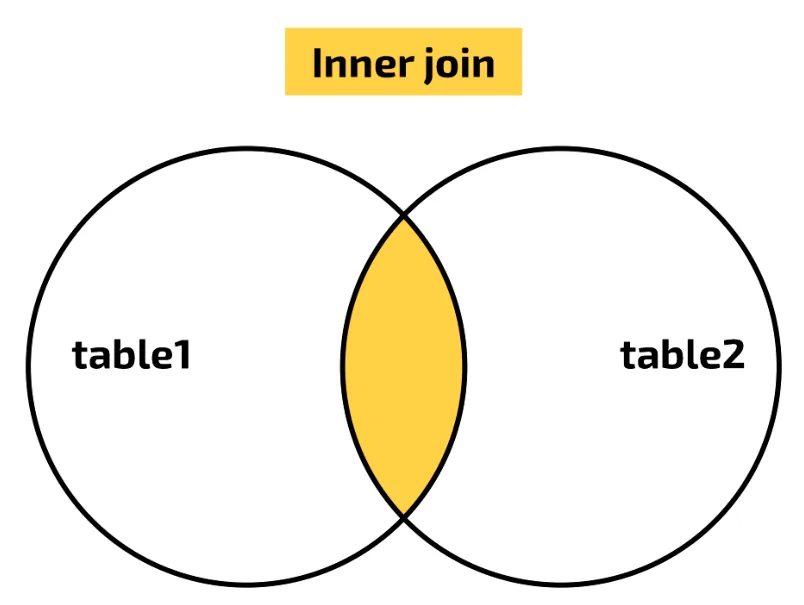
The Venn diagram shows how the tables are combined. Each table holds a set of records, with no repeats because each record has its own primary key. An INNER JOIN gives the intersection of the two sets: only the records that have a match in both tables.
There is another way to write the same query:
SELECT field1, field2, ...
FROM table1
INNER JOIN table2
ON join-criteria;
SELECT Member.FirstName, Member.LastName,
Certificate.CourseCode, Certificate.AssessmentDate
FROM Member
INNER JOIN Certificate
ON Member.MemberId = Certificate.MemberId;Both forms give exactly the same result, and both are accepted in the exam.
Adding more criteria. Often you also need other selection criteria. This query (in the first form) selects the certificates that were awarded on or after 1 June 2019:
SELECT Member.FirstName, Member.LastName,
       Certificate.CourseCode, Certificate.AssessmentDate
FROM Member, Certificate
WHERE Member.MemberId = Certificate.MemberId
AND Certificate.AssessmentDate >= '01/06/2019';| FirstName | LastName | CourseCode | AssessmentDate |
|---|---|---|---|
| Abdel | Patel | SO0112 | 02/06/2019 |
| Precious | Jones | SO0112 | 02/06/2019 |
| Jack | Marr | SP8701 | 11/06/2019 |
| Precious | Jones | CR0014 | 01/07/2019 |
With INNER JOIN, the join goes after ON and the extra criteria go in a WHERE clause:
SELECT Member.FirstName, Member.LastName,
       Certificate.CourseCode, Certificate.AssessmentDate
FROM Member
INNER JOIN Certificate
ON Member.MemberId = Certificate.MemberId
WHERE Certificate.AssessmentDate >= '01/06/2019';
Practise this: past-paper questions
- June 2021 · Paper 12 · Q1(c)(ii)Write a Data Manipulation Language (DML) script to return the first name and last name of all customers who have not paid their deposit
- June 2022 · Paper 12 · Q5(c)Complete the SQL script to return the IDs of all the actors in the film with the title Cinderella. SELECT FROM FILM_ACTOR INNER JOIN ON…
- June 2022 · Paper 13 · Q6(b)(i)Complete the SQL script to return the number of devices stored in the database for the staff member with the first name ‘Ali’ and last name…
- June 2023 · Paper 11 · Q2(b)(iv)The database tables are repeated here for reference: BIRD_TYPE(BirdID, Name, Size) BIRD_SEEN(SeenID, BirdID, Date, Location, PersonID)…
Show 11 more
- June 2023 · Paper 12 · Q2(c)(iii)The following SQL script should return the number of riders that have the rider level beginner and have a lesson booked on 09/09/2023. SELECT…
- November 2023 · Paper 11 · Q3(c)(ii)Write the SQL script to return the total quantity of items that the customer with the ID of HJ231 has ordered
- June 2024 · Paper 13 · Q4(c)Write an SQL script to return the number of times each show is scheduled. For example, in the sample data in part (b), the show MK12 is scheduled…
- June 2025 · Paper 11 · Q5(e)Write an Structured Query Language (SQL) script to output the customer ID, the customer’s name and the total cost of the customer’s orders that…
- June 2025 · Paper 12 · Q5(d)(i)Write a Structured Query Language (SQL) script to count the number of items purchased by the user with the username "KAT123"
- June 2025 · Paper 13 · Q6(c)The attribute Collected in the table ORDER stores the Boolean value TRUE if the order has been collected and FALSE if the order has not been…
- November 2025 · Paper 12 · Q4(c)Write an SQL script to return the number of containers stored in the database for the ship with the name Caledonia
- November 2025 · Paper 13 · Q5(c)Products are given a rating between 1 and 10 inclusive. Write an SQL script to return only the ProductID, ProductName and ComplaintDetails for all…
- June 2026 · Paper 11 · Q4(b)Write a Structured Query Language (SQL) script to return the total number of days of all toys borrowed by each customer. The customer ID and first…
- June 2026 · Paper 12 · Q3(b)(ii)Write an SQL script to return each player's name and the number of characters each player has created. The result needs to include a suitable…
- June 2026 · Paper 13 · Q4(c)(ii)Write an SQL script to return each department's name and the number of subject codes for that department. The result needs to include a suitable…
8.3 · 21 of 23Book page Contents
SUM, AVG and COUNT
Builds on
SQL can do calculations on the selected records. Three functions are in the syllabus:
- SUM(field) adds up the values in a numeric field.
- AVG(field) works out the mean of the values in a numeric field.
- COUNT(field) counts how many records there are.
SELECT AVG(Fee)
FROM Course;
This gives one value: 260 ÷ 7 = 37.14 (to 2 decimal places).
SELECT SUM(Fee)
FROM Course;
This gives 260, the total of all seven course fees.
Naming the result. A calculated column has no field name of its own. Exam questions often ask for "a suitable field name": give one with AS after the calculation. With a WHERE clause, only the records that meet the criteria are counted:
SELECT COUNT(CourseCode) AS CheapCourses
FROM Course
WHERE Fee < 25;| CheapCourses |
|---|
| 3 |
The functions work on two tables too. This counts the certificates held by Precious Jones:
SELECT COUNT(Certificate.CourseCode)
       AS Certificates
FROM Member
INNER JOIN Certificate
ON Member.MemberId = Certificate.MemberId
WHERE Member.FirstName = 'Precious'
AND Member.LastName = 'Jones';| Certificates |
|---|
| 3 |
SUM or COUNT?
- Use COUNT for "how many" or "the number of": it counts records.
- Use SUM for "the total" of a quantity or an amount of money: it adds up the values.
- SUM of a text field, such as SUM(LastName), is always wrong.
Practise this: past-paper questions
- November 2021 · Paper 11 · Q5(c)(i)Complete the following DML statements to return the number of cars for sale in each shop. SELECT COUNT( ) FROM ShopID
- November 2021 · Paper 12 · Q6(c)(i)Complete the DML statements to return the total number of items purchased with the purchase ID of 3011A. SELECT SUM( ) FROM WHERE = ;
- June 2022 · Paper 11 · Q4(c)(ii)Write a Structured Query Language (SQL) script to find the average mark of students in test A7
- June 2022 · Paper 12 · Q5(d)Write an SQL script to count the number of films that were released in January 2022
Show 20 more
- June 2022 · Paper 13 · Q6(b)(i)Complete the SQL script to return the number of devices stored in the database for the staff member with the first name ‘Ali’ and last name…
- November 2022 · Paper 11 · Q4(c)(ii)Complete the Structured Query Language (SQL) script to display the total number of photographs that have been taken using a camera with a camera…
- November 2022 · Paper 13 · Q2(c)Complete the SQL script to return the total number of telescopes owned by the company whose ID begins with HW. SELECT ( ) FROM TELESCOPE WHERE LIKE ;
- June 2023 · Paper 11 · Q2(b)(iv)The database tables are repeated here for reference: BIRD_TYPE(BirdID, Name, Size) BIRD_SEEN(SeenID, BirdID, Date, Location, PersonID)…
- June 2023 · Paper 12 · Q2(c)(iii)The following SQL script should return the number of riders that have the rider level beginner and have a lesson booked on 09/09/2023. SELECT…
- November 2023 · Paper 11 · Q3(c)(ii)Write the SQL script to return the total quantity of items that the customer with the ID of HJ231 has ordered
- November 2023 · Paper 13 · Q3(b)(ii)Write the Structured Query Language (SQL) script to return the total number of courses that have started after 9 September 2023. The value…
- June 2024 · Paper 11 · Q6(c)(ii)Write an SQL script to return the number of events that each player has completed
- June 2024 · Paper 13 · Q4(c)Write an SQL script to return the number of times each show is scheduled. For example, in the sample data in part (b), the show MK12 is scheduled…
- November 2024 · Paper 11 · Q2(b)(iii)Suppliers send invoices to the company for the parts that are used. A new table, INVOICE, stores the data about each invoice and whether it has…
- November 2024 · Paper 12 · Q6(b)(ii)The database also has the table INVOICE that stores data about each invoice that is sent to a customer. Example data from the table INVOICE is…
- November 2024 · Paper 13 · Q4(b)Write an SQL script to return the total quantity of ice cream sold to the customer with the ID of 0034E in the year 2023
- June 2025 · Paper 11 · Q5(e)Write an Structured Query Language (SQL) script to output the customer ID, the customer’s name and the total cost of the customer’s orders that…
- June 2025 · Paper 12 · Q5(d)(i)Write a Structured Query Language (SQL) script to count the number of items purchased by the user with the username "KAT123"
- June 2025 · Paper 13 · Q6(c)The attribute Collected in the table ORDER stores the Boolean value TRUE if the order has been collected and FALSE if the order has not been…
- November 2025 · Paper 11 · Q2(c)(ii)Write an SQL script to return the total number of placements completed by the student with ID LDEA01 at the company with ID NEAM. The total should…
- November 2025 · Paper 12 · Q4(c)Write an SQL script to return the number of containers stored in the database for the ship with the name Caledonia
- June 2026 · Paper 11 · Q4(b)Write a Structured Query Language (SQL) script to return the total number of days of all toys borrowed by each customer. The customer ID and first…
- June 2026 · Paper 12 · Q3(b)(ii)Write an SQL script to return each player's name and the number of characters each player has created. The result needs to include a suitable…
- June 2026 · Paper 13 · Q4(c)(ii)Write an SQL script to return each department's name and the number of subject codes for that department. The result needs to include a suitable…
8.3 · 22 of 23Book page Contents
GROUP BY
Builds on
GROUP BY puts the selected records into groups that have the same value in a field, and then works out SUM, AVG or COUNT once for each group. Use it when a question says "for each" or "of each".
This query gives the number of certificates awarded for each course:
SELECT CourseCode, COUNT(MemberId)
FROM Certificate
GROUP BY CourseCode;| CourseCode | COUNT(MemberId) |
|---|---|
| CR0001 | 2 |
| CR0014 | 1 |
| CR0020 | 1 |
| DG0011 | 2 |
| DG3002 | 1 |
| SO0112 | 2 |
| SP8701 | 1 |
The field you group by is usually also in the SELECT list, so you can see which group each total belongs to. Any other field in the SELECT list should be inside SUM, COUNT or AVG, or be a field that has only one value in each group, such as a member’s name when you group by MemberId (as in the worked example below). Add an ORDER BY clause if the groups must be in a particular order.
The clauses always go in this order:
SELECT ...
FROM ...
INNER JOIN ... ON ...
WHERE ...
GROUP BY ...
ORDER BY ...;
Worked example
Write an SQL script to return the first name and last name of each member and the number of certificates they hold. The result must include a suitable field name for the number of certificates, and be in ascending order of last name.
- Step 1Select the two name fields and count a field from Certificate, naming the count with AS.
SELECT Member.FirstName, Member.LastName, COUNT(Certificate.CourseCode) AS NumberOfCertificates - Step 2The data is in two tables, so join them on the primary key and foreign key pair.
FROM Member INNER JOIN Certificate ON Member.MemberId = Certificate.MemberId - Step 3The question says "each member", so group by the member’s primary key.
GROUP BY Member.MemberId - Step 4Sort by last name. Emily and Jack are both Marr, so sort by first name as well to fix their order.
ORDER BY Member.LastName, Member.FirstName; - Step 5The result is Joe Donald 1, Precious Jones 3, Emily Marr 2, Jack Marr 1, Abdel Patel 3.
| FirstName | LastName | NumberOfCertificates |
|---|---|---|
| Joe | Donald | 1 |
| Precious | Jones | 3 |
| Emily | Marr | 2 |
| Jack | Marr | 1 |
| Abdel | Patel | 3 |
Practise this: past-paper questions
- November 2021 · Paper 11 · Q5(c)(i)Complete the following DML statements to return the number of cars for sale in each shop. SELECT COUNT( ) FROM ShopID
- June 2023 · Paper 11 · Q2(b)(iv)The database tables are repeated here for reference: BIRD_TYPE(BirdID, Name, Size) BIRD_SEEN(SeenID, BirdID, Date, Location, PersonID)…
- June 2024 · Paper 11 · Q6(c)(ii)Write an SQL script to return the number of events that each player has completed
- June 2024 · Paper 13 · Q4(c)Write an SQL script to return the number of times each show is scheduled. For example, in the sample data in part (b), the show MK12 is scheduled…
Show 5 more
- June 2025 · Paper 11 · Q5(e)Write an Structured Query Language (SQL) script to output the customer ID, the customer’s name and the total cost of the customer’s orders that…
- June 2025 · Paper 13 · Q6(c)The attribute Collected in the table ORDER stores the Boolean value TRUE if the order has been collected and FALSE if the order has not been…
- June 2026 · Paper 11 · Q4(b)Write a Structured Query Language (SQL) script to return the total number of days of all toys borrowed by each customer. The customer ID and first…
- June 2026 · Paper 12 · Q3(b)(ii)Write an SQL script to return each player's name and the number of characters each player has created. The result needs to include a suitable…
- June 2026 · Paper 13 · Q4(c)(ii)Write an SQL script to return each department's name and the number of subject codes for that department. The result needs to include a suitable…
8.3 · 23 of 23Contents
Reading and correcting SQL
Builds on
Exam questions also give you an SQL script and ask what it does, or ask you to find and correct its errors. Read it one clause at a time and check each line against the syntax in these notes.
Errors to look for
- A keyword spelt wrongly, such as CREATE DATA BASE or NONULL (they should be CREATE DATABASE and NOT NULL).
- A missing comma at the end of a field definition, or a missing bracket.
- PRIMARY KEY without brackets round the field name.
- FOREIGN KEY without REFERENCES and the other table and field.
- SUM used where COUNT is needed, or the other way round.
- A join condition without table names, such as
StudentID = StudentID. - OR used where both conditions must be true (AND).
- A text value without quotation marks.
Worked example 1. This script should create a Booking table for the sports club, with BookingId as the primary key and MemberId as a foreign key:
01 CREATE TABLE Booking (
02     BookingId INTEGER
03     MemberId CHAR(6),
04     BookingDate DATE,
05     PRIMARY KEY BookingId,
06     FOREIGN KEY (MemberId));
Worked example 1
Find the three errors in the script and correct them.
- Step 1Line 02 has no comma at the end.
02 BookingId INTEGER, - Step 2Line 05 needs brackets round the field name.
05 PRIMARY KEY (BookingId), - Step 3Line 06 must say which table and field the foreign key refers to.
06 FOREIGN KEY (MemberId) REFERENCES Member (MemberId));
Worked example 2. This query should return the number of certificates held by the member with the surname Jones:
SELECT SUM(Certificate.CourseCode) AS Certificates
FROM Member, Certificate
WHERE MemberId = MemberId
OR LastName = Jones;
Worked example 2
Find the four errors in the query and correct them.
- Step 1SUM should be COUNT, because the question asks for the number of certificates.
SELECT COUNT(Certificate.CourseCode) AS Certificates - Step 2The join condition needs the table names.
WHERE Member.MemberId = Certificate.MemberId - Step 3OR should be AND, because both conditions must be true.
AND Member.LastName = 'Jones'; - Step 4Jones is text, so it needs quotation marks, as in step 3. The corrected query returns 3 (Precious Jones holds three certificates).
Practise this: past-paper questions
- June 2023 · Paper 12 · Q2(c)(iii)The following SQL script should return the number of riders that have the rider level beginner and have a lesson booked on 09/09/2023. SELECT…
- June 2026 · Paper 12 · Q3(b)(i)The given Structured Query Language (SQL) script is written to define the table CHARACTER. 01 CREATE TABLE CHARACTER( 02 CharacterID INT, 03…
- June 2026 · Paper 13 · Q4(c)(i)The table shows some sample data for SUBJECT. SubjectCode | SubjectName | DepartmentID CS1 | Computer Science IGCSE | ITCS CS2 | Computer Science…
8.3
Concepts in 8.3
Every idea explained in 8.3, and where else in the notes it is used.
| Concept | In one line | Also used in |
|---|---|---|
| ALTER TABLE | The DDL statement that changes an existing table, for example to add a field or a key. | only here |
| AS | Gives a field or calculation a name (alias) in the results. | only here |
| AVG | Works out the mean of the values in a numeric field. | 8.3 GROUP BY |
| BETWEEN | Selects values in a range, including both end values. | only here |
| COUNT | Counts how many records there are. | 8.3 GROUP BY, 8.3 Reading and correcting SQL |
| CREATE DATABASE | The DDL statement that creates a new database. | 8.3 Reading and correcting SQL |
| CREATE TABLE | The DDL statement that defines a new table, its fields, data types and keys. | 8.3 SQL data types, 8.3 Primary and foreign keys, 8.3 Table constraints |
| Data Definition Language (DDL) | The SQL commands that create and change the structure of a database. | 8.3 CREATE DATABASE |
| Data Manipulation Language (DML) | The SQL commands that query, insert, update and delete data. | 8.3 INSERT INTO |
| DELETE FROM | The DML statement that removes records from a table. | only here |
| GROUP BY | Groups records with the same value so SUM, AVG or COUNT is worked out for each group. | only here |
| INNER JOIN | Combines two tables, returning only records that match on the join fields. | 8.3 Selecting data from two tables |
| INSERT INTO | The DML statement that adds new records to a table. | only here |
| LIKE | Matches text against a pattern with wildcards, such as LIKE 'SO%'. | only here |
| NOT NULL | A constraint that stops a field being left empty. | 8.3 Reading and correcting SQL |
| ORDER BY | Sorts the results in ascending (ASC) or descending (DESC) order. | 8.3 GROUP BY |
| SELECT | The DML statement that returns chosen fields from a table. | 8.3 SQL, DDL and DML, 8.3 UPDATE, 8.3 The sports club sample data, 8.3 Sorting with ORDER BY, 8.3 Choosing records with WHERE, 8.3 GROUP BY |
| SQL data types | CHARACTER, VARCHAR(n), BOOLEAN, INTEGER, REAL, DATE and TIME. | only here |
| SQL script | A set of SQL statements written to do one job. | 8.3 GROUP BY, 8.3 Reading and correcting SQL |
| Structured Query Language (SQL) | The industry standard language for both DDL and DML in relational databases. | 8.1 Foreign key, 8.1 Referential integrity, 8.2 The developer interface, 8.2 The query processor, 8.3 CREATE DATABASE, 8.3 Naming tables and fields, 8.3 INSERT INTO, 8.3 SELECT ... FROM, 8.3 Sorting with ORDER BY, 8.3 SUM, AVG and COUNT |
| SUM | Adds up the values in a numeric field. | 8.3 GROUP BY, 8.3 Reading and correcting SQL |
| table constraints | Rules data must follow to be accepted in a table, such as NOT NULL. | only here |
| UPDATE | The DML statement that changes values in existing records. | 8.3 SQL, DDL and DML, 8.3 DELETE FROM |
| WHERE clause | Filters the records so only those meeting the criteria are used. | 8.3 UPDATE, 8.3 DELETE FROM, 8.3 AND, OR and NOT, 8.3 LIKE and BETWEEN, 8.3 Selecting data from two tables, 8.3 INNER JOIN, 8.3 SUM, AVG and COUNT |
| wildcard | A symbol in a pattern: % for any characters, _ for one character. | only here |
Zain Merchant's notes, page by page, as printed in his book. The Notes tab has the same notes as text, with links.
Past-paper questions and mark schemes © Cambridge University Press & Assessment. Compiled for revision by Zain Merchant.
- June 2021 · Paper 11 · Q7Notes:CREATE DATABASE
- June 2021 · Paper 12 · Q1Notes:CREATE TABLESQL data typesPrimary and foreign keysTable constraintsSELECT ... FROMChoosing records with WHERESelecting data from two tablesINNER JOIN
- November 2021 · Paper 11 · Q5Notes:INSERT INTOSELECT ... FROMSUM, AVG and COUNTGROUP BY
- November 2021 · Paper 12 · Q6Notes:ALTER TABLESELECT ... FROMChoosing records with WHERESUM, AVG and COUNT
- June 2022 · Paper 11 · Q4Notes:CREATE TABLESQL data typesPrimary and foreign keysSELECT ... FROMChoosing records with WHERESUM, AVG and COUNT
- June 2022 · Paper 12 · Q5Notes:SELECT ... FROMChoosing records with WHEREText, numbers and dates in criteriaSelecting data from two tablesINNER JOINSUM, AVG and COUNT
- June 2022 · Paper 13 · Q6Notes:ALTER TABLESELECT ... FROMChoosing records with WHEREAND, OR and NOTSelecting data from two tablesINNER JOINSUM, AVG and COUNT
- November 2022 · Paper 11 · Q4Notes:ALTER TABLESELECT ... FROMChoosing records with WHERELIKE and BETWEENSUM, AVG and COUNT
- November 2022 · Paper 12 · Q5Notes:INSERT INTO
- November 2022 · Paper 13 · Q2Notes:ALTER TABLESELECT ... FROMChoosing records with WHERELIKE and BETWEENSUM, AVG and COUNT
- June 2023 · Paper 11 · Q2Notes:CREATE TABLESQL data typesPrimary and foreign keysSELECT ... FROMChoosing records with WHERESelecting data from two tablesINNER JOINSUM, AVG and COUNTGROUP BY
- June 2023 · Paper 12 · Q2Notes:SELECT ... FROMChoosing records with WHEREAND, OR and NOTText, numbers and dates in criteriaSelecting data from two tablesINNER JOINSUM, AVG and COUNTReading and correcting SQL
- November 2023 · Paper 11 · Q3Notes:CREATE DATABASESELECT ... FROMChoosing records with WHERESelecting data from two tablesINNER JOINSUM, AVG and COUNT
- November 2023 · Paper 13 · Q3Notes:SELECT ... FROMChoosing records with WHEREText, numbers and dates in criteriaSUM, AVG and COUNT
- June 2024 · Paper 11 · Q6Notes:Primary and foreign keysALTER TABLESELECT ... FROMSUM, AVG and COUNTGROUP BY
- June 2024 · Paper 12 · Q4Notes:CREATE TABLESQL data typesPrimary and foreign keysALTER TABLE
- June 2024 · Paper 13 · Q4Notes:CREATE TABLESQL data typesPrimary and foreign keysSELECT ... FROMSelecting data from two tablesINNER JOINSUM, AVG and COUNTGROUP BY
- November 2024 · Paper 11 · Q2Notes:CREATE TABLESQL data typesPrimary and foreign keysTable constraintsSELECT ... FROMChoosing records with WHEREAND, OR and NOTSUM, AVG and COUNT
- November 2024 · Paper 12 · Q6Notes:SELECT ... FROMChoosing records with WHEREAND, OR and NOTText, numbers and dates in criteriaSUM, AVG and COUNT
- November 2024 · Paper 13 · Q4Notes:CREATE TABLESQL data typesPrimary and foreign keysTable constraintsSELECT ... FROMChoosing records with WHEREAND, OR and NOTText, numbers and dates in criteriaSUM, AVG and COUNT
- June 2025 · Paper 11 · Q5Notes:SELECT ... FROMChoosing records with WHERESelecting data from two tablesINNER JOINSUM, AVG and COUNTGROUP BY
- June 2025 · Paper 12 · Q5Notes:UPDATESELECT ... FROMChoosing records with WHERESelecting data from two tablesINNER JOINSUM, AVG and COUNT
- June 2025 · Paper 13 · Q6Notes:INSERT INTOSELECT ... FROMChoosing records with WHERESelecting data from two tablesINNER JOINSUM, AVG and COUNTGROUP BY
- November 2025 · Paper 11 · Q2Notes:DELETE FROMSELECT ... FROMChoosing records with WHEREAND, OR and NOTSUM, AVG and COUNT
- November 2025 · Paper 12 · Q4Notes:ALTER TABLESELECT ... FROMChoosing records with WHERESelecting data from two tablesINNER JOINSUM, AVG and COUNT
- November 2025 · Paper 13 · Q5Notes:CREATE TABLESQL data typesPrimary and foreign keysSELECT ... FROMSorting with ORDER BYChoosing records with WHERESelecting data from two tablesINNER JOIN
- June 2026 · Paper 11 · Q4Notes:ALTER TABLEUPDATESELECT ... FROMSelecting data from two tablesINNER JOINSUM, AVG and COUNTGROUP BY
- June 2026 · Paper 12 · Q3Notes:CREATE TABLESQL data typesPrimary and foreign keysSELECT ... FROMSorting with ORDER BYSelecting data from two tablesINNER JOINSUM, AVG and COUNTGROUP BYReading and correcting SQL
- June 2026 · Paper 13 · Q4Notes:CREATE DATABASECREATE TABLESQL data typesPrimary and foreign keysTable constraintsSELECT ... FROMSorting with ORDER BYSelecting data from two tablesINNER JOINSUM, AVG and COUNTGROUP BYReading and correcting SQL
Past-paper questions and mark schemes © Cambridge University Press & Assessment. Compiled for revision by Zain Merchant.
Try the questions first.
Write your answers, then check them against the mark scheme. Your choice is remembered on this device.