A Level 9618 · Paper 3 · 14.1
Protocols
Why computers need protocols, and how the TCP/IP stack carries a message across the internet. Read the notes, try the past-paper questions, then check the mark scheme.
Past papers from June 2022 to June 202618 questions · 97 marks
In this subtopic
- Why a protocol is essential for communication
- Protocols as a stack, where each layer has its own job
- The four TCP/IP layers: application, transport, internet and link
- HTTP, FTP, POP3, IMAP, SMTP and BitTorrent, and what each is for
14.1 · 1 of 19Book page Contents
What a protocol is and why it is needed
Builds on
A protocol is a set of rules that specify how two devices can communicate with each other. The internet uses many different protocols, and they decide every part of how it works. Without these rules, devices of different kinds would have no way of communicating with each other.
Communication over the internet involves many different technologies. For any particular message, a subset of these technologies is chosen to carry the communication between two applications running on different devices.
Devices within a network communicate and share information about their connections, so that they learn the best paths between networks. Data to be sent is handed to the network, and the devices send it over the best path to the destination. The network devices must work together to carry the data across the whole communications path.
Who handles the traffic
- On a local area network, most traffic is handled by switches.
- On the internet, traffic is handled by routers.
The path chosen has to adapt in real time to changing situations, such as congested or broken links. The devices must also cope with data that is "lost" in the network, or that arrives in a different order from the one in which it was sent. The data may need to be encrypted and decrypted on some parts of the path, or over the whole "end-to-end" path.
The overall system must be able to use a range of different media for each part of the transmission path, and adapt easily as new technologies are developed and added to the internet.
Why protocols are essential
- Each of the technologies uses a set of rules called protocols. These set out the "language" to be used, and the order in which certain actions must be carried out.
- Each protocol is designed for a particular task, and the protocols must all work together to give a seamless path over which the data can be transferred.
Practise this: past-paper questions
- November 2022 · Paper 32 · Q3(a)Explain why a protocol is used in communication between computers
- June 2024 · Paper 32 · Q2(a)Outline why protocols are essential for communication between computers
- November 2025 · Paper 31 · Q3(a)Explain why protocols are essential for communication between computer systems
Used later in
14.1 · 2 of 19Book page Contents
The protocol stack
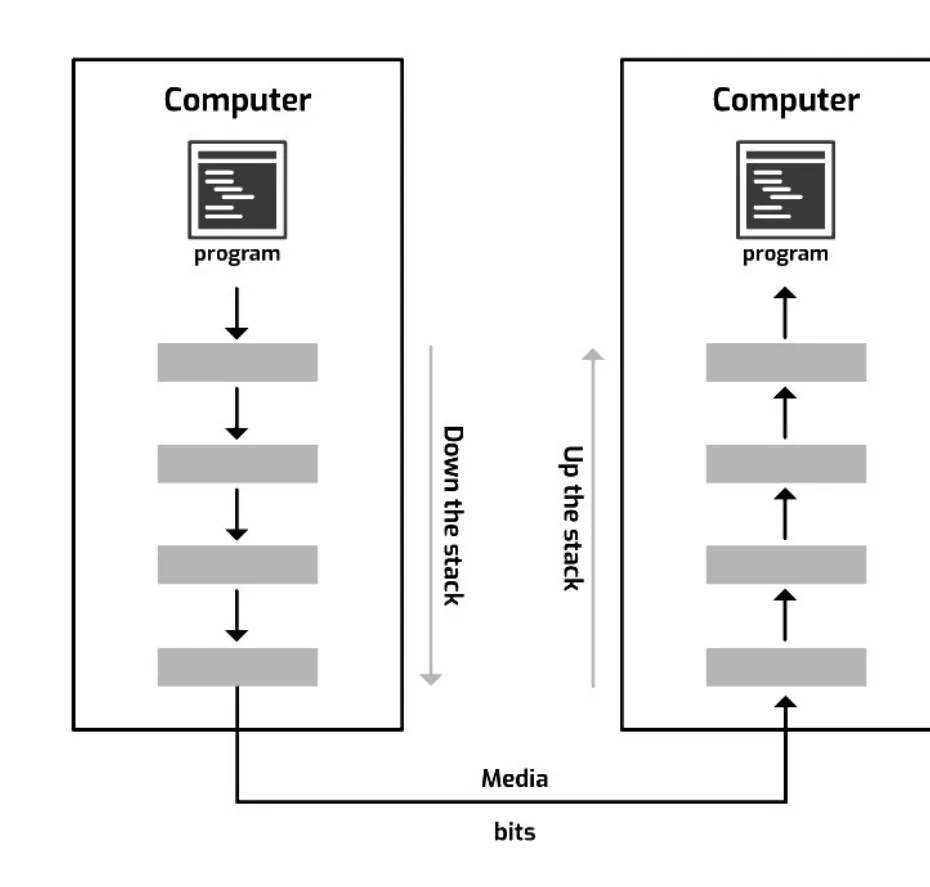
The protocols take the data from the application that wants to send it, and turn it into bits encoded as a suitable optical, electrical or radio signal. This signal is then sent onto the media (any wired or wireless technology that data can be sent over). At the receiving end the reverse happens: the bits are turned back into the data, which is passed to the receiving application.
This complex set of jobs is organised into a series of layers. The data is passed from layer to layer for processing, before it is sent out onto the media.
These layers can be pictured as a set of processes arranged on top of each other to form a stack, the protocol stack. On the sending device, data flows down the stack from the application and out onto the media. At the receiving end, the data flows from the media up the stack, to be delivered to the application on the receiving device.
Practise this: past-paper questions
- November 2023 · Paper 32 · Q4Complete the following paragraph about a protocol suite, using words from the given list. Some words are not used. BitTorrent circuit switching…
- November 2024 · Paper 31 · Q4The TCP/IP protocol may be viewed as a stack that contains four layers: Application, Transport, Internet, Link. Describe how the layers of the…
- June 2025 · Paper 32 · Q3(b)Describe how the TCP/IP protocol suite is applied when a message is sent through the internet from one host to another. Do not describe the…
- June 2026 · Paper 33 · Q2Complete the following paragraph using the most appropriate words from the given list. Some words are not used. adjacent Application BitTorrent…
14.1 · 3 of 19Book page Contents
The four layers of the TCP/IP suite
Builds on
The TCP/IP protocol suite has four layers. From the top, they are the application layer, the transport layer, the internet layer and the link layer.
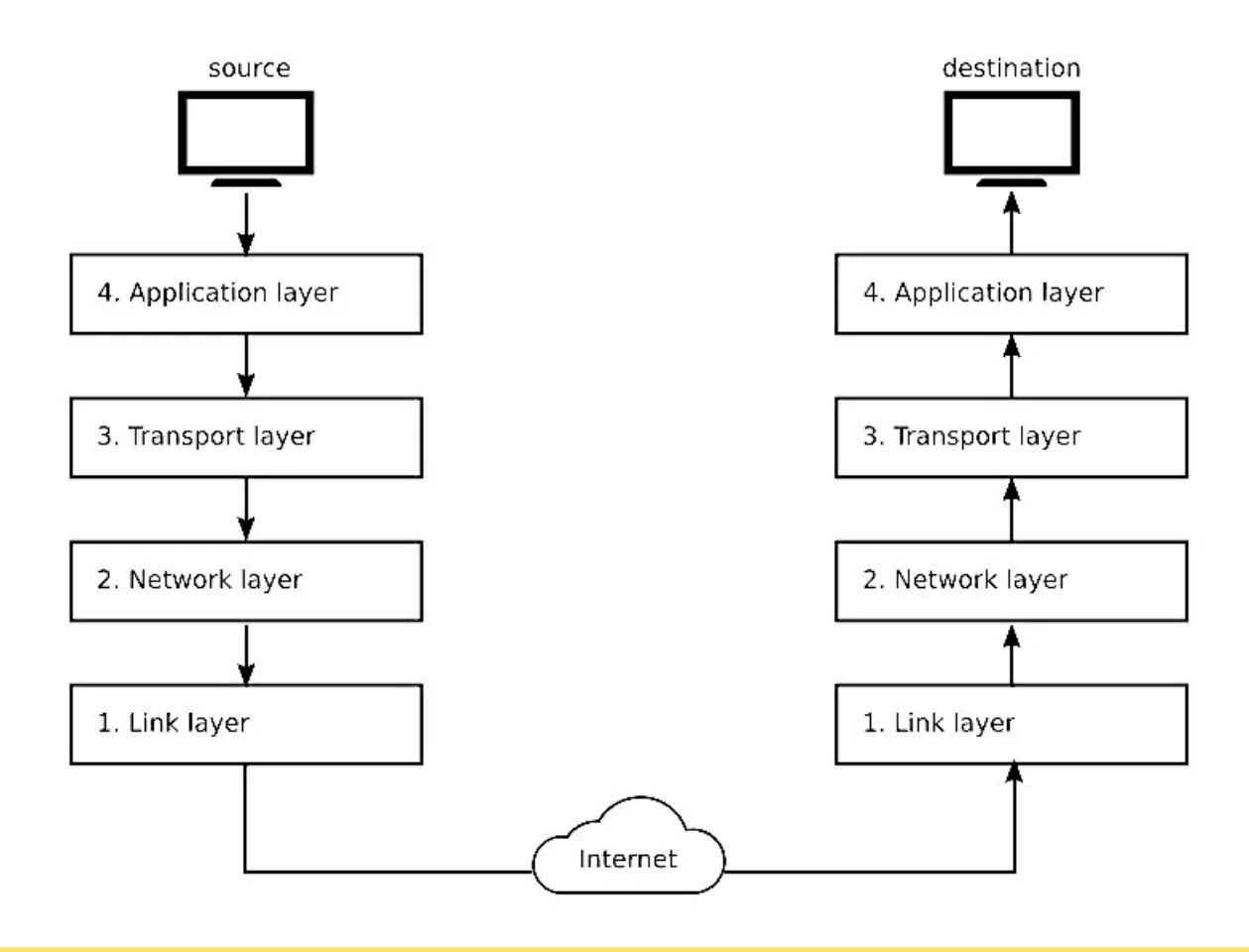
- The application layer uses protocols that are designed to work with particular types of application. For example, a web browser uses HTTP, while an email client uses SMTP, together with either IMAP or POP3.
- The transport layer breaks the application data down into segments (TCP) or datagrams (UDP). Sequence numbers are given out, and the source and destination port numbers are added to the header. With TCP, delivery is acknowledged and lost segments are sent again.
- The internet layer (sometimes called the network layer) prepares packets for the internet. The source and destination IP addresses are added at this stage.
- The link layer (sometimes called the data link layer) carries IP packets across each of the separate links that make up the path between client and server. At this level, networking protocols such as Ethernet are used.
Practise this: past-paper questions
- June 2022 · Paper 32 · Q3(b)Identify two other layers of the TCP/IP protocol suite. Describe the function of each layer. Layer 1 Description Layer 2 Description
- November 2022 · Paper 32 · Q3(b)The TCP/IP protocol implementation can be viewed as a stack. Complete the diagram for the TCP/IP protocol stack. | | | Transport | | | | Link |
- November 2023 · Paper 32 · Q4Complete the following paragraph about a protocol suite, using words from the given list. Some words are not used. BitTorrent circuit switching…
- June 2024 · Paper 31 · Q2(a)Complete the diagram to show the correct order for these layers
Show 4 more
- June 2025 · Paper 32 · Q3(a)Identify two different layers of the TCP/IP protocol suite
- June 2026 · Paper 31 · Q4Draw one line to connect each TCP/IP layer to its most appropriate description. TCP/IP layer: • Application • Transport • Internet • Link…
- June 2026 · Paper 32 · Q2Complete the following paragraph using the most appropriate words from the given list. Some words are not used. application controls disconnects…
- June 2026 · Paper 33 · Q2Complete the following paragraph using the most appropriate words from the given list. Some words are not used. adjacent Application BitTorrent…
Used later in
14.1 · 4 of 19Book pages Contents
Encapsulation: how the layers work together
Builds on
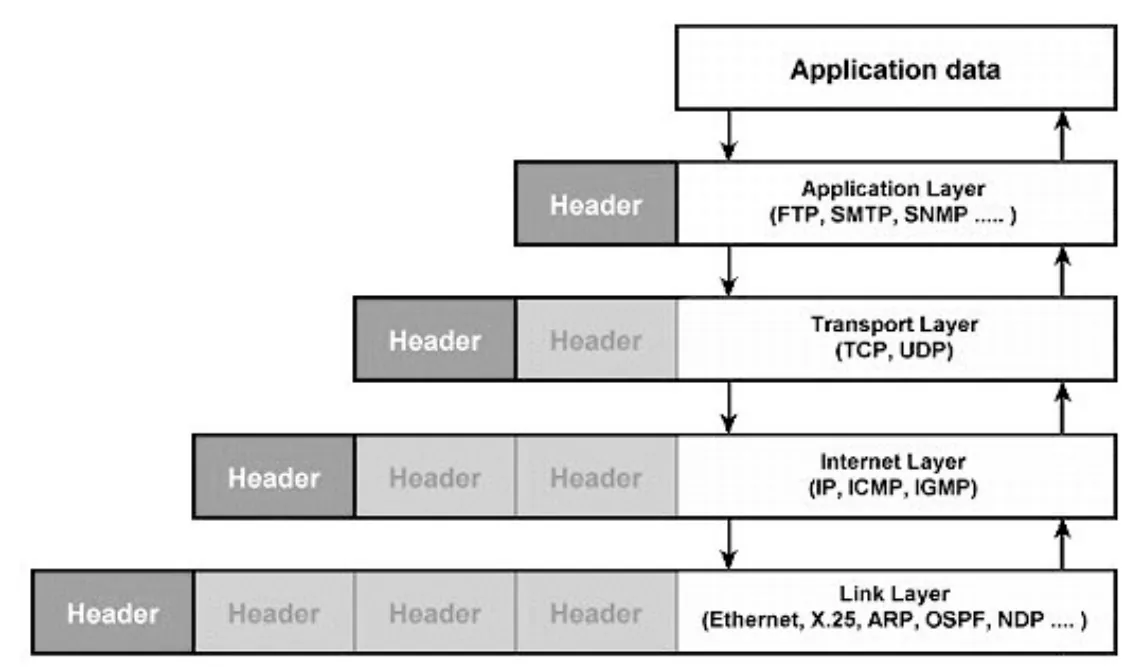
When data is sent, each layer of the TCP/IP model accepts data from the layer above (or from a program, for the application layer). It adds the extra information that layer needs to do its job. Sometimes the original data is processed first, for example encrypted, before the extra information is added. The layer then passes the data on to the layer below (or onto the transmission media, for the link layer).
At the receiving end the process happens in reverse. Each layer accepts data from the layer below, inspects and removes the extra information that the matching layer on the sending device added, and passes the data up to the layer above.
So each layer adds its own headers to the data from the layer above. This encapsulation at each layer gives a new structure that wraps up the original data. Each structure has its own name, which depends on the layer that creates it:
| TCP/IP layer | Data block produced |
|---|---|
| Application | Application data (for example HTTP, SMTP, FTP) |
| Transport | Segments (for example a TCP segment) or datagrams (a UDP datagram) |
| Internet | Packets (for example an IP packet) |
| Link | Frames (for example an Ethernet frame) |
Practise this: past-paper questions
- November 2024 · Paper 31 · Q4The TCP/IP protocol may be viewed as a stack that contains four layers: Application, Transport, Internet, Link. Describe how the layers of the…
- June 2025 · Paper 32 · Q3(b)Describe how the TCP/IP protocol suite is applied when a message is sent through the internet from one host to another. Do not describe the…
- June 2026 · Paper 33 · Q2Complete the following paragraph using the most appropriate words from the given list. Some words are not used. adjacent Application BitTorrent…
Used later in
14.1 · 5 of 19Book page Contents
TCP and IP
The suite is named after its two most important protocols, TCP and IP.
TCP
- Transmission Control Protocol.
- Works at the transport layer.
- Sets up and maintains the connection between two nodes.
- Makes sure data is delivered between two nodes (on the internet).
IP
- Internet Protocol.
- Works at the internet (network) layer.
- Gives the rules for exchanging packets (or datagrams) over the internet.
- Decides the path for the transmission of each packet.
14.1 · 6 of 19Book page Contents
The application layer
Each type of application is linked to a different protocol, or set of protocols. If you run a web browser and want to communicate with a web server on a distant computer, your browser uses Hypertext Transfer Protocol (HTTP), or Hypertext Transfer Protocol Secure (HTTPS). If you open your email client and send an email, the email client uses Simple Mail Transfer Protocol (SMTP).
What the application layer does
- Each application uses the services of the application layer.
- The application layer contains a whole suite of protocols designed to manage the communication between different types of program.
- These protocols are written in software as subprograms, procedures or subroutines.
If you are running several applications that communicate over the internet at the same time, each one communicates with its own application layer protocol(s) to manage the exchange of data.
You may think of a protocol in the application layer on one device as talking directly to the same protocol in the application layer on the receiving device. However, the path for this "direct" communication is actually provided by the transport layer.
Practise this: past-paper questions
14.1 · 7 of 19Book page Contents
HTTP and FTP
Builds on
HTTP (HyperText Transfer Protocol) is a request-response protocol for transferring web pages across the internet. It is based on the client-server model. HTTP has two main methods, GET and POST:
GETis for retrieving data from a server.POSTis for putting data into a server’s database.
FTP (File Transfer Protocol) is a protocol for transferring files in a client-server model. An FTP server hosts files, and clients can upload, download or remove files if they have permission.
File transfer can be anonymous or non-anonymous (protected), depending on whether you need to identify yourself before the download. A protected site needs a username and password. An anonymous site does not.
Practise this: past-paper questions
- June 2022 · Paper 32 · Q3(a)Identify two protocols used by this layer. Describe the use of each protocol. Protocol 1 Description Protocol 2 Description
- November 2023 · Paper 31 · Q2(a)Draw one line to connect each protocol to its most appropriate use. Protocol: HTTP BitTorrent SMTP IMAP Use: to provide peer-to-peer file sharing…
- June 2024 · Paper 31 · Q2(c)Outline one protocol that is associated with the Application layer
- November 2024 · Paper 32 · Q5(a)Name and describe two protocols used by the Application Layer of the TCP/IP protocol suite
Show 2 more
- November 2025 · Paper 32 · Q3(a)HTTP and IMAP are examples of protocols used in the Application Layer of the TCP/IP protocol suite. State the purpose of the HTTP and IMAP protocols
- November 2025 · Paper 33 · Q4Identify and describe three protocols that are used in the Application Layer of the TCP/IP protocol suite. Protocol 1 ... Description ... Protocol…
14.1 · 8 of 19Book page Contents
Email protocols: SMTP, POP3 and IMAP
Builds on
- SMTP (Simple Mail Transfer Protocol) is for sending mail to a mail server.
- POP3 (Post Office Protocol version 3) is for receiving mail from a mail server.
- IMAP (Internet Message Access Protocol) is also used to receive mail. Unlike POP3, it keeps the mail on the server, so it stays in sync across all your devices.
It is common for mail to be sent and received using other protocols, such as HTTP. SMTP is still used for moving mail between mail servers.
Practise this: past-paper questions
- June 2022 · Paper 32 · Q3(a)Identify two protocols used by this layer. Describe the use of each protocol. Protocol 1 Description Protocol 2 Description
- November 2022 · Paper 32 · Q3(c)Describe the purpose of the IMAP protocol
- November 2023 · Paper 31 · Q2(a)Draw one line to connect each protocol to its most appropriate use. Protocol: HTTP BitTorrent SMTP IMAP Use: to provide peer-to-peer file sharing…
- June 2024 · Paper 31 · Q2(c)Outline one protocol that is associated with the Application layer
Show 5 more
- June 2024 · Paper 32 · Q2(b)State the names of two different protocols associated with the sending and receiving of emails between computers. Sending Receiving
- November 2024 · Paper 32 · Q5(a)Name and describe two protocols used by the Application Layer of the TCP/IP protocol suite
- November 2025 · Paper 31 · Q3(b)POP3 is an email communication protocol. Identify and describe two other communication protocols that are used when sending or receiving emails
- November 2025 · Paper 32 · Q3(a)HTTP and IMAP are examples of protocols used in the Application Layer of the TCP/IP protocol suite. State the purpose of the HTTP and IMAP protocols
- November 2025 · Paper 33 · Q4Identify and describe three protocols that are used in the Application Layer of the TCP/IP protocol suite. Protocol 1 ... Description ... Protocol…
Used later in
14.1 · 9 of 19Book page Contents
The transport layer and segments
The transport layer is the second layer of the protocol stack, counting from the top: it sits just below the application layer. Two protocols are used at the transport layer: Transmission Control Protocol (TCP) and User Datagram Protocol (UDP).
The transport layer accepts "messages" from the application layer as application data. It does not care whether this data is part of setting up the connection, actual data to be transferred, or some other control message. It just sees a block of data to be carried to the transport layer at the receiving end.
Segments
- Application data is often very large, so it must be split into chunks, called segments, so that the internet layer can carry it.
- This splitting into segments is carried out at the transport layer.
- TCP segments are often called TCP packets.
- Each segment has a header (the data needed for transport) and a payload (the actual data).
Practise this: past-paper questions
- November 2022 · Paper 31 · Q2Outline the functions of the Transport and Internet layers of the TCP/IP protocol suite. Transport layer Internet layer
- June 2024 · Paper 31 · Q2(b)Describe the function of the Transport layer
- June 2025 · Paper 31 · Q3(a)The Application Layer and Transport Layer are two layers of the TCP/IP protocol suite. Describe the purpose of the Application Layer and the…
14.1 · 10 of 19Book pages Contents
Ports
A port is a number given to every application or process. In communication, data is sent from a sending device to a destination device (the receiver). If the destination device has three applications running, the port number helps to identify the application, or process, that needs the data that has arrived.
- A computer has 65 536 ports in total.
- The port numbers 0 to 1023 are reserved for system use.
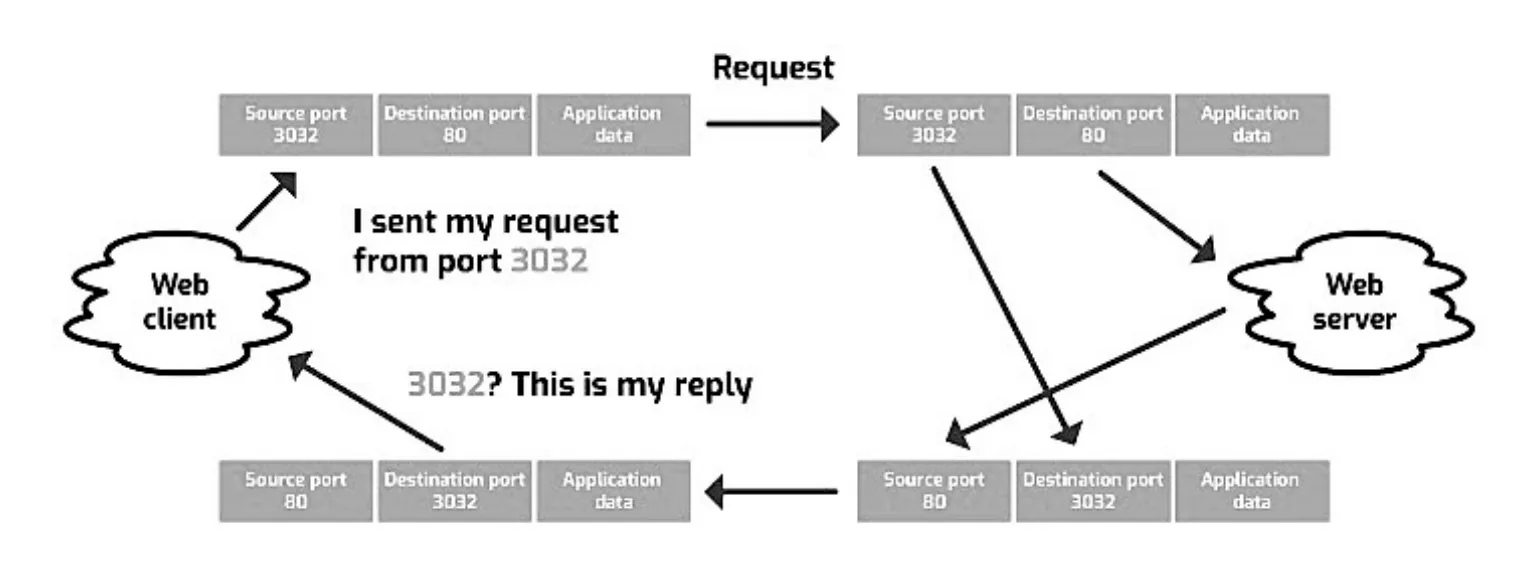
When a request reaches the server, the source and destination ports are swapped. For example, if a web browser sends a message to a web server on port 80 (destination) from port 3032 (source), the reply comes back from the web server on port 80 (source) and is sent to the web browser on port 3032 (destination).
This matters because you may have many sessions open to the same resource, for example several tabs in a browser showing different pages of the same website. The source port is generated at random, and it becomes the destination port of the reply, so it identifies exactly which process made the original request.
Used later in
14.1 · 11 of 19Book page Contents
Sockets
Builds on
TCP is often called an "end-to-end" protocol. From the point of view of the application (client or server), using TCP to handle communication is like having a simple serial cable running between the two devices. All the complex detail of how this works is hidden (abstracted) in the lower layers.
A TCP end point is a combination of an IP address and a port number. This combination is called a socket. The socket lasts for the whole of the connection.
A server has to handle many sessions at the same time, as it communicates with many clients. Each session is identified by its own socket. Because each client uses a unique IP address and a 16-bit port number, the server can keep track of up to 65 534 connections per host.
A TCP connection between two sockets is full duplex: the client and the server can both send data at the same time. For any one transmission, one socket is the source and the other is the destination.
| Port | Socket | |
|---|---|---|
| What it is | A number used by a program in a computer. | A combination of an IP address and a port number. |
| What it identifies | A program running on different computers can use the same port number, so port numbers cannot identify a computer uniquely. | A socket identifies a computer, and a program within that computer, uniquely. |
| Layer | Port numbers are used in the transport layer. | Sockets are involved in the application layer. A socket is an interface between the transport layer and the application layer. |
| How it is used | A port uses a socket to drop the data to the current application. | A server and a client use a socket to keep track of data requests and responses. |
Used later in
14.1 · 12 of 19Book page Contents
TCP and UDP at the transport layer
TCP (Transmission Control Protocol). Many internet applications, such as web browsing and file transfer, need all of the data. For some activities, such as online banking, there is no room for error. TCP makes sure none of the data is lost.
It does this by keeping track of every segment it makes and giving each one a sequence number. The sequence numbers are added to the segment header. At the receiving end, TCP keeps a record of the sequence numbers that arrive and acknowledges each segment. If the sender does not receive an acknowledgement, the segment is sent again.
The delays caused by waiting for segments to be sent again mean that TCP is not suited to live, real-time uses such as video calls, where late data is of no use.
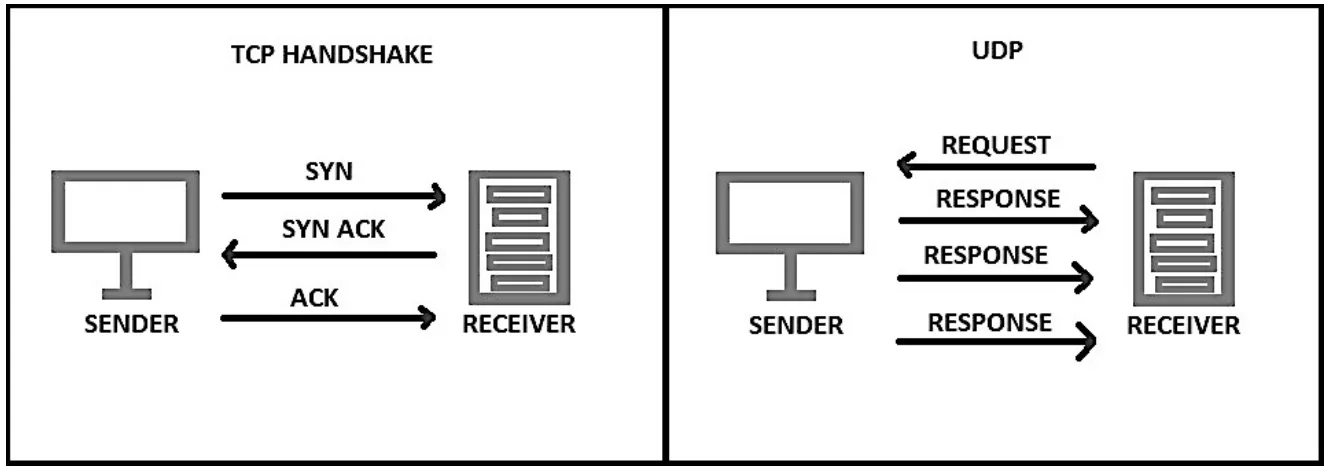
UDP (User Datagram Protocol). If the speed of data transfer matters most, and the application can put up with losing some data, then UDP, the "unreliable" protocol, can be used. Services that use UDP include real-time applications such as FaceTime and WhatsApp calls, and live media streaming services. Losing some data may cause a blip in the audio or a missing frame in a video, but these losses are acceptable in exchange for fast data transfer.
Practise this: past-paper questions
14.1 · 13 of 19Book page Contents
The internet layer and IP packets
Builds on
The internet layer (sometimes called the network layer) receives segments or datagrams from the transport layer. Like the transport layer, it does not care whether they are data or control messages. It only knows that it must wrap them in a suitable package so that they can be routed across the internet to their final destination.
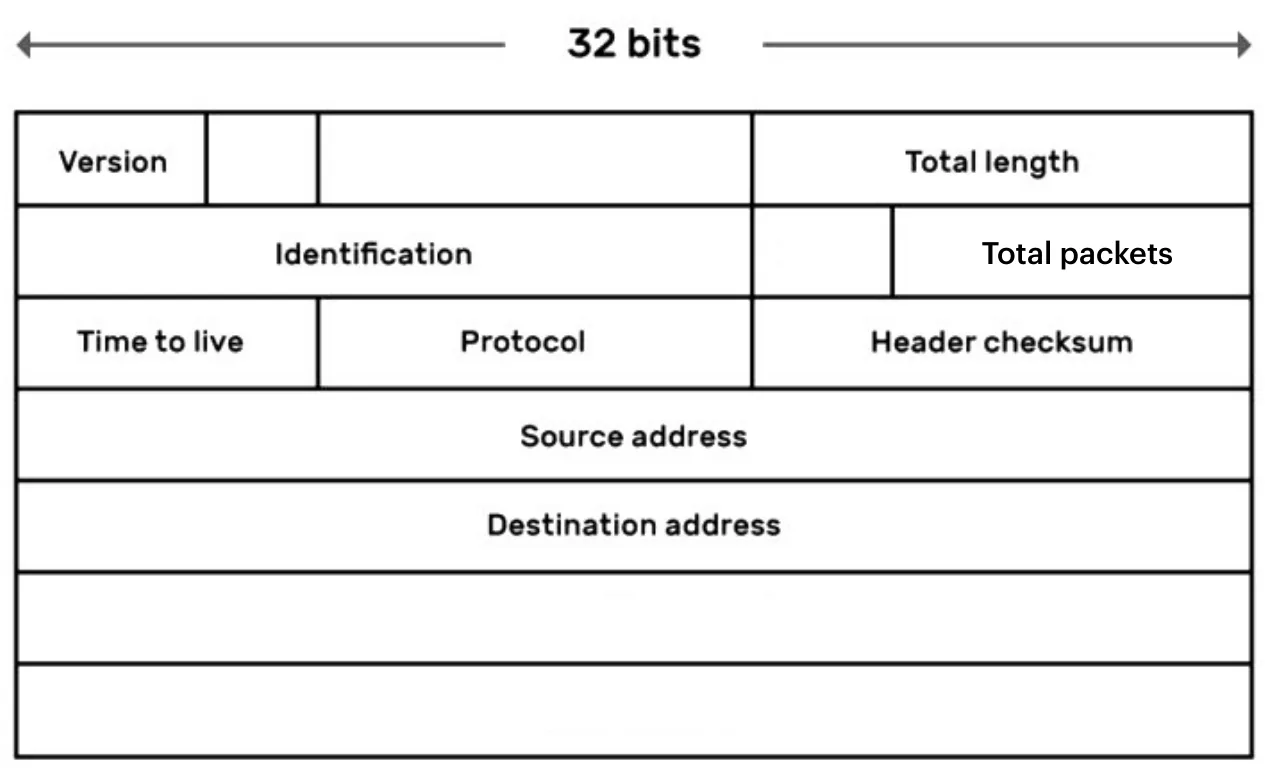
IP packets
- The internet protocol encapsulates the segments from the transport layer to create IP packets.
- Each IP packet is given a header made of several pieces of data (called fields) that help to deliver the data.
- The two most important pieces of header data are the source and destination IP addresses.
- The source address is the one given to the computer sending the IP packet. The destination address has to be looked up.
Practise this: past-paper questions
- November 2022 · Paper 31 · Q2Outline the functions of the Transport and Internet layers of the TCP/IP protocol suite. Transport layer Internet layer
- June 2025 · Paper 33 · Q4(a)The Internet layer and Link layer are two layers of the TCP/IP protocol suite. Describe the purpose of the Internet layer and the purpose of the…
Used later in
14.1 · 14 of 19Book page Contents
The data-link layer and frames
Builds on
The data-link layer puts data into frames so that it is ready to be sent in the physical layer. It adds both a header and a trailer to the data coming from the network layer.
Frame header and trailer
- The frame header holds the physical addresses of the source and destination devices.
- These physical addresses are usually Media Access Control (MAC) addresses, which uniquely identify a Network Interface Card (NIC). The NIC is what connects a device to the network.
- The frame trailer may contain an error control method, such as parity checking.
When data is sent across a network, frames carry the data from one system to the next. This is called hop-by-hop forwarding. When data passes through many systems on the way, each one receives a frame, removes the old frame header and trailer, wraps the data in a new header and trailer for the next hop, and forwards it to the next system.
Practise this: past-paper questions
- November 2023 · Paper 31 · Q2(b)Outline the purpose of the Link layer in the TCP / IP protocol suite
- June 2025 · Paper 33 · Q4(a)The Internet layer and Link layer are two layers of the TCP/IP protocol suite. Describe the purpose of the Internet layer and the purpose of the…
- June 2026 · Paper 32 · Q2Complete the following paragraph using the most appropriate words from the given list. Some words are not used. application controls disconnects…
Used later in
14.1 · 15 of 19Book page Contents
Exam summary: layers and protocols
Builds on
- Application: handles access to services, manages the data exchange, and defines the protocols used.
- Transport: handles the forwarding of packets.
- Internet (network): handles the transmission of data, routing and IP addressing.
- Data link: handles how data is physically sent.
| Protocol | Description | Use |
|---|---|---|
| HTTP(S), Hypertext Transfer Protocol (Secure) | Transfer of web pages or hypertext | Browsing websites |
| FTP, File Transfer Protocol | Transfers data directly between two computers over a network | Uploading and downloading files over the internet |
| SMTP, Simple Mail Transfer Protocol | Protocol for sending email | Used by mail servers to forward email messages |
| POP3, Post Office Protocol 3 | Mail is held for you by a remote server until you download it | To receive email |
| IMAP, Internet Message Access Protocol | Mail stays on the server and syncs across devices | To receive email |
| BitTorrent | Protocol for peer-to-peer file sharing | Decentralised distribution of data |
Practise this: past-paper questions
- June 2022 · Paper 32 · Q3(a)Identify two protocols used by this layer. Describe the use of each protocol. Protocol 1 Description Protocol 2 Description
- June 2022 · Paper 32 · Q3(b)Identify two other layers of the TCP/IP protocol suite. Describe the function of each layer. Layer 1 Description Layer 2 Description
- November 2022 · Paper 32 · Q3(b)The TCP/IP protocol implementation can be viewed as a stack. Complete the diagram for the TCP/IP protocol stack. | | | Transport | | | | Link |
- November 2023 · Paper 31 · Q2(a)Draw one line to connect each protocol to its most appropriate use. Protocol: HTTP BitTorrent SMTP IMAP Use: to provide peer-to-peer file sharing…
Show 7 more
- June 2024 · Paper 31 · Q2(a)Complete the diagram to show the correct order for these layers
- June 2024 · Paper 31 · Q2(c)Outline one protocol that is associated with the Application layer
- November 2024 · Paper 32 · Q5(a)Name and describe two protocols used by the Application Layer of the TCP/IP protocol suite
- June 2025 · Paper 32 · Q3(a)Identify two different layers of the TCP/IP protocol suite
- November 2025 · Paper 32 · Q3(a)HTTP and IMAP are examples of protocols used in the Application Layer of the TCP/IP protocol suite. State the purpose of the HTTP and IMAP protocols
- November 2025 · Paper 33 · Q4Identify and describe three protocols that are used in the Application Layer of the TCP/IP protocol suite. Protocol 1 ... Description ... Protocol…
- June 2026 · Paper 31 · Q4Draw one line to connect each TCP/IP layer to its most appropriate description. TCP/IP layer: • Application • Transport • Internet • Link…
Used later in
14.1 · 16 of 19Book page Contents
Packet headers
Builds on
Purpose of a packet header
- To store data about the packet and its routing, so that it reaches its destination.
- To make sure the message can be properly put back together.
Items contained in a packet header
- IP address of the sender
- IP address of the destination
- IP version
- Number of packets the message is made of
- ID (packet number) of that packet
- Protocol used
- Packet length
- Time to live (the maximum number of hops)
- Source port
- Destination port
- Checksum
Practise this: past-paper questions
14.1 · 17 of 19Book page Contents
The BitTorrent protocol
Builds on
The BitTorrent protocol is a way of sharing files using a decentralised peer-to-peer model, instead of the traditional, more centralised, client-server model.
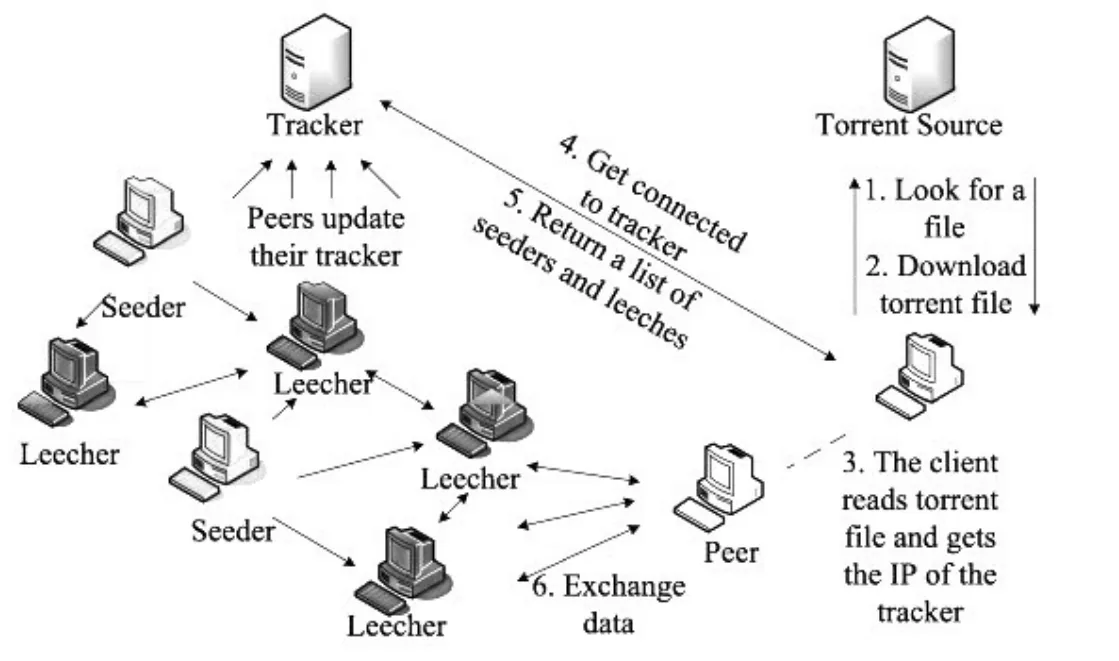
In the client-server model, clients download files from a central server. With BitTorrent, a swarm of peers upload to and download from each other. This stops any single device being overwhelmed, because every device shares with only a few others.
To use BitTorrent, a peer loads a .torrent file into a BitTorrent client, which connects it to a tracker. The tracker is a device that keeps a list of the peers connected to it, and tracks which peers have which chunks of which files. The tracker does not store the files; it only keeps track of them. Every so often, peers update the tracker, so that they are not sent chunks they already have.
A peer that has all of the chunks of a file is a seed. Seeds send chunks of the file to peers that do not have the whole file. Once a peer has every chunk, it becomes a new seed and can send chunks to other peers. To keep downloads fast, rarer chunks are given priority.
Main advantage of BitTorrent
- It scales well.
- If thousands of people try to download a file from the same server, the server may be overwhelmed and crash, which slows the downloads down.
- With BitTorrent, a larger swarm can actually give faster downloads.
Practise this: past-paper questions
- November 2023 · Paper 31 · Q2(a)Draw one line to connect each protocol to its most appropriate use. Protocol: HTTP BitTorrent SMTP IMAP Use: to provide peer-to-peer file sharing…
- June 2024 · Paper 32 · Q2(c)Explain the meaning of the phrase: BitTorrent protocol provides peer-to-peer file sharing
- November 2025 · Paper 32 · Q3(b)Describe how files are shared using the BitTorrent protocol
14.1 · 18 of 19Book page Contents
How the BitTorrent protocol works
Builds on
How the BitTorrent protocol works
- BitTorrent client software is made available on friends’ and family’s computers.
- A complete copy of the torrent (the file to be shared) is available on at least one computer.
- The torrent is split into small pieces. Rare pieces are given priority for downloading.
- The torrent descriptor file is made available.
- A computer (user) joins the swarm by using the BitTorrent software to load the torrent descriptor file.
- The computer can now download a piece of the torrent.
- Once a computer has a piece, or the whole file, it can become a seed and upload to other members of the swarm.
- Every member of the swarm both downloads and uploads pieces of the torrent.
- A server called a tracker keeps records of all the computers in the swarm.
- The tracker shares their IP addresses, so they can connect to each other.
Practise this: past-paper questions
14.1 · 19 of 19Book page Contents
BitTorrent terms
Builds on
| BitTorrent term | Definition |
|---|---|
| Swarm | A group of peers connected together. One of the most important things in deciding whether a swarm can keep letting peers complete a torrent is its availability: the number of complete copies of the torrent’s contents spread across the swarm. (A torrent is simply the name for a file being shared on the peer-to-peer network.) |
| Seed | A peer that has downloaded a file (or pieces of a file) and then made it available to other peers in the swarm. |
| Tracker | A central server that stores details about the other computers in the swarm. It stores details of all the peers downloading or uploading the file, so the peers can find each other using the stored IP addresses. |
| Leech | A peer that has a negative effect on the swarm because it has a poor share ratio: it downloads much more data than it uploads to the others. |
| Lurker | A peer that downloads many files but does not make any new content available to the community as a whole. |
14.1
Concepts in 14.1
Every idea explained in 14.1, and where else in the notes it is used.
| Concept | In one line | Also used in |
|---|---|---|
| application layer | The top TCP/IP layer: holds the protocols, such as HTTP and SMTP, that applications use to exchange data. | 14.1 The four layers of the TCP/IP suite, 14.1 Encapsulation: how the layers work together, 14.1 The transport layer and segments, 14.1 Sockets |
| BitTorrent | A protocol for peer-to-peer file sharing, where peers in a swarm upload and download pieces. | 14.1 Exam summary: layers and protocols, 14.1 How the BitTorrent protocol works, 14.1 BitTorrent terms |
| datagram | The block of data made by UDP at the transport layer. | 14.1 The four layers of the TCP/IP suite, 14.1 Encapsulation: how the layers work together, 14.1 The internet layer and IP packets |
| encapsulation | Each layer wrapping the data from the layer above in its own header. | 14.1 The internet layer and IP packets |
| frame | The block of data made at the link layer, with a header of MAC addresses and a trailer. | 14.1 Encapsulation: how the layers work together |
| FTP | Protocol for uploading, downloading and removing files on an FTP server. | 14.1 Encapsulation: how the layers work together, 14.1 Exam summary: layers and protocols |
| hop-by-hop forwarding | Passing a frame from one system to the next, with a new frame header and trailer for each hop. | only here |
| HTTP | Request-response protocol for transferring web pages, using GET and POST. | 14.1 The four layers of the TCP/IP suite, 14.1 Encapsulation: how the layers work together, 14.1 The application layer, 14.1 Email protocols: SMTP, POP3 and IMAP, 14.1 Exam summary: layers and protocols |
| IMAP | Protocol for receiving email that keeps the mail on the server, in sync across devices. | 14.1 The four layers of the TCP/IP suite, 14.1 Exam summary: layers and protocols |
| internet layer | The TCP/IP layer that makes IP packets, adds IP addresses and routes packets. | 14.1 The four layers of the TCP/IP suite, 14.1 The transport layer and segments, 14.1 The data-link layer and frames |
| IP | Internet layer protocol with the rules for sending packets across the internet. | 14.1 The internet layer and IP packets, 14.1 Packet headers, 17.1 Security protocols: SSL and TLS |
| IP packet | A segment wrapped in an IP header holding the source and destination IP addresses. | 14.1 The four layers of the TCP/IP suite, 14.1 Encapsulation: how the layers work together |
| leech | A peer that downloads much more than it uploads. | only here |
| link layer | The bottom TCP/IP layer: puts packets into frames and sends them across each physical link. | 14.1 The four layers of the TCP/IP suite, 14.1 Encapsulation: how the layers work together |
| lurker | A peer that downloads many files but shares no new content. | only here |
| MAC address | A physical address that uniquely identifies a network interface card. | only here |
| packet header | The part of a packet holding data such as the IP addresses, packet number and time to live. | 14.2 Packet switching |
| POP3 | Protocol for receiving email by downloading it from a mail server. | 14.1 The four layers of the TCP/IP suite, 14.1 Exam summary: layers and protocols |
| port | A number that identifies the application or process that data is for. | 14.1 The four layers of the TCP/IP suite, 14.1 Sockets |
| protocol | A set of rules that specify how two devices communicate with each other. | only here |
| protocol stack | Protocols arranged as layers on top of each other; data goes down the stack to send and up to receive. | 14.1 Encapsulation: how the layers work together, 14.1 The transport layer and segments, 16.1 Operating system structure |
| seed | A peer that has the whole file (or pieces of it) and uploads it to other peers. | 14.1 How the BitTorrent protocol works, 14.1 BitTorrent terms |
| segment | A chunk of application data with a transport header, made by TCP at the transport layer. | 14.1 The four layers of the TCP/IP suite, 14.1 Encapsulation: how the layers work together |
| sequence number | A number given to each TCP segment so the receiver can acknowledge it and put the data in order. | 14.1 The four layers of the TCP/IP suite |
| SMTP | Protocol for sending email to a mail server and between mail servers. | 14.1 The four layers of the TCP/IP suite, 14.1 Encapsulation: how the layers work together, 14.1 The application layer, 14.1 Exam summary: layers and protocols |
| socket | A TCP end point: an IP address together with a port number. | only here |
| swarm | The group of peers connected together to share a torrent. | 14.1 How the BitTorrent protocol works, 14.1 BitTorrent terms |
| TCP | Transport layer protocol that sets up a connection and makes sure every segment arrives, resending lost ones. | 14.1 The four layers of the TCP/IP suite, 14.1 TCP and IP, 14.1 The transport layer and segments, 14.1 Sockets, 17.1 Security protocols: SSL and TLS |
| TCP/IP protocol suite | The four-layer set of protocols used on the internet: application, transport, internet and link. | 14.1 Encapsulation: how the layers work together, 14.1 Exam summary: layers and protocols, 18.1 Where shortest paths are used |
| torrent descriptor file | The .torrent file a peer loads into its BitTorrent client to join the swarm. | 14.1 How the BitTorrent protocol works |
| tracker | A server that records which peers are in the swarm and shares their IP addresses. | 14.1 How the BitTorrent protocol works, 14.1 BitTorrent terms |
| transport layer | The TCP/IP layer that splits data into segments, adds port numbers and makes sure data is delivered. | 14.1 The four layers of the TCP/IP suite, 14.1 TCP and IP, 14.1 The application layer, 14.1 Sockets, 14.1 The internet layer and IP packets |
| UDP | Fast transport layer protocol with no acknowledgements, used where some data loss is acceptable. | 14.1 The four layers of the TCP/IP suite, 14.1 The transport layer and segments |
Zain Merchant's notes, page by page, as printed in his book. The Notes tab has the same notes as text, with links.
Past-paper questions and mark schemes © Cambridge University Press & Assessment. Compiled for revision by Zain Merchant.
- June 2022 · Paper 32 · Q3Notes:The four layers of the TCP/IP suiteHTTP and FTPEmail protocols: SMTP, POP3 and IMAPExam summary: layers and protocols
- November 2022 · Paper 31 · Q2Notes:The transport layer and segmentsThe internet layer and IP packets
- November 2022 · Paper 32 · Q3Notes:What a protocol is and why it is neededThe four layers of the TCP/IP suiteEmail protocols: SMTP, POP3 and IMAPExam summary: layers and protocols
- November 2023 · Paper 31 · Q2Notes:HTTP and FTPEmail protocols: SMTP, POP3 and IMAPThe data-link layer and framesExam summary: layers and protocolsThe BitTorrent protocol
- November 2023 · Paper 32 · Q4Notes:The protocol stackThe four layers of the TCP/IP suite
- June 2024 · Paper 31 · Q2Notes:The four layers of the TCP/IP suiteHTTP and FTPEmail protocols: SMTP, POP3 and IMAPThe transport layer and segmentsExam summary: layers and protocols
- June 2024 · Paper 32 · Q2Notes:What a protocol is and why it is neededEmail protocols: SMTP, POP3 and IMAPThe BitTorrent protocol
- November 2024 · Paper 31 · Q4Notes:The protocol stackEncapsulation: how the layers work together
- November 2024 · Paper 32 · Q5Notes:The application layerHTTP and FTPEmail protocols: SMTP, POP3 and IMAPExam summary: layers and protocols
- June 2025 · Paper 31 · Q3Notes:The application layerThe transport layer and segments
- June 2025 · Paper 32 · Q3Notes:The protocol stackThe four layers of the TCP/IP suiteEncapsulation: how the layers work togetherExam summary: layers and protocols
- June 2025 · Paper 33 · Q4Notes:The internet layer and IP packetsThe data-link layer and frames
- November 2025 · Paper 31 · Q3Notes:What a protocol is and why it is neededEmail protocols: SMTP, POP3 and IMAP
- November 2025 · Paper 32 · Q3Notes:HTTP and FTPEmail protocols: SMTP, POP3 and IMAPExam summary: layers and protocolsThe BitTorrent protocolHow the BitTorrent protocol works
- November 2025 · Paper 33 · Q4Notes:HTTP and FTPEmail protocols: SMTP, POP3 and IMAPExam summary: layers and protocols
- June 2026 · Paper 31 · Q4Notes:The four layers of the TCP/IP suiteExam summary: layers and protocols
- June 2026 · Paper 32 · Q2Notes:The four layers of the TCP/IP suiteThe data-link layer and frames
- June 2026 · Paper 33 · Q2Notes:The protocol stackThe four layers of the TCP/IP suiteEncapsulation: how the layers work together
Past-paper questions and mark schemes © Cambridge University Press & Assessment. Compiled for revision by Zain Merchant.
Try the questions first.
Write your answers, then check them against the mark scheme. Your choice is remembered on this device.