A Level 9618 · Paper 3 · 17.1
Encryption, Encryption Protocols and Digital Certificates
How data is kept secret on a network, and how a message is proven to be genuine. Read the notes, try the past-paper questions, then check the mark scheme.
Past papers from November 2021 to June 202618 questions · 103 marks
In this subtopic
- Symmetric and asymmetric encryption, with public and private keys
- Sending a private message, and sending a verified message
- Quantum cryptography: purpose, benefits and drawbacks
- SSL and TLS in client-server communication
- Digital certificates and digital signatures
17.1 · 1 of 12Book page Contents
Encryption: symmetric and asymmetric
Encryption is used to make sure that data is unreadable if it is intercepted. An encryption algorithm converts plaintext (the readable message) into ciphertext (the scrambled message). Decryption turns the ciphertext back into plaintext.
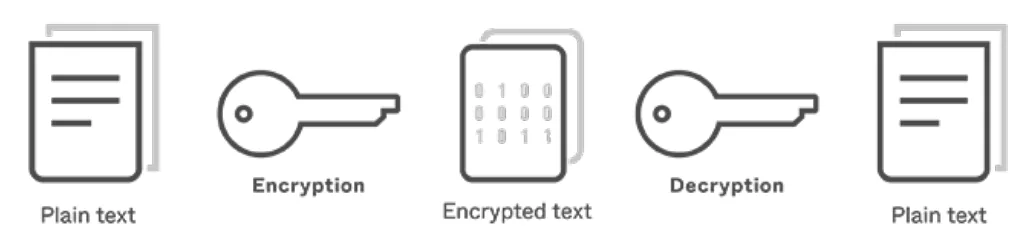
There are two types of encryption: symmetric and asymmetric.
- Symmetric encryption uses the same key for both encryption and decryption. Symmetric encryption is faster than asymmetric encryption because it uses less complex mathematical operations. This means data can be encrypted and decrypted at a speed and volume that suits network communications.
- Asymmetric encryption uses a related set of keys: one public and one private. The keys work as a pair: one key encrypts the message and the other key decrypts it. Asymmetric encryption is slower, but it allows the sender to be authenticated.
Most computer systems today use asymmetric encryption to exchange a symmetric key safely. The symmetric key is then used to secure one limited communications session, so the key is not in use for a long time.
| Symmetric encryption | Asymmetric encryption | |
|---|---|---|
| Keys | One key, the same for encrypting and decrypting | A pair of keys: a public key and a private key |
| How the keys are used | The same key encrypts and decrypts | One key of the pair encrypts, the other decrypts |
| Speed | Faster: simpler mathematics | Slower: more complex mathematics |
Practise this: past-paper questions
- June 2022 · Paper 31 · Q8(a)(i)Give two reasons for using key cryptography
- June 2022 · Paper 31 · Q8(a)(ii)Give two methods of key cryptography that can be used
- November 2022 · Paper 32 · Q6(a)State two differences between symmetric and asymmetric encryption
- June 2023 · Paper 32 · Q5(b)Explain the differences between symmetric and asymmetric cryptography when encrypting and decrypting data
Show 3 more
- November 2025 · Paper 32 · Q7(a)Asymmetric encryption is a type of cryptography. Identify one other type of cryptography
- June 2026 · Paper 31 · Q8(a)(i)Define the following asymmetric key encryption terms: cipher text
- June 2026 · Paper 32 · Q8(a)Describe the differences between symmetric key and asymmetric key cryptography
Used later in
17.1 · 2 of 12Book page Contents
The key exchange problem and asymmetric keys
Builds on
A major weakness of symmetric encryption, where the sender and the recipient use the same key, is the need to exchange keys. To be really secure, a key must only be used once, so a new key would have to be exchanged every time a new message is sent. When the sender and receiver are in different places, perhaps on opposite sides of the globe, key exchange is a real challenge.
This problem was solved by a system that uses asymmetric keys. In an asymmetric encryption scheme, the key used to encrypt a message cannot be used to decrypt the ciphertext. This sounds as if it could not possibly work, and it took a long time for a method to be found.
The RSA algorithm (named after Rivest, Shamir and Adleman, who devised it) generates several components. These components are mathematically linked, so a message encrypted using one set of components can be decrypted using the other set. Together the components are known as a public and private key pair. The mathematics is complex, and you do not need to understand it for A Level. It relies on the intractable problem of factorising very large numbers, which makes it computationally secure.
Public key cryptography uses an asymmetric encryption scheme, where different keys are used for encrypting and decrypting the data.
- The public key is widely shared. Anyone can have it.
- The private key is known only to its owner and must be kept secure.
Practise this: past-paper questions
- November 2022 · Paper 31 · Q6(a)State what is meant by a private key
- June 2023 · Paper 31 · Q9(a)Encryption is used to alter data into a form that makes it meaningless if intercepted. Describe the purpose of asymmetric key cryptography
- June 2026 · Paper 31 · Q8(a)(ii)Define the following asymmetric key encryption terms: public key
Used later in
17.1 · 3 of 12Book page Contents
How public-key encryption works
Builds on
Imagine that Alice (A) and Bob (B) want to exchange secure messages. They each need a public/private key pair. The public keys can be shared openly: they are of no use to anyone else. However, each person must keep their own private key absolutely secret.
When Alice wants to send a message to Bob:
- Alice encrypts the message using Bob’s public key.
- Bob receives the encrypted message. He decrypts it using his own private key.
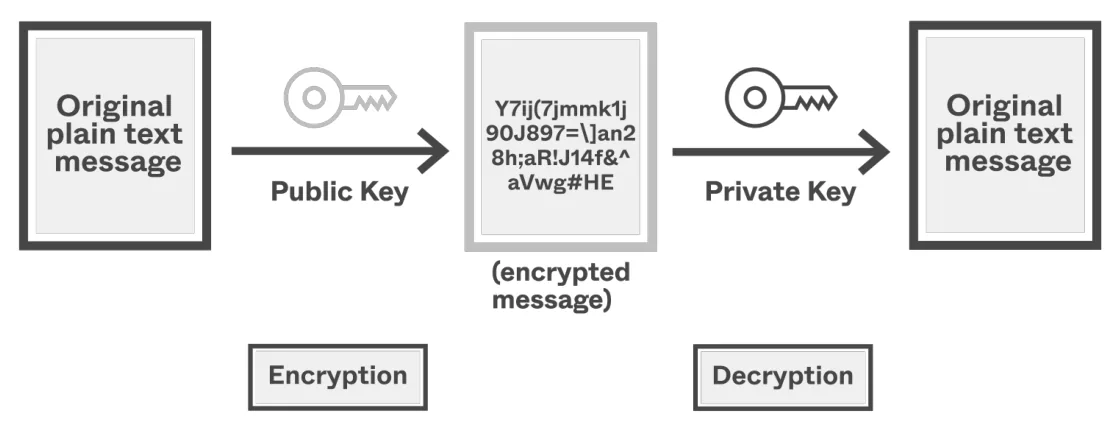
As long as Bob keeps his private key absolutely secret, no one else can decrypt the message. The key pair cannot be guessed because it is computationally secure.
Sending a message with asymmetric encryption
- The sender gets the receiver’s public key.
- The sender encrypts the message (plaintext) with the receiver’s public key to make ciphertext.
- The receiver decrypts the ciphertext with their own matching private key.
- Only the receiver has the private key, so only the receiver can read the message.
Practise this: past-paper questions
- November 2022 · Paper 31 · Q6(b)Describe the process of asymmetric encryption
- June 2023 · Paper 31 · Q9(a)Encryption is used to alter data into a form that makes it meaningless if intercepted. Describe the purpose of asymmetric key cryptography
- June 2024 · Paper 32 · Q4Sheila has a customer called Fred. Fred wants to send Sheila a confidential document as part of a transaction. Explain how Fred uses asymmetric…
- November 2025 · Paper 32 · Q7(b)An organisation holds two asymmetric encryption keys, which they intend to use to receive secure transmissions. Explain how the organisation makes…
17.1 · 4 of 12Book pages Contents
Digital signatures
Builds on
Public key encryption keeps a message confidential: if Alice encrypts it with Bob’s public key, only Bob can read it. But how can Bob be sure that Alice sent it (authentication), and that it has not been changed on the way (integrity)? This is what a digital signature is for.
A digital signature is like a handwritten signature that says “I am satisfied that this content is accurate and comes from me”. Here is how Alice signs a message she sends to Bob:
- First, Alice runs a hash function on the plaintext message. This produces a hash total, also called a digest.
- She encrypts the digest with her own private key. This encrypted digest is the digital signature for the message. Only Alice could have produced it, so it proves that the message came from her.
- She attaches the signature to her message.
- She then encrypts the whole thing with Bob’s public key, as before.
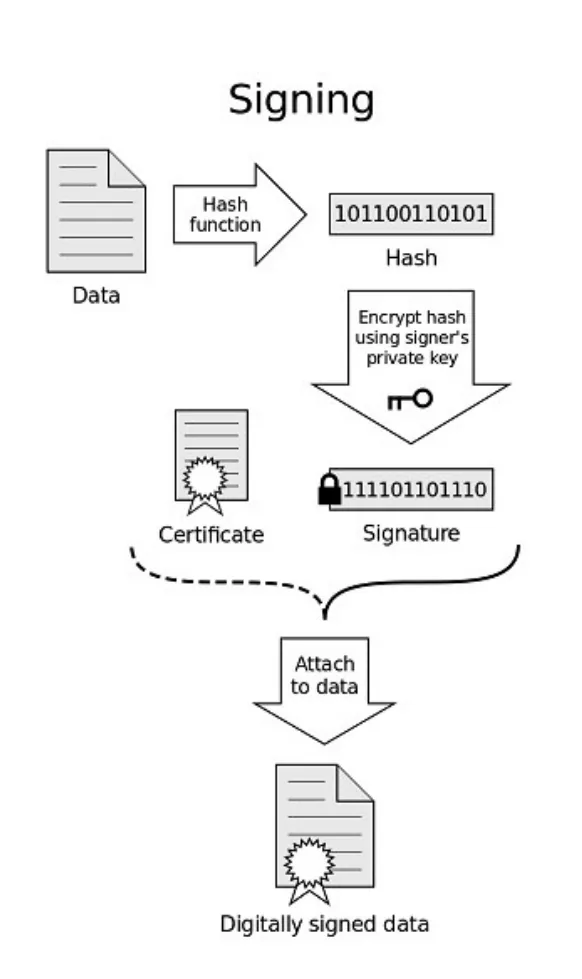
When Bob receives the message:
- He decrypts it with his private key, as before. Now he has the plaintext, so he can read the message.
- Next, he uses Alice’s public key to decrypt the signature. This gives him the digest that Alice made.
- He runs the same hash function on the plaintext himself and checks whether the two digests match. If they do, he knows the message was not changed on the way. He has verified the digital signature, and can be sure of the message’s integrity.
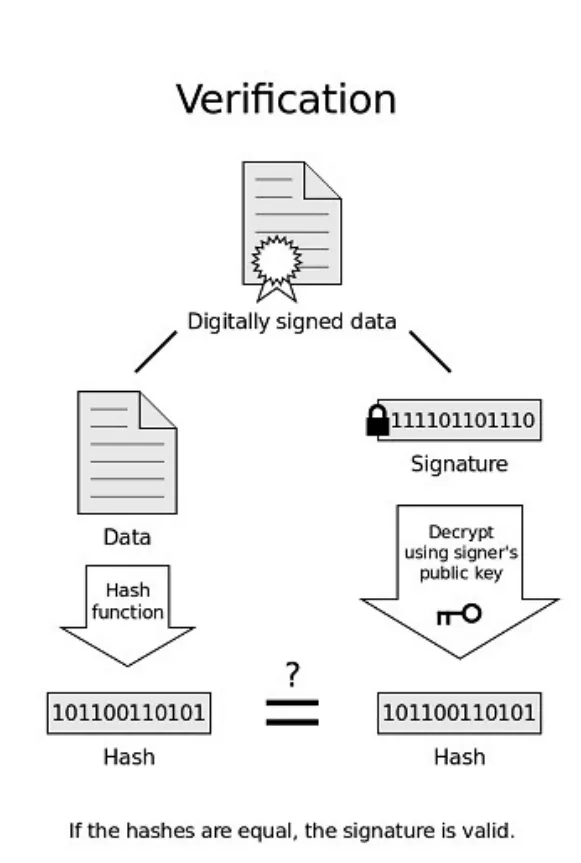
If a hacker intercepts the message and changes it, the digest Bob calculates will not match the digest recovered from Alice’s signature.
The digital signature can include a timestamp, so that a false signature cannot be recreated at a later date.
You can use a digital signature to make sure that data has not been tampered with, even when the message itself is not encrypted. For example, most email clients can handle digital signatures, and your browser might use a digital signature to check that a download from a software company has not been tampered with.
However, anyone can create a digital signature and claim to be a trusted person. To guard against this, you can check a digital certificate to verify the sender’s identity.
Producing a digital signature (sender)
- The message is put through a hash function to produce a digest.
- The digest is encrypted with the sender’s private key. This is the digital signature.
- The signature is attached to the message and sent.
Checking a digital signature (receiver)
- The receiver decrypts the signature with the sender’s public key to get the original digest.
- The receiver puts the message received through the same hash function to make a new digest.
- If the two digests match, the message came from the sender and was not altered in transmission.
Practise this: past-paper questions
- June 2022 · Paper 32 · Q7(b)(i)Explain how a digital signature is produced before the message is sent
- June 2022 · Paper 32 · Q7(b)(ii)Explain how the digital signature can be checked on receipt to ensure that the message has not been altered during transmission
- November 2022 · Paper 31 · Q6(c)Explain how a digital signature is used to verify a message when it is received
- June 2024 · Paper 31 · Q7(b)Explain the role of a digital certificate in creating a digital signature
17.1 · 5 of 12Book page Contents
Digital certificates
Builds on
A digital certificate is an electronic document that authenticates (verifies the identity of) a message sender or a website. It is issued by an official certificate authority (CA), such as Let’s Encrypt or DigiCert. A digital certificate includes a serial number, an expiry date, the holder’s name and the holder’s public key. It is signed with the CA’s private key, so that you can check that it is genuine.
These items are commonly found on a digital certificate:
- version number
- serial number of the certificate
- algorithm identification
- name of the certificate issuer
- validity (the start date and the expiry date of the certificate)
- public key
- issuer’s identifier
- company’s identifier
- signature algorithm used
- digital signature.
Practise this: past-paper questions
17.1 · 6 of 12Book pages Contents
Getting a digital certificate
Builds on
A person or an organisation gets a digital certificate from a certificate authority (CA):
- The applicant creates a public key and a private key. The private key is kept secret.
- The applicant sends the CA a request with their public key and proof of who they are.
- The CA checks the applicant’s identity.
- The CA builds the certificate. It holds the applicant’s name, their public key, the name of the CA, a serial number and the dates the certificate is valid.
- The CA makes a digest of the certificate and encrypts it with the CA’s own private key. This is the CA’s signature on the certificate.
- The CA sends the signed certificate to the applicant, who can now share it with anyone.
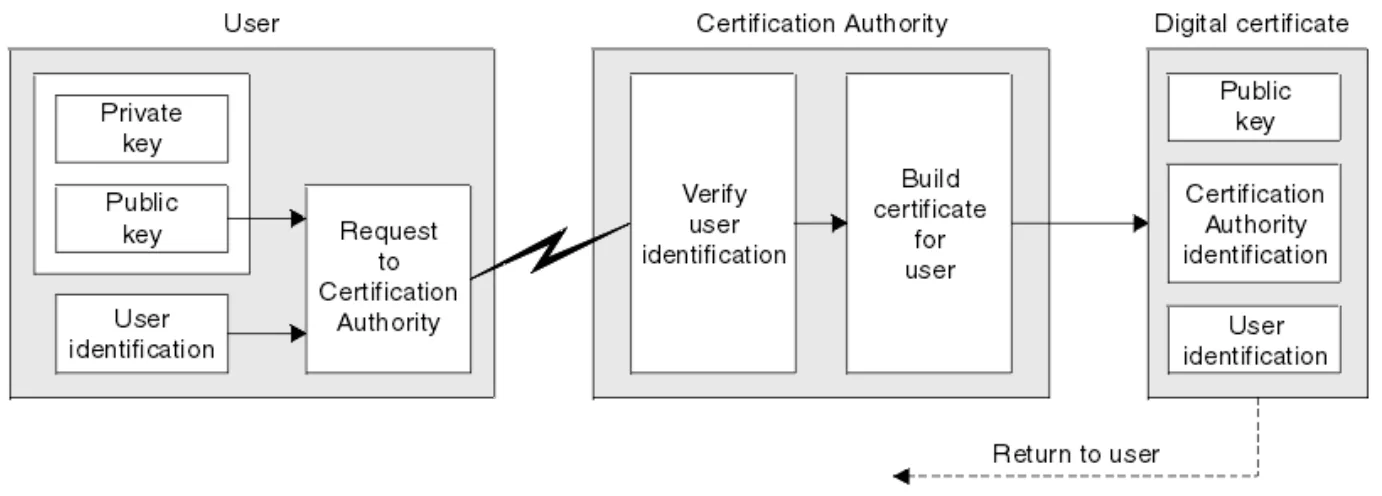
Practise this: past-paper questions
- June 2022 · Paper 32 · Q7(a)State how a digital certificate is obtained
- November 2022 · Paper 32 · Q6(b)Explain the process by which an organisation may acquire its digital certificate
- November 2025 · Paper 33 · Q9A company requires a digital certificate to ensure the authenticity of its online communications. Outline the process followed to acquire a…
17.1 · 7 of 12Book page Contents
Checking a signature with a certificate
Builds on
When Alice sends Bob a signed message, she attaches her certificate. Bob uses it like this:
- Bob uses the CA’s public key, which is already stored on his computer, to check the CA’s signature on the certificate. He also checks that the certificate is still in date. If both are fine, the certificate is genuine and has not been changed.
- Bob takes Alice’s public key from the certificate.
- He uses Alice’s public key to decrypt her digital signature. This gives him the digest Alice made.
- He runs the same hash function on the message he received, to make his own digest.
- If the two digests match, the message came from Alice and was not changed on the way.
Without the certificate, anyone could send Bob a public key and claim to be Alice. The CA’s signature is what lets Bob trust that the key really belongs to her.
Practise this: past-paper questions
- June 2022 · Paper 32 · Q7(b)(ii)Explain how the digital signature can be checked on receipt to ensure that the message has not been altered during transmission
- November 2022 · Paper 31 · Q6(c)Explain how a digital signature is used to verify a message when it is received
- June 2024 · Paper 31 · Q7(b)Explain the role of a digital certificate in creating a digital signature
- November 2025 · Paper 31 · Q5(b)Explain why a digital certificate is required to validate a digital signature
17.1 · 8 of 12Book pages Contents
Security protocols: SSL and TLS
Builds on
The protocol used to keep internet communication secure today is Transport Layer Security (TLS), which replaced the older Secure Sockets Layer (SSL).
TLS is the more modern of the two: it is based on SSL. SSL and TLS are mainly used in client/server applications. They both use standard cryptographic protocols to make sure that communication between the client and the server is secure and authenticated. Normally only the server is authenticated, and the client stays unauthenticated. Once a secure link between the server and the client is set up, the SSL or TLS protocol makes sure that no third party can eavesdrop.
Secure Sockets Layer. When a user logs on to a website, SSL encrypts the data, so only the client’s computer and the web server can make sense of what is being sent. SSL also checks the integrity of the data. A user can tell that a secure connection is being used when the web address starts with https. SSL itself is now obsolete: it has been replaced by TLS, which is what browsers use today.
TCP is used to set up a connection between the client and the server. A handshake takes place, so that communication between the client and the server can begin. One part of the SSL protocol is to agree which encryption algorithms will be used: this is essential for a secure, encrypted communication. To create an SSL connection, a web server needs an SSL digital certificate. The website owner must get this certificate so that the SSL protocols can be used.
Where SSL and TLS are used
- online banking and all online financial transactions
- online shopping (e-commerce)
- sending software to a restricted list of users
- sending and receiving emails
- using cloud storage
- intranets and extranets (as well as the internet)
- using virtual private networks (VPNs)
- using Voice over Internet Protocol (VoIP) for video or audio chat over the internet
- using instant messaging
- using a social networking site.
Practise this: past-paper questions
17.1 · 9 of 12Book pages Contents
Transport Layer Security (TLS)
Builds on
Transport Layer Security (TLS) is a modern, more secure version of SSL. It provides encryption, authentication and data integrity more effectively. It keeps data secure and private between devices and users when they communicate over a network such as the internet. When a website and a client communicate over the internet, TLS prevents a third party from eavesdropping.
TLS is made of two main layers:
- The record protocol holds the data being sent over the network or internet. It can be used with or without encryption.
- The handshake protocol lets the web server and the client authenticate each other and agree the encryption algorithms to use. A secure session between the client and the server is then set up.
Note SSL is now obsolete. It was retired in 2015 and current web browsers no longer support it, so TLS is what is used today. The name lives on in the term “SSL certificate”, which is just the old name for the certificates that TLS uses.
How TLS improves on SSL
- TLS can be extended by adding new authentication methods (SSL cannot).
- TLS can use session caching, which improves the overall performance of the communication compared with SSL.
- TLS separates the handshaking process from the record protocol (layer), where all the data is held.
Session caching. Opening a TLS session takes a lot of computer time, mainly because of the complex cryptographic processes involved. Session caching avoids using as much computer time for each connection: TLS can either set up a new session or try to resume an existing one. Resuming an existing session can greatly boost the performance of the system.
Two main functions of SSL/TLS
- The encryption of data.
- The identification of the client and the server, so that each knows who it is communicating with.
17.1 · 10 of 12Book page Contents
Setting up a secure connection
Builds on
These are the stages when a browser (the client) opens a secure connection to a web server:
- The client types the URL into the browser and presses the Enter key. Several steps happen before any encrypted data is sent: this is known as the handshaking stage.
- The client’s browser requests secure pages (https) from the web server.
- The web server sends back its SSL digital certificate, which also contains the server’s public key. The certificate is digitally signed by a third party called the certificate authority (CA).
- When the client’s browser receives the digital certificate, it checks: the digital signature of the CA (is it one of the CAs in the browser’s trusted store? The list of trusted CAs comes as part of the browser the client downloads); that the start and end dates on the certificate are still valid; and that the domain in the certificate exactly matches the domain the client asked for.
- Once the browser trusts the digital certificate, it creates a temporary session key, encrypts it with the server’s public key (taken from the digital certificate) and sends it to the web server.
- The web server uses its private key to decrypt the session key. It then sends back an acknowledgement, encrypted with the same session key.
- The browser and the web server can now encrypt all the data sent over the connection using this session key, and secure communication can take place.
Note This is asymmetric encryption used to exchange a symmetric key: the session key travels safely because it is encrypted with the server’s public key, and then the faster symmetric encryption is used for the rest of the session.
Practise this: past-paper questions
17.1 · 11 of 12Book pages Contents
Quantum cryptography
Quantum mechanics gives the fundamental laws of physics for the behaviour of particles. The particles that carry light are called photons. Photons behave like waves: each photon seems to vibrate in a particular direction, at right angles to the direction it travels in. The direction a photon vibrates in is called its polarisation, and it is drawn as a double-ended arrow.
A photon can be created with a chosen polarisation to represent the value of a bit. With four possible polarisations, there are two ways to represent a 1 and two ways to represent a 0:

The vertical and horizontal pair is called the + basis, and the two diagonal directions are the x basis. The table shows ten bits being sent: the bit value sent, the polarisation basis the sender used, the polarisation basis the receiver chose, and the bit values confirmed.
| Bit | Value sent | Sender’s basis | Receiver’s basis | Value kept |
|---|---|---|---|---|
| 1 | 1 | + | x | |
| 2 | 0 | x | + | |
| 3 | 1 | x | + | |
| 4 | 1 | + | + | 1 |
| 5 | 0 | + | x | |
| 6 | 0 | x | x | 0 |
| 7 | 0 | x | + | |
| 8 | 1 | + | x | |
| 9 | 0 | x | x | 0 |
| 10 | 1 | + | + | 1 |
- The sender chooses the bit pattern at random, and also chooses the polarisation basis for each bit at random.
- The receiver chooses a polarisation basis for each bit, again at random.
- After the transmission, the sender tells the receiver which basis was used for each bit.
- The receiver replies saying which of its choices matched.
- For each match, both sides now have a stored bit value. In this example (bits 4, 6, 9 and 10) the “shared secret” code 1001 has been created.
This scheme is used in Quantum Key Distribution (QKD) systems. Asymmetric encryption can be used to transfer a key that is then used for symmetric encryption. QKD offers another way to transfer the key, and the key is then used in the normal way.
The advantage of QKD is that the transfer does not send defined values, just photons. By the laws of quantum mechanics, anyone who intercepts the flow of photons to find out their polarisation will destroy the photons. A photon cannot be detected and measured and then sent on again.
The main drawback of quantum cryptography is that it cannot use standard communication media. It needs a dedicated, special-purpose quantum channel between the sender and the receiver. This is very expensive to provide, so routine use is unlikely.
There are big hopes for quantum computing, but progress is slow. QKD, a quantum technology used for communication, is one of the few areas where there has been clear success.
Practise this: past-paper questions
17.1 · 12 of 12Book pages Contents
Benefits and drawbacks of quantum cryptography
Benefits of quantum cryptography
- The key is sent as photons, not as defined values.
- Anyone who intercepts the photons to read their polarisation destroys them, so a photon cannot be measured and then sent on again.
Drawbacks of quantum cryptography
- It cannot use standard communication media: it needs a dedicated line (a quantum channel) and specialist hardware, which can be expensive to set up.
- It still has a limited range.
- The polarisation of the light can be changed (by various conditions) while it travels along fibre optic cables.
- Because it is so secure, terrorists and other criminals can use it to hide their activities from government law enforcers.
Practise this: past-paper questions
- June 2022 · Paper 31 · Q8(b)(i)State two possible benefits of using quantum cryptography
- June 2022 · Paper 31 · Q8(b)(ii)State two possible drawbacks of using quantum cryptography
- June 2023 · Paper 31 · Q9(b)Identify two benefits and two drawbacks of quantum cryptography. Benefit 1 Benefit 2 Drawback 1 Drawback 2
- June 2026 · Paper 33 · Q8(b)Outline two benefits and two drawbacks of quantum cryptography
17.1
Concepts in 17.1
Every idea explained in 17.1, and where else in the notes it is used.
| Concept | In one line | Also used in |
|---|---|---|
| asymmetric encryption | Encryption with a key pair: one key (public) encrypts and the other (private) decrypts. | 17.1 The key exchange problem and asymmetric keys, 17.1 How public-key encryption works, 17.1 Digital signatures, 17.1 Setting up a secure connection, 17.1 Quantum cryptography |
| asymmetric keys | A pair of mathematically linked keys: what one encrypts, only the other can decrypt. | only here |
| certificate authority (CA) | A trusted organisation that checks identities and issues signed digital certificates. | 17.1 Getting a digital certificate, 17.1 Setting up a secure connection |
| ciphertext | The scrambled, unreadable form of a message after encryption. | 17.1 The key exchange problem and asymmetric keys, 17.1 How public-key encryption works |
| digest | The short value (hash total) a hash function produces from a message. | 17.1 Getting a digital certificate, 17.1 Checking a signature with a certificate |
| digital certificate | An electronic document from a CA that proves who owns a public key. | 17.1 Digital signatures, 17.1 Getting a digital certificate, 17.1 Security protocols: SSL and TLS, 17.1 Transport Layer Security (TLS), 17.1 Setting up a secure connection |
| digital signature | A message digest encrypted with the sender’s private key, proving who sent it and that it is unchanged. | 17.1 Digital certificates, 17.1 Checking a signature with a certificate, 17.1 Setting up a secure connection |
| encryption | Using an algorithm and a key to turn plaintext into ciphertext, so intercepted data is unreadable. | 17.1 Security protocols: SSL and TLS, 17.1 Transport Layer Security (TLS) |
| handshake protocol | The TLS layer where client and server authenticate and agree encryption algorithms. | only here |
| handshaking stage | The steps before encrypted data is sent: certificate checked and session key agreed. | only here |
| hash function (security) | A calculation that turns a message into a short digest; any change to the message changes the digest. | 17.1 Checking a signature with a certificate |
| key exchange | Getting the same secret key safely to both the sender and the receiver. | only here |
| photon | A particle of light; its polarisation can represent a bit. | 17.1 Benefits and drawbacks of quantum cryptography |
| plaintext | The original, readable message before encryption or after decryption. | 17.1 How public-key encryption works, 17.1 Digital signatures |
| polarisation | The direction a photon vibrates in, at right angles to its direction of travel. | 17.1 Benefits and drawbacks of quantum cryptography |
| private key | The key of a pair known only to its owner, used to decrypt messages or make a digital signature. | 17.1 Encryption: symmetric and asymmetric, 17.1 How public-key encryption works, 17.1 Digital signatures, 17.1 Digital certificates, 17.1 Getting a digital certificate, 17.1 Setting up a secure connection |
| public and private key pair | Two linked keys: a public key that is shared and a private key kept by its owner. | 17.1 How public-key encryption works |
| public key | The key of a pair that is shared openly, used to encrypt messages to its owner or check their signature. | 17.1 Encryption: symmetric and asymmetric, 17.1 How public-key encryption works, 17.1 Digital signatures, 17.1 Digital certificates, 17.1 Getting a digital certificate, 17.1 Checking a signature with a certificate, 17.1 Setting up a secure connection |
| quantum channel | The dedicated, special-purpose link that quantum cryptography needs between sender and receiver. | 17.1 Benefits and drawbacks of quantum cryptography |
| quantum cryptography | Using the polarisation of photons to share a secret key; interception destroys the photons. | 17.1 Benefits and drawbacks of quantum cryptography |
| Quantum Key Distribution (QKD) | Sending a key as polarised photons, as an alternative to sending it with asymmetric encryption. | only here |
| record protocol | The TLS layer that holds the data being sent, with or without encryption. | only here |
| RSA algorithm | The algorithm that makes a public and private key pair, secure because factorising huge numbers is so hard. | only here |
| Secure Sockets Layer (SSL) | The older protocol for secure client/server communication, now obsolete and replaced by TLS. | 17.1 Transport Layer Security (TLS) |
| session caching | Resuming an earlier TLS session instead of setting up a new one, to save computer time. | only here |
| session key | A temporary symmetric key used to encrypt the data in one secure session. | only here |
| symmetric encryption | Encryption where the same key is used to encrypt and to decrypt. | 17.1 The key exchange problem and asymmetric keys, 17.1 Setting up a secure connection, 17.1 Quantum cryptography |
| Transport Layer Security (TLS) | The protocol that encrypts and authenticates client/server communication today; it replaced SSL. | 17.1 Transport Layer Security (TLS) |
Zain Merchant's notes, page by page, as printed in his book. The Notes tab has the same notes as text, with links.
Past-paper questions and mark schemes © Cambridge University Press & Assessment. Compiled for revision by Zain Merchant.
- November 2021 · Paper 32 · Q8Notes:Security protocols: SSL and TLSSetting up a secure connection
- June 2022 · Paper 31 · Q8Notes:Encryption: symmetric and asymmetricBenefits and drawbacks of quantum cryptography
- June 2022 · Paper 32 · Q7Notes:Digital signaturesGetting a digital certificateChecking a signature with a certificate
- November 2022 · Paper 31 · Q6Notes:The key exchange problem and asymmetric keysHow public-key encryption worksDigital signaturesChecking a signature with a certificate
- November 2022 · Paper 32 · Q6Notes:Encryption: symmetric and asymmetricGetting a digital certificate
- June 2023 · Paper 31 · Q9Notes:The key exchange problem and asymmetric keysHow public-key encryption worksBenefits and drawbacks of quantum cryptography
- June 2023 · Paper 32 · Q5Notes:Encryption: symmetric and asymmetricQuantum cryptography
- June 2024 · Paper 31 · Q7Notes:Digital signaturesDigital certificatesChecking a signature with a certificate
- June 2024 · Paper 32 · Q4Notes:How public-key encryption works
- June 2025 · Paper 31 · Q9Notes:Security protocols: SSL and TLSTransport Layer Security (TLS)
- June 2025 · Paper 32 · Q10Notes:Transport Layer Security (TLS)
- June 2025 · Paper 33 · Q7Notes:Setting up a secure connection
- November 2025 · Paper 31 · Q5Notes:Digital signaturesDigital certificatesChecking a signature with a certificate
- November 2025 · Paper 32 · Q7Notes:Encryption: symmetric and asymmetricHow public-key encryption works
- November 2025 · Paper 33 · Q9Notes:Getting a digital certificate
- June 2026 · Paper 31 · Q8Notes:Encryption: symmetric and asymmetricThe key exchange problem and asymmetric keysHow public-key encryption works
- June 2026 · Paper 32 · Q8Notes:Encryption: symmetric and asymmetricDigital signatures
- June 2026 · Paper 33 · Q8Notes:Quantum cryptographyBenefits and drawbacks of quantum cryptography
Past-paper questions and mark schemes © Cambridge University Press & Assessment. Compiled for revision by Zain Merchant.
Try the questions first.
Write your answers, then check them against the mark scheme. Your choice is remembered on this device.