A Level 9618 · Paper 3 · 16.2
Translation Software
How source code becomes a program the computer can run, and how a language's grammar is written down. Read the notes, try the past-paper questions, then check the mark scheme.
Past papers from June 2021 to June 202627 questions · 145 marks
In this subtopic
- How an interpreter runs a program without translating it first
- The stages of compilation: lexical analysis, syntax analysis, code generation and optimisation
- Syntax diagrams and Backus-Naur Form (BNF)
- Reverse Polish Notation (RPN) for evaluating expressions
16.2 · 1 of 21Book page Contents
Compilers and interpreters
A compiler translates the whole program into object code before it runs. An interpreter never produces a translated program. Instead, it translates and runs the source code one statement at a time:
- Read the next statement of the source code.
- Check it for errors and translate it.
- Run it straight away.
- Go back to step 1, until the program ends. If a statement has an error, the interpreter stops there and reports it.
Nothing is saved, so the program is translated again every time it runs, and a statement inside a loop is translated every time round the loop. The interpreter must be on the computer that runs the program.
| Compiler | Interpreter | |
|---|---|---|
| Translates | The whole program, before it runs | One statement at a time, while it runs |
| Output | An executable file that can be run again without translating | No executable file |
| Errors | Reports all the errors after translating the whole program | Stops at the first error |
| Speed | Runs quickly, because it is already translated | Runs more slowly, because each statement is translated as it runs |
| To run it you need | Only the executable file, so the source code stays private | The interpreter and the source code |
| Best for | Handing out finished software | Writing and testing a program, because each part can be run straight away |
Practise this: past-paper questions
Used later in
16.2 · 2 of 21Book page Contents
Stages of compilation
The compilation process is a set of stages that turns source code into executable object code. The programmer first creates the source code, and then the compiler takes it through four stages in order:
| Stage | What happens |
|---|---|
| 1. Lexical analysis | Removes comments and white space, allocates tokens, produces a symbol table, optimises code |
| 2. Syntax analysis | Checks the code tokens are in the correct order and follow the language rules, optimises code |
| 3. Semantic analysis | Checks that the code is valid within a given context, optimises code |
| 4. Code generation | Creates the object code, optimises code |
Note In the exam, Cambridge names the stages as lexical analysis, syntax analysis, code generation and optimisation, so learn optimisation as a stage. In practice, code can be optimised at every stage, and most of all during code generation.
Practise this: past-paper questions
16.2 · 3 of 21Book page Contents
Lexical analysis
Lexical analysis is the first stage in the process of compilation. All unnecessary characters that the compiler does not need, such as white space and comments, are removed.
Here is a small program before and after the unnecessary characters have been removed.
Source program
// My addition program Version 2
DECLARE x, y, z : INTEGER
OUTPUT "Please enter two numbers to add together" INPUT x, y
z=x+ y
OUTPUT "Answer is ", z
Source program after unnecessary characters have been removed (the comment line has gone)
DECLARE x, y, z : INTEGER
OUTPUT "Please enter two numbers to add together" INPUT x, y
z=x+ y
OUTPUT "Answer is ", z
Practise this: past-paper questions
- November 2022 · Paper 31 · Q4Draw one line to connect each stage of compilation to its most appropriate description. Stage of compilation: • Lexical analysis • Syntax analysis…
- June 2025 · Paper 32 · Q8Explain what is meant by lexical analysis during program compilation
- November 2025 · Paper 31 · Q8(a)Outline the purpose of lexical analysis during the compilation of a program
16.2 · 4 of 21Book pages Contents
Tokens, the keyword table and the symbol table
Before translation, the source program must be converted to tokens. This process is called tokenisation. To tokenise the program, the compiler uses a keyword table that holds the tokens for all the reserved words and symbols of the programming language. In this example, every token is written as two hexadecimal digits.
The keyword table stores all the reserved words and symbols that can be used in the language. The term fixed symbol table can also be used for the symbols stored. Every program being compiled uses the same keyword table. Part of a keyword table could look like this:
| Keyword or symbol | Token |
|---|---|
= | 01 |
+ | 02 |
: | 03 |
, | 04 |
DECLARE | 31 |
INTEGER | 32 |
INPUT | 33 |
OUTPUT | 34 |
During lexical analysis, the variables, constants and other identifiers used in the program are also added to a symbol table. The symbol table is made during compilation specially for that one program. Part of the symbol table for the program above could be:
| Symbol | Token value | Token type | Data type |
|---|---|---|---|
x | 81 | variable | integer |
y | 82 | variable | integer |
z | 83 | variable | integer |
"Please enter two numbers to add together" | 84 | constant | string |
"Answer is " | 85 | constant | string |
The output from lexical analysis is a tokenised list, stored in main memory. This is the output for the first three lines of the program:
31 81 04 82 04 83 03 32 34 84 33 81 04 82 83 01 81 02 82Reading the token list
Check the tokenised list against the three lines of the program.
- Step 1
DECLARE x, y, z : INTEGERbecomes31 81 04 82 04 83 03 32 - Step 2
OUTPUT "Please enter two numbers to add together" INPUT x, ybecomes34 84 33 81 04 82 - Step 3
z=x+ ybecomes83 01 81 02 82
16.2 · 5 of 21Book page Contents
Syntax analysis
Syntax analysis is the compilation stage that comes straight after lexical analysis. Once tokens have been given to the code elements, the compiler checks that the tokens are in the correct order and that they follow the rules of the programming language.
In Python, the command print(user_name) is syntactically correct because it follows the rules for a print statement:
- print in lower case
- immediately followed by a left-hand bracket
- followed by an identifier
- closed by a right-hand bracket
Natural languages like English work the same way. The sentence “he Moved wearily” breaks three syntax rules. A sentence must:
- start with a capital letter
- continue in lower case letters
- end with a full stop
The syntax rules of a programming language are limited, but they must be followed.
Practise this: past-paper questions
- November 2022 · Paper 31 · Q4Draw one line to connect each stage of compilation to its most appropriate description. Stage of compilation: • Lexical analysis • Syntax analysis…
- November 2022 · Paper 32 · Q2(b)Outline the purpose of syntax analysis
- June 2025 · Paper 33 · Q8Explain the process of syntax analysis during program compilation
16.2 · 6 of 21Book page Contents
Abstract syntax tree
During syntax analysis, an abstract syntax tree (AST) is created. It maps the structure of the program, first dropping the brackets, semicolons and so on that the programmer used. If required tokens are missing from the tree, or are in the wrong place, the compiler reports an error.
Every language produces a different AST, depending on its syntax. Below is a general example of an AST for this small piece of pseudocode:
a = 5
b = a + 2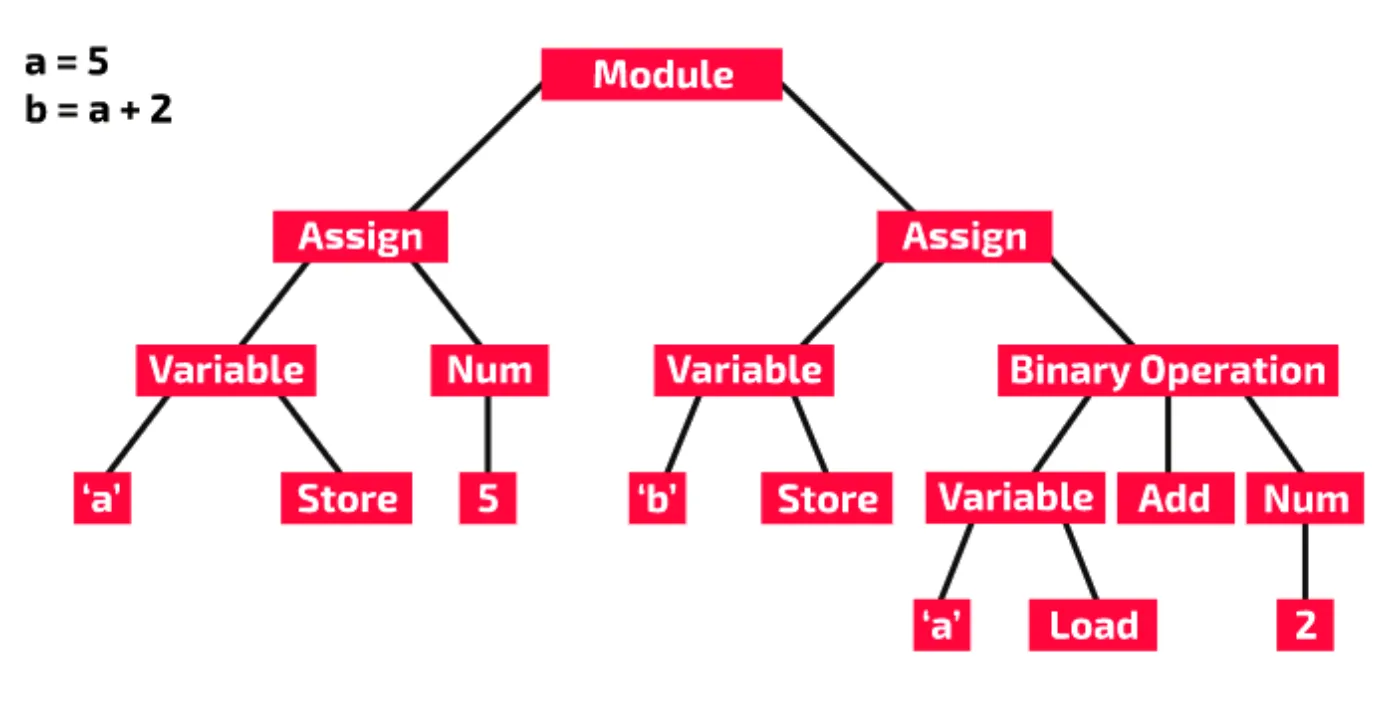
16.2 · 7 of 21Book pages Contents
Semantic analysis
Builds on
So far, lexical analysis has checked whether the tokens in the program are valid, and syntax analysis has checked whether the tokens are used according to the rules of the language. Another stage, semantic analysis, checks whether what has been written actually has a meaning within the language.
Suppose you are writing rules for grammatically correct English sentences. One rule for a valid sentence could be:
<pronoun> <verb> <plural noun>So “I eat crackers” and “They play video games” are valid sentences. But a computer that only uses syntax analysis would also accept “You swim cats” and “We bite movies”, even though these make no sense in English.
Semantic analysis checks whether the code is valid within a given context. In this pseudocode, every token is valid and the assignment statement is formatted correctly:
DECLARE Total : INTEGER
Total ← "Karachi"
However, line 2 gives a semantic error when the program is compiled, because assigning a string value to an identifier that has been declared as an integer is not valid.
Here is another example, in Python:
fruit = ["apple", "peach", "pear"]
print(fruit[4])
This code gives no error at the lexical analysis stage, because all the tokens are valid in the language. It gives no error at the syntax analysis stage, because the list declaration and the print statement are correctly formed. But it has a semantic error: index 4 is out of bounds for the fruit list. Python only reports this when the program runs, as below, but a compiler could flag it during semantic analysis.
Traceback (most recent call last):
  File "main.py", line 2, in <module>
    print(fruit[4])
          ~~~~~^^^
IndexError: list index out of range
Semantic analysis flags errors that do not make sense in the context the code is used in.
Types of semantic errors a compiler might find
- a data type declaration mismatch
- trying to access an array index that is out of bounds
- using a variable before it has been declared
- passing the wrong number of parameters to a subroutine
- trying to access a variable that is out of scope
Used later in
16.2 · 8 of 21Book page Contents
Code generation
Builds on
Code generation comes after lexical analysis, syntax analysis and semantic analysis. A separate program is created, distinct from the original source code. The generated code is a binary representation of the source code, known as object code. It is the executable version of the code, before linked libraries are included.
Here is a “Hello World” program in Python:
print("hello world")When this code is built, an executable file is generated. The executable file is a binary file meant to be read by the computer. If you open it in a text editor, it makes no sense: the editor has turned the binary into characters because it assumes the file holds text, which it does not.
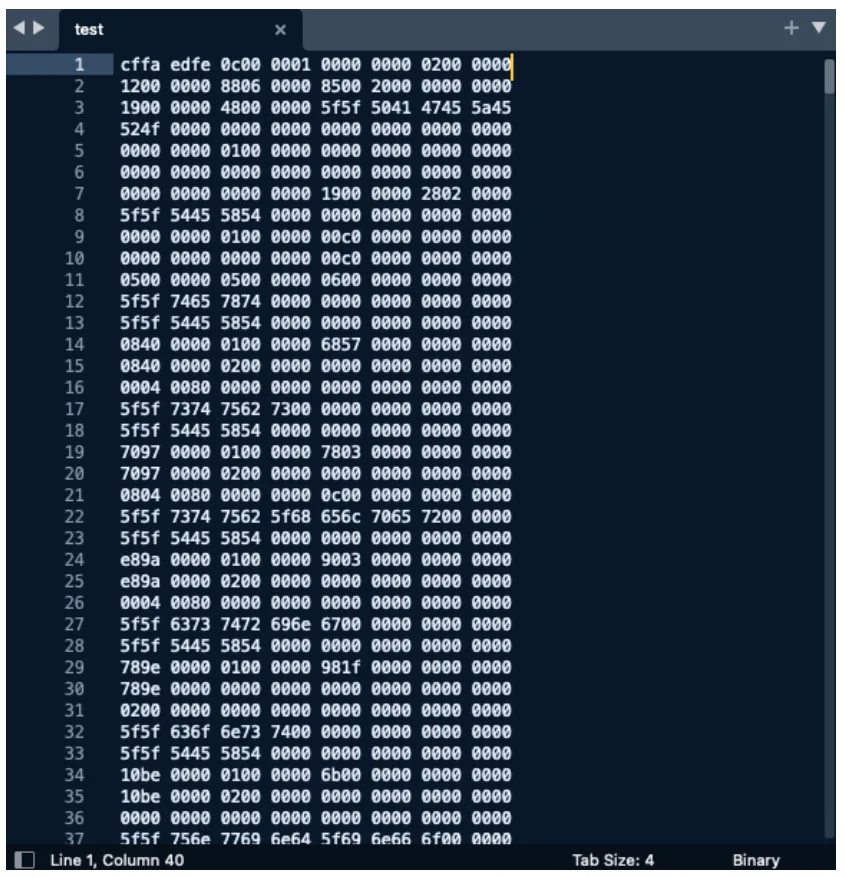
- Code generation is a major difference between compilation and interpretation: interpreters do not produce a separate executable file.
Practise this: past-paper questions
Used later in
16.2 · 9 of 21Book page Contents
Code optimisation
Builds on
Code optimisation happens throughout the compilation process, and most of all during the code generation stage. The optimiser may find redundant or repeated code, and remove or rearrange it as needed.
Note Exam wording: the purpose of optimisation is to make the program more efficient, by reducing its execution time and the memory it needs.
This pseudocode displays the nine times table:
FOR Number ← 1 TO 12
    Multiplier ← 9
    Result ← Number * Multiplier
    OUTPUT Result
NEXT Number
This code is inefficient because Multiplier is assigned the value 9 inside the loop, so the assignment happens twelve times. The value never changes, so the optimiser moves the statement to before the loop:
Multiplier ← 9
FOR Number ← 1 TO 12
    Result ← Number * Multiplier
    OUTPUT Result
NEXT Number
Here is another piece of code that the compiler would optimise:
FUNCTION DoubleIt(Num : INTEGER) RETURNS INTEGER
    DECLARE Result : INTEGER
    Result ← Num * 2
    RETURN Result
    OUTPUT "The number doubled is ", Result
ENDFUNCTION
The OUTPUT statement is dead code, because it can never be executed. As soon as the function reaches the RETURN statement, it stops, and the program goes back to the place the function was called from. The optimiser can remove dead code.
Practise this: past-paper questions
- November 2022 · Paper 31 · Q4Draw one line to connect each stage of compilation to its most appropriate description. Stage of compilation: • Lexical analysis • Syntax analysis…
- November 2025 · Paper 32 · Q8(a)State the purpose of the optimisation stage in the compilation of a program
- November 2025 · Paper 33 · Q7(a)Outline the process of optimisation during the compilation of a program
16.2 · 10 of 21Book page Contents
Context-free languages
Backus-Naur Form is used to describe a class of languages called context-free languages. The diagram shows how they fit inside the set of all languages.
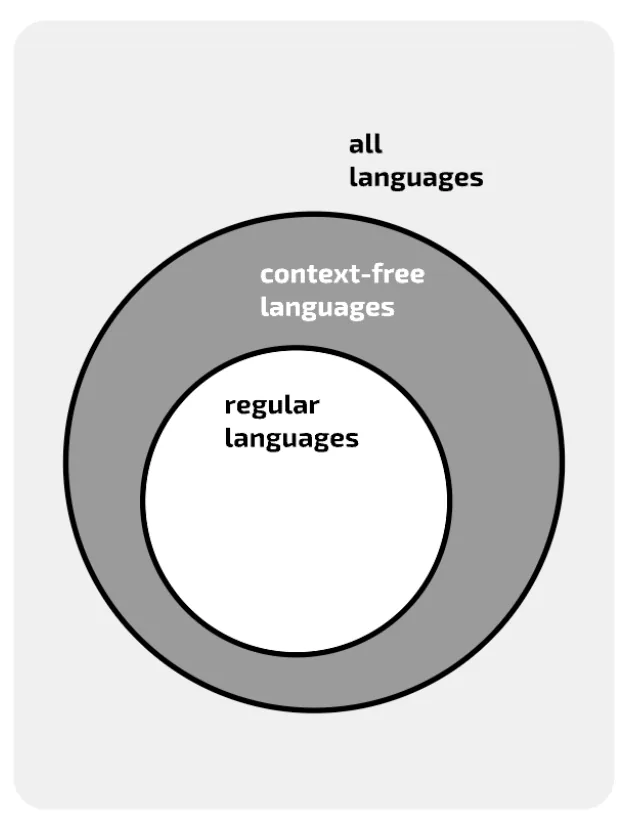
Most programming languages can be defined as context-free languages. To define the set of strings in a particular context-free language, you use a context-free grammar: a set of production rules that describe all the possible strings in that language. One example of a context-free grammar is Backus-Naur Form.
16.2 · 11 of 21Book pages Contents
Backus-Naur Form (BNF)
Backus-Naur Form (BNF) is a context-free grammar that developers of programming languages often use to set out the syntax rules of a language. John Backus was a programming language designer who created a notation to document IAL (an early version of Algol). Peter Naur later worked on Backus’ ideas, and the notation is credited to both computer scientists.
BNF uses a set of symbols to write production rules. A simple BNF production rule looks like this:
<digit> ::= 0|1|2|3|4|5|6|7|8|9This means: a digit can be defined as 0, 1, 2, 3, 4, 5, 6, 7, 8 or 9.
The chevrons < > mark a non-terminal symbol. If a non-terminal symbol appears on the right side of a production rule, there will be another production rule (or set of rules) that defines what it can be replaced by. Look at this rule:
<fullname> ::= <title><name><name>This shows that a full name is made of a title, a name and another name. All three parts are non-terminal, so more production rules are needed. For example, a rule could define title:
<title> ::= Mr|Mrs|Ms|Miss|DrIn this rule, Mr, Mrs, Ms, Miss and Dr are terminal symbols. They are not in chevrons, so they are the actual values allowed for a title. The pipe symbol | is a metacharacter that separates alternatives. Each production rule is applied strictly: you may know that other titles exist, such as Lord, but only the production rule decides what is valid in this formal language.
BNF symbols
::=means “is defined as”.|means “or”: it separates the alternatives.< >surround a non-terminal symbol, which has its own production rule.- Anything not in chevrons is a terminal symbol: an actual value.
The production rules for something as complex as a whole programming language form a very large set of BNF statements that set out how every part of the language is defined. Whenever a non-terminal symbol appears on the right side of a production rule, there should be another rule with that symbol on the left side. This goes on until everything is defined in terms of terminal symbols.
Here is a complete set of rules for a small part of a programming language:
<addition> ::= <number>+<number>
<number>   ::= <sign><integer>|<integer>
<integer>  ::= <digit>|<digit><integer>
<digit>    ::= 0|1|2|3|4|5|6|7|8|9
<sign>     ::= +|-
The terminal symbols are the digits 0 to 9 and the plus and minus signs. The plus sign appears twice: once as an operator and once as the sign of a number. So a valid addition can have a double plus sign, for example 23++6.
Practise this: past-paper questions
- November 2021 · Paper 32 · Q4(a)Write the Backus-Naur Form (BNF) notation of the syntax diagram for character
- November 2021 · Paper 32 · Q4(b)(ii)A valid password is represented by the syntax diagram: password: character, then digit or capital letter, with a loop back allowing repetition…
- June 2022 · Paper 32 · Q4(b)Complete the Backus-Naur Form (BNF) for the syntax diagrams shown. <letter> has been completed for you. <variable> ::= <unsigned_integer> ::=…
- June 2022 · Paper 32 · Q4(c)(ii)Write the Backus-Naur Form (BNF) for your syntax diagram
Show 9 more
- June 2023 · Paper 31 · Q6(b)Complete the Backus-Naur Form (BNF) for the syntax diagrams shown. <symbol> ::= <letter>
- June 2023 · Paper 32 · Q3(b)<word> contains one or more letters. Complete the Backus-Naur Form (BNF) for <word> and use this to complete the BNF for <variable>. <word> ::=…
- November 2024 · Paper 31 · Q10(a)Complete the Backus-Naur Form (BNF) for the given syntax diagrams. <operator> ::= <label> ::= <equation>
- November 2024 · Paper 31 · Q10(b)(ii)Write the BNF for password
- November 2024 · Paper 32 · Q7(b)Complete the Backus-Naur Form (BNF) for the given syntax diagrams. <symbol> ::= <number>
- November 2024 · Paper 32 · Q7(c)(ii)Write the BNF for code
- June 2025 · Paper 31 · Q7(b)Complete the Backus-Naur Form (BNF) for <uppercase> and <passcode>. <uppercase> ::= <passcode>
- June 2025 · Paper 32 · Q9(b)Complete the Backus-Naur Form (BNF) for <operator>. <operator>
- June 2025 · Paper 33 · Q9(b)Complete the Backus-Naur Form (BNF) for <upper> and <passcode>. <upper> ::= ... <passcode>
16.2 · 12 of 21Book pages Contents
Recursion in BNF
Recursion is used in BNF to write production rules for “one or more” of a symbol. For example, a number can be made of one or more digits. You might start by writing an ordinary production rule:
<number> ::= <digit>|<digit><digit>|<digit><digit><digit>|...But where would you stop? How many digits can a number have? Recursion gives a neat solution:
<number> ::= <digit>|<digit><number>
<digit>  ::= 0|1|2|3|4|5|6|7|8|9
Recursive rules
Use the production rules to decide whether 2, 16 and 234 are numbers.
- Step 12 is a digit, so it matches the first alternative,
<digit>. It is a number. - Step 216 is not a single digit, so it does not match the first alternative. Try the second alternative,
<digit><number>: 1 is a digit, so that part is fine. Is 6 a number? Yes: go back to the rule, and 6 matches the first alternative. So 16 is a number. - Step 3234 has more than one digit, so the first alternative is ruled out straight away. Using the second alternative, 2 is a digit. Is the rest, 34, a number? Use the second alternative again: 3 is a digit. Is the rest, 4, a number? Yes, it matches the first alternative. So 234 is a number.
Notice how you go back to the rule, taking each symbol one at a time, until the symbols run out (or you meet a symbol that means the rule cannot be satisfied).
This recursive production rule has a base case (a single digit) and a general case (a digit followed by a number). The general case uses the recursive definition. The problem gets smaller and smaller until it reaches the base case: is 234 a number? Is 34 a number? Is 4 a number?
Note In BNF, recursion is the only way to show “one or more” or a loop.
Practise this: past-paper questions
- November 2021 · Paper 32 · Q4(a)Write the Backus-Naur Form (BNF) notation of the syntax diagram for character
- November 2021 · Paper 32 · Q4(b)(ii)A valid password is represented by the syntax diagram: password: character, then digit or capital letter, with a loop back allowing repetition…
- June 2022 · Paper 32 · Q4(b)Complete the Backus-Naur Form (BNF) for the syntax diagrams shown. <letter> has been completed for you. <variable> ::= <unsigned_integer> ::=…
- June 2022 · Paper 32 · Q4(c)(ii)Write the Backus-Naur Form (BNF) for your syntax diagram
Show 7 more
- June 2023 · Paper 32 · Q3(b)<word> contains one or more letters. Complete the Backus-Naur Form (BNF) for <word> and use this to complete the BNF for <variable>. <word> ::=…
- November 2024 · Paper 31 · Q10(a)Complete the Backus-Naur Form (BNF) for the given syntax diagrams. <operator> ::= <label> ::= <equation>
- November 2024 · Paper 31 · Q10(b)(ii)Write the BNF for password
- November 2024 · Paper 32 · Q7(b)Complete the Backus-Naur Form (BNF) for the given syntax diagrams. <symbol> ::= <number>
- November 2024 · Paper 32 · Q7(c)(ii)Write the BNF for code
- June 2025 · Paper 31 · Q7(b)Complete the Backus-Naur Form (BNF) for <uppercase> and <passcode>. <uppercase> ::= <passcode>
- June 2025 · Paper 33 · Q9(b)Complete the Backus-Naur Form (BNF) for <upper> and <passcode>. <upper> ::= ... <passcode>
Used later in
16.2 · 13 of 21Book pages Contents
Parse trees
A parse tree is a useful way to check whether a string satisfies a set of production rules. Parsing means breaking something down into its parts. Here are the production rules from before:
<addition> ::= <number>+<number>
<number>   ::= <sign><integer>|<integer>
<integer>  ::= <digit>|<digit><integer>
<digit>    ::= 0|1|2|3|4|5|6|7|8|9
<sign>     ::= +|-
Worked example
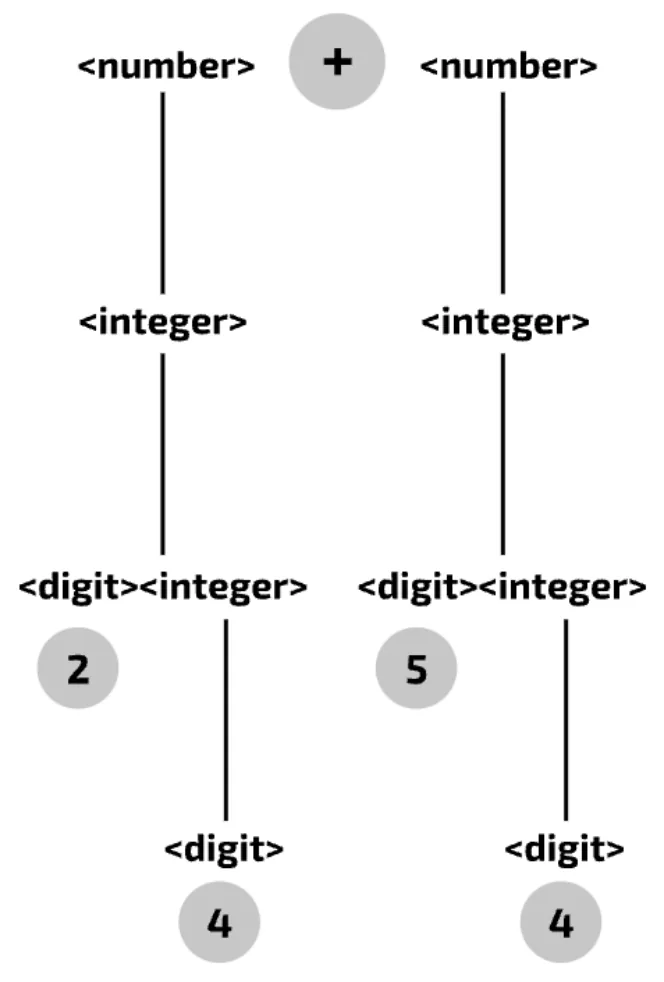
Use a parse tree to check whether 24+54 is a valid addition.
- Step 1Put the production rule for addition at the top of the tree:
<number> + <number>. It includes the terminal symbol +, and the string being checked has a +, so far so good. Highlight the + in the tree. - Step 2The strings on either side of the + must satisfy
<number> ::= <sign><integer>|<integer>: a sign followed by an integer, or just an integer. Neither 24 nor 54 starts with a sign, so each must be an integer. Write<integer>below<number>on both sides of the tree. - Step 3Now show that 24 is an integer, using
<integer> ::= <digit>|<digit><integer>. 24 is not a digit (a digit is a single numeric symbol), so to be valid it must be<digit><integer>. Write this on the next line of the tree. Do the same on the other side, because 54 works the same way. - Step 4Is 24 a digit followed by an integer? 2 is definitely a digit, so write 2 below
<digit>. In the same way, write 5 below<digit>on the right side. Highlight 2 and 5. - Step 5Now show that 4 is an integer, on both sides. 4 is a digit, so write
<digit>below<integer>and 4 below<digit>. Do the same on the other side, and highlight both digits. - Step 6Every part of 24+54 has been matched to the rules, so the parse tree proves that 24+54 is a valid addition.
16.2 · 14 of 21Book pages Contents
Syntax diagrams
As well as BNF, you can use a diagram that mirrors the formal grammar: a syntax diagram. When no key is given, you must be able to recognise the terminal and non-terminal symbols yourself. Here is a syntax diagram for this production rule:
<special> ::= @|?|&|*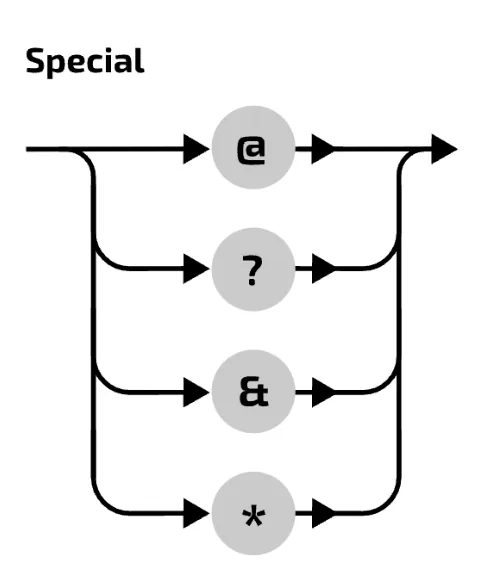
By following any one of the lines, you get a character that is a valid special. The alternatives are stacked under each other, and you can pick any of them as you follow the line through the diagram from start to end.
Now a more complex rule:
<date> ::= <day-name><month-name>|<day-name><month-name><year>This can be drawn as syntax diagrams like this:
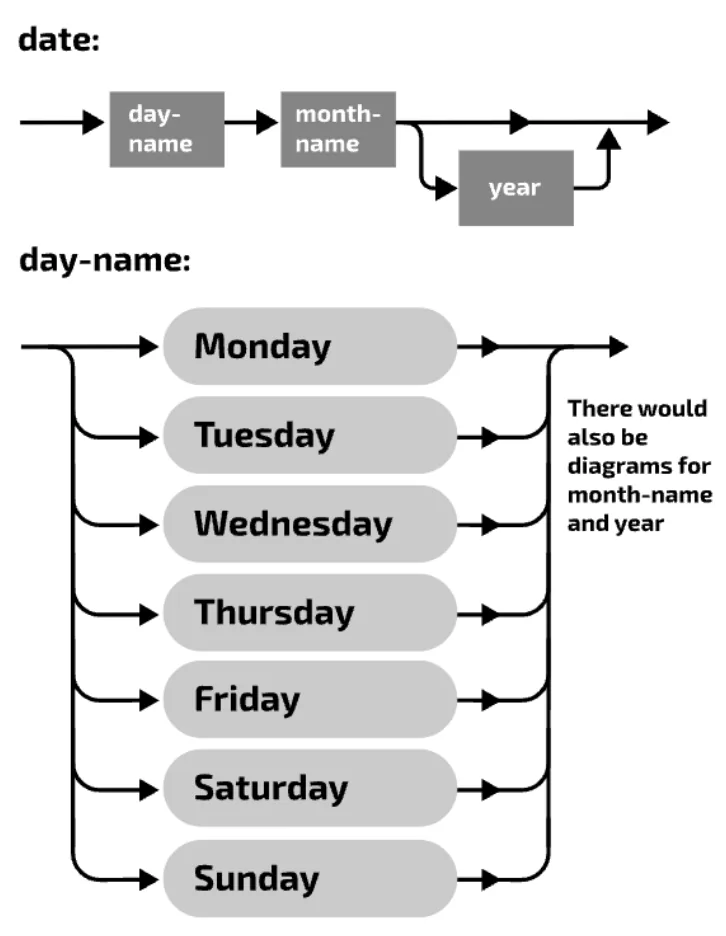
Year is optional, as the production rule says. Syntax diagrams are always read from left to right, following the arrows. You can follow the top line, which leaves out the year, or drop down to include it. You cannot go back on yourself unless the arrows allow it.
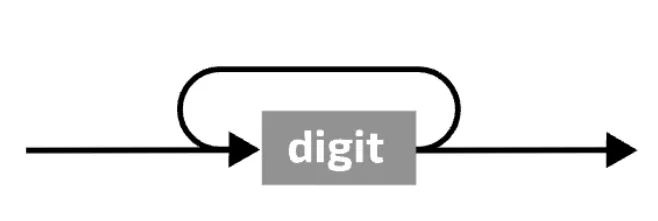
Recursion is shown by a loop back through the diagram (in BNF, the only way to show a loop is recursion). The rule
<number> ::= <digit>|<digit><number>is drawn as a syntax diagram like this:
Reading a syntax diagram
- Read from left to right, following the arrows.
- Stacked paths are alternatives: take exactly one of them.
- A path that goes around a box makes that part optional.
- A loop back over a box means that part can be repeated (one or more times).
Practise this: past-paper questions
- November 2021 · Paper 32 · Q4(a)Write the Backus-Naur Form (BNF) notation of the syntax diagram for character
- November 2021 · Paper 32 · Q4(b)(i)State an example of a valid password
- November 2021 · Paper 32 · Q4(b)(ii)A valid password is represented by the syntax diagram: password: character, then digit or capital letter, with a loop back allowing repetition…
- June 2022 · Paper 32 · Q4(a)The following assignment statements are invalid. State the reason in each case. X1 = Y2 - 12 Reason Z = Y12 + Z1 Reason
Show 26 more
- June 2022 · Paper 32 · Q4(b)Complete the Backus-Naur Form (BNF) for the syntax diagrams shown. <letter> has been completed for you. <variable> ::= <unsigned_integer> ::=…
- June 2022 · Paper 32 · Q4(c)(i)Draw a syntax diagram for the new syntax of the assignment statement
- June 2022 · Paper 32 · Q4(c)(ii)Write the Backus-Naur Form (BNF) for your syntax diagram
- June 2023 · Paper 31 · Q6(a)State whether each of the following passwords is valid or invalid and give a reason for your choice. DPAD99$ Reason DAD#95 Reason ADY123? Reason
- June 2023 · Paper 31 · Q6(b)Complete the Backus-Naur Form (BNF) for the syntax diagrams shown. <symbol> ::= <letter>
- June 2023 · Paper 31 · Q6(c)An identifier begins with one or more letters, followed by zero digits or one digit or more digits. Valid letters and digits are shown in the…
- June 2023 · Paper 32 · Q3(a)State whether each variable is valid or invalid and give a reason for your choice in each case. 9SW Reason UWY Reason
- June 2023 · Paper 32 · Q3(b)<word> contains one or more letters. Complete the Backus-Naur Form (BNF) for <word> and use this to complete the BNF for <variable>. <word> ::=…
- June 2023 · Paper 32 · Q3(c)(i)State an example of a valid vehicle registration
- June 2023 · Paper 32 · Q3(c)(ii)Draw a syntax diagram for a vehicle registration
- November 2024 · Paper 31 · Q10(a)Complete the Backus-Naur Form (BNF) for the given syntax diagrams. <operator> ::= <label> ::= <equation>
- November 2024 · Paper 31 · Q10(b)(i)Draw a syntax diagram for password
- November 2024 · Paper 31 · Q10(b)(ii)Write the BNF for password
- November 2024 · Paper 32 · Q7(a)State why each number is invalid for the given syntax diagrams. 21 123
- November 2024 · Paper 32 · Q7(b)Complete the Backus-Naur Form (BNF) for the given syntax diagrams. <symbol> ::= <number>
- November 2024 · Paper 32 · Q7(c)(i)Draw a syntax diagram for code
- November 2024 · Paper 32 · Q7(c)(ii)Write the BNF for code
- June 2025 · Paper 31 · Q7(a)State why each passcode is invalid for the given syntax diagrams. #Jd7 C%6A
- June 2025 · Paper 31 · Q7(b)Complete the Backus-Naur Form (BNF) for <uppercase> and <passcode>. <uppercase> ::= <passcode>
- June 2025 · Paper 32 · Q9(a)State why 9K is not a valid variable for the given syntax diagrams
- June 2025 · Paper 32 · Q9(b)Complete the Backus-Naur Form (BNF) for <operator>. <operator>
- June 2025 · Paper 32 · Q9(c)An expression is defined as follows: • A variable is assigned to a variable followed by an operator followed by another variable. • The operator…
- June 2025 · Paper 32 · Q9(d)A character can be a letter or a digit. An additional constraint has been applied to the definition of variable. It must comply with the given…
- June 2025 · Paper 33 · Q9(a)State why JJ90 is not a valid passcode for the given syntax diagrams
- June 2025 · Paper 33 · Q9(b)Complete the Backus-Naur Form (BNF) for <upper> and <passcode>. <upper> ::= ... <passcode>
- June 2025 · Paper 33 · Q9(c)A character can be an upper, a lower or a digit. The rules for passcode have been changed so that the third character may also be selected from…
Used later in
16.2 · 15 of 21Book pages Contents
Reverse Polish notation and infix notation
Reverse Polish Notation (RPN) was invented as a way of simplifying mathematical expressions.
RPN is older than modern computers. It became useful with the first electronic calculators, which were not good at handling complex expressions with brackets. RPN needs no brackets, because expressions are entered in an unambiguous postfix form.
Early program translators converted expressions to RPN to evaluate them. Today only a few fairly specialised stack-based languages use RPN.
When you write an arithmetic expression normally, you use infix notation: the operator is placed in between the operands. So 2+3 means “add together the values 2 and 3”.
For more complex expressions, a set of agreed rules decides the order of evaluation. The mnemonic BODMAS (sometimes BIDMAS or PEDMAS) helps you remember the order of precedence of the operators:
| Letters | Rule |
|---|---|
| B | Anything in brackets is done first |
| O | Powers and roots are done next |
| DM | Division and multiplication are next (equal precedence, worked left to right) |
| AS | Addition and subtraction are done last (equal precedence, worked left to right) |
Worked example
Evaluate 7 + (8 * 32 + 4).
- Step 1First deal with the part in brackets: 8 * 32 + 4.
- Step 2Raise 3 to the power 2: 32 = 9.
- Step 3Multiply 9 by 8 = 72.
- Step 4Add 4: 72 + 4 = 76.
- Step 5Add 7: 7 + 76 = 83.
Practise this: past-paper questions
16.2 · 16 of 21Book page Contents
Postfix notation
In postfix notation, or Reverse Polish Notation, the operator comes after its operands. The infix expression
2 + 3is written in postfix notation as
2 3 +Now take the more complex expression from before, 7 + (8 * 32 + 4). Using ^ for the power operator, it is written in postfix as:
7 8 3 2 ^ * 4 + +There are no brackets. You also do not need a mnemonic to remember the order of precedence: the expression is simply evaluated from left to right.
Used later in
16.2 · 17 of 21Book pages Contents
Evaluating RPN using a stack
Builds on
To evaluate a postfix (RPN) expression, use a stack. A stack is a LIFO (last in, first out) data structure. Work through the expression from left to right:
- When you meet an operand, push it onto the stack.
- When you meet an operator, pop two values from the stack, apply the operator to them, and push the result back onto the stack.
- When you have been through the whole expression, pop the final answer from the stack.
Here is the method applied to 7 8 3 2 ^ * 4 + +. The stack is written from bottom to top, so the last number in each row is the top of the stack.
| Still to read | Action | Stack (bottom to top) |
|---|---|---|
7 8 3 2 ^ * 4 + + | Push operand 7 onto the stack | 7 |
8 3 2 ^ * 4 + + | Push operand 8 onto the stack | 7, 8 |
3 2 ^ * 4 + + | Push operand 3 onto the stack | 7, 8, 3 |
2 ^ * 4 + + | Push operand 2 onto the stack | 7, 8, 3, 2 |
^ * 4 + + | Pop 2 items (3 and 2), apply the operator: 3 ^ 2 = 9, push 9 back onto the stack | 7, 8, 9 |
* 4 + + | Pop 2 items (8 and 9), apply the operator: 8 * 9 = 72, push 72 back onto the stack | 7, 72 |
4 + + | Push operand 4 onto the stack | 7, 72, 4 |
+ + | Pop 2 items (72 and 4), apply the operator: 72 + 4 = 76, push 76 back onto the stack | 7, 76 |
+ | Pop 2 items (7 and 76), apply the operator: 7 + 76 = 83, push 83 back onto the stack | 83 |
| nothing left | Pop the final result from the stack: 83 | empty |
This method is almost foolproof. The one thing to remember is that when you pop two items for an operator, the first item off the stack is the right operand and the second is the left operand. With addition and multiplication the order makes no difference, but with subtraction, division and powers it does. In the example above, working out 2 ^ 3 (= 8) instead of 3 ^ 2 (= 9) would give a different result. To check your order, make sure the operands always stay in the same left-to-right order as in the original expression.
16.2 · 18 of 21Book page Contents
Evaluating RPN by sliding
Another way to evaluate an RPN expression, which you may find easier, is to “slide” the operators into place and evaluate. At each step:
- Take the leftmost operator.
- Slide it one place to the left.
- Apply the operator to the operands on either side.
- Substitute the result.
Sliding
Evaluate 7 8 3 2 ^ * 4 + + by sliding.
- Step 1The leftmost operator is ^. Slide it between 3 and 2: 3 ^ 2 = 9.
7 8 3 2 ^ * 4 + + → 7 8 9 * 4 + + - Step 2The leftmost operator is now *. Slide it between 8 and 9: 8 * 9 = 72.
7 8 9 * 4 + + → 7 72 4 + + - Step 3The leftmost operator is +. Slide it between 72 and 4: 72 + 4 = 76.
7 72 4 + + → 7 76 + - Step 4The last operator is +. Slide it between 7 and 76: 7 + 76 = 83.
7 76 +
→ 83
Practise this: past-paper questions
16.2 · 19 of 21Book page Contents
Converting from infix to postfix
Builds on
A well-known algorithm for converting from infix to postfix notation is Dijkstra’s Shunting Yard Algorithm. It uses a queue and a stack to do the conversion, and is good programming practice when you study data structures.
To do the conversion by hand, use the fully parenthesising method.
Fully parenthesising
Convert the infix expression 7 + 8 * 6 to postfix.
- Step 1Using the rules of operator precedence, add brackets around the whole expression, so that the inner brackets hold the part to be evaluated first.
( 7 + ( 8 * 6 ) ) - Step 2Move each operator to the end of its own pair of brackets, just before the right-hand bracket.
( 7 ( 8 6 * ) + ) - Step 3Finally, remove the brackets.
7 8 6 * +
The golden rule
- When you convert from postfix to infix, or from infix to postfix, the order of the operands must not change.
- Check your answer by evaluating it with the stack method: you must get the same answer as when you evaluate the infix expression.
Practise this: past-paper questions
- June 2021 · Paper 31 · Q4(b)Write the infix expression in RPN. (a - b) * (a + c) / 7
- June 2022 · Paper 31 · Q5(a)Write the Reverse Polish Notation (RPN) for the expression: (j + k)/(j - k)
- November 2022 · Paper 31 · Q5(a)Write the infix expression in Reverse Polish Notation (RPN). a * b + b - d + 15
- June 2024 · Paper 31 · Q5(b)Write this infix expression in RPN: ((7 + 3) - (2 * 8)) / 6
Show 6 more
- June 2024 · Paper 32 · Q5(a)Write this infix expression in Reverse Polish Notation (RPN): (7 - 2 + 8) / (9 - 5)
- November 2025 · Paper 31 · Q8(b)Write the Reverse Polish Notation (RPN) for the given infix expression: (2 - 6) * (13 + 7) / 5
- November 2025 · Paper 33 · Q7(b)Write the Reverse Polish Notation (RPN) for the given infix expression: ((6 + 12) / (16 - 10)) * 18
- June 2026 · Paper 31 · Q7(a)Write this infix expression in Reverse Polish Notation (RPN). 21 * (15 - 3 + 8) / 7
- June 2026 · Paper 32 · Q6(a)Write this infix expression in Reverse Polish Notation (RPN). 16 + ((9 - 7) / (18 + 6))
- June 2026 · Paper 33 · Q7(b)Write the following infix expression in RPN. ((18 - 15 + 3) * 5) / 12
16.2 · 20 of 21Book pages Contents
Converting from postfix to infix
Builds on
Worked example
Convert the postfix expression 7 8 6 * + back to infix.
- Step 1Working from left to right, find the first operator, move it one place to the left, and put brackets around the infix expression this makes.
7 ( 8 * 6 ) + - Step 2Continue from left to right, moving each operator in turn one place to the left (a bracketed part counts as a single place). Put brackets around each infix expression this makes.
( 7 + ( 8 * 6 ) ) - Step 3It is common to end up with brackets you do not need, and they can be removed. Here the outer brackets are not needed.
7 + ( 8 * 6 )
Worked example
Convert the longer postfix expression 7 8 3 2 ^ * 4 + + back to infix.
- Step 1Move ^ one place left.
7 8 ( 3 ^ 2 ) * 4 + + - Step 2Move * one place left.
7 ( 8 * ( 3 ^ 2 ) ) 4 + + - Step 3Move the first + one place left.
7 ( ( 8 * ( 3 ^ 2 ) ) + 4 ) + - Step 4Move the last + one place left.
( 7 + ( ( 8 * ( 3 ^ 2 ) ) + 4 ) ) - Step 5Remove the outer brackets, because the addition would be done last anyway.
7 + ( ( 8 * ( 3 ^ 2 ) ) + 4 ) - Step 6Remove the next set of outer brackets, for the same reason.
7 + ( 8 * ( 3 ^ 2 ) ) + 4 - Step 7Finally, double-check that you have not changed the order of the operands: 7, 8, 3, 2, 4.
Practise this: past-paper questions
- June 2021 · Paper 31 · Q4(c)Write the RPN expression as an infix expression. a b / 4 * a b + -
- November 2022 · Paper 31 · Q5(b)(i)Write the RPN expression in infix form. a b - c d + * a /
- November 2023 · Paper 31 · Q9(a)(i)Write the infix expression for this Reverse Polish Notation (RPN) expression: 5 2 - 5 4 + * 9 /
- June 2024 · Paper 31 · Q5(a)Write this Reverse Polish Notation (RPN) in infix form: 5 2 + 9 3 - / 3 *
Show 4 more
- June 2024 · Paper 32 · Q5(c)Write this RPN expression in infix form: b a c - + d b + * c /
- November 2025 · Paper 32 · Q8(b)Convert this Reverse Polish Notation (RPN) back to its original infix form: a b - c + c a - * d /
- June 2026 · Paper 31 · Q7(b)Write this RPN expression in infix form. c d + a b - a c - * /
- June 2026 · Paper 32 · Q6(b)Write this RPN expression in infix form. 6 15 + 20 3 - - 27 9 * /
16.2 · 21 of 21Book page Contents
Advantages of RPN
Advantages of RPN
- RPN expressions do not need brackets, and there is no need for rules of operator precedence.
- RPN is simpler for a machine to evaluate (with a stack).
- There is no need for backtracking during evaluation: the operators appear in the order needed for the calculation, so the expression can be evaluated from left to right.
Practise this: past-paper questions
16.2
Concepts in 16.2
Every idea explained in 16.2, and where else in the notes it is used.
| Concept | In one line | Also used in |
|---|---|---|
| abstract syntax tree | A tree made during syntax analysis that maps the structure of the program. | only here |
| Backus-Naur Form (BNF) | A notation of production rules using ::=, | and <non-terminals> to define the syntax of a language. | 16.2 Context-free languages, 16.2 Recursion in BNF, 16.2 Syntax diagrams |
| BODMAS | The order of precedence: brackets, powers, division and multiplication, then addition and subtraction. | only here |
| code generation | The compilation stage that creates the object code, a separate binary program. | 16.2 Stages of compilation, 16.2 Code optimisation |
| code optimisation | Removing or rearranging redundant or repeated code so the program runs faster or is smaller. | only here |
| compiler | A translator that turns the whole source program into object code before it runs. | 16.2 Stages of compilation, 16.2 Lexical analysis, 16.2 Tokens, the keyword table and the symbol table, 16.2 Syntax analysis, 16.2 Abstract syntax tree, 16.2 Semantic analysis, 16.2 Code generation, 16.2 Code optimisation |
| context-free grammar | A set of production rules that describe all the possible strings in a language. | 16.2 Backus-Naur Form (BNF) |
| context-free language | A language whose strings can be described by a context-free grammar; most programming languages are. | only here |
| dead code | Code that can never be executed, such as a statement after RETURN. | only here |
| fully parenthesising | Converting infix to postfix by bracketing every operation, moving each operator to its closing bracket, then removing brackets. | only here |
| infix notation | Writing the operator between its operands, as in 2 + 3. | 16.2 Postfix notation, 16.2 Converting from infix to postfix, 16.2 Converting from postfix to infix |
| interpreter | A translator that translates and runs a program one statement at a time, making no executable file. | 16.2 Code generation |
| keyword table | A table of every reserved word and symbol in a language with its token, the same for all programs. | only here |
| lexical analysis | The first compilation stage: removes white space and comments and turns the code into tokens. | 16.2 Stages of compilation, 16.2 Tokens, the keyword table and the symbol table, 16.2 Syntax analysis, 16.2 Semantic analysis, 16.2 Code generation |
| metacharacter | A symbol with a special meaning in BNF, such as | for “or”. | only here |
| non-terminal symbol | A symbol in chevrons that is defined by another production rule. | 16.2 Syntax diagrams |
| object code | The binary, executable version of a program made by code generation, before libraries are linked. | 16.2 Compilers and interpreters, 16.2 Stages of compilation |
| parse tree | A tree that breaks a string into parts to show it satisfies a set of production rules. | only here |
| production rule | A rule that defines what a symbol can be replaced by, such as <digit> ::= 0|1|...|9. | 16.2 Context-free languages, 16.2 Recursion in BNF, 16.2 Parse trees, 16.2 Syntax diagrams |
| Reverse Polish Notation (RPN) | Postfix notation: each operator comes after its operands, as in 2 3 +, with no brackets. | 16.2 Reverse Polish notation and infix notation, 16.2 Evaluating RPN using a stack, 16.2 Evaluating RPN by sliding, 16.2 Converting from infix to postfix, 16.2 Converting from postfix to infix, 16.2 Advantages of RPN |
| semantic analysis | The compilation stage that checks whether valid code has a meaning in its context. | 16.2 Stages of compilation, 16.2 Code generation |
| semantic error | Code that follows the syntax rules but makes no sense in context, such as a type mismatch. | only here |
| Shunting Yard Algorithm | Dijkstra’s algorithm that uses a queue and a stack to convert infix to postfix. | only here |
| stages of compilation | Lexical analysis, syntax analysis, semantic analysis and code generation, with optimisation throughout. | 16.2 Code optimisation |
| symbol table | A table made for one program during compilation, holding its identifiers with their tokens and types. | 16.2 Stages of compilation |
| syntax analysis | The compilation stage that checks the tokens are in the right order and follow the language rules. | 16.2 Stages of compilation, 16.2 Abstract syntax tree, 16.2 Semantic analysis, 16.2 Code generation |
| syntax diagram | A diagram of a grammar rule, read left to right, with stacked alternatives and loops for repetition. | only here |
| terminal symbol | An actual value allowed by a rule, written without chevrons. | 16.2 Parse trees |
| tokenisation | Replacing each keyword, symbol and identifier in the source code with a token. | only here |
Zain Merchant's notes, page by page, as printed in his book. The Notes tab has the same notes as text, with links.
Past-paper questions and mark schemes © Cambridge University Press & Assessment. Compiled for revision by Zain Merchant.
- June 2021 · Paper 31 · Q3Notes:Compilers and interpreters
- June 2021 · Paper 31 · Q4Notes:Evaluating RPN using a stackEvaluating RPN by slidingConverting from infix to postfixConverting from postfix to infixAdvantages of RPN
- November 2021 · Paper 32 · Q4Notes:Backus-Naur Form (BNF)Recursion in BNFSyntax diagrams
- June 2022 · Paper 31 · Q5Notes:Converting from infix to postfix
- June 2022 · Paper 32 · Q4Notes:Backus-Naur Form (BNF)Recursion in BNFSyntax diagrams
- November 2022 · Paper 31 · Q4Notes:Stages of compilationLexical analysisSyntax analysisCode generationCode optimisation
- November 2022 · Paper 31 · Q5Notes:Reverse Polish notation and infix notationConverting from infix to postfixConverting from postfix to infix
- November 2022 · Paper 32 · Q2Notes:Stages of compilationSyntax analysisAbstract syntax tree
- June 2023 · Paper 31 · Q6Notes:Backus-Naur Form (BNF)Syntax diagrams
- June 2023 · Paper 32 · Q3Notes:Backus-Naur Form (BNF)Recursion in BNFSyntax diagrams
- November 2023 · Paper 31 · Q9Notes:Converting from postfix to infix
- June 2024 · Paper 31 · Q5Notes:Converting from infix to postfixConverting from postfix to infix
- June 2024 · Paper 32 · Q5Notes:Converting from infix to postfixConverting from postfix to infix
- November 2024 · Paper 31 · Q10Notes:Backus-Naur Form (BNF)Recursion in BNFSyntax diagrams
- November 2024 · Paper 32 · Q7Notes:Backus-Naur Form (BNF)Recursion in BNFSyntax diagrams
- June 2025 · Paper 31 · Q6Notes:Compilers and interpreters
- June 2025 · Paper 31 · Q7Notes:Backus-Naur Form (BNF)Recursion in BNFSyntax diagrams
- June 2025 · Paper 32 · Q8Notes:Lexical analysisTokens, the keyword table and the symbol table
- June 2025 · Paper 32 · Q9Notes:Backus-Naur Form (BNF)Syntax diagrams
- June 2025 · Paper 33 · Q8Notes:Syntax analysisAbstract syntax tree
- June 2025 · Paper 33 · Q9Notes:Backus-Naur Form (BNF)Recursion in BNFSyntax diagrams
- November 2025 · Paper 31 · Q8Notes:Lexical analysisTokens, the keyword table and the symbol tableConverting from infix to postfix
- November 2025 · Paper 32 · Q8Notes:Code optimisationConverting from postfix to infix
- November 2025 · Paper 33 · Q7Notes:Code optimisationConverting from infix to postfix
- June 2026 · Paper 31 · Q7Notes:Converting from infix to postfixConverting from postfix to infix
- June 2026 · Paper 32 · Q6Notes:Converting from infix to postfixConverting from postfix to infix
- June 2026 · Paper 33 · Q7Notes:Converting from infix to postfix
Past-paper questions and mark schemes © Cambridge University Press & Assessment. Compiled for revision by Zain Merchant.
Try the questions first.
Write your answers, then check them against the mark scheme. Your choice is remembered on this device.