AS Level 9618 · Paper 1 · 8.1
Database Concepts
Why relational databases replace files, and how to design one. Read the notes, try the past-paper questions, then check the mark scheme.
Past papers from June 2021 to June 202631 questions · 174 marks
In this subtopic
- Limits of a file-based approach, and how a relational database fixes them
- Relational database terms: tables, keys and relationships
- Entity-relationship (E-R) diagrams
- Normalisation to third normal form (3NF)
8.1 · 1 of 21Book pages Contents
Limitations of a file-based approach: one file
Before databases, data was often kept in a file-based approach: each program had its own text files, and each line of a file held the data for one item.
Think of a theatrical agency that makes bookings for bands. It sets up a computerised system that uses text files. One text file stores data about individual band members. Each line of the file holds this data for one band member:
- name
- contact details
- banking details
- band name
- band agent name
- band agent contact details
The file can be used when the agency needs to contact a band member, directly or through the band’s agent, and after a gig when the band member has to be paid. The file might have a thousand or more lines. Here is a selection of the given names, family names and band names from various lines:
| Given name | Family name | Band name |
|---|---|---|
| Xiangfei | Jha | ComputerKidz |
| Mahesh | Ravuru | ITWizz |
| Dylan | Stoddart | |
| Graham | Vandana | ITWizz |
| Vandana | Graham | ITWizz |
| Mahesh | Ravuru | ITWizz |
| Precious | Olsen | ComputerKidz |
| Precious | Olsen | ITWizz |
There are clear problems with this data:
- When Vandana Graham’s data was first entered, her names were put in the wrong order. A correct entry was added later, but the wrong one was never deleted. No validation check could have found the first mistake, and this problem can happen in any system, not only a file-based one.
- Dylan Stoddart has no band name. Validation should have caught this missing value.
- The Precious Olsen lines are examples of duplicated data and inconsistent data: she is stored twice, in two different bands. (Mahesh Ravuru is also stored twice.)
- A band name could also be typed in for a band that does not exist, and nothing in the file would show this.
So a file-based approach can lead to data integrity problems in a single file. The reason is that there is no built-in control when data is entered. The database approach can prevent these problems, or at least make them less likely.
A second problem is data privacy. The file was designed so that the finance section could find banking details and the recruitment section could find contact details. But there is no way to control access to only part of a file, so staff in recruitment could also see the band members’ banking details. A database system can handle data privacy properly.
Practise this: past-paper questions
- June 2023 · Paper 13 · Q4(a)Describe two ways in which a relational database addresses the limitations of a file-based approach
- November 2024 · Paper 11 · Q2(a)Give one limitation of using a file-based approach to store the data and explain how a relational database addresses this limitation. Limitation…
8.1 · 2 of 21Book page Contents
Data redundancy and inconsistency in multiple files
Because of the privacy problem, the agency decides to keep a separate file for each department. The table shows the main data stored in each department’s file:
| Department | Data items in the department’s file |
|---|---|
| Contract | Member names, band name, gig details |
| Finance | Member names, bank details, gig details |
| Publicity | Band name, gig details |
| Recruitment | Member names, band name, agent details |
Now the same data is stored in several files. This is called data redundancy. It does not mean the data is no longer useful: it means that once data has been stored in one file, there should be no need to store it again in a different file. In a file-based system some data redundancy cannot be avoided.
Data redundancy can lead to data inconsistency: two copies of the same data that do not match. This happens because of mistakes when the data is first entered, or because one copy is edited later and the other is not. This is a second cause of data lacking integrity. One of the main aims of the database approach is to remove data redundancy.
Data redundancy and data inconsistency
- Data redundancy: the same data is stored more than once, in the same file or in different files.
- Data inconsistency: copies of the same data do not match, for example after only one copy is updated.
Practise this: past-paper questions
- June 2023 · Paper 13 · Q4(a)Describe two ways in which a relational database addresses the limitations of a file-based approach
- November 2024 · Paper 11 · Q2(a)Give one limitation of using a file-based approach to store the data and explain how a relational database addresses this limitation. Limitation…
8.1 · 3 of 21Book page Contents
Data dependency
Builds on
The problems so far are about storing the data. There are also problems when programs use the files.
Traditionally, a programmer wrote a program and, at the same time, defined the data files that the program needed. In the agency, each department would have its own programs to use its own files. The programmer must know exactly how the data is laid out in the files, for example that the fourth item on a line is the band name. This is called data dependency: the programs depend on the structure of the files.
Files used by one department probably hold some of the same data as other departments’ files, but there is no plan for sharing files.
Data dependency causes two more problems:
- Changing what is stored is expensive. Suppose more and more bands perform with extra session musicians, and their data must be added to some files. The existing files must be rewritten, and then the programs must be rewritten so that they read the new files correctly. With a database, the existing programs could still run after the new data is added: the only new programming is for the programs that use the new data.
- New applications are hard to build. File structures designed to suit particular programs may not suit a new use. If the agency wanted to analyse how successful its gigs have been over several years, getting that data out of the files would be complex and would take a long time.
Limitations of a file-based approach
- Data redundancy: the same data is stored in many files, which wastes storage space.
- Data inconsistency: when one copy is changed and another is not, the copies no longer match, so data integrity is lost.
- No built-in control when data is entered, so errors such as a missing value or a band that does not exist are not stopped.
- Data privacy: access cannot be controlled to just part of a file.
- Data dependency: programs are written for one file structure, so if the structure changes, the programs must be rewritten.
- Data is hard to share between departments, and hard to extract for new applications.
Practise this: past-paper questions
- June 2023 · Paper 13 · Q4(a)Describe two ways in which a relational database addresses the limitations of a file-based approach
- November 2024 · Paper 11 · Q2(a)Give one limitation of using a file-based approach to store the data and explain how a relational database addresses this limitation. Limitation…
8.1 · 4 of 21Book pages Contents
Relational databases
Builds on
A flat file keeps all the data in one single table. Here is a single table that stores which students are in which classes:
| StudentName | Subject | Teacher | Class | Time |
|---|---|---|---|---|
| Virat Kohli | Computer Science | Zain Merchant | CSC101 | 8:00 |
| Virat Kohli | Math | John von Neumann | MTH106 | 11:00 |
| Cristiano Ronaldo | Computer Science | Zain Merchant | CSC103 | 14:00 |
| Virat Kohli | Physics | Albert Einstein | PHY110 | 15:00 |
| Shaheen Afridi | Computer Science | Zain Merchant | CSC101 | 8:00 |
A relational database avoids many of the flat-file problems by storing the data in several tables that are linked together by relationships. The single table above could be stored as a relational database with this structure:
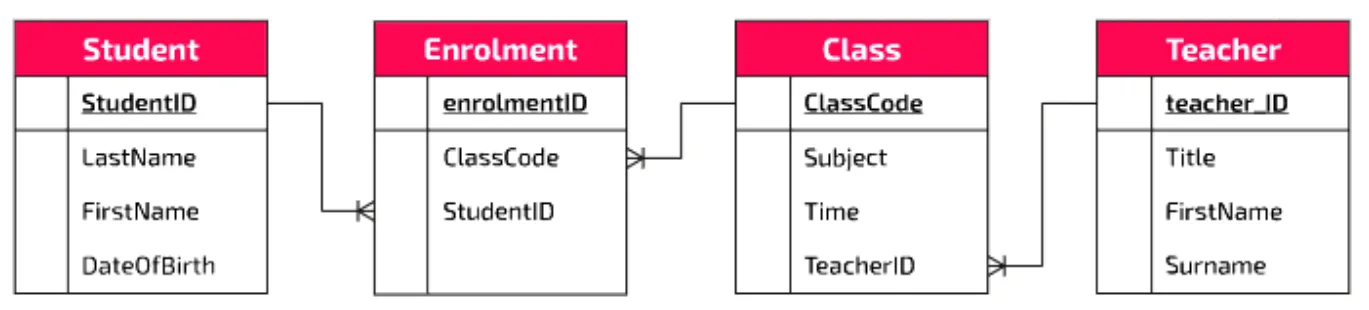
Each box is a database table, and the list in each box shows the categories of data (the fields) stored in that table. The lines between the tables are the relationships that link them.
Look at the Student and Enrolment tables. The StudentID field is in both. Each student’s details appear in the Student table only once, but the student can be enrolled in many classes. The data could now look like this:
| StudentID | LastName | FirstName | DoB |
|---|---|---|---|
| 246524 | Afridi | Shaheen | 06/04/2008 |
| 451421 | Kohli | Virat | 05/11/2007 |
| 466712 | Ronaldo | Cristiano | 05/02/2007 |
| EnrolmentID | ClassCode | StudentID |
|---|---|---|
| 1 | CSC101 | 451421 |
| 2 | MTH106 | 451421 |
| 3 | CSC103 | 466712 |
| 4 | PHY110 | 451421 |
| 5 | CSC101 | 246524 |
In the Student table each student is recorded once. In the Enrolment table, only the StudentID is repeated. If a student’s details need to change, they are changed in one place, the Student table. So there is much less data redundancy, and less chance of errors that lead to inconsistent data.
How a relational database addresses the limitations of a file-based approach
- Data is stored in separate linked tables, and each item of data is stored only once, so there is less data redundancy.
- A change is made in one place only, so there is less data inconsistency and better data integrity.
- Rules such as validation and referential integrity are checked when data is entered.
- Access can be controlled, so each user sees only the data they need (better data privacy).
- Programs are independent of how the data is stored, so the structure can change, or data be added, without rewriting existing programs.
- The same data can be shared by many users and programs, and queried in new ways.
Practise this: past-paper questions
- June 2021 · Paper 11 · Q7(a)Bobby tells Kim that a file-based approach is usually better than a relational database. Explain why Bobby is incorrect
- June 2022 · Paper 11 · Q4(a)Describe the advantages of using a relational database compared to a file-based approach
- June 2023 · Paper 13 · Q4(a)Describe two ways in which a relational database addresses the limitations of a file-based approach
- November 2023 · Paper 11 · Q3(b)Identify three advantages of a relational database compared to a file-based approach
Show 2 more
Used later in
8.1 · 5 of 21Book pages Contents
Database, table, record, field and entity
A database is an organised collection of data. In theory, even a well organised filing cabinet is a database. But computer systems produce huge amounts of data, so electronic databases have become a necessity. You could not realistically keep an index of every website on the internet in a filing cabinet, and even if you could, imagine how long it would take to find all the websites about cats.
Electronic databases must be well designed from the start, so that data can be stored and retrieved as efficiently as possible, and to avoid problems such as inconsistent and duplicated data.
A table is a collection of related data, made up of records and fields. Imagine a school that stores data about students, staff, classes and grades. This is a table it might use to store data about each student:
| StudentID | LastName | FirstName | |
|---|---|---|---|
| 246524 | Afridi | Shaheen | s.afridi@cswithzain.com |
| 451421 | Kohli | Virat | v.kohli@cswithzain.com |
| 466712 | Ronaldo | Cristiano | c.ronaldo@cswithzain.com |
- Fields give the category heading for each item of data in the table. Here the fields are StudentID, LastName, FirstName and Email.
- A record is a collection of data about one object, person or thing. In the student table, a record is one row: the data about one student.
Each table in a database should represent a single entity. An entity is an object in the real world that can be told apart from other objects. It can have:
- a physical existence, for example a customer or a product
- a conceptual existence, for example an order or a booking.
In the example, the entity is a student. Everything the school wants to store about a student is an attribute of the entity, and each attribute becomes a field. Each student has their own row in the table: a record.
In relational database language, a record is also called a tuple. So a tuple is one row of a table, such as (246524, Afridi, Shaheen, s.afridi@cswithzain.com).
Exam definitions
- Entity: a thing (object, person, event or idea) about which data is stored.
- Table: a collection of related records about one entity, arranged in rows and columns.
- Record: all the data about one instance of the entity, one row of a table.
- Tuple: one row of a table, another name for a record.
- Field: one column of a table, holding one item of data for every record.
- Attribute: one item of data stored about an entity, such as an email address; it is stored as a field.
Note Indexing is also part of this topic: an index is a separate, quick-to-search list of key values with pointers to the matching records, which makes searching a large table faster. It is explained with the other DBMS features in 8.2.
Practise this: past-paper questions
- June 2021 · Paper 12 · Q1(a)Give the definition of the following database terms, using an example from the database HOUSE_RENTALS for each definition. | Term | Definition and…
- November 2022 · Paper 11 · Q4(c)(i)State what is meant by a tuple. Give an example of a tuple from PHOTO_DATA. Tuple Example
- June 2023 · Paper 13 · Q4(b)Complete the table by writing the missing term or description for each database feature. Term | Description | An object that data is stored about.…
- November 2023 · Paper 12 · Q2(a)State what is meant by the following terms in a relational database model. Entity ... Primary key ... Referential integrity
Show 2 more
- November 2024 · Paper 11 · Q2(c)Complete the table by writing a definition for each of the database terms. | Term | Definition | | Referential integrity | | | Candidate key | | |…
- November 2024 · Paper 13 · Q4(d)Complete the following table by defining each database term. Database term | Definition Entity | Attribute |
Used later in
8.1 · 6 of 21Book pages Contents
Primary key
A primary key is a field (or fields) in a table that acts as a unique identifier for each record. A primary key value can never be repeated within a table, so each record in the table is unique.
Here is part of a Subjects table from a school’s database:
| SubjectID | SubjectName | Level |
|---|---|---|
| 1 | Computer Science | GCSE |
| 2 | Computer Science | A Level |
| 3 | Math | GCSE |
| 4 | Math | A Level |
| 5 | Physics | GCSE |
Which field is suitable as the primary key?
- SubjectName is not unique: Computer Science and Math each appear more than once, so it cannot be the primary key.
- Level is not unique either: GCSE and A Level are repeated, so it cannot be the primary key.
- SubjectID has been included to make sure each record has something unique about it.
Making SubjectID the primary key means no other record in the table can have a SubjectID that is already in use.
Sometimes there is an obvious choice for the primary key. Every published book has an ISBN (International Standard Book Number) that is unique to that book, so a table of the books in a library can use the ISBN as its primary key.
In other cases it is harder to find a suitable field. A common solution is to give each record a number as its primary key, like StudentID in the student table:
| StudentID (PK) | LastName | FirstName | |
|---|---|---|---|
| 246524 | Afridi | Shaheen | s.afridi@cswithzain.com |
| 451421 | Kohli | Virat | v.kohli@cswithzain.com |
| 466712 | Ronaldo | Cristiano | c.ronaldo@cswithzain.com |
Exam definition
- A primary key is an attribute, or combination of attributes, that uniquely identifies each tuple (record) in a table.
Practise this: past-paper questions
- November 2021 · Paper 11 · Q5(a)Tick (✓) one box in each row to identify whether each field is a primary key or a foreign key. | Table | Field name | Primary key | Foreign key |…
- June 2022 · Paper 12 · Q5(b)A composite primary key consists of two or more attributes that together form the primary key. Explain why the table FILM_ACTOR has a composite…
- November 2022 · Paper 13 · Q2(a)Complete the following table by writing the correct answer for each item. | Item | Answer | | a suitable field for the primary key in COMPANY | |…
- June 2023 · Paper 13 · Q4(b)Complete the table by writing the missing term or description for each database feature. Term | Description | An object that data is stored about.…
Show 5 more
- June 2023 · Paper 13 · Q4(c)The car rental database is not normalised. The current database design is: BOOKING(CarRegistration, StartDate, EndDate, CarModel, CarColour,…
- November 2023 · Paper 12 · Q2(a)State what is meant by the following terms in a relational database model. Entity ... Primary key ... Referential integrity
- June 2025 · Paper 12 · Q5(b)Underline the attribute, or attributes, that form the primary key in each of the tables. USER(Username, Password, DateOfBirth)…
- June 2026 · Paper 11 · Q4(a)Complete the table by describing the relationship between each pair of tables. Include the primary key(s) and foreign key(s) and how these create…
- June 2026 · Paper 13 · Q4(a)Create a 3-table design for the library database normalised to Third Normal Form (3NF). Give your table design in the format: TableName(Field1,…
Used later in
8.1 · 7 of 21Book pages Contents
Composite key
Builds on
A composite key is a primary key made up of more than one attribute.
Suppose a school offers tutoring sessions after lessons. Each teacher must deliver one session a week for each subject they teach. The Tutoring table stores which teacher delivers each session, on which day, and in which room:
| SubjectID | TeacherID | Day | Room |
|---|---|---|---|
| 2 | 130 | Monday | H18 |
| 3 | 278 | Monday | S14 |
| 4 | 278 | Tuesday | S14 |
| 5 | 345 | Monday | S22 |
| 5 | 785 | Friday | S22 |
Even in this small sample, no single attribute can be guaranteed to be unique:
- There can be more than one session for the same subject: subject 5 has sessions on Monday and Friday.
- The same teacher can deliver more than one session a week: teacher 278 delivers sessions for subjects 3 and 4.
- There can be more than one session (for different subjects) on the same day.
- More than one session can take place in the same room (on different days).
But a teacher delivers only one session for a given subject each week. So the combination of SubjectID and TeacherID is unique for every record, and these two attributes together form a composite primary key.
When you design your first database with several tables, you may want to avoid composite keys by adding a new attribute that is unique for each record, such as an auto-incremented TutoringID. This is not necessary. Even with a TutoringID, the table would still need the SubjectID and TeacherID columns to show which teacher delivers each session. Since that data is already in the table, and the two values together are unique, they are an effective and correct choice for the primary key.
Practise this: past-paper questions
- June 2022 · Paper 12 · Q5(b)A composite primary key consists of two or more attributes that together form the primary key. Explain why the table FILM_ACTOR has a composite…
- June 2025 · Paper 12 · Q5(b)Underline the attribute, or attributes, that form the primary key in each of the tables. USER(Username, Password, DateOfBirth)…
Used later in
8.1 · 8 of 21Book page Contents
Candidate key and secondary key
A candidate key is an attribute, or the smallest set of attributes, in a table where no tuple has the same value. In other words, it is any attribute (or set of attributes) that could be chosen as the primary key.
| StudentID (primary key) | LastName | FirstName | Email (secondary key) |
|---|---|---|---|
| 246524 | Afridi | Shaheen | s.afridi@cswithzain.com |
| 451421 | Kohli | Virat | v.kohli@cswithzain.com |
| 466712 | Ronaldo | Cristiano | c.ronaldo@cswithzain.com |
| 456879 | Khan | Shaheen | s.khan@cswithzain.com |
| 325689 | Ronaldo | Nazario | n.ronaldo@cswithzain.com |
In this table, StudentID and Email are both candidate keys: no two students share either value. LastName (two students called Ronaldo) and FirstName (two called Shaheen) are not.
StudentID has been chosen as the primary key. A secondary key is a candidate key that is an alternative to the primary key, so here Email is a secondary key.
Exam definitions
- Candidate key: an attribute, or smallest set of attributes, in a table where no tuple has the same value; it could be the primary key.
- Secondary key: a candidate key that is not chosen as the primary key.
Practise this: past-paper questions
- November 2022 · Paper 12 · Q5(c)State what is meant by a candidate key in a relational database
- November 2022 · Paper 13 · Q2(a)Complete the following table by writing the correct answer for each item. | Item | Answer | | a suitable field for the primary key in COMPANY | |…
- June 2023 · Paper 13 · Q4(b)Complete the table by writing the missing term or description for each database feature. Term | Description | An object that data is stored about.…
- November 2024 · Paper 11 · Q2(c)Complete the table by writing a definition for each of the database terms. | Term | Definition | | Referential integrity | | | Candidate key | | |…
Used later in
8.1 · 9 of 21Book pages Contents
Foreign key
Builds on
A foreign key is the primary key field of one table that appears in another table, to make a link between (join) the two tables. Foreign keys help keep the relationships between tables correct: for example, a foreign key value can only be put into a table if that value already exists as a primary key in the other table.
The example below has three tables:
- Student: StudentID, LastName, FirstName, Email
- Subject: SubjectID, SubjectName, Level
- Enrolment: EnrolmentID, SubjectID, StudentID, TargetGrade
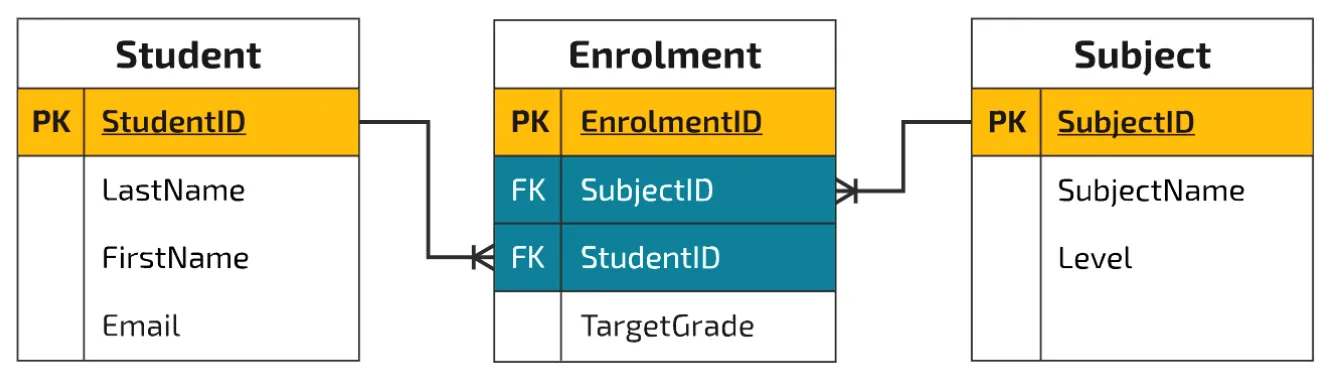
Each table has its own primary key, and the Enrolment table has two foreign keys that link it to the Student and Subject tables. The data in the Enrolment table could look like this:
| EnrolmentID (PK) | SubjectID (FK) | StudentID (FK) | TargetGrade |
|---|---|---|---|
| 9784 | 1 | 246524 | A |
| 9755 | 3 | 246524 | B |
| 9567 | 5 | 246524 | A |
SubjectID and StudentID are foreign keys: the data in these fields links to the tables where those fields are the primary keys. A student can enrol on more than one subject, so including StudentID as a foreign key links each enrolment to the student’s record in the Student table. This avoids storing all the student’s details again for every enrolment: only the StudentID is repeated.
To find out who student 246524 is, look in the Student table:
| StudentID | LastName | FirstName | |
|---|---|---|---|
| 246524 | Afridi | Shaheen | s.afridi@cswithzain.com |
| 451421 | Kohli | Virat | v.kohli@cswithzain.com |
| 466712 | Ronaldo | Cristiano | c.ronaldo@cswithzain.com |
Student 246524 is Shaheen Afridi, and the Enrolment table shows she takes the subjects with IDs 1, 3 and 5. To find out what these are, look in the Subject table:
| SubjectID | SubjectName | Level |
|---|---|---|
| 1 | Computer Science | GCSE |
| 2 | Computer Science | A Level |
| 3 | Math | GCSE |
| 4 | Math | A Level |
| 5 | Physics | GCSE |
Opening every table to match up the foreign keys by hand would take a long time. Because the data is linked, SQL can query the database and pull out this information for you. For example, an SQL query can find all the subjects taken by Shaheen and give this output:
| SubjectName | Level | TargetGrade |
|---|---|---|
| Computer Science | GCSE | A |
| Math | GCSE | B |
| Physics | GCSE | A |
Exam definition
- A foreign key is an attribute in one table that refers to (links to) the primary key of another table, to create a relationship between the two tables.
Practise this: past-paper questions
- June 2021 · Paper 12 · Q1(a)Give the definition of the following database terms, using an example from the database HOUSE_RENTALS for each definition. | Term | Definition and…
- November 2021 · Paper 11 · Q5(a)Tick (✓) one box in each row to identify whether each field is a primary key or a foreign key. | Table | Field name | Primary key | Foreign key |…
- June 2022 · Paper 13 · Q6(a)Describe the relationship between the two tables. Refer to the primary and foreign keys in your answer
- June 2023 · Paper 11 · Q2(b)(i)Complete the table by identifying two foreign keys and the database table where each is found. | Foreign key | Database table | | | | | | |
Show 8 more
- June 2024 · Paper 12 · Q4(d)The database also needs to store data about the students, the exams the students have taken and the marks the students achieved in each question…
- June 2024 · Paper 13 · Q4(d)Customers give their first name, last name and email address when they are making a booking. One booking can include multiple seats. Describe the…
- November 2024 · Paper 13 · Q4(a)Identify two foreign keys in the table SALE and the table that each foreign key references
- November 2024 · Paper 13 · Q4(c)(ii)The table BATCH is not normalised. Normalise the database table BATCH. Write the table definitions for your new tables. Identify any primary and…
- June 2025 · Paper 11 · Q5(c)Identify two tables in the database that contain one or more foreign keys. Give one attribute that is a foreign key in each table. | Table |…
- November 2025 · Paper 12 · Q4(a)Describe the relationship between the two tables. Refer to the primary and foreign keys in your answer
- June 2026 · Paper 11 · Q4(a)Complete the table by describing the relationship between each pair of tables. Include the primary key(s) and foreign key(s) and how these create…
- June 2026 · Paper 13 · Q4(a)Create a 3-table design for the library database normalised to Third Normal Form (3NF). Give your table design in the format: TableName(Field1,…
Used later in
8.1 · 10 of 21Book page Contents
Referential integrity
Builds on
A relational database can improve data integrity further by enforcing referential integrity. At its simplest, when a record is added to a table and a value is put in a foreign key field, the system checks that the value exists in the primary key field of the linked table.
For example, students are enrolled on subjects. If referential integrity is enforced, the system checks that a student with the given StudentID exists in the Student table. If it does not, that StudentID cannot be used in an enrolment record.
Referential integrity can also say what happens when a record is updated or deleted:
- If a primary key value is changed, the matching foreign key values can be updated automatically.
- If a record is deleted, the records with matching foreign key values can be deleted too.
- There are other options as well, such as stopping the change.
Very often you will not want data to be deleted automatically, because it gives useful management information or is still needed for day-to-day queries. When a student leaves the college, it is more likely that you would store a ‘date left’ attribute than delete their data. The student can then be left out of registers and progress monitoring, but still be counted when enrolments or course completions are analysed.
As a database designer, one of your jobs is to keep the integrity of the data as high as possible. You learn how to enforce referential integrity when you create tables with SQL.
Why referential integrity is important
- Every foreign key value must match an existing primary key value in the linked table.
- A record cannot be added with a foreign key value that does not exist, for example an enrolment for a student who is not in the Student table.
- A record cannot be deleted (or its primary key changed) while other records link to it, unless the change is passed on to those records, so no record is left linking to nothing.
- This keeps the data in linked tables consistent and accurate.
Practise this: past-paper questions
- June 2023 · Paper 12 · Q2(b)Explain the reasons why referential integrity is important in a database
- November 2023 · Paper 12 · Q2(a)State what is meant by the following terms in a relational database model. Entity ... Primary key ... Referential integrity
- November 2024 · Paper 11 · Q2(c)Complete the table by writing a definition for each of the database terms. | Term | Definition | | Referential integrity | | | Candidate key | | |…
- November 2025 · Paper 11 · Q2(d)The database tables are repeated here: STUDENT(StudentID, FirstName, TelephoneNumber, UniversityName) PLACEMENT(PlacementID, StudentID, CompanyID,…
8.1 · 11 of 21Book pages Contents
E-R diagrams and relationships
Builds on
In an entity-relationship (E-R) diagram, each entity is drawn as a rectangle. A relationship between two entities is drawn as a line, and it is one of three types:
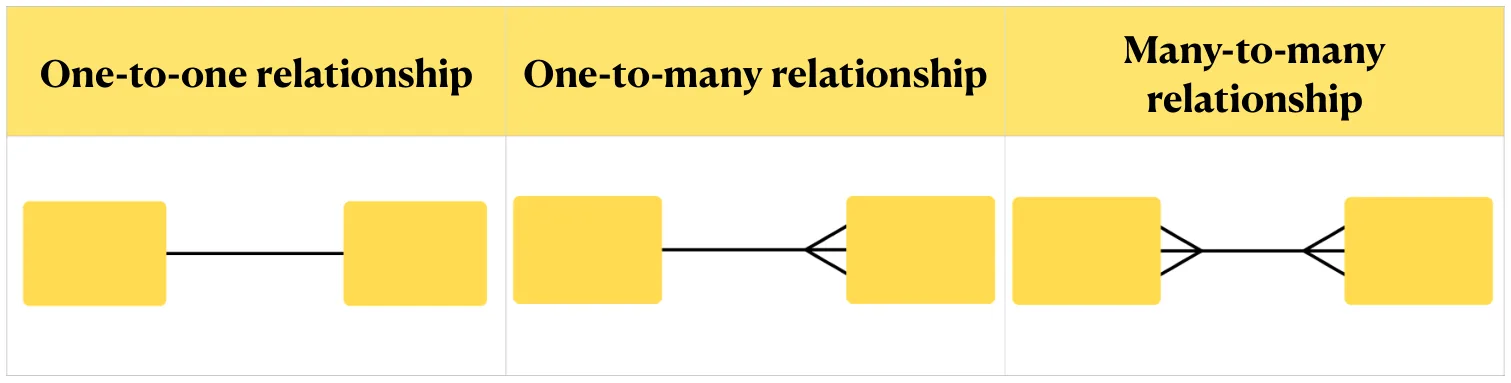
The line shows the cardinality of the relationship. Cardinality can be one or many: it is the number of times one instance of an entity can be linked to instances of the other entity. Read the cardinality at the end of the line nearest each entity. For a cardinality of one, the end of the line is straight. For a cardinality of many, the end splays out into a crow’s foot.
By far the most common relationship is one-to-many. In the early stages of design you will also find the other types. A many-to-many relationship cannot be implemented directly in a relational database: it has to be resolved first (see below).
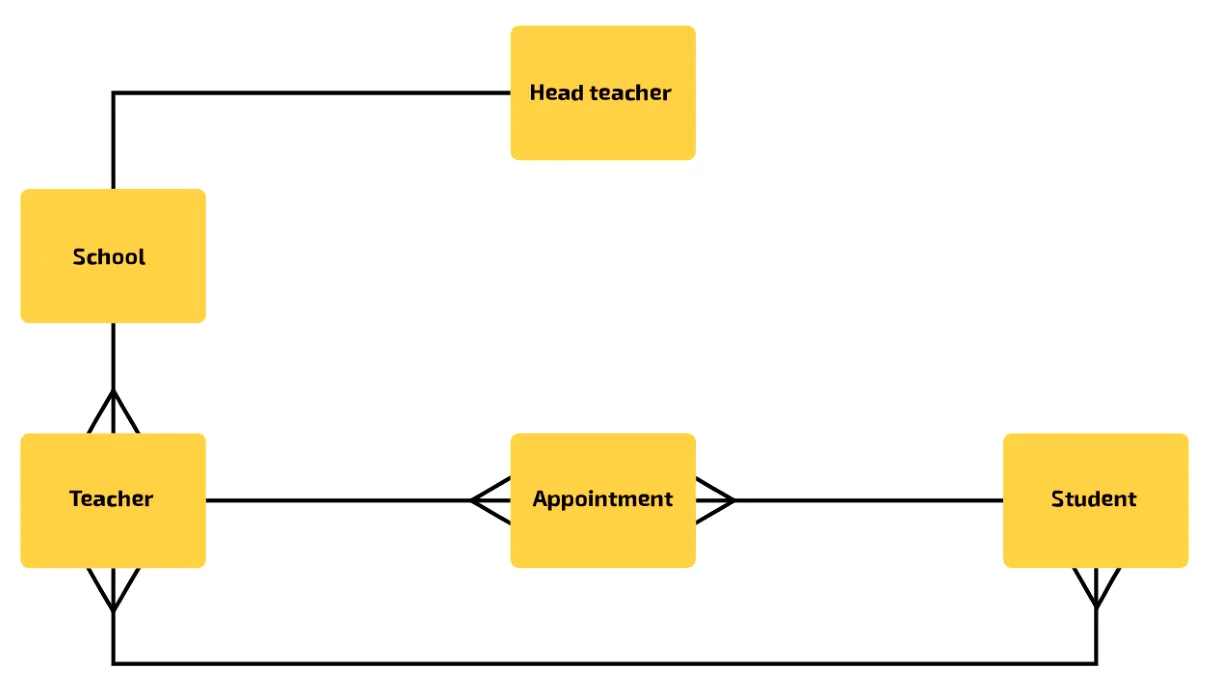
Examples of each type:
- Many-to-many: pupil and teacher. Each pupil is taught by many teachers, and each teacher has many pupils.
- One-to-many: pupil and appointment. Each pupil books many appointments, and each appointment is for one pupil.
- One-to-one: head teacher and school. Each head teacher runs one school, and each school is run by one head teacher.
Once you have found all the entities and relationships, you can put them together into an E-R diagram:
Describing a relationship in an exam answer
- Name the type, for example one-to-many, and say it both ways: one customer makes many orders; each order is made by one customer.
- Name the keys that make the link: the primary key of the table on the “one” side is a foreign key in the table on the “many” side.
Practise this: past-paper questions
- June 2021 · Paper 11 · Q7(b)(i)Give one example of each of the following relationships from Bobby’s database. one-to-one one-to-many many-to-many
- June 2021 · Paper 11 · Q7(b)(ii)Tick (✓) one box to identify the relationship that cannot be directly implemented in a normalised relational database. | Relationship | Tick (✓) |…
- November 2021 · Paper 12 · Q6(a)(ii)Draw an entity-relationship (E-R) diagram for the database PLANTSALES. PLANT CUSTOMER PURCHASE_ITEM PURCHASE
- June 2022 · Paper 12 · Q5(a)Complete the entity-relationship (E-R) diagram. ACTOR FILM_FACT FILM_ACTOR
Show 16 more
- June 2022 · Paper 13 · Q6(a)Describe the relationship between the two tables. Refer to the primary and foreign keys in your answer
- November 2022 · Paper 11 · Q4(a)Complete the entity-relationship (E-R) diagram for the database PHOTOGRAPHS. [ PARTY ] [ CUSTOMER ] [ PHOTO_DATA ] [ CAMERA_DATA ]
- November 2022 · Paper 13 · Q2(a)Complete the following table by writing the correct answer for each item. | Item | Answer | | a suitable field for the primary key in COMPANY | |…
- November 2023 · Paper 11 · Q3(a)Complete the entity-relationship (E-R) diagram for the relational database. [Diagram: five entity boxes to be connected - SHOP_ORDER, CUSTOMER,…
- November 2023 · Paper 13 · Q3(b)(i)Complete the entity-relationship (E-R) diagram for the database COURSES. COURSE_SCHEDULE TUTOR COURSE_INFORMATION
- June 2024 · Paper 12 · Q4(a)Identify the relationship between EXAM and EXAM_QUESTION
- June 2024 · Paper 13 · Q4(a)Identify the relationship between the tables PERFORMANCE and SHOW
- November 2024 · Paper 11 · Q2(b)(i)Complete the entity-relationship (E-R) diagram for the given tables. REPAIR_PART PART REPAIR CUSTOMER
- November 2024 · Paper 12 · Q6(b)(i)Identify each relationship between the database tables and explain how each relationship can be implemented in the normalised database
- June 2025 · Paper 11 · Q5(a)Complete the entity‑relationship (E‑R) diagram for the database. CUSTOMER CUSTOMER_CARD_DATA ORDER ORDER_ITEM
- June 2025 · Paper 13 · Q6(a)Complete the entity-relationship (E-R) diagram for the database
- November 2025 · Paper 11 · Q2(a)Complete the entity-relationship (E-R) diagram for the database WORKEXPERIENCE
- November 2025 · Paper 12 · Q4(a)Describe the relationship between the two tables. Refer to the primary and foreign keys in your answer
- November 2025 · Paper 13 · Q5(a)Complete the entity-relationship (E-R) diagram for the database REVIEWS. [diagram with four entity boxes to be connected: CUSTOMER, PRODUCT,…
- June 2026 · Paper 11 · Q4(a)Complete the table by describing the relationship between each pair of tables. Include the primary key(s) and foreign key(s) and how these create…
- June 2026 · Paper 12 · Q3(a)Describe the relationships between the three entities
Used later in
8.1 · 12 of 21Book pages Contents
Worked example: an E-R diagram for a sports club
Builds on
There is a standard notation for describing an entity:
EntityName(PrimaryKey, attribute1, attribute2, attribute3, …)
It starts with the name of the entity, followed by its attributes in brackets. The primary key is underlined, and is usually written first. If the primary key is a composite key, every attribute in it is underlined. (On this page, the primary key is shown in bold. In the exam, underline it.) Entity names are written in the singular, for example Member, not Members.
A sports club records the courses its members are assessed on. These are its entities in standard notation:
- Member(MemberId, FirstName, LastName, Phone)
- Course(CourseCode, Description, Fee)
- Instructor(InstructorId, FirstName, LastName, Email)
- Certificate(MemberId, CourseCode, AssessmentDate, InstructorId)
Certificate has a composite primary key. The combination of MemberId and CourseCode makes each record unique, so no entry can be duplicated.
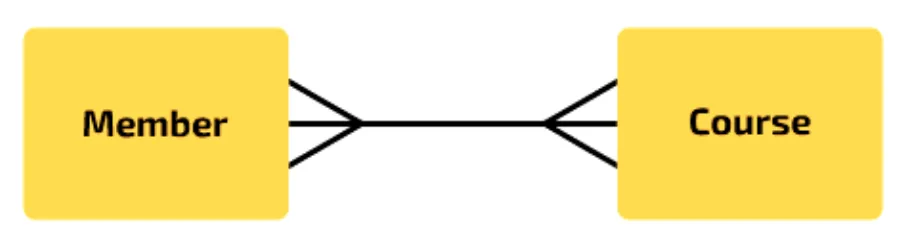
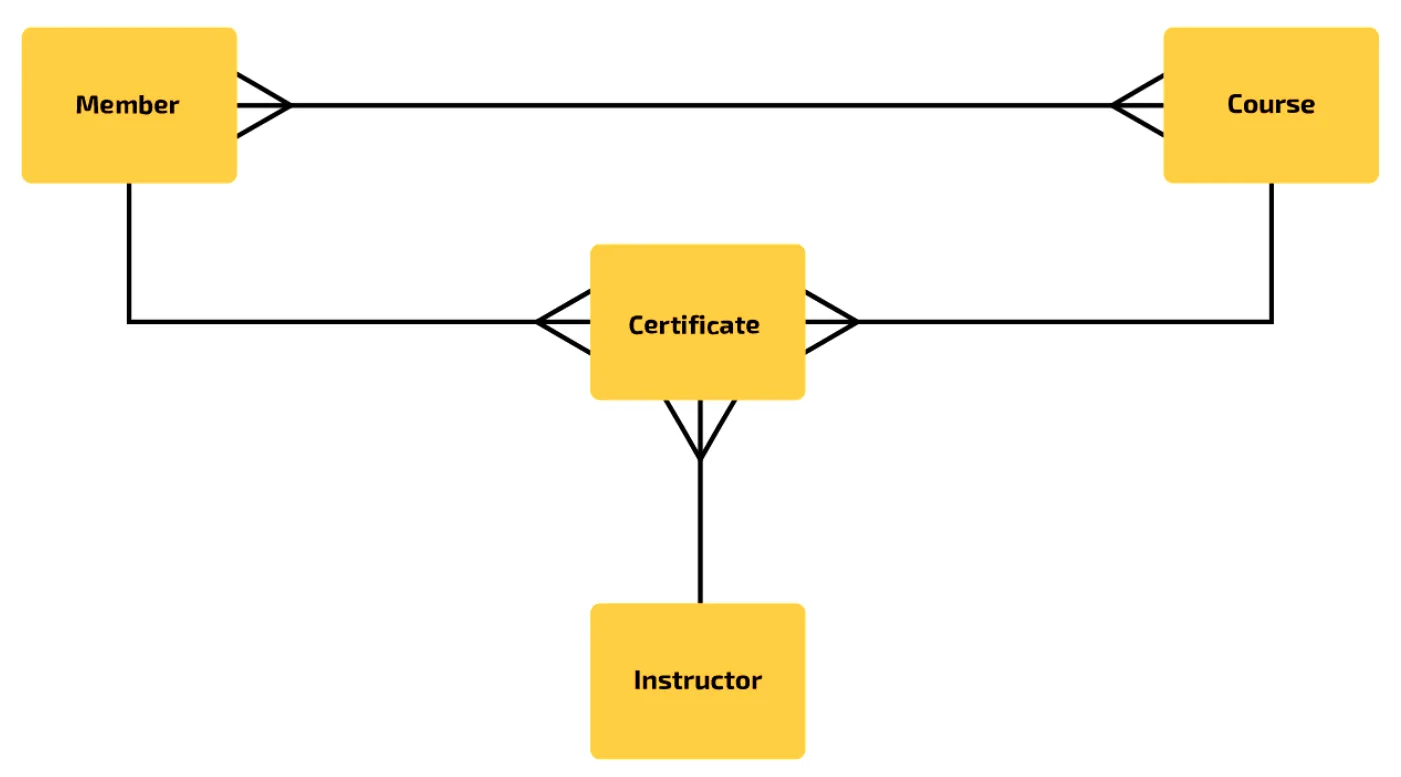
The relationship between Member and Course is many-to-many: each member can be assessed for many courses, and each course is assessed for many members.
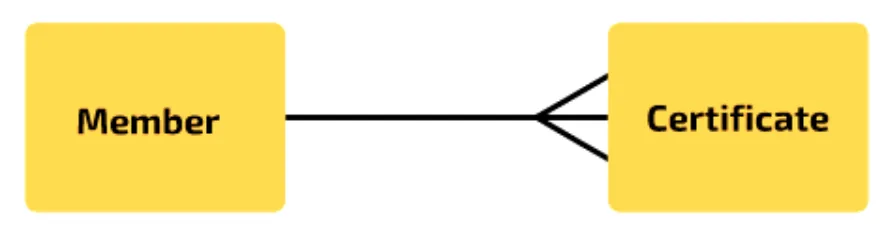
The relationship between Member and Certificate is one-to-many: each member can gain many certificates, and each certificate is awarded to just one member.
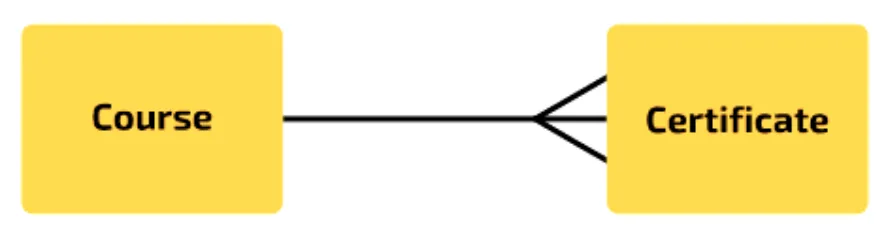
The relationship between Course and Certificate is also one-to-many: each course can have many certificates (one for each member who completes it), and each certificate is for just one course.
The relationship between Instructor and Certificate is also one-to-many: each certificate has one instructor, and each instructor can carry out many assessments.

The completed E-R diagram looks like this:
Practise this: past-paper questions
- November 2021 · Paper 12 · Q6(a)(ii)Draw an entity-relationship (E-R) diagram for the database PLANTSALES. PLANT CUSTOMER PURCHASE_ITEM PURCHASE
- June 2022 · Paper 12 · Q5(a)Complete the entity-relationship (E-R) diagram. ACTOR FILM_FACT FILM_ACTOR
- November 2022 · Paper 11 · Q4(a)Complete the entity-relationship (E-R) diagram for the database PHOTOGRAPHS. [ PARTY ] [ CUSTOMER ] [ PHOTO_DATA ] [ CAMERA_DATA ]
- November 2023 · Paper 11 · Q3(a)Complete the entity-relationship (E-R) diagram for the relational database. [Diagram: five entity boxes to be connected - SHOP_ORDER, CUSTOMER,…
Show 6 more
- November 2023 · Paper 13 · Q3(b)(i)Complete the entity-relationship (E-R) diagram for the database COURSES. COURSE_SCHEDULE TUTOR COURSE_INFORMATION
- November 2024 · Paper 11 · Q2(b)(i)Complete the entity-relationship (E-R) diagram for the given tables. REPAIR_PART PART REPAIR CUSTOMER
- June 2025 · Paper 11 · Q5(a)Complete the entity‑relationship (E‑R) diagram for the database. CUSTOMER CUSTOMER_CARD_DATA ORDER ORDER_ITEM
- June 2025 · Paper 13 · Q6(a)Complete the entity-relationship (E-R) diagram for the database
- November 2025 · Paper 11 · Q2(a)Complete the entity-relationship (E-R) diagram for the database WORKEXPERIENCE
- November 2025 · Paper 13 · Q5(a)Complete the entity-relationship (E-R) diagram for the database REVIEWS. [diagram with four entity boxes to be connected: CUSTOMER, PRODUCT,…
Used later in
8.1 · 13 of 21Book page Contents
Finding relationships from entity descriptions
Builds on
If an exam question gives you entity descriptions, you can find the relationships from the keys. Here are the sports club entities again:
- Member(MemberId, FirstName, LastName, Phone)
- Course(CourseCode, Description, Fee)
- Instructor(InstructorId, FirstName, LastName, Email)
- Certificate(MemberId, CourseCode, AssessmentDate, InstructorId)
Look at each entity whose primary key is a single attribute. If that attribute is also in another entity, either as a non-key attribute or as part of a composite primary key, there is a one-to-many relationship from the first entity to the second.
- If two entities have the same primary key, the relationship is one-to-one.
- If two entities share an attribute that is the primary key (made of a single attribute) of one of them, the relationship is one-to-many.
- If two entities share an attribute that is not a single-attribute primary key in either of them, there is a many-to-many relationship that needs resolving.
Worked example
Find the relationships between the sports club entities.
- Step 1Member has the single-attribute primary key MemberId. MemberId is also in Certificate, as part of its composite primary key, so Member to Certificate is one-to-many.
- Step 2Course has the single-attribute primary key CourseCode. CourseCode is also part of the composite key of Certificate, so Course to Certificate is one-to-many.
- Step 3Instructor has the single-attribute primary key InstructorId. InstructorId is a non-key attribute in Certificate, so Instructor to Certificate is one-to-many.
Take care with composite primary keys. No part of a composite key is unique on its own: only the combination is a unique identifier. In Certificate, each part of the composite key is also a foreign key, so CourseCode is a foreign key (and part of the composite primary key), and the relationship between Course and Certificate is one-to-many.
Practise this: past-paper questions
- November 2021 · Paper 12 · Q6(a)(ii)Draw an entity-relationship (E-R) diagram for the database PLANTSALES. PLANT CUSTOMER PURCHASE_ITEM PURCHASE
- June 2022 · Paper 12 · Q5(a)Complete the entity-relationship (E-R) diagram. ACTOR FILM_FACT FILM_ACTOR
- November 2022 · Paper 11 · Q4(a)Complete the entity-relationship (E-R) diagram for the database PHOTOGRAPHS. [ PARTY ] [ CUSTOMER ] [ PHOTO_DATA ] [ CAMERA_DATA ]
- November 2023 · Paper 11 · Q3(a)Complete the entity-relationship (E-R) diagram for the relational database. [Diagram: five entity boxes to be connected - SHOP_ORDER, CUSTOMER,…
Show 6 more
- November 2023 · Paper 13 · Q3(b)(i)Complete the entity-relationship (E-R) diagram for the database COURSES. COURSE_SCHEDULE TUTOR COURSE_INFORMATION
- November 2024 · Paper 11 · Q2(b)(i)Complete the entity-relationship (E-R) diagram for the given tables. REPAIR_PART PART REPAIR CUSTOMER
- June 2025 · Paper 11 · Q5(a)Complete the entity‑relationship (E‑R) diagram for the database. CUSTOMER CUSTOMER_CARD_DATA ORDER ORDER_ITEM
- June 2025 · Paper 13 · Q6(a)Complete the entity-relationship (E-R) diagram for the database
- November 2025 · Paper 11 · Q2(a)Complete the entity-relationship (E-R) diagram for the database WORKEXPERIENCE
- November 2025 · Paper 13 · Q5(a)Complete the entity-relationship (E-R) diagram for the database REVIEWS. [diagram with four entity boxes to be connected: CUSTOMER, PRODUCT,…
8.1 · 14 of 21Book page Contents
Resolving a many-to-many relationship
Builds on
A many-to-many relationship cannot be implemented directly in a relational database. One record in a table cannot hold a list of many foreign key values, because that would break first normal form.
Instead, it is resolved with a link table (also called a link entity): a new table between the two entities. The link table holds the primary key of each of the two tables as foreign keys, and usually these two foreign keys together form its composite primary key. The one many-to-many relationship becomes two one-to-many relationships, each with the crow’s foot at the link table.
The sports club already does this. Member to Course is many-to-many, and Certificate is the link table: Member to Certificate and Course to Certificate are both one-to-many, and Certificate’s primary key is MemberId plus CourseCode. In the same way, the Enrolment table links Student and Subject.
Purpose of a link table
- To resolve a many-to-many relationship into two one-to-many relationships.
- It holds the primary keys of both tables as foreign keys (often together as its composite primary key), so each record links one record from each table.
Practise this: past-paper questions
- June 2021 · Paper 11 · Q7(b)(ii)Tick (✓) one box to identify the relationship that cannot be directly implemented in a normalised relational database. | Relationship | Tick (✓) |…
- June 2024 · Paper 12 · Q4(d)The database also needs to store data about the students, the exams the students have taken and the marks the students achieved in each question…
- June 2024 · Paper 13 · Q4(d)Customers give their first name, last name and email address when they are making a booking. One booking can include multiple seats. Describe the…
- November 2024 · Paper 12 · Q6(b)(i)Identify each relationship between the database tables and explain how each relationship can be implemented in the normalised database
Used later in
8.1 · 15 of 21Book page Contents
Normalisation and the normal forms
Builds on
Normalisation is a technique used when designing a database to reduce duplicated data. It also improves data integrity.
In his important work on relational databases, Edgar F. Codd proposed a three-stage process, in which each stage reaches a normal form. His work was later extended, and you may see other stages in textbooks or online, but a database is usually considered normalised if it is in third normal form (3NF). For the exam, you only need to normalise to 3NF.
| Normal form | Rules |
|---|---|
| 1NF | Each record has a primary key. Data is atomic. No repeating groups of attributes. |
| 2NF | In 1NF, and no partial dependencies. |
| 3NF | In 2NF, and no non-key (transitive) dependencies. |
Data that has not been normalised at all is sometimes called 0NF (zero normal form, or unnormalised). Each stage of normalisation removes one kind of problem:
| Stage | Task |
|---|---|
| 0NF to 1NF | Remove any repeating groups of attributes, and make every attribute atomic. |
| 1NF to 2NF | Remove any partial key dependencies. |
| 2NF to 3NF | Remove any non-key dependencies. |
Describing the three normal forms
- 1NF: there are no repeating groups of attributes, every attribute is atomic, and each table has a primary key.
- 2NF: it is in 1NF, and every non-key attribute depends on the whole primary key, not just part of it (no partial dependencies).
- 3NF: it is in 2NF, and every non-key attribute depends only on the primary key, not on another non-key attribute (no non-key dependencies).
Practise this: past-paper questions
- November 2021 · Paper 12 · Q6(a)(i)The table lists the following three stages of normalisation: • The first stage is from a database that is not normalised (0NF) to First Normal…
- June 2022 · Paper 11 · Q4(b)Give the highest level of Normal Form (NF) the database MARKS is in and justify your choice. Normal Form Justification
- June 2022 · Paper 13 · Q6(c)The database is in Third Normal Form (3NF). Complete the table by describing the three normal forms. | Normal Form | Description | | First Normal…
- November 2022 · Paper 11 · Q4(b)The database is normalised and is in Third Normal Form (3NF). Describe the characteristics of a database that is in Third Normal Form (3NF)
Used later in
8.1 · 16 of 21Book pages Contents
Worked example: the sports club as a flat file
Builds on
Back to the sports club. If a flat-file approach has been used to store the data about members and their certificates, the instructor might keep it in a spreadsheet or even a word-processed document:
| Member Id | Name | Phone | Assessment Date | Course Code | Description | Fee | Instructor | |
|---|---|---|---|---|---|---|---|---|
| 012010 | Emily Marr | 01632 961743 | 21/02/2019, 15/04/2019 | DG0011, CR0020 | Tennis, Badminton | 30, 20 | Sue, Sue R | sue.james@example.org, susan.robbins@example.net |
| 131092 | Joe Donald | 01632 960007 | 15/04/2019 | CR0001 | Kayaking | 100 | Mohammed | m.franks@example.com |
| 132099 | Abdel Patel | 01632 967267 | 01/03/2019, 15/04/2019, 02/06/2019 | DG3002, CR0001, SO0112 | Swimming, Kayaking, Judo L1 | 20, 100, 20 | Greta, Mohammed, Jay | g.geuze@example.com, m.franks@example.com, jay12@example.net |
| 145543 | Precious Jones | 01632 962816 | 21/02/2019, 02/06/2019, 01/07/2019 | DG0011, SO0112, CR0014 | Tennis, Judo L1, Climbing | 30, 20, 40 | Sue, Jay, Sue R | sue.james@example.org, jay12@example.net, susan.robbins@example.net |
| 148765 | Jack Marr | 01632 961743 | 11/06/2019 | SP8701 | Judo L2 | 30 | Greta | g.geuze@example.com |
This gives one record for each member, and a member’s certificate data is spread over several values in one cell. The instructor could sort and filter on member details, but could not work with the certificate data, because there are several values in each cell.
Another way is to make each row the award of one certificate. Then the member’s details must be repeated on every row:
| Member Id | Name | Phone | Assessment Date | Course Code | Description | Fee | Instructor | |
|---|---|---|---|---|---|---|---|---|
| 145543 | Precious Jones | 01632 962816 | 21/02/2019 | DG0011 | Tennis | 30.0 | Sue | sue.james@example.org |
| 012010 | Emily Marr | 01632 961743 | 21/02/2019 | DG0011 | Tennis | 30.0 | Sue | sue.james@example.org |
| 132099 | Abdel Patel | 01632 967267 | 01/03/2019 | DG3002 | Swimming | 20.0 | Greta | g.geuze@example.com |
| 131092 | Joe Donald | 01632 960007 | 15/04/2019 | CR0001 | Kayaking | 100.0 | Mohammed | m.franks@example.com |
| 132099 | Abdel Patel | 01632 967267 | 15/04/2019 | CR0001 | Kayaking | 100.0 | Mohammed | m.franks@example.com |
| 012010 | Emily Marr | 01632 961743 | 15/04/2019 | CR0020 | Badminton | 20.0 | Sue R | susan.robbins@example.net |
| 132099 | Abdel Patel | 01632 967267 | 02/06/2019 | SO0112 | Judo L1 | 20.0 | Jay | Jay12@example.net |
| 145543 | Precious Jones | 01632 962816 | 02/06/2019 | SO0112 | Judo L1 | 20.0 | Jay | Jay12@example.net |
| 148765 | Jack Marr | 01632 961743 | 11/06/2019 | SP8701 | Judo L2 | 30.0 | Greta | g.geuze@example.com |
| 145543 | Precious Jones | 01632 962816 | 01/07/2019 | CR0014 | Climbing | 40.0 | Sue R | susan.robbins@example.net |
Either way works when there are only a few records. But it is not an efficient way to hold the data: it is hard to analyse, and data is duplicated for no reason. In a large system, duplicated data can become inconsistent, as described earlier. If you look carefully at the data, you may spot some inconsistencies already.
To design a better system, the data must be stored in one or more linked tables, and every table must be in third normal form.
Normalisation has a reputation for being difficult, but the basic idea is simple: there must be a table for each entity, and in each record every attribute must be fully dependent on the primary key.
8.1 · 17 of 21Book page Contents
What is a dependency?
Before the rules of normalisation, you need to know what a dependency is. In database design, a dependency is a value that varies in line with another value.
In the flat file, the course description varies in line with the course code. Whenever you see the code CR0001, you find the description Kayaking. So the description is dependent on the course code.
But be careful not to assume a dependency. Always check any assumption with someone who understands the organisation and its current system. If the design is wrong, the database structure may have to be changed later, which can mean a lot of extra work.
8.1 · 18 of 21Book pages Contents
First normal form (1NF)
To decide whether data is in first normal form (1NF), check that:
- each record has a primary key
- the data in each field (column) is atomic
- no record has repeating groups of attributes.
Look again at the original flat file, with one record for each member (the first table in the worked example). Check each rule in turn.
Does each record have a primary key? Yes. MemberId is unique for each record, so it can be the primary key. If no attribute, or combination of attributes, could be guaranteed to be unique, you would need to add a new attribute to give each member a unique ID.
Is the data atomic? Data is atomic when a column holds a single value that cannot sensibly be divided further.
- The Name field is not atomic. It has two separate parts, first name and last name, so it is split into two fields: FirstName and LastName.
- The course description is atomic. Some descriptions have two parts, such as Judo L1, but the parts do not make sense on their own.
- AssessmentDate could be said to have three parts (day, month and year), but date fields are not usually split, because there are many date functions that can pull out the parts.
- The instructor’s name is not atomic. There are two instructors called Sue, and one is told apart from the other by being written “Sue R”. So it is split into InstructorFirstName and InstructorLastName.
Are there repeating groups of attributes? A repeating group of attributes is a set of attributes that appears more than once in a record. Sometimes a single attribute repeats, and this must be dealt with too.
Here there is a repeating group about certificates: Abdel Patel, for example, has gained three certificates. The attributes that repeat are CourseCode, Description, AssessmentDate, Fee, Instructor (now split into InstructorFirstName and InstructorLastName) and Email (now renamed InstructorEmail).
A repeating group must be moved to a new table, and removed from the original table. When you move it, you must still be able to link each moved record back to its original record, so the new table also gets a copy of the original primary key. Here, all the attributes about certificates go to a new Certificate table, and each certificate gets the MemberId of the member who gained it.
This is the new Certificate table, with all the atomic attributes from the repeating group. Each certificate now has its own record, linked back to its member by MemberId. The instructors’ surnames have been filled in. Its primary key is the composite key MemberId and CourseCode:
Certificate(MemberId, CourseCode, AssessmentDate, Description, Fee, InstructorLastName, InstructorFirstName, InstructorEmail)
| MemberId (PK) | CourseCode (PK) | AssessmentDate | Description | Fee | InstructorLastName | InstructorFirstName | InstructorEmail |
|---|---|---|---|---|---|---|---|
| 145543 | DG0011 | 21/02/2019 | Tennis | 30.00 | James | Sue | sue.james@example.org |
| 012010 | DG0011 | 21/02/2019 | Tennis | 30.00 | James | Sue | sue.james@example.org |
| 132099 | DG3002 | 01/03/2019 | Swimming | 20.00 | Geuze | Greta | g.geuze@example.com |
| 131092 | CR0001 | 15/04/2019 | Kayaking | 100.00 | Franks | Mohammed | m.franks@example.com |
| 132099 | CR0001 | 15/04/2019 | Kayaking | 100.00 | Franks | Mohammed | m.franks@example.com |
| 012010 | CR0020 | 15/04/2019 | Badminton | 20.00 | Robbins | Sue | susan.robbins@example.net |
| 132099 | SO0112 | 02/06/2019 | Judo L1 | 20.00 | Linton | Jay | Jay12@example.net |
| 145543 | SO0112 | 02/06/2019 | Judo L1 | 20.00 | Linton | Jay | Jay12@example.net |
| 148765 | SP8701 | 11/06/2019 | Judo L2 | 30.00 | Geuze | Greta | g.geuze@example.com |
| 145543 | CR0014 | 01/07/2019 | Climbing | 40.00 | Robbins | Sue | susan.robbins@example.net |
This is the Member table, with the name split into two attributes and the repeating group removed:
Member(MemberId, FirstName, LastName, Phone)
| MemberId (PK) | FirstName | LastName | Phone |
|---|---|---|---|
| 012010 | Emily | Marr | 01632 961743 |
| 131092 | Joe | Donald | 01632 960007 |
| 132099 | Abdel | Patel | 01632 967267 |
| 145543 | Precious | Jones | 01632 962816 |
| 148765 | Jack | Marr | 01632 961743 |
Both tables are now in first normal form.
Practise this: past-paper questions
8.1 · 19 of 21Book pages Contents
Second normal form (2NF)
Builds on
The rule for second normal form (2NF) is: the tables are in 1NF, and there are no partial dependencies.
A partial dependency is a non-key attribute that depends on only part of a composite primary key. So partial dependencies can only happen in a table with a composite key. The Member table has a primary key made of a single attribute, so it is already in 2NF.
The Certificate table has a composite primary key (MemberId and CourseCode), so it must be checked. For each non-key field, ask: does it depend on the whole key, or on just MemberId or just CourseCode? (Remember: a dependency is a value that varies in line with another value.) The two key fields are the first two columns, marked PK:
| MemberId (PK) | CourseCode (PK) | AssessmentDate | Description | Fee | InstructorLastName | InstructorFirstName | InstructorEmail |
|---|---|---|---|---|---|---|---|
| 145543 | DG0011 | 21/02/2019 | Tennis | 30.00 | James | Sue | sue.james@example.org |
| 012010 | DG0011 | 21/02/2019 | Tennis | 30.00 | James | Sue | sue.james@example.org |
| 132099 | DG3002 | 01/03/2019 | Swimming | 20.00 | Geuze | Greta | g.geuze@example.com |
| 131092 | CR0001 | 15/04/2019 | Kayaking | 100.00 | Franks | Mohammed | m.franks@example.com |
| 132099 | CR0001 | 15/04/2019 | Kayaking | 100.00 | Franks | Mohammed | m.franks@example.com |
| 012010 | CR0020 | 15/04/2019 | Badminton | 20.00 | Robbins | Sue | susan.robbins@example.net |
| 132099 | SO0112 | 02/06/2019 | Judo L1 | 20.00 | Linton | Jay | Jay12@example.net |
| 145543 | SO0112 | 02/06/2019 | Judo L1 | 20.00 | Linton | Jay | Jay12@example.net |
| 148765 | SP8701 | 11/06/2019 | Judo L2 | 30.00 | Geuze | Greta | g.geuze@example.com |
| 145543 | CR0014 | 01/07/2019 | Climbing | 40.00 | Robbins | Sue | susan.robbins@example.net |
- AssessmentDate depends on the whole composite key: it is the date that a particular member was assessed on a particular course.
- Description depends only on CourseCode. Whenever you see the code CR0001, you find the description Kayaking. This is a partial dependency.
- Fee also depends only on CourseCode. Whenever you see the code SP8701, you find the fee 30.00. This is a partial dependency.
- InstructorLastName depends on the whole composite key: it is the surname of the instructor who assessed a particular member on a particular course. InstructorFirstName and InstructorEmail are the same.
Note In this small sample, each course happens to have only one assessment date and one instructor. The design follows how the club works: each member is assessed separately, possibly on a different day by a different instructor. This is why a dependency must be checked with the organisation, not guessed from a few rows of data.
The two fields with a partial dependency, Description and Fee, are moved to a new table, together with a copy of the part of the key they depend on, CourseCode. The new table has one record for each course, so it is called Course, and its primary key is CourseCode:
Course(CourseCode, Description, Fee)
| CourseCode (PK) | Description | Fee |
|---|---|---|
| DG0011 | Tennis | 30.00 |
| CR0001 | Kayaking | 100.00 |
| DG3002 | Swimming | 20.00 |
| SO0112 | Judo L1 | 20.00 |
| SP8701 | Judo L2 | 30.00 |
| CR0020 | Badminton | 20.00 |
| CR0014 | Climbing | 40.00 |
Description and Fee can now be removed from the Certificate table. They can be found from the Course table, by linking through CourseCode:
Certificate(MemberId, CourseCode, AssessmentDate, InstructorLastName, InstructorFirstName, InstructorEmail)
| MemberId (PK) | CourseCode (PK) | AssessmentDate | InstructorLastName | InstructorFirstName | InstructorEmail |
|---|---|---|---|---|---|
| 145543 | DG0011 | 21/02/2019 | James | Sue | sue.james@example.org |
| 012010 | DG0011 | 21/02/2019 | James | Sue | sue.james@example.org |
| 132099 | DG3002 | 01/03/2019 | Geuze | Greta | g.geuze@example.com |
| 131092 | CR0001 | 15/04/2019 | Franks | Mohammed | m.franks@example.com |
| 132099 | CR0001 | 15/04/2019 | Franks | Mohammed | m.franks@example.com |
| 012010 | CR0020 | 15/04/2019 | Robbins | Sue | susan.robbins@example.net |
| 132099 | SO0112 | 02/06/2019 | Linton | Jay | Jay12@example.net |
| 145543 | SO0112 | 02/06/2019 | Linton | Jay | Jay12@example.net |
| 148765 | SP8701 | 11/06/2019 | Geuze | Greta | g.geuze@example.com |
| 145543 | CR0014 | 01/07/2019 | Robbins | Sue | susan.robbins@example.net |
Member, Course and Certificate are now all in second normal form.
Practise this: past-paper questions
- November 2022 · Paper 12 · Q5(a)The database is not in Third Normal Form (3NF). Explain how the database can be normalised to 3NF
- June 2023 · Paper 13 · Q4(c)The car rental database is not normalised. The current database design is: BOOKING(CarRegistration, StartDate, EndDate, CarModel, CarColour,…
- June 2024 · Paper 11 · Q6(a)Create a 3-table design for this database normalised to Third Normal Form (3NF). Give your table design in the format: TableName(PrimaryKey,…
- November 2024 · Paper 13 · Q4(c)(ii)The table BATCH is not normalised. Normalise the database table BATCH. Write the table definitions for your new tables. Identify any primary and…
8.1 · 20 of 21Book pages Contents
Third normal form (3NF)
Builds on
For third normal form (3NF), the tables must be in 2NF and have no non-key dependencies. A non-key dependency is a non-key attribute that depends on another non-key attribute, rather than on the primary key (it depends on the key only indirectly, through the other attribute, so it is also called a transitive dependency). All three tables must be checked.
Member table. This is in 3NF. Every field depends fully on the primary key, MemberId: each record describes one club member, and the attributes are only about that member.
| MemberId (PK) | FirstName | LastName | Phone |
|---|---|---|---|
| 012010 | Emily | Marr | 01632 961743 |
| 131092 | Joe | Donald | 01632 960007 |
| 132099 | Abdel | Patel | 01632 967267 |
| 145543 | Precious | Jones | 01632 962816 |
| 148765 | Jack | Marr | 01632 961743 |
Course table. This is in 3NF. Every field depends fully on the primary key, CourseCode.
| CourseCode (PK) | Description | Fee |
|---|---|---|
| DG0011 | Tennis | 30.00 |
| CR0001 | Kayaking | 100.00 |
| DG3002 | Swimming | 20.00 |
| SO0112 | Judo L1 | 20.00 |
| SP8701 | Judo L2 | 30.00 |
| CR0020 | Badminton | 20.00 |
| CR0014 | Climbing | 40.00 |
Certificate table. This one has a non-key dependency:
| MemberId (PK) | CourseCode (PK) | AssessmentDate | InstructorLastName | InstructorFirstName | InstructorEmail |
|---|---|---|---|---|---|
| 145543 | DG0011 | 21/02/2019 | James | Sue | sue.james@example.org |
| 012010 | DG0011 | 21/02/2019 | James | Sue | sue.james@example.org |
| 132099 | DG3002 | 01/03/2019 | Geuze | Greta | g.geuze@example.com |
| 131092 | CR0001 | 15/04/2019 | Franks | Mohammed | m.franks@example.com |
| 132099 | CR0001 | 15/04/2019 | Franks | Mohammed | m.franks@example.com |
| 012010 | CR0020 | 15/04/2019 | Robbins | Sue | susan.robbins@example.net |
| 132099 | SO0112 | 02/06/2019 | Linton | Jay | Jay12@example.net |
| 145543 | SO0112 | 02/06/2019 | Linton | Jay | Jay12@example.net |
| 148765 | SP8701 | 11/06/2019 | Geuze | Greta | g.geuze@example.com |
| 145543 | CR0014 | 01/07/2019 | Robbins | Sue | susan.robbins@example.net |
The instructor’s first name and last name depend on the instructor’s email address, which is not a key. Whenever you see a particular email address, such as Jay12@example.net, you find the same first name and last name, Jay Linton. So a new Instructor table is needed.
Email is not a good primary key for the new table. Each email address seems to identify one instructor, but two people could share an email address. When you choose a primary key, do not only look at the data you have; ask yourself: “Could two records ever have the same value in this field?” You should also choose a field whose value will not change, and people often change their email address. InstructorLastName cannot be the key, because two instructors may have the same last name, and InstructorFirstName cannot either, for the same reason.
A practical solution is to add a new attribute, InstructorId. Each instructor gets a unique number, and this number is stored in each certificate record, so the instructor can be identified. In the new Instructor table the word Instructor has been removed from most attribute names, because every record describes an instructor, so there is no confusion:
| InstructorId (PK) | LastName | FirstName | |
|---|---|---|---|
| 1 | James | Sue | sue.james@example.org |
| 2 | Geuze | Greta | g.geuze@example.com |
| 3 | Franks | Mohammed | m.franks@example.com |
| 4 | Linton | Jay | Jay12@example.net |
| 5 | Robbins | Sue | susan.robbins@example.net |
The instructor details can now be removed from the Certificate table and replaced by the single attribute InstructorId. InstructorId is a foreign key in the Certificate table, and it lets the instructor’s details be found when they are needed. This is the Certificate table in third normal form:
| MemberId (PK, FK) | CourseCode (PK, FK) | AssessmentDate | InstructorId (FK) |
|---|---|---|---|
| 145543 | DG0011 | 21/02/2019 | 1 |
| 012010 | DG0011 | 21/02/2019 | 1 |
| 132099 | DG3002 | 01/03/2019 | 2 |
| 131092 | CR0001 | 15/04/2019 | 3 |
| 132099 | CR0001 | 15/04/2019 | 3 |
| 012010 | CR0020 | 15/04/2019 | 5 |
| 132099 | SO0112 | 02/06/2019 | 4 |
| 145543 | SO0112 | 02/06/2019 | 4 |
| 148765 | SP8701 | 11/06/2019 | 2 |
| 145543 | CR0014 | 01/07/2019 | 5 |
Explaining why tables are, or are not, in 3NF
- In 3NF: give a reason for each rule. There are no repeating groups and all attributes are atomic; tables with a composite key have no attribute that depends on only part of it; and no non-key attribute depends on another non-key attribute.
- Not in 3NF: point to the actual problem in the given tables, for example “Description depends only on CourseCode, which is only part of the primary key” (a partial dependency), or “InstructorFirstName depends on InstructorEmail, which is not the primary key” (a non-key dependency).
- Always use attribute and table names from the question in your answer.
Practise this: past-paper questions
- June 2021 · Paper 12 · Q1(b)Tick (✓) one box to identify whether the database HOUSE_RENTALS is in Third Normal Form (3NF) or not in 3NF. Justify your choice using one or more…
- June 2022 · Paper 11 · Q4(b)Give the highest level of Normal Form (NF) the database MARKS is in and justify your choice. Normal Form Justification
- November 2022 · Paper 11 · Q4(b)The database is normalised and is in Third Normal Form (3NF). Describe the characteristics of a database that is in Third Normal Form (3NF)
- November 2022 · Paper 12 · Q5(a)The database is not in Third Normal Form (3NF). Explain how the database can be normalised to 3NF
Show 5 more
- June 2023 · Paper 13 · Q4(c)The car rental database is not normalised. The current database design is: BOOKING(CarRegistration, StartDate, EndDate, CarModel, CarColour,…
- June 2024 · Paper 11 · Q6(a)Create a 3-table design for this database normalised to Third Normal Form (3NF). Give your table design in the format: TableName(PrimaryKey,…
- November 2024 · Paper 13 · Q4(c)(ii)The table BATCH is not normalised. Normalise the database table BATCH. Write the table definitions for your new tables. Identify any primary and…
- November 2025 · Paper 11 · Q2(b)Explain why the database WORKEXPERIENCE is in Third Normal Form (3NF)
- June 2026 · Paper 13 · Q4(a)Create a 3-table design for the library database normalised to Third Normal Form (3NF). Give your table design in the format: TableName(Field1,…
Used later in
8.1 · 21 of 21Book pages Contents
The final design in 3NF
Builds on
The tables are now in third normal form, and all the unnecessary duplicated data has been removed. Here is the final design of each table, in standard notation, with an extract of its data. A foreign key is marked FK.
Member(MemberId, FirstName, LastName, Phone)
| MemberId (PK) | FirstName | LastName | Phone |
|---|---|---|---|
| 012010 | Emily | Marr | 01632 961743 |
| 131092 | Joe | Donald | 01632 960007 |
| 132099 | Abdel | Patel | 01632 967267 |
| 145543 | Precious | Jones | 01632 962816 |
| 148765 | Jack | Marr | 01632 961743 |
Course(CourseCode, Description, Fee)
| CourseCode (PK) | Description | Fee |
|---|---|---|
| DG0011 | Tennis | 30.00 |
| CR0001 | Kayaking | 100.00 |
| DG3002 | Swimming | 20.00 |
| SO0112 | Judo L1 | 20.00 |
| SP8701 | Judo L2 | 30.00 |
| CR0020 | Badminton | 20.00 |
| CR0014 | Climbing | 40.00 |
Instructor(InstructorId, FirstName, LastName, Email)
| InstructorId (PK) | LastName | FirstName | |
|---|---|---|---|
| 1 | James | Sue | sue.james@example.org |
| 2 | Geuze | Greta | g.geuze@example.com |
| 3 | Franks | Mohammed | m.franks@example.com |
| 4 | Linton | Jay | Jay12@example.net |
| 5 | Robbins | Sue | susan.robbins@example.net |
Certificate(MemberId, CourseCode, AssessmentDate, InstructorId)
| MemberId (PK, FK) | CourseCode (PK, FK) | AssessmentDate | InstructorId (FK) |
|---|---|---|---|
| 145543 | DG0011 | 21/02/2019 | 1 |
| 012010 | DG0011 | 21/02/2019 | 1 |
| 132099 | DG3002 | 01/03/2019 | 2 |
| 131092 | CR0001 | 15/04/2019 | 3 |
| 132099 | CR0001 | 15/04/2019 | 3 |
| 012010 | CR0020 | 15/04/2019 | 5 |
| 132099 | SO0112 | 02/06/2019 | 4 |
| 145543 | SO0112 | 02/06/2019 | 4 |
| 148765 | SP8701 | 11/06/2019 | 2 |
| 145543 | CR0014 | 01/07/2019 | 5 |
Compare this with the E-R diagram drawn earlier for the same club: there is one table for each entity, and each one-to-many relationship is made by a foreign key in the Certificate table.
Practise this: past-paper questions
- November 2022 · Paper 12 · Q5(a)The database is not in Third Normal Form (3NF). Explain how the database can be normalised to 3NF
- June 2023 · Paper 13 · Q4(c)The car rental database is not normalised. The current database design is: BOOKING(CarRegistration, StartDate, EndDate, CarModel, CarColour,…
- June 2024 · Paper 11 · Q6(a)Create a 3-table design for this database normalised to Third Normal Form (3NF). Give your table design in the format: TableName(PrimaryKey,…
- November 2024 · Paper 13 · Q4(c)(ii)The table BATCH is not normalised. Normalise the database table BATCH. Write the table definitions for your new tables. Identify any primary and…
8.1
Concepts in 8.1
Every idea explained in 8.1, and where else in the notes it is used.
Zain Merchant's notes, page by page, as printed in his book. The Notes tab has the same notes as text, with links.
Past-paper questions and mark schemes © Cambridge University Press & Assessment. Compiled for revision by Zain Merchant.
- June 2021 · Paper 11 · Q7Notes:Relational databasesE-R diagrams and relationshipsResolving a many-to-many relationship
- June 2021 · Paper 12 · Q1Notes:Database, table, record, field and entityForeign keyThird normal form (3NF)
- November 2021 · Paper 11 · Q5Notes:Primary keyForeign key
- November 2021 · Paper 12 · Q6Notes:E-R diagrams and relationshipsWorked example: an E-R diagram for a sports clubFinding relationships from entity descriptionsNormalisation and the normal forms
- June 2022 · Paper 11 · Q4Notes:Relational databasesNormalisation and the normal formsThird normal form (3NF)
- June 2022 · Paper 12 · Q5Notes:Primary keyComposite keyE-R diagrams and relationshipsWorked example: an E-R diagram for a sports clubFinding relationships from entity descriptions
- June 2022 · Paper 13 · Q6Notes:Foreign keyE-R diagrams and relationshipsNormalisation and the normal forms
- November 2022 · Paper 11 · Q4Notes:Database, table, record, field and entityE-R diagrams and relationshipsWorked example: an E-R diagram for a sports clubFinding relationships from entity descriptionsNormalisation and the normal formsThird normal form (3NF)
- November 2022 · Paper 12 · Q5Notes:Candidate key and secondary keySecond normal form (2NF)Third normal form (3NF)The final design in 3NF
- November 2022 · Paper 13 · Q2Notes:Primary keyCandidate key and secondary keyE-R diagrams and relationships
- June 2023 · Paper 11 · Q2Notes:Foreign keyNormalisation and the normal forms
- June 2023 · Paper 12 · Q2Notes:Referential integrity
- June 2023 · Paper 13 · Q4Notes:Limitations of a file-based approach: one fileData redundancy and inconsistency in multiple filesData dependencyRelational databasesDatabase, table, record, field and entityPrimary keyCandidate key and secondary keySecond normal form (2NF)Third normal form (3NF)The final design in 3NF
- November 2023 · Paper 11 · Q3Notes:Relational databasesE-R diagrams and relationshipsWorked example: an E-R diagram for a sports clubFinding relationships from entity descriptions
- November 2023 · Paper 12 · Q2Notes:Database, table, record, field and entityPrimary keyReferential integrityFirst normal form (1NF)
- November 2023 · Paper 13 · Q3Notes:E-R diagrams and relationshipsWorked example: an E-R diagram for a sports clubFinding relationships from entity descriptions
- June 2024 · Paper 11 · Q6Notes:Second normal form (2NF)Third normal form (3NF)The final design in 3NF
- June 2024 · Paper 12 · Q4Notes:Foreign keyE-R diagrams and relationshipsResolving a many-to-many relationship
- June 2024 · Paper 13 · Q4Notes:Foreign keyE-R diagrams and relationshipsResolving a many-to-many relationship
- November 2024 · Paper 11 · Q2Notes:Limitations of a file-based approach: one fileData redundancy and inconsistency in multiple filesData dependencyRelational databasesDatabase, table, record, field and entityCandidate key and secondary keyReferential integrityE-R diagrams and relationshipsWorked example: an E-R diagram for a sports clubFinding relationships from entity descriptions
- November 2024 · Paper 12 · Q6Notes:Relational databasesE-R diagrams and relationshipsResolving a many-to-many relationship
- November 2024 · Paper 13 · Q4Notes:Database, table, record, field and entityForeign keySecond normal form (2NF)Third normal form (3NF)The final design in 3NF
- June 2025 · Paper 11 · Q5Notes:Candidate key and secondary keyForeign keyE-R diagrams and relationshipsWorked example: an E-R diagram for a sports clubFinding relationships from entity descriptionsResolving a many-to-many relationshipFirst normal form (1NF)
- June 2025 · Paper 12 · Q5Notes:Primary keyComposite keyResolving a many-to-many relationship
- June 2025 · Paper 13 · Q6Notes:E-R diagrams and relationshipsWorked example: an E-R diagram for a sports clubFinding relationships from entity descriptions
- November 2025 · Paper 11 · Q2Notes:Referential integrityE-R diagrams and relationshipsWorked example: an E-R diagram for a sports clubFinding relationships from entity descriptionsThird normal form (3NF)
- November 2025 · Paper 12 · Q4Notes:Foreign keyE-R diagrams and relationships
- November 2025 · Paper 13 · Q5Notes:E-R diagrams and relationshipsWorked example: an E-R diagram for a sports clubFinding relationships from entity descriptions
- June 2026 · Paper 11 · Q4Notes:Primary keyForeign keyE-R diagrams and relationships
- June 2026 · Paper 12 · Q3Notes:E-R diagrams and relationships
- June 2026 · Paper 13 · Q4Notes:Primary keyForeign keyReferential integritySecond normal form (2NF)Third normal form (3NF)The final design in 3NF
Past-paper questions and mark schemes © Cambridge University Press & Assessment. Compiled for revision by Zain Merchant.
Try the questions first.
Write your answers, then check them against the mark scheme. Your choice is remembered on this device.