A Level 9618 · Paper 3 · 14.2
Circuit switching, packet switching
Two ways to carry data across a network: one reserved path, or packets that find their own way. Read the notes, try the past-paper questions, then check the mark scheme.
Past papers from June 2021 to November 202513 questions · 68 marks
In this subtopic
- Circuit switching: benefits, drawbacks and where it is used
- Packet switching: benefits, drawbacks and where it is used
- What a router does in packet switching
- How a message crosses a network, including the internet, as packets
14.2 · 1 of 4Book pages Contents
Circuit switching
Builds on
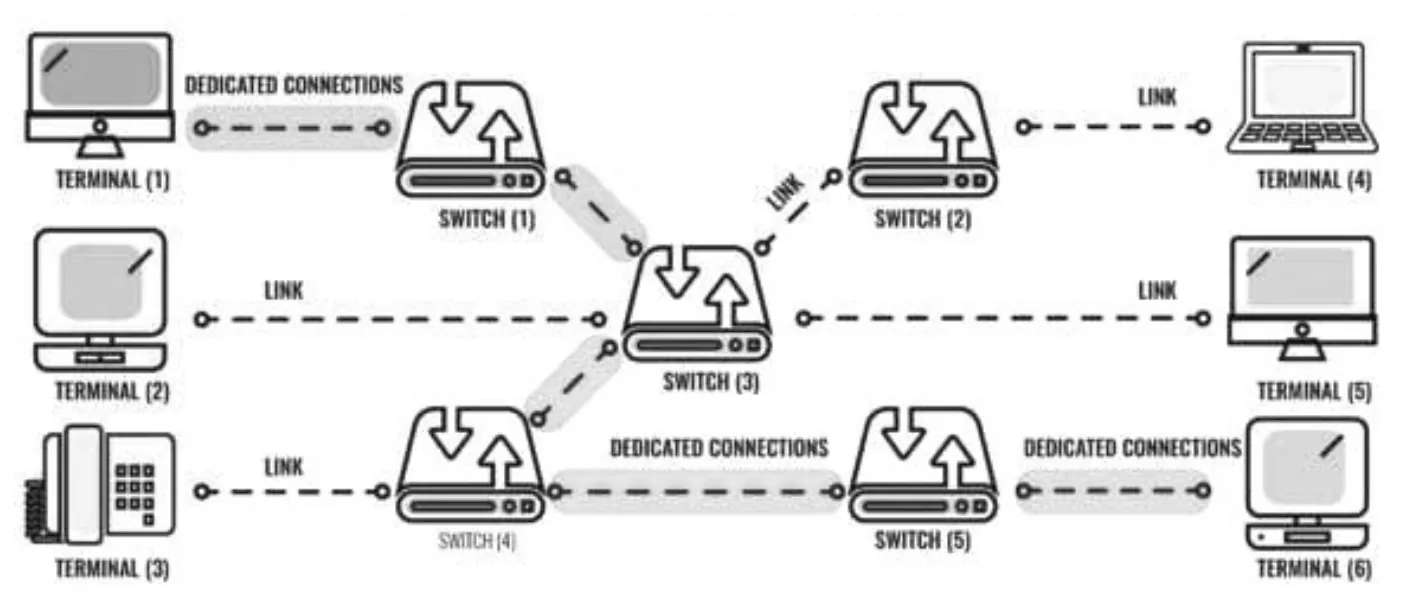
Circuit switching is where the connection across the network is a dedicated link that lasts for the whole transmission. This is how phone calls usually work: a phone is connected to a switching station, by a landline or by radio; that switching station is connected to other switching stations; and the last switching station is connected to the phone of the person you are calling.
In a circuit-switched system, all the data is sent from node to node across the same connections. So for the whole of the communication, those links cannot be used by other data.
Description
- A dedicated circuit.
- The circuit is set up before transmission starts.
- The circuit is released after transmission ends.
- Data is transferred using the whole bandwidth.
- All data is transferred over the same route.
Advantages
- Data arrives in order and does not need to be put back together (reassembled).
- The full bandwidth is available.
- Better synchronisation.
- Preferred for real-time transmission, such as phone calls.
Disadvantages
- The channel is not available to other users, even when it is idle.
- Less secure, as data is easier to intercept when only one channel is used.
- Time is needed to set up the circuit before communication can start.
- If the single route fails, the whole transmission fails.
Practise this: past-paper questions
- June 2022 · Paper 31 · Q3Data can be sent over networks using either circuit switching or packet switching. Describe both methods of data transmission. Include a different…
- June 2023 · Paper 31 · Q5(a)State, with a reason, where it would be appropriate to use circuit switching
- June 2023 · Paper 31 · Q5(b)Give two benefits and two drawbacks of circuit switching. Benefit 1 Benefit 2 Drawback 1 Drawback 2
- June 2023 · Paper 32 · Q7(b)Give four differences between circuit switching and packet switching. 1 2 3 4
Show 5 more
- November 2024 · Paper 31 · Q3(a)Describe circuit switching as a method of data transmission
- November 2024 · Paper 31 · Q3(b)State one benefit and one drawback of circuit switching as a method of data transmission
- June 2025 · Paper 32 · Q4Circuit switching may be used as a method of data transmission. State two benefits and two drawbacks of circuit switching
- November 2025 · Paper 32 · Q4(a)Identify one benefit of circuit switching and one benefit of packet switching
- November 2025 · Paper 32 · Q4(b)Identify two differences between circuit switching and packet switching
14.2 · 2 of 4Book pages Contents
Packet switching
Builds on
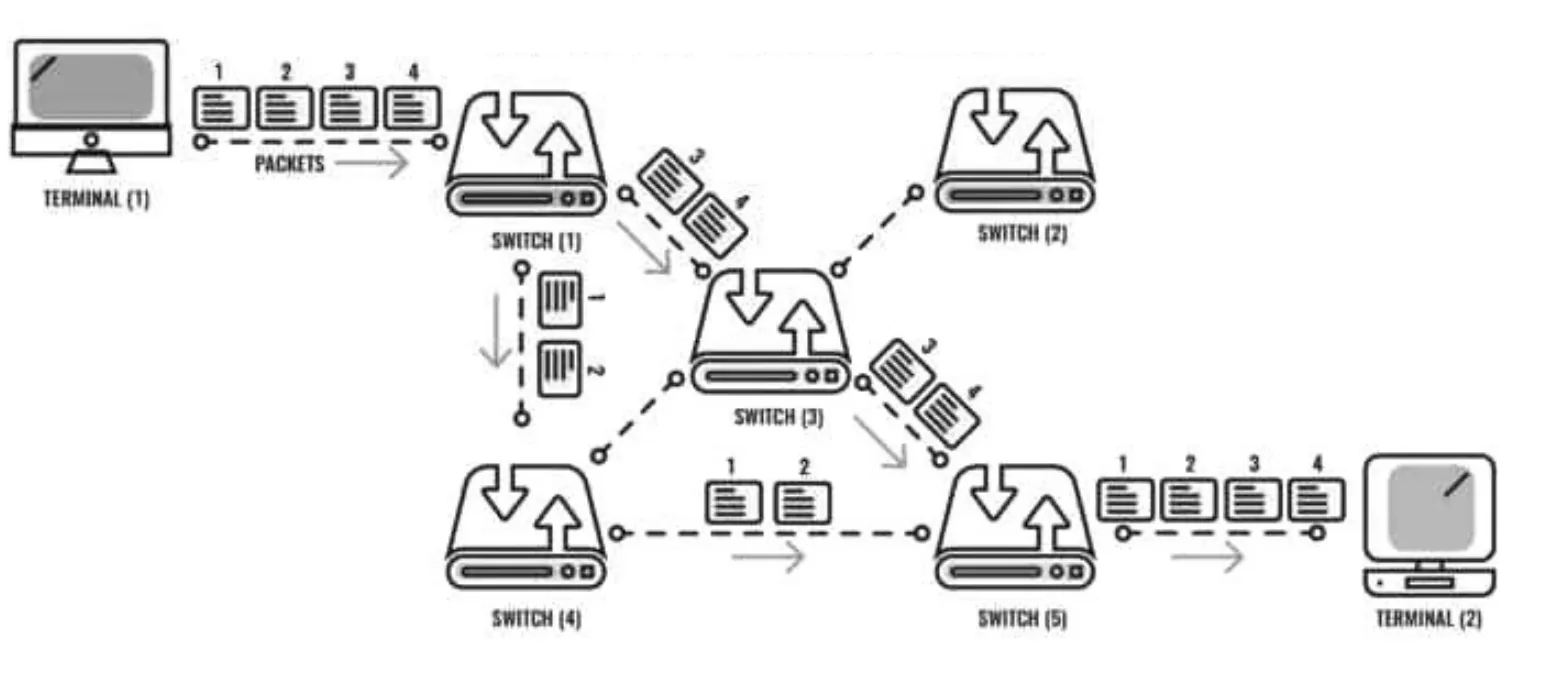
Traffic on the internet is carried as packets. An internet packet is made of the data being carried, called the payload, and a header.
Internet packets carry all sorts of payloads: part of a web page, an email, or a streamed audio track, for example. The type of data is identified by the protocol field in the header. Internet packets have a maximum size, to stop anything "hogging" the bandwidth.
Packets are moved around the internet using a method called packet switching. Using fairly small packets lets many users share a data path. Different packets from the same "conversation" may be sent over different routes.
The internet follows an end-to-end principle: the end points (the source and the destination) are responsible for checking that everything that was sent has been received. This kind of communication between sender and receiver is called connectionless (rather than dedicated). Most internet traffic uses packet switching, and the internet is basically a connectionless network.
Description
- Data is split into packets, and the necessary data is added to each packet (in its header).
- Each packet is sent independently of the others, and packets do not need to take the same route.
- The route taken by a packet depends on the congestion.
- Packets may not arrive in the order they were sent.
- Packets are reassembled at the destination.
- Missing or corrupt packets can be sent again.
Advantages
- Packets can be rerouted if there are problems.
- More secure, as messages are harder to intercept.
- Packets take the least congested route.
Disadvantages
- It takes time to reassemble the packets at the destination.
- Packets can be delayed or dropped.
Practise this: past-paper questions
- June 2021 · Paper 31 · Q6Give two benefits and two drawbacks of packet switching
- November 2021 · Paper 32 · Q6(a)Explain how packet switching is used to transfer messages across the internet
- June 2022 · Paper 31 · Q3Data can be sent over networks using either circuit switching or packet switching. Describe both methods of data transmission. Include a different…
- June 2023 · Paper 32 · Q7(a)State two examples of where it would be appropriate to use packet switching
Show 8 more
- June 2023 · Paper 32 · Q7(b)Give four differences between circuit switching and packet switching. 1 2 3 4
- November 2024 · Paper 32 · Q1(a)Describe how packet switching is used to transmit messages across a network
- November 2024 · Paper 32 · Q1(b)State two benefits and two drawbacks of packet switching as a method of transmitting messages across a network
- June 2025 · Paper 31 · Q3(b)Describe packet switching as a method of transmitting messages across the internet
- November 2025 · Paper 31 · Q3(c)Describe two ways in which packet switching ensures a complete message is received when passing messages across a network
- November 2025 · Paper 32 · Q4(a)Identify one benefit of circuit switching and one benefit of packet switching
- November 2025 · Paper 32 · Q4(b)Identify two differences between circuit switching and packet switching
- November 2025 · Paper 33 · Q3Describe how packet switching is used to pass messages across a network. Do not include checking for completeness and resending packets in your answer
14.2 · 3 of 4Book pages Contents
Circuit switching compared with packet switching
Builds on
Questions often ask for differences between the two methods. These all come from the points above:
| Circuit switching | Packet switching | |
|---|---|---|
| Connection | A dedicated circuit is set up before transmission and released after it | No dedicated circuit: connectionless, and each packet is sent independently |
| Route | All data goes over the same route | Packets may take different routes, depending on congestion |
| Order | Data arrives in order, so it does not need reassembling | Packets may arrive out of order and are reassembled at the destination |
| Bandwidth | The whole bandwidth is used, and the channel is not available to others even when idle | Small packets let the data path be shared |
| If a link fails | The whole transmission fails | Packets are rerouted |
| Security | Easier to intercept, as only one channel is used | Harder to intercept |
| Best for | Real-time transmission, such as phone calls | Most internet traffic |
Practise this: past-paper questions
- June 2022 · Paper 31 · Q3Data can be sent over networks using either circuit switching or packet switching. Describe both methods of data transmission. Include a different…
- June 2023 · Paper 32 · Q7(b)Give four differences between circuit switching and packet switching. 1 2 3 4
- November 2025 · Paper 32 · Q4(a)Identify one benefit of circuit switching and one benefit of packet switching
- November 2025 · Paper 32 · Q4(b)Identify two differences between circuit switching and packet switching
14.2 · 4 of 4Book pages Contents
Routers and routing tables
Builds on
In any packet-switched network, the router is the key device. The router looks at the destination address of an incoming packet and decides which of its interfaces to send the packet to, until the packet finally arrives at its destination.
A home router (such as the one in your "home hub") has only two interfaces: the LAN and the WAN. Here the decision is simple: every packet that is not for the local network is sent to the WAN interface. Core backbone routers have many interfaces. Because the internet backbone is a mesh, it may be possible to reach a destination over several different paths.
Each router has a set of rules, a routing table, that it uses to decide what to do with an incoming packet. Each packet is treated on its own, and a separate routing decision is made for each one. Each router-to-router link is called a hop. The router works out the best "next hop" to move the packet on its way to its final destination. If any part of the communications infrastructure fails, the router chooses a different route, and later packets may be sent over a different path.
Routers can be set up to select the best route, or they can share data with each other so that they learn the best routes. This is how the core routers work. The routing table is constantly updated with information about the best route for packets to take.
A routing table includes
- The number of hops.
- The IP address of the next router (the next hop) that the packet is forwarded to.
- Metrics: a cost is given to each available route, so that the most efficient route (path) is found.
- The network destination (network ID) or pathway.
- The gateway: the same information as the next hop. It points to the gateway through which the target network can be reached.
- The netmask, used to work out the network ID.
- The interface: which local interface is responsible for reaching the gateway.
Practise this: past-paper questions
- November 2021 · Paper 32 · Q6(a)Explain how packet switching is used to transfer messages across the internet
- November 2021 · Paper 32 · Q6(b)Outline the function of a router in packet switching
- November 2024 · Paper 32 · Q1(a)Describe how packet switching is used to transmit messages across a network
- June 2025 · Paper 31 · Q3(b)Describe packet switching as a method of transmitting messages across the internet
14.2
Concepts in 14.2
Every idea explained in 14.2, and where else in the notes it is used.
| Concept | In one line | Also used in |
|---|---|---|
| circuit switching | Sending data over a dedicated circuit that is set up first and held for the whole transmission. | 14.2 Circuit switching compared with packet switching |
| connectionless | Communication with no dedicated connection; the end points check that everything arrived. | 14.2 Circuit switching compared with packet switching |
| hop | One router-to-router link on a packet’s path. | 14.1 The data-link layer and frames, 14.1 Packet headers |
| packet switching | Splitting data into packets that are sent independently, possibly by different routes, and reassembled. | 14.2 Circuit switching, 14.2 Circuit switching compared with packet switching, 14.2 Routers and routing tables, 18.1 Where shortest paths are used |
| payload | The actual data carried in a packet, as opposed to its header. | 14.1 The transport layer and segments |
| router | The device that reads each packet’s destination address and forwards it on the best next hop. | 14.1 What a protocol is and why it is needed, 14.2 Packet switching |
| routing table | The rules a router uses to decide where to send each packet, such as next hop and metrics. | only here |
Zain Merchant's notes, page by page, as printed in his book. The Notes tab has the same notes as text, with links.
Past-paper questions and mark schemes © Cambridge University Press & Assessment. Compiled for revision by Zain Merchant.
- June 2021 · Paper 31 · Q6Notes:Packet switching
- November 2021 · Paper 32 · Q6Notes:Packet switchingRouters and routing tables
- June 2022 · Paper 31 · Q3Notes:Circuit switchingPacket switchingCircuit switching compared with packet switching
- June 2023 · Paper 31 · Q5Notes:Circuit switching
- June 2023 · Paper 32 · Q7Notes:Circuit switchingPacket switchingCircuit switching compared with packet switching
- November 2024 · Paper 31 · Q3Notes:Circuit switching
- November 2024 · Paper 32 · Q1Notes:Packet switchingRouters and routing tables
- June 2025 · Paper 31 · Q3Notes:Packet switchingRouters and routing tables
- June 2025 · Paper 32 · Q4Notes:Circuit switching
- June 2025 · Paper 33 · Q4Notes:Routers and routing tables
- November 2025 · Paper 31 · Q3Notes:TCP and UDP at the transport layerPacket headersPacket switching
- November 2025 · Paper 32 · Q4Notes:Circuit switchingPacket switchingCircuit switching compared with packet switching
- November 2025 · Paper 33 · Q3Notes:Packet switchingRouters and routing tables
Past-paper questions and mark schemes © Cambridge University Press & Assessment. Compiled for revision by Zain Merchant.
Try the questions first.
Write your answers, then check them against the mark scheme. Your choice is remembered on this device.