A Level 9618 · Paper 3 · 16.1
Purposes of an Operating System (OS)
What the operating system does to share one computer between many programs. Read the notes, try the past-paper questions, then check the mark scheme.
Past papers from June 2021 to November 202513 questions · 74 marks
In this subtopic
- How an OS makes the best use of resources
- How the user interface hides the hardware from the user
- Processes, process states and scheduling: round robin, shortest job first, first come first served, shortest remaining time
- Interrupts and low-level scheduling
- Virtual memory, paging and segmentation, page replacement and disk thrashing
16.1 · 1 of 23Book page Contents
Purpose of an operating system
A computer needs a program that starts to run as soon as it is switched on. At that moment there is no operating system (OS) running, because the OS programs are stored on disk. Instead, the computer has a basic input/output system (BIOS) stored in ROM. The BIOS starts a bootstrap program, and it is this bootstrap program that loads the operating system into memory and sets it running.
An operating system can keep more than one program in memory at the same time. Only one program can use the CPU at any moment, but the others are ready to use it when their chance comes. This is called multi-programming, and it happens even for one single user. Some systems are designed to have many users logged in at the same time: this is called a time-sharing system.
Note Exam questions often call this idea multi-tasking: the OS manages the running of many programs so that they appear to run at the same time, by swapping the CPU between them.
The purposes of an operating system can be looked at from two viewpoints:
- The internal viewpoint is about how the OS organises its own activities to make the best use of the resources available. The main resources here are the CPU, the memory and the I/O (input and output) system.
- The external viewpoint is about the facilities the OS gives to the user of the system.
Practise this: past-paper questions
- June 2021 · Paper 31 · Q3(a)Draw one line to connect each Operating System (OS) term to the most appropriate description about it. OS term: • Multi-tasking • Paging •…
- November 2024 · Paper 32 · Q9(b)(i)State what is meant by the term multi-tasking in an Operating System
- June 2025 · Paper 31 · Q8(a)Describe what is meant by multi-tasking and how it benefits process management
- November 2025 · Paper 33 · Q5(a)State the purpose of multi-tasking
Used later in
16.1 · 2 of 23Book page Contents
Operating system structure
Builds on
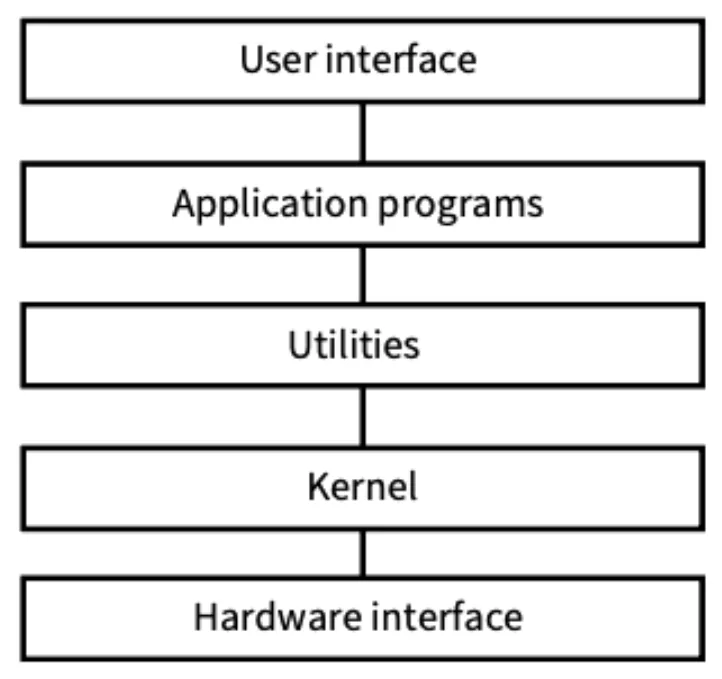
An operating system is structured to give a platform for two things: managing the resources, and providing facilities for users. Its logical structure gives two modes of operation:
- User mode is the mode available to the user or to an application program.
- Kernel mode (it has other names, but this one is used most often) has sole access to part of the memory and to certain system functions that user mode cannot reach.
The parts of the OS that provide the two modes are kept separate. The kernel runs all of the time. The rest of the OS runs in user mode, so each part is only used when it is needed.
One way to organise this is a layered structure, shown below. Application programs or utility programs can make system calls to the kernel. To work properly, each higher layer must be fully served by the layer below it, just as in a network protocol stack.
Practise this: past-paper questions
16.1 · 3 of 23Book page Contents
Managing resources and processing time
Each program running on a computer is called a process. The OS manages how processes share the resources of the system.
For example, most software needs to save data to a storage device, such as a hard disk. Imagine three processes running at the same time, all saving data regularly. A process might ask to save data while the storage device is already in use. The operating system manages these requests so that all three processes can save their data.
Managing processing time. When several processes are running, the OS must share out processing time between them. To do this it runs a scheduler, which swaps between processes as needed. The scheduler follows a scheduling algorithm, which decides:
- how the processing time is divided: for example, the processes may not all get the same amount of processing time
- the order in which processes get processing time: for example, based on how important each running process seems to be, and on how interrupts are handled.
When the OS swaps between processes:
- the process that is running now is paused, its state is saved, and it is moved back into a queue
- the scheduler decides which process should run next.
In a multiprocessor system, the scheduler also shares the processes out between the cores, as well as sharing out processing time between them.
Practise this: past-paper questions
- June 2021 · Paper 31 · Q3(a)Draw one line to connect each Operating System (OS) term to the most appropriate description about it. OS term: • Multi-tasking • Paging •…
- November 2022 · Paper 32 · Q9(a)Explain the need for scheduling in process management
- November 2024 · Paper 32 · Q9(b)(ii)Describe how multi-tasking is implemented in an Operating System
- June 2025 · Paper 33 · Q6(a)Describe one reason why scheduling is necessary in process management
16.1 · 4 of 23Book page Contents
The memory manager
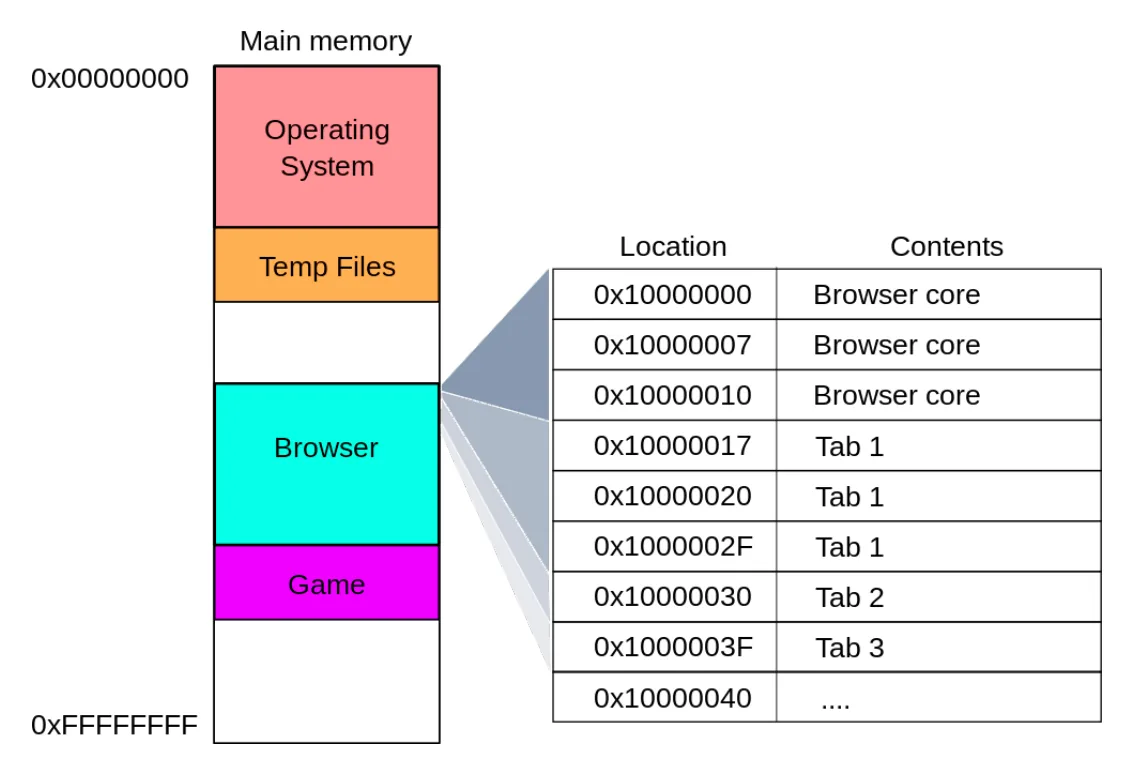
The instructions and data that a process needs must be in main memory. To make sure of this, the OS runs a memory manager program, which:
- keeps track of which parts of memory have been allocated: memory is mapped as addresses, and the memory manager records which addresses are allocated to each process
- decides how much memory to allocate to each process
- decides when a part of memory should be made available to a process.
16.1 · 5 of 23Book page Contents
Managing input and output devices
A key job of the operating system is controlling and using input and output (I/O) devices. The OS manages I/O devices in several ways:
- It records which device needs processor time, so the processor can communicate with each device without any conflicts.
- It sets the priority of processes using the control signals that the I/O device sends and receives.
- If an I/O device makes a more urgent request than the task being executed now, the OS can interrupt the current task and swap to the more important one.
16.1 · 6 of 23Book page Contents
Managing secondary storage
When files and folders are on a secondary storage device that is connected to the computer, the operating system:
- gives access to the data and programs that must be loaded from secondary storage into main memory
- keeps track of where programs and files are stored
- carries out backups
- supports a user-friendly interface by providing a file management system, which lets the user create, edit and delete files and folders on secondary storage devices.
16.1 · 7 of 23Book page Contents
Process scheduling: the three schedulers
Managing the CPU as a resource is mainly about scheduling, so that the CPU is used efficiently. These notes treat the CPU as a single unit; the extra issues of a multiprocessor system are not covered.
Programs that can be run are stored on disk at first. A user could submit a program as a job, which holds the program and some instructions about how it should be run. The figure shows the parts involved when a program is run.
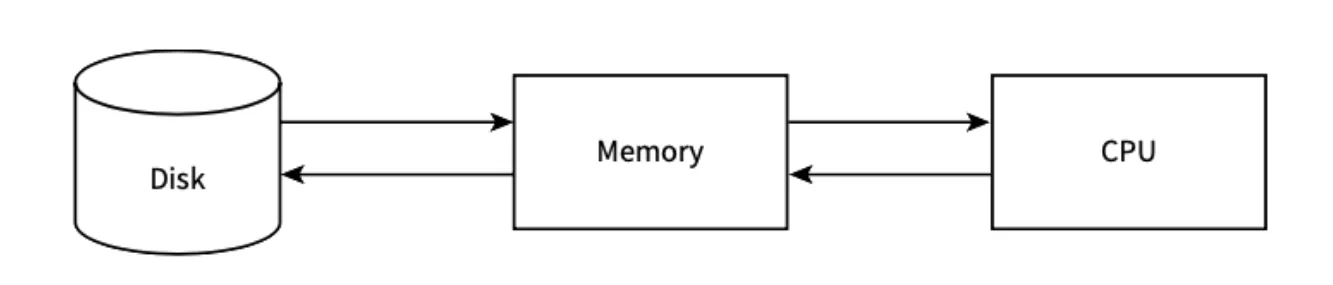
- A long-term or high-level scheduler chooses which program stored on disk is moved into main memory.
- Sometimes a program has to be moved back to disk because memory is getting overcrowded. This is controlled by the medium-term scheduler.
- Once the program is in memory, a short-term or low-level scheduler controls when it gets the CPU.
Practise this: past-paper questions
Used later in
16.1 · 8 of 23Book page Contents
The process control block
A process control block (PCB) is a data structure that holds all the data a process needs in order to run. It can be created in memory when data needs to be received while the process is running. The PCB stores:
- the current process state (ready, running or blocked)
- the process privileges (for example, which resources it is allowed to use)
- the register values (PC, MAR, MDR and ACC)
- the process priority and any other scheduling information
- the amount of CPU time the process will need to complete
- a process ID, which lets the process be uniquely identified.
16.1 · 9 of 23Book pages Contents
Process states
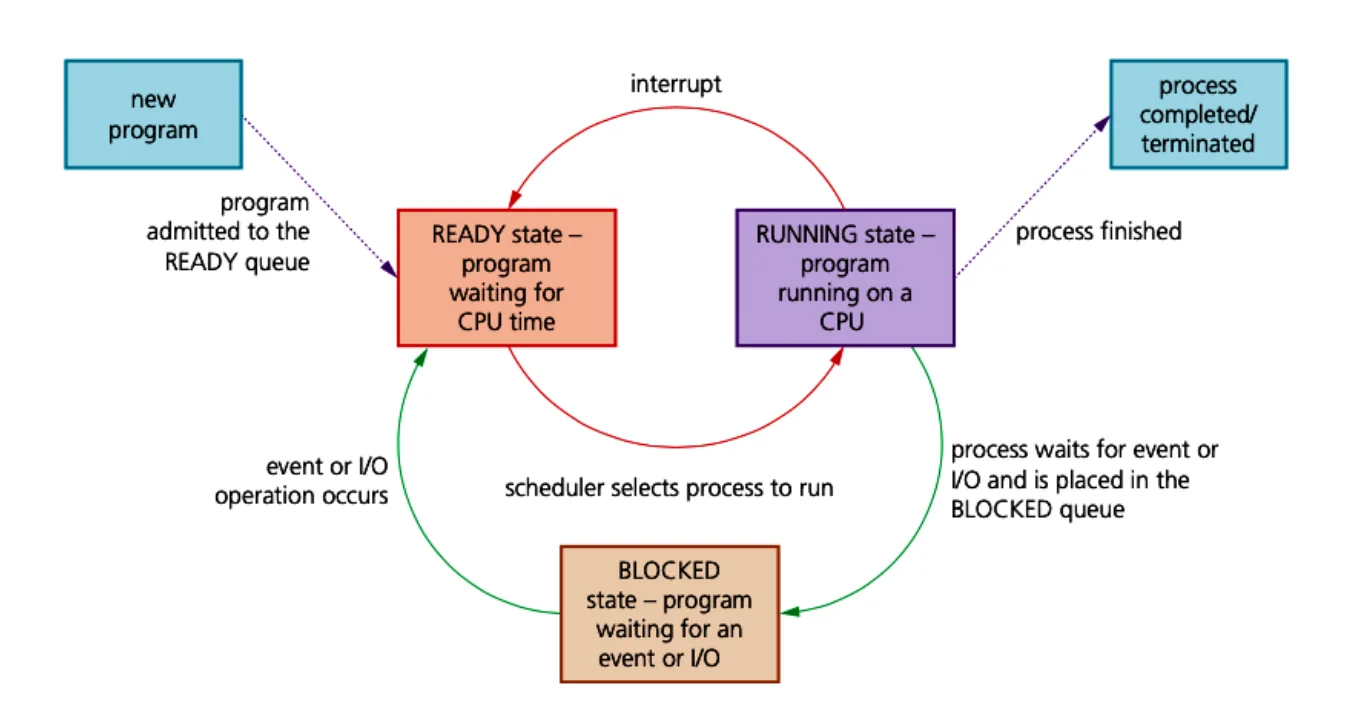
A process state is one of three possible conditions of a process:
- running: the program is running on a CPU
- ready: the program is waiting for CPU time
- blocked: the program is waiting for an event or for I/O.
| Change of state | When it happens |
|---|---|
| running to ready | The program runs during its time slice. When the time slice is used up, an interrupt happens and the program is moved to the READY queue. |
| ready to running | It is the process’s turn to use the processor: the OS scheduler gives CPU time to the process so that it can be executed. |
| running to blocked | The process needs to carry out an I/O operation, so the OS scheduler puts it in the BLOCKED queue. |
| blocked to ready | The process was waiting for an I/O resource or an event. The I/O operation is now ready to be completed by the process, so it goes back to the READY queue. |
Note The diagram has no arrow from blocked to running: a blocked process must go back to the READY queue first and wait to be chosen by the scheduler.
Practise this: past-paper questions
- November 2023 · Paper 31 · Q7(b)Two of the process states are the running state and the ready state. Identify one other process state
- November 2023 · Paper 31 · Q7(c)Outline conditions under which a process could change from the running state to the ready state
- June 2025 · Paper 32 · Q5(a)Identify three process states
- November 2025 · Paper 32 · Q5(b)In process management, a process can be in one of three process states: running, ready or blocked. Complete the table to identify one reason why a…
16.1 · 10 of 23Book page Contents
Interrupts and the interrupt handler
Builds on
Some interrupts are caused by errors that end a running process early. Apart from these, there are two reasons for interrupts:
- A process has periods of using the CPU and periods of using I/O, one after the other. I/O takes far too long for the CPU to sit idle waiting for it. So when a running process makes a system call that needs an I/O operation, an interrupt is used and the process moves to the blocked state.
- The scheduler decides to stop the process, for one of the reasons given in the scheduling algorithms below.
Whatever the reason for an interrupt, the OS kernel must call an interrupt-handling routine. This may have to decide the priority of the interrupt. One thing it must always do is save the current values in the registers into the process control block. This lets the process carry on from where it stopped when it returns to the running state.
Practise this: past-paper questions
- June 2021 · Paper 31 · Q3(a)Draw one line to connect each Operating System (OS) term to the most appropriate description about it. OS term: • Multi-tasking • Paging •…
- November 2024 · Paper 32 · Q9(a)The kernel is the central component of an Operating System (OS). Outline how the kernel of an OS acts as an interrupt handler
- November 2025 · Paper 32 · Q5(a)Describe how interrupt handling is used in low-level scheduling
16.1 · 11 of 23Book page Contents
Why scheduling algorithms are needed
To switch between tasks, the OS must control the suspension of the process that is running now, and then control the continuation of another process. The running process is not stopped for good: it is suspended and saved into memory. When the processor is ready to serve it again, the state it was suspended in is reloaded and the process carries on running.
The OS may do this many times over, for a great many tasks. The scheduling algorithm decides the order in which the OS executes the processes. The four scheduling algorithms (also called scheduling routines) below are the ones you need: round robin, first come first served, shortest job first and shortest remaining time first.
Practise this: past-paper questions
- November 2022 · Paper 32 · Q9(a)Explain the need for scheduling in process management
- June 2025 · Paper 33 · Q6(a)Describe one reason why scheduling is necessary in process management
- November 2025 · Paper 31 · Q4(a)A scheduling routine determines how processes are managed by the operating system. Identify two scheduling routines
16.1 · 12 of 23Book page Contents
Round robin
In round robin scheduling, processor time is divided equally between all the running tasks. Each period of time is called a time slice. Each process gets a time slice. If the process has not finished when its time is up, it stops running and the computer switches to the next process. A suspended process can only carry on when it is next given processor time.
Round robin is like sharing sweets with friends: you give each person one sweet in turn, until everyone has the number of sweets they want.
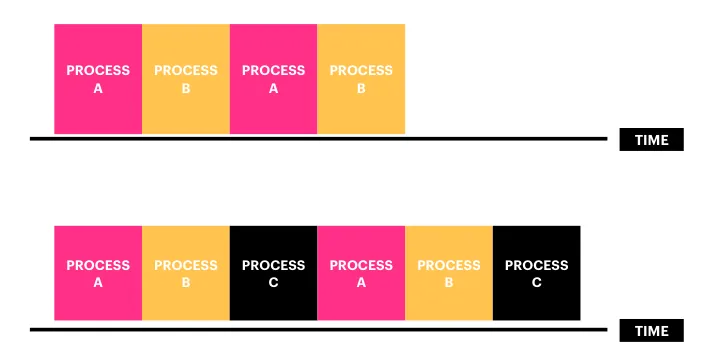
Round robin: benefit and drawbacks
- Every task is given processor time without a long wait.
- It does not scale well: the time slice stays the same, so the more processes there are, the longer each process waits between its turns.
- It ignores priority, so urgent tasks are less likely to be completed quickly.
Practise this: past-paper questions
- November 2022 · Paper 32 · Q9(b)Describe these scheduling routines and identify a benefit for each one. Shortest job first Round robin First come first served
- November 2024 · Paper 32 · Q9(b)(ii)Describe how multi-tasking is implemented in an Operating System
- June 2025 · Paper 33 · Q6(b)Explain the function of the round robin scheduling routine and give a benefit of this routine. Function ... Benefit
16.1 · 13 of 23Book page Contents
First come, first served
In first come, first served scheduling, processes run from start to finish in the order in which the processor receives their requests to run. It is like the queue at a supermarket till: customers are served in the order in which they arrive at the till.
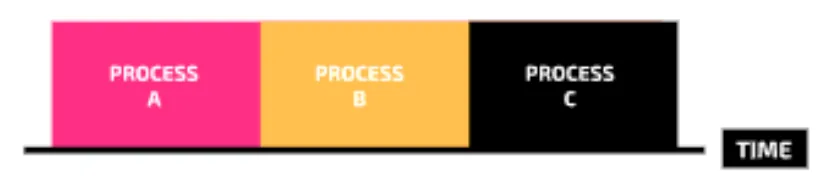
First come, first served: benefits and drawback
- It is the simplest method to implement.
- Once a job starts, it will definitely complete. With other scheduling algorithms, starvation may happen.
- But because processes run in the order their requests arrive, there can be a long wait before a process can run. So it works well in a system with only a few processes running at the same time.
Starvation is when a process cannot complete its execution because it is constantly denied processor time.
Practise this: past-paper questions
Used later in
16.1 · 14 of 23Book page Contents
Shortest job first
In shortest job first scheduling, the processes are queued and the process that needs the shortest total time to complete goes first. It is like a supermarket queue in which the person with the fewest items in their basket is allowed to pay first.
Shortest job first: benefit and drawback
- It reduces waiting times, because short processes are finished and removed quickly, so the processor can give more time to longer jobs.
- It can cause starvation if shorter jobs keep being added: the scheduler keeps choosing them, so longer processes are never served.
Practise this: past-paper questions
Used later in
16.1 · 15 of 23Book page Contents
Shortest remaining time first
In shortest remaining time first scheduling (also called shortest time remaining), the process with the shortest time left to completion goes first, until a new task is added that has a shorter time to completion. The new task then takes priority.
This is different from shortest job first, because it looks at the time left, not the total time. A long job that is nearly complete may have a very short time remaining, so it would be given priority.
Shortest remaining time first: how it behaves
- The less a process has left to do, the higher its priority becomes.
- Like shortest job first, it delays longer processes from finishing if shorter processes are added in the meantime.
Practise this: past-paper questions
16.1 · 16 of 23Book page Contents
What memory management involves
Builds on
Memory management covers several jobs:
- Providing protected memory space for the OS kernel.
- Loading a program into memory, which means setting the memory addresses for the program itself, for the procedures it uses and for the data it needs.
- In a multiprogramming system this may not be simple. The processes stored in main memory can become fragmented, in the same way as files stored on a hard disk. The medium-term scheduler may need to move a process out of main memory to ease the problem.
- Deciding how large a part of memory to give to each of the processes that share memory.
16.1 · 17 of 23Book page Contents
Partitions and segmentation
An early way of managing memory, when several processes were loaded into memory at the same time, was to partition the memory. The aim was to load the whole of a process into one partition. This wasted memory when the process was smaller than the partition. An improvement was dynamic partitioning, where the partition size could change to match the process size. The rule of one process per partition stayed.
An extension of this idea, which let larger processes be handled, was segmentation. A large process is divided into segments, and each segment is loaded into a dynamic partition in memory. A segment table records, for each segment number, the base address where the segment starts in memory and its size (limit).
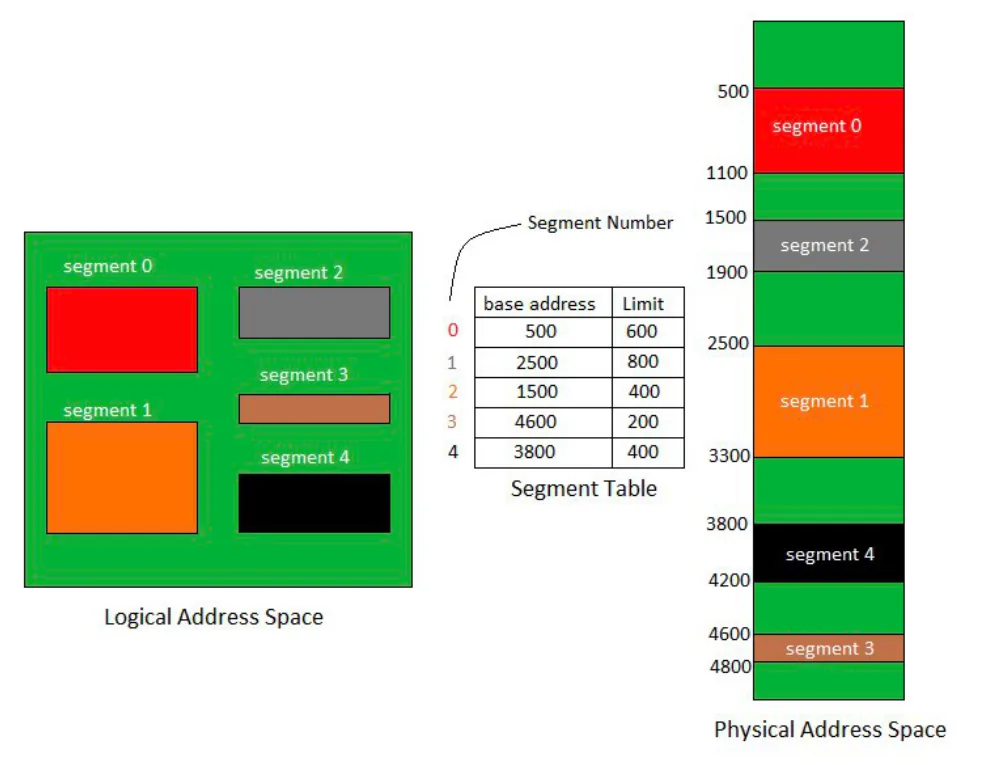
Two things limited how efficient this was:
- The segments did not have to be the same size.
- A process could be too big for all of its segments to be in memory at the same time. Segments had to be moved from disk to memory, and then back to disk when a different segment was needed in memory.
Together, these caused fragmentation of both the memory and the disk storage, which made the system perform worse.
Practise this: past-paper questions
Used later in
16.1 · 18 of 23Book page Contents
Paging and virtual memory
The modern approach is paging. The process is divided into equal-sized pages, and memory is divided into page frames of the same size. Secondary storage can also be divided into frames.
It might be possible to load all the pages into memory at the same time. But even then, not all parts of the program are usually needed at the same time: a large program is likely to have optional routes through its execution.
A special case is a program so large that the address space it needs is bigger than the memory. Paging then supports virtual memory management: secondary storage is used as if it were extra main memory, and only the pages that are needed are loaded into memory.
Paging needs the CPU to pass address values to a memory management unit (MMU), which gives the matching address on a page. An address is made of two parts: the page number and the offset from the start of the page. The memory management unit works by using a page table.
Practise this: past-paper questions
- June 2021 · Paper 31 · Q3(a)Draw one line to connect each Operating System (OS) term to the most appropriate description about it. OS term: • Multi-tasking • Paging •…
- November 2022 · Paper 31 · Q8(a)Explain what is meant by virtual memory
- November 2023 · Paper 32 · Q5(a)Outline the reasons why an operating system may need to use virtual memory
16.1 · 19 of 23Book page Contents
How a page table works
Here is a very simple system that shows how this works. A program has 48 instructions, which fill three pages and so take up the first 48 logical addresses. Only 8 bits are used for a logical address: the four most significant bits store the page number and the four least significant bits store the offset. So there can only be 16 pages, each holding 16 addresses.
| Page number | Logical addresses | Program |
|---|---|---|
| 15 | 11110000 to 11111111 | (not used) |
| 3 to 14 | 00110000 to 11101111 | (not used) |
| 2 | 00100000 to 00101111 | Instr32 to Instr47 |
| 1 | 00010000 to 00011111 | Instr16 to Instr31 |
| 0 | 00000000 to 00001111 | Instr00 to Instr15 |
The first two pages of the program have been loaded into page frames in physical memory. The page frames used do not have to be next to each other:
| Page frame | Physical addresses | Program |
|---|---|---|
| 3 | 00110000 to 00111111 | Instr16 to Instr31 (page 1) |
| 2 | 00100000 to 00101111 | (empty) |
| 1 | 00010000 to 00011111 | Instr00 to Instr15 (page 0) |
| 0 | 00000000 to 00001111 | (empty) |
The page table for this process is shown below (every process in memory has its own page table). The page number works as the index. The presence flag shows whether or not the page is in memory, and the third column gives the page frame number. Instead, it could have recorded the physical address of the first item in the page frame.
| Page number | Presence flag | Page frame number |
|---|---|---|
| 0 | 1 | 1 |
| 1 | 1 | 3 |
| 2 | 0 | (not in memory) |
Worked example: using the page table
Using the page table above, find the physical address of logical address 00010101, and the instruction stored there.
- Step 1Split the logical address: the first four bits 0001 give page 1, and the last four bits 0101 give offset 5.
- Step 2Look up page 1 in the page table: the presence flag is 1, so the page is in memory, in page frame 3.
- Step 3Page frame 3 is 0011, so the physical address is 0011 followed by the same offset 0101: 00110101.
- Step 4Page 1 starts with Instr16, so offset 5 holds Instr21.
16.1 · 20 of 23Book page Contents
Page faults, page replacement and disk thrashing
Builds on
When paging is used, all the pages of a process start off stored on disk. One or more of them is loaded into memory as the process moves to the ready state. When the process is dispatched to the running state, it starts executing. At some point the process will need a page that the page table shows is not in memory. This is called a page fault.
To bring the needed page in from secondary storage, a page almost always has to be taken out of memory first. This is when a page replacement algorithm is needed. There are several options:
- A simple algorithm uses first in, first out: the page that has been in memory longest is removed.
- A more sensible method removes the least recently used page, but this needs statistics about page use to be recorded.
The extra work the system does to run virtual memory can be a disadvantage. The worst problem is disk thrashing: part of a process on one page needs another page that is on disk. When that page is loaded, it almost immediately needs the original page again.
This can lead to almost never-ending loading and unloading of pages. Algorithms have been developed to guard against this, but the problem can still happen.
16.1 · 21 of 23Book page Contents
Paging compared with segmentation
Builds on
The table compares paging with segmentation, point by point.
| Point | Paging | Segmentation |
|---|---|---|
| Block size | A page is a fixed-size block of memory. | A segment is a variable-size block of memory. |
| Fragmentation | Because the block size is fixed, some blocks may not be fully used. This can lead to internal fragmentation. | Because memory blocks are a variable size, there is less risk of internal fragmentation but more risk of external fragmentation. |
| Address | The user gives a single value for an address, so the hardware decides the actual page size. | The user gives an address as two values: the segment number and the offset within the segment. |
| Mapping table | A page table maps logical addresses to physical addresses. It holds the base address of each page stored in frames in physical memory. | A segment map table maps logical addresses to physical addresses. It holds the base address and the size (limit) of each segment, found by segment number. |
| Visibility | Paging is essentially invisible to the user or programmer. | Segmentation is essentially visible to the user or programmer. |
| Procedures and data | Procedures and their data cannot be separated when paging is used. | Procedures and their data can be separated when segmentation is used. |
| Linking and loading | Paging uses static linking and dynamic loading. | Segmentation uses dynamic linking and dynamic loading. |
| Size | Pages are usually smaller than segments. | Segments are usually larger than pages. |
16.1 · 22 of 23Book page Contents
Hiding the hardware
Builds on
Users and programmers never have to deal with the hardware directly. The operating system does that work for them and gives them a simpler way to use the computer:
- User interface: a graphical user interface (GUI) lets the user click icons, menus and windows instead of typing instructions. A command line interface gives expert users short typed commands. Either way, the user does not need to know how the hardware carries out the task.
- Device drivers: each device has a driver that turns general instructions from the OS into the exact signals that device needs. A program just asks for a page to be printed; it does not need to know which printer is attached.
- File management: the user sees named files and folders. The OS works out where the data is actually stored on the disk.
- System calls: programmers use ready-made OS routines, for example to open a file or read a key press, instead of writing code to control the hardware themselves.
Practise this: past-paper questions
16.1 · 23 of 23Book page Contents
Making the most of resources
Builds on
The OS tries to keep every part of the computer busy, so that more work gets done in the same time:
- Multiprogramming: several programs are kept in memory at once. When one process has to wait, for example for input or for a file to load, the scheduler gives the CPU to another process instead of leaving it idle.
- Direct memory access (DMA): a DMA controller moves data between a device and main memory without using the CPU. The CPU carries on with other work and gets an interrupt when the transfer is finished.
- Memory management: paging and virtual memory let more processes run at the same time than main memory could hold on its own, because only the pages in use need to be in RAM. Memory is given back as soon as a process ends.
16.1
Concepts in 16.1
Every idea explained in 16.1, and where else in the notes it is used.
| Concept | In one line | Also used in |
|---|---|---|
| basic input/output system (BIOS) | Software stored in ROM that runs when the computer is switched on and starts the bootstrap program. | only here |
| bootstrap program | The program, started by the BIOS, that loads the operating system into memory and runs it. | only here |
| command line interface | An interface where the user types short commands. | only here |
| device driver | Software that turns general OS instructions into the exact signals one device needs. | only here |
| direct memory access (DMA) | A controller moves data between a device and memory without using the CPU. | only here |
| disk thrashing | Pages being swapped in and out of memory almost without end, so little useful work is done. | only here |
| dynamic partitioning | Memory partitions whose size changes to match the size of the process. | only here |
| first come, first served | Scheduling where processes run to the end in the order their requests arrive. | 16.1 Why scheduling algorithms are needed |
| fragmentation | When memory is split into scattered pieces, so space is wasted. | 16.1 Partitions and segmentation, 16.1 Paging compared with segmentation |
| graphical user interface (GUI) | An interface where the user clicks icons, menus and windows instead of typing. | only here |
| high-level scheduler | Chooses which program stored on disk is moved into main memory. | only here |
| interrupt-handling routine | The kernel routine run for an interrupt; it saves the register values in the PCB. | 16.1 Round robin |
| kernel | The central part of the OS that runs all the time, in kernel mode. | 16.1 Interrupts and the interrupt handler, 16.1 What memory management involves |
| kernel mode | The OS mode with sole access to protected memory and system functions. | only here |
| low-level scheduler | Decides when a process that is in memory gets the CPU. | only here |
| medium-term scheduler | Moves a program from memory back to disk when memory is overcrowded. | 16.1 What memory management involves |
| memory management unit (MMU) | Hardware that turns a logical address into a physical address using the page table. | only here |
| memory manager | The OS program that tracks, allocates and frees the memory used by each process. | only here |
| multi-programming | Keeping several programs in memory at once, with the CPU swapped between them. | 16.1 What memory management involves, 16.1 Making the most of resources |
| operating system | The software that manages the hardware and gives the user an interface. | 15.1 Uses of a virtual machine, 16.1 Operating system structure, 16.1 Managing resources and processing time, 16.1 Managing input and output devices, 16.1 Managing secondary storage, 16.1 Hiding the hardware |
| page fault | When a process needs a page that is not in memory. | only here |
| page frame | A block of main memory the same size as a page, which holds one page. | 16.1 How a page table works |
| page replacement algorithm | The rule that chooses which page to remove from memory, such as FIFO or least recently used. | only here |
| page table | A table for each process giving, for each page, whether it is in memory and in which frame. | 16.1 Paging and virtual memory, 16.1 Page faults, page replacement and disk thrashing, 16.1 Paging compared with segmentation |
| paging | Dividing a process into equal-sized pages that are loaded into page frames of the same size. | 16.1 Page faults, page replacement and disk thrashing, 16.1 Paging compared with segmentation, 16.1 Making the most of resources |
| presence flag | The page table entry that shows whether a page is in memory (1) or not (0). | only here |
| process | A program that is running on a computer. | only here |
| process control block (PCB) | A data structure holding everything a process needs to run: state, registers, priority, ID. | 16.1 Interrupts and the interrupt handler |
| process states | The condition a process is in: running, ready or blocked. | 16.1 The process control block, 16.1 Interrupts and the interrupt handler, 16.1 Page faults, page replacement and disk thrashing |
| round robin | Scheduling where each process gets an equal time slice in turn. | 16.1 Why scheduling algorithms are needed |
| scheduler | The OS program that shares out processing time by swapping between processes. | 16.1 Process states, 16.1 Interrupts and the interrupt handler, 16.1 Shortest job first, 16.1 Making the most of resources |
| scheduling algorithm | The rules that decide the order in which processes get the CPU, and for how long. | 16.1 Managing resources and processing time, 16.1 Interrupts and the interrupt handler, 16.1 First come, first served |
| segmentation | Dividing a process into variable-sized segments, each loaded into memory separately. | 16.1 Paging compared with segmentation |
| shortest job first | Scheduling where the process needing the shortest total time goes first. | 16.1 Why scheduling algorithms are needed, 16.1 First come, first served, 16.1 Shortest remaining time first |
| shortest remaining time first | Scheduling where the process with the least time left runs first; a new, shorter process takes over. | 16.1 Why scheduling algorithms are needed |
| starvation | When a process cannot complete because it is constantly denied processor time. | 16.1 Shortest job first |
| system call | A request from a program to the kernel to carry out an OS routine for it. | 16.1 Interrupts and the interrupt handler, 16.1 Hiding the hardware |
| time slice | The fixed period of processor time a process gets before the next process runs. | 16.1 Process states |
| time-sharing system | A system designed to have many users logged in at the same time. | only here |
| user mode | The mode used by the user and application programs, with no access to protected functions. | only here |
| virtual memory | Using secondary storage as extra main memory, so programs larger than memory can run. | 16.1 Page faults, page replacement and disk thrashing, 16.1 Making the most of resources |
Zain Merchant's notes, page by page, as printed in his book. The Notes tab has the same notes as text, with links.
Past-paper questions and mark schemes © Cambridge University Press & Assessment. Compiled for revision by Zain Merchant.
- June 2021 · Paper 31 · Q3Notes:Purpose of an operating systemManaging resources and processing timeInterrupts and the interrupt handlerPaging and virtual memory
- November 2022 · Paper 31 · Q8Notes:Paging and virtual memoryPaging compared with segmentation
- November 2022 · Paper 32 · Q9Notes:Managing resources and processing timeWhy scheduling algorithms are neededRound robinFirst come, first servedShortest job first
- November 2023 · Paper 31 · Q7Notes:Process statesHiding the hardware
- November 2023 · Paper 32 · Q5Notes:Paging and virtual memoryPage faults, page replacement and disk thrashing
- November 2024 · Paper 31 · Q8Notes:Partitions and segmentationPage faults, page replacement and disk thrashingPaging compared with segmentation
- November 2024 · Paper 32 · Q9Notes:Purpose of an operating systemOperating system structureManaging resources and processing timeInterrupts and the interrupt handlerRound robin
- June 2025 · Paper 31 · Q8Notes:Purpose of an operating systemShortest remaining time firstMaking the most of resources
- June 2025 · Paper 32 · Q5Notes:Process statesShortest job first
- June 2025 · Paper 33 · Q6Notes:Managing resources and processing timeWhy scheduling algorithms are neededRound robin
- November 2025 · Paper 31 · Q4Notes:Why scheduling algorithms are neededHiding the hardware
- November 2025 · Paper 32 · Q5Notes:Process scheduling: the three schedulersProcess statesInterrupts and the interrupt handler
- November 2025 · Paper 33 · Q5Notes:Purpose of an operating systemManaging resources and processing timeMaking the most of resources
Past-paper questions and mark schemes © Cambridge University Press & Assessment. Compiled for revision by Zain Merchant.
Try the questions first.
Write your answers, then check them against the mark scheme. Your choice is remembered on this device.